


Bootstrap Undo Action Toast — Free HTML CSS JS Snippet
Bootstrap Undo Action Toast · Modals · Plain HTML, CSS & JS · Live preview
Copy & paste
Source Code
<div class="container py-5 d-flex justify-content-center">
  <div class="card bsundo-card">
    <div class="card-body p-3">
      <h6 class="fw-bold mb-2">Inbox</h6>
      <ul class="list-unstyled mb-0" id="bsundoList"></ul>
    </div>
  </div>

  <div class="toast-container position-fixed bottom-0 end-0 p-3">
    <div class="toast align-items-center" id="bsundoToast" role="status">
      <div class="d-flex">
        <div class="toast-body" id="bsundoToastBody"></div>
        <button type="button" class="btn btn-sm btn-link text-decoration-none flex-shrink-0" id="bsundoBtn">Undo</button>
      </div>
    </div>
  </div>
</div>
.bsundo-card { width: 380px; max-width: 100%; border: 1px solid #eceef1; border-radius: 14px; }
.bsundo-item { display: flex; justify-content: space-between; align-items: center; padding: 8px 4px; font-size: 13.5px; border-bottom: 1px solid #f1f2f5; }
.bsundo-item:last-child { border-bottom: none; }
.bsundo-remove { border: none; background: none; color: #9ca3af; cursor: pointer; }
.bsundo-remove:hover { color: #dc3545; }const MESSAGES = [
'Q3 planning notes',
'Invoice #4021 receipt',
'Team offsite itinerary',
'Design review feedback',
'Weekly report draft',
];
const list = document.getElementById('bsundoList');
const toastEl = document.getElementById('bsundoToast');
const toastBody = document.getElementById('bsundoToastBody');
const toast = new bootstrap.Toast(toastEl, { autohide: true, delay: 4000 });
let items = MESSAGES.map((text, id) => ({ id, text }));
let lastRemoved = null;
let lastIndex = -1;
function render() {
list.innerHTML = items.map(item =>
'<li class="bsundo-item" data-id="' + item.id + '"><span>' + item.text +
'</span><button type="button" class="bsundo-remove" data-id="' + item.id + '">×</button></li>'
).join('') || '<li class="bsundo-item text-muted">Inbox is empty.</li>';
}
list.addEventListener('click', e => {
const btn = e.target.closest('.bsundo-remove');
if (!btn) return;
const id = Number(btn.dataset.id);
lastIndex = items.findIndex(i => i.id === id);
lastRemoved = items[lastIndex];
items = items.filter(i => i.id !== id);
render();
toastBody.textContent = '"' + lastRemoved.text + '" deleted.';
toast.show();
});
document.getElementById('bsundoBtn').addEventListener('click', () => {
if (!lastRemoved) return;
items.splice(Math.min(lastIndex, items.length), 0, lastRemoved);
lastRemoved = null;
render();
toast.hide();
});
render();Extend with AI
Take This Snippet Further With AI
The AI prompt for this one is for Patreon supporters ($3 a month), along with a site with no ads. Supporters enter the passcode once and it is remembered in this browser.
What's included
Features
About this UI Snippet
Bootstrap Undo Action Toast — HTML, CSS & JavaScript
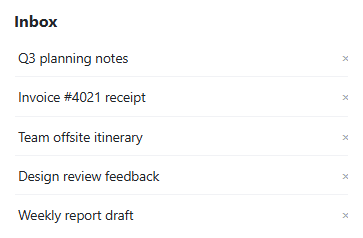
Undo only feels trustworthy if the restored item lands back exactly where it was — this snippet records lastIndex (the removed item's position) alongside lastRemoved (the item itself) at the moment of deletion, and splice(lastIndex, 0, lastRemoved) re-inserts it at that same position rather than appending it to the end of the list, which would silently reorder the inbox every time Undo was used.
Only the single most recently deleted item is ever recoverable — removing a second item before undoing the first overwrites lastRemoved/lastIndex with the new deletion, matching how a real single-toast undo pattern behaves (and matching what the visible toast itself can honestly represent, since only one toast is showing a single "Undo" action at a time).
The toast uses Bootstrap's own Toast component with autohide: true — after 4 seconds with no action, it disappears on its own, and lastRemoved staying set past that point is deliberate: nothing in this snippet clears it on autohide, so a very fast click on a since-hidden toast's Undo button (impossible through the UI, but worth noting for anyone modifying this) would still work as expected. In a real implementation, the actual delete request to a server should be delayed until the toast's hide event fires with no undo, so a click on Undo can cancel the deletion before it's ever actually persisted.
Step by step
How to Use
- 1Load the snippetFive inbox items show in a list, no toast visible.
- 2Click the \u00d7 next to the third itemIt disappears from the list, and a toast appears at the bottom right naming it, with an Undo action.
- 3Click "Undo"The item reappears in the exact same position — third in the list, not appended to the end.
- 4Delete an item and wait 4 seconds without clicking UndoThe toast automatically hides itself, and the deletion stands.
- 5Delete two different items in a rowOnly the second deletion remains undoable — the toast and Undo action always reflect the most recent removal.
Real-world uses
Common Use Cases
Got questions?
Frequently Asked Questions
The first deletion becomes permanently unrecoverable through this UI — lastRemoved and lastIndex are overwritten by the second deletion, and the toast (there's only ever one visible) now represents only the most recent removal.
Yes — splice(lastIndex, 0, lastRemoved) inserts it back at its original index, clamped to the current list length in case items were somehow shorter since (which can't happen in this demo, but is a reasonable defensive detail).
This demo removes it from the visible list immediately for clarity; a production implementation typically delays the real destructive backend call until the toast's hide event fires with no Undo click, so an in-time Undo can cancel the action before anything is truly deleted.
Yes. Keep the items array, lastRemoved, and lastIndex in component state, and drive Bootstrap's Toast through a ref-based instance or an equivalent framework toast/snackbar component using the same restore-at-index logic.