


Bootstrap Re-authentication Modal — Free HTML CSS JS Snippet
Bootstrap Re-authentication Modal · Modals · Plain HTML, CSS & JS · Live preview
Copy & paste
Source Code
<div class="container py-5 d-flex justify-content-center">
<div class="card bsreauth-card">
<div class="card-body p-4">
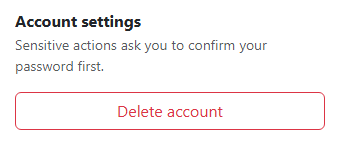
<h6 class="fw-bold mb-1">Account settings</h6>
<p class="small text-muted mb-3">Sensitive actions ask you to confirm your password first.</p>
<button type="button" class="btn btn-outline-danger w-100" data-bs-toggle="modal" data-bs-target="#bsreauthModal">
Delete account
</button>
<p class="small mt-3 mb-0" id="bsreauthStatus"> </p>
</div>
</div>
</div>
<div class="modal fade" id="bsreauthModal" tabindex="-1" aria-hidden="true">
<div class="modal-dialog modal-dialog-centered">
<div class="modal-content">
<div class="modal-header">
<h5 class="modal-title fw-bold">Confirm it's you</h5>
<button type="button" class="btn-close" data-bs-dismiss="modal"></button>
</div>
<div class="modal-body">
<p class="small text-muted mb-2">Re-enter your password to continue (try "demo1234" for this preview).</p>
<input type="password" class="form-control" id="bsreauthPassword" autocomplete="current-password">
<p class="small text-danger mt-2 mb-0 d-none" id="bsreauthError">Incorrect password. Try again.</p>
</div>
<div class="modal-footer">
<button type="button" class="btn btn-outline-secondary" data-bs-dismiss="modal">Cancel</button>
<button type="button" class="btn btn-danger fw-bold" id="bsreauthConfirm">Confirm & delete</button>
</div>
</div>
</div>
</div>.bsreauth-card { width: 360px; max-width: 100%; border: 1px solid #eceef1; border-radius: 14px; }
#bsreauthPassword.is-invalid { border-color: #dc3545; }const REAL_PASSWORD = 'demo1234';
const modalEl = document.getElementById('bsreauthModal');
const modal = new bootstrap.Modal(modalEl);
const passwordInput = document.getElementById('bsreauthPassword');
const error = document.getElementById('bsreauthError');
const confirmBtn = document.getElementById('bsreauthConfirm');
const status = document.getElementById('bsreauthStatus');
let attempts = 0;
modalEl.addEventListener('shown.bs.modal', () => {
passwordInput.value = '';
passwordInput.classList.remove('is-invalid');
error.classList.add('d-none');
passwordInput.focus();
});
function attempt() {
attempts++;
if (passwordInput.value === REAL_PASSWORD) {
modal.hide();
status.textContent = 'Account deleted. (Attempts needed: ' + attempts + ')';
status.className = 'small mt-3 mb-0 text-danger fw-semibold';
attempts = 0;
} else {
passwordInput.classList.add('is-invalid');
error.classList.remove('d-none');
passwordInput.select();
}
}
confirmBtn.addEventListener('click', attempt);
passwordInput.addEventListener('keydown', e => { if (e.key === 'Enter') attempt(); });
passwordInput.addEventListener('input', () => {
passwordInput.classList.remove('is-invalid');
error.classList.add('d-none');
});Extend with AI
Take This Snippet Further With AI
The AI prompt for this one is for Patreon supporters ($3 a month), along with a site with no ads. Supporters enter the passcode once and it is remembered in this browser.
What's included
Features
About this UI Snippet
Bootstrap Re-authentication Modal — HTML, CSS & JavaScript
This is a distinct pattern from an idle-session timeout warning like bootstrap-session-expiry-warning — re-authentication isn't about *how long* a session has lasted, it's about confirming identity again right before one *specific, high-consequence* action, regardless of how recently the user last typed their password. That's why it's triggered directly from the "Delete account" button via Bootstrap's own data-bs-toggle="modal", not from any timer.
Bootstrap's shown.bs.modal event is what resets the password field, clears any previous error, and focuses the input — deliberately on every single open, not just the first, so a user who gets the password wrong, dismisses the modal, and reopens it always starts from a clean state rather than seeing a stale error message from their last attempt.
A wrong password clears itself the moment the user starts typing again (the input listener removes is-invalid and hides the error immediately), rather than requiring another failed submit to acknowledge that they're actively correcting it — leaving a red error state visible while someone is mid-correction reads as the form ignoring what they're currently doing.
Step by step
How to Use
- 1Click "Delete account"A modal opens asking to confirm your password, with the field empty and focused.
- 2Type an incorrect password and confirmThe field outlines in red with an "Incorrect password" message beneath it.
- 3Start typing againThe red error clears immediately, even before you've resubmitted.
- 4Type "demo1234" and confirm (or press Enter)The modal closes and a status message confirms the action, along with how many attempts it took.
- 5Reopen the modal after a successful or failed attemptThe field is always empty and the error always cleared, regardless of what happened last time.
Real-world uses
Common Use Cases
Got questions?
Frequently Asked Questions
A session expiry warning (see bootstrap-session-expiry-warning) is about time — it fires after a period of inactivity regardless of what the user is doing. This modal fires in response to a specific action, checking identity again right before something consequential happens, independent of how long the session has been active.
This demo compares against a fixed, visible demo password ("demo1234") for illustration; a real implementation should send the entered password to a real authentication endpoint and treat the modal's success state as driven by that server response, not a client-side string comparison.
Leaving a red error visible while someone is actively correcting their input misrepresents the current state of the form — clearing it immediately on input reflects that the previous failed attempt no longer describes what's currently in the field.
Yes. Track the password value and an error boolean in component state, reset both inside a modal-shown callback (or effect keyed to the modal's open state), and call your real authentication check from the same confirm handler.