


Bootstrap Session Expiry Warning — Free HTML CSS JS Snippet
Bootstrap Session Expiry Warning · Modals · Plain HTML, CSS & JS · Live preview
Copy & paste
Source Code
<div class="container py-5 d-flex justify-content-center">
  <div class="card bssess-card">
    <div class="card-body p-4 text-center">
      <h6 class="fw-bold mb-1">Dashboard</h6>
      <p class="small text-muted mb-2">Demo session (sped up): expires after 18 seconds of inactivity.</p>
      <p class="fw-semibold mb-0" id="bssessTimer">18s remaining</p>
    </div>
  </div>
</div>

<div class="modal fade" id="bssessModal" tabindex="-1" data-bs-backdrop="static" aria-hidden="true">
  <div class="modal-dialog modal-dialog-centered">
    <div class="modal-content">
      <div class="modal-header">
        <h5 class="modal-title fw-bold">Your session is about to expire</h5>
      </div>
      <div class="modal-body">
        <p class="mb-0">You've been inactive for a while. You'll be signed out in <strong id="bssessCountdown">8</strong> seconds.</p>
      </div>
      <div class="modal-footer">
        <button type="button" class="btn btn-outline-secondary" id="bssessLogout">Log out now</button>
        <button type="button" class="btn btn-dark fw-bold" id="bssessStay">Stay signed in</button>
      </div>
    </div>
  </div>
</div>

<div class="bssess-expired d-none" id="bssessExpired">
  <div class="text-center text-white">
    <p class="fw-bold mb-2">Session expired</p>
    <button type="button" class="btn btn-light btn-sm fw-bold" id="bssessRestart">Log in again</button>
  </div>
</div>
.bssess-card { width: 340px; max-width: 100%; border: 1px solid #eceef1; border-radius: 14px; position: relative; }
.bssess-expired {
position: fixed; inset: 0; background: rgba(20,22,28,.85);
display: flex; align-items: center; justify-content: center; z-index: 1100;
}const TOTAL = 18;
const WARN_AT = 8;
const timerEl = document.getElementById('bssessTimer');
const modalEl = document.getElementById('bssessModal');
const modal = new bootstrap.Modal(modalEl);
const countdownEl = document.getElementById('bssessCountdown');
const expiredOverlay = document.getElementById('bssessExpired');
let remaining = TOTAL;
let interval = null;
function tick() {
remaining--;
if (remaining > WARN_AT) {
timerEl.textContent = remaining + 's remaining';
} else if (remaining > 0) {
timerEl.textContent = remaining + 's remaining';
countdownEl.textContent = remaining;
if (!modalEl.classList.contains('show')) modal.show();
} else {
clearInterval(interval);
modal.hide();
expiredOverlay.classList.remove('d-none');
}
}
function start() {
clearInterval(interval);
remaining = TOTAL;
timerEl.textContent = remaining + 's remaining';
expiredOverlay.classList.add('d-none');
interval = setInterval(tick, 1000);
}
document.getElementById('bssessStay').addEventListener('click', () => {
modal.hide();
start();
});
document.getElementById('bssessLogout').addEventListener('click', () => {
clearInterval(interval);
modal.hide();
expiredOverlay.classList.remove('d-none');
});
document.getElementById('bssessRestart').addEventListener('click', start);
start();Extend with AI
Take This Snippet Further With AI
The AI prompt for this one is for Patreon supporters ($3 a month, 7 days free), along with a site with no ads. Supporters enter the passcode once and it is remembered in this browser.
What's included
Features
About this UI Snippet
Bootstrap Session Expiry Warning — HTML, CSS & JavaScript
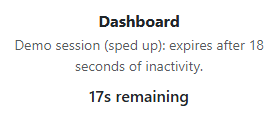
One setInterval ticking once a second drives every state this snippet shows — the quiet background countdown on the page itself, the warning modal that appears once remaining crosses WARN_AT, and the final expired overlay once it hits zero — rather than three separate timers that would need to stay manually synchronized with each other.
The modal is deliberately configured with data-bs-backdrop="static", one of Bootstrap's own real modal options, so clicking outside it can't dismiss it the way a normal informational modal would — an expiry warning that can be casually clicked away without addressing it defeats its own purpose. "Stay signed in" and "Log out now" both stop the current countdown, but only "Stay signed in" calls start() again to reset remaining back to TOTAL; "Log out now" intentionally goes straight to the expired overlay instead, since choosing to log out shouldn't need its own separate countdown to actually happen.
The expired state is modeled as a full-page overlay rather than another modal — a session that has actually expired should block interaction with the underlying page entirely until the user restarts (in a real app, redirects to a login page), which a dismissible Bootstrap modal isn't designed to guarantee on its own.
Step by step
How to Use
- 1Load the snippetA countdown begins immediately, sped up for this demo to 18 seconds total.
- 2Wait until 8 seconds remainA warning modal appears automatically, itself counting down from 8, with backdrop clicks disabled.
- 3Click "Stay signed in"The modal closes and the full 18-second countdown restarts from the beginning.
- 4Let the modal's countdown reach zero without clicking anythingThe modal is replaced by a full-page "Session expired" overlay blocking the page.
- 5Click "Log in again"The whole demo resets and the countdown starts over from 18 seconds.
Real-world uses
Common Use Cases
Got questions?
Frequently Asked Questions
This demo runs on a fixed countdown so the behavior is fully visible without waiting for a real idle period; a production version should reset the timer on genuine activity signals (mousemove, keydown, or an actual API heartbeat) rather than running unconditionally.
It's configured with Bootstrap's data-bs-backdrop="static" option specifically so an accidental outside click can't make an unanswered expiry warning disappear without the user actually choosing to stay or log out.
This snippet only models the timing and lockout behavior — a real implementation should pair this with something like bootstrap-unsaved-changes-alert's dirty-tracking to warn about (or attempt to save) unsaved work before a session lockout occurs.
Yes. Keep the remaining seconds in a ref-backed interval (to avoid restarting it on every re-render) mirrored into component state for display, and drive the modal and overlay's visibility from that same state.