



Bootstrap Unsaved Changes Alert — Free HTML CSS JS Snippet
Bootstrap Unsaved Changes Alert · Forms · Plain HTML, CSS & JS · Live preview
Copy & paste
Source Code
<div class="container py-5 d-flex justify-content-center">
<div class="card bsuca-card">
<div class="card-body p-4">
<div class="d-flex justify-content-between align-items-center mb-3">
<h5 class="fw-bold mb-0">Profile settings</h5>
<button type="button" class="btn btn-sm btn-outline-secondary" id="bsucaLeave">← Back to dashboard</button>
</div>
<div class="mb-3">
<label class="form-label small fw-semibold">Display name</label>
<input type="text" class="form-control" id="bsucaName" value="Priya Nair">
</div>
<div class="mb-3">
<label class="form-label small fw-semibold">Bio</label>
<textarea class="form-control" id="bsucaBio" rows="3">Frontend engineer. Building small, fast things.</textarea>
</div>
<div class="d-flex align-items-center gap-2">
<button type="button" class="btn btn-dark fw-bold" id="bsucaSave">Save changes</button>
<span class="small" id="bsucaStatus">No changes yet</span>
</div>
</div>
</div>
</div>
<div class="modal fade" id="bsucaModal" tabindex="-1" aria-hidden="true">
<div class="modal-dialog modal-dialog-centered">
<div class="modal-content">
<div class="modal-header">
<h5 class="modal-title fw-bold">Unsaved changes</h5>
<button type="button" class="btn-close" data-bs-dismiss="modal"></button>
</div>
<div class="modal-body">
<p class="mb-0">You've edited this form but haven't saved. Leaving now will discard those changes.</p>
</div>
<div class="modal-footer">
<button type="button" class="btn btn-outline-secondary" data-bs-dismiss="modal">Keep editing</button>
<button type="button" class="btn btn-outline-danger" id="bsucaDiscard">Discard & leave</button>
<button type="button" class="btn btn-dark fw-bold" id="bsucaSaveLeave">Save & leave</button>
</div>
</div>
</div>
</div>.bsuca-card { width: 420px; max-width: 100%; border: 1px solid #eceef1; border-radius: 14px; }
#bsucaStatus.text-warning { color: #b45309 !important; }
#bsucaStatus.text-success { color: #198754 !important; }const nameInput = document.getElementById('bsucaName');
const bioInput = document.getElementById('bsucaBio');
const saveBtn = document.getElementById('bsucaSave');
const leaveBtn = document.getElementById('bsucaLeave');
const status = document.getElementById('bsucaStatus');
const modalEl = document.getElementById('bsucaModal');
const modal = new bootstrap.Modal(modalEl);
let isDirty = false;
let savedName = nameInput.value;
let savedBio = bioInput.value;
function markDirty() {
isDirty = true;
status.textContent = 'Unsaved changes';
status.className = 'small text-warning fw-semibold';
}
function save() {
savedName = nameInput.value;
savedBio = bioInput.value;
isDirty = false;
status.textContent = 'Saved';
status.className = 'small text-success fw-semibold';
}
[nameInput, bioInput].forEach(el => el.addEventListener('input', markDirty));
saveBtn.addEventListener('click', save);
// The real, page-leaving protection: a native confirmation the browser itself
// shows when a tab is closed or a full navigation happens while isDirty is
// still true. It won't visibly fire inside this sandboxed preview, but this
// is the exact line a real page needs.
window.addEventListener('beforeunload', e => {
if (!isDirty) return;
e.preventDefault();
e.returnValue = '';
});
// The in-page nav we can actually demo: clicking "Back to dashboard" is
// treated as a same-app navigation, so it goes through the modal instead of
// a full page load, and only when there is something to lose.
leaveBtn.addEventListener('click', () => {
if (!isDirty) {
status.textContent = 'Left the page';
status.className = 'small text-muted';
return;
}
modal.show();
});
document.getElementById('bsucaDiscard').addEventListener('click', () => {
nameInput.value = savedName;
bioInput.value = savedBio;
isDirty = false;
status.textContent = 'Left the page (changes discarded)';
status.className = 'small text-muted';
modal.hide();
});
document.getElementById('bsucaSaveLeave').addEventListener('click', () => {
save();
status.textContent = 'Saved, then left the page';
status.className = 'small text-muted';
modal.hide();
});Extend with AI
Take This Snippet Further With AI
The AI prompt for this one is for Patreon supporters ($3 a month), along with a site with no ads. Supporters enter the passcode once and it is remembered in this browser.
What's included
Features
About this UI Snippet
Bootstrap Unsaved Changes Alert — HTML, CSS & JavaScript
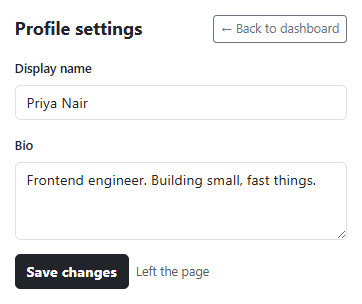
Two separate things have to work for this pattern to be real rather than decorative: knowing the form is actually dirty, and knowing when the user is actually trying to leave. This snippet tracks the first with a single isDirty flag flipped by an input listener on every field, and it tracks the second two ways at once — a same-page click on "Back to dashboard" (interceptable, so it can show a real Bootstrap modal with three genuine choices) and a native beforeunload listener (for a real tab close or address-bar navigation, which no in-page modal can ever intercept).
The three modal buttons aren't decoration either — "Discard & leave" restores nameInput/bioInput to the last saved values before closing, "Save & leave" runs the exact same save() function the visible Save button uses, and "Keep editing" is just Bootstrap's own data-bs-dismiss. Because save() is the single function that updates the saved snapshot and clears isDirty, there's no separate "did the modal's save actually work" bookkeeping to keep in sync with the main form.
The beforeunload listener is guarded behind if (!isDirty) return specifically so it never fires for a clean form — a form that nags on every exit regardless of whether anything changed trains users to click through the browser's own dialog without reading it, which defeats the point of having one at all.
Step by step
How to Use
- 1Load the snippetThe status line reads "No changes yet" and the form is untouched.
- 2Edit the name or bio fieldThe status flips to "Unsaved changes" the instant you type.
- 3Click "Back to dashboard" while dirtyA modal appears offering to keep editing, discard, or save before leaving.
- 4Click "Discard & leave"Both fields revert to their last saved values and the modal closes.
- 5Edit again, then click "Save changes"The status turns green and reads "Saved" — the dirty flag clears.
- 6Click "Back to dashboard" nowNothing to lose, so it leaves immediately with no modal at all.
Real-world uses
Common Use Cases
Got questions?
Frequently Asked Questions
No — sandboxed iframes and most browsers suppress custom beforeunload dialogs outside of a real top-level page, and some browsers show only a generic built-in message regardless of e.returnValue. The listener itself is real and correct; only the in-page modal demo is fully visible here.
Both approaches work — this snippet uses a flag for simplicity, but comparing current values against the saved snapshot on demand is equally valid and avoids ever getting the flag out of sync, at the cost of a slightly more expensive check.
Yes — add every field that should count as "dirty" to the array passed to forEach, and add its restore logic to Discard the same way nameInput and bioInput are handled.
Yes. In React, track isDirty and the saved snapshot in useState and open/close the modal via a ref to Bootstrap's Modal API or a controlled modal component; the beforeunload listener belongs in a useEffect that re-attaches whenever isDirty changes.
No — they solve different problems and pair well together. See bootstrap-form-autosave-status for a pattern that removes the need for this warning almost entirely by saving continuously instead of on a single explicit action.