



Bootstrap Inline Form Editing — Free HTML CSS JS Snippet
Bootstrap Inline Form Editing · Forms · Plain HTML, CSS & JS · Live preview
Copy & paste
Source Code
<div class="container py-5 d-flex justify-content-center">
  <div class="card bsinline-card">
    <div class="card-body p-4">
      <h6 class="fw-bold mb-3">Profile</h6>

      <div class="bsinline-row" data-field="name" data-value="Dana Reyes">
        <span class="bsinline-label small text-muted">Name</span>
        <div class="bsinline-display">
          <span class="bsinline-value">Dana Reyes</span>
          <button type="button" class="btn btn-sm btn-link p-0 bsinline-edit">Edit</button>
        </div>
        <div class="bsinline-editor d-none">
          <input type="text" class="form-control form-control-sm">
          <div class="d-flex gap-2 mt-1">
            <button type="button" class="btn btn-sm btn-dark bsinline-save">Save</button>
            <button type="button" class="btn btn-sm btn-outline-secondary bsinline-cancel">Cancel</button>
          </div>
        </div>
      </div>

      <div class="bsinline-row" data-field="title" data-value="Engineering Lead">
        <span class="bsinline-label small text-muted">Title</span>
        <div class="bsinline-display">
          <span class="bsinline-value">Engineering Lead</span>
          <button type="button" class="btn btn-sm btn-link p-0 bsinline-edit">Edit</button>
        </div>
        <div class="bsinline-editor d-none">
          <input type="text" class="form-control form-control-sm">
          <div class="d-flex gap-2 mt-1">
            <button type="button" class="btn btn-sm btn-dark bsinline-save">Save</button>
            <button type="button" class="btn btn-sm btn-outline-secondary bsinline-cancel">Cancel</button>
          </div>
        </div>
      </div>

      <div class="bsinline-row" data-field="email" data-value="[email protected]">
        <span class="bsinline-label small text-muted">Email</span>
        <div class="bsinline-display">
          <span class="bsinline-value">[email protected]</span>
          <button type="button" class="btn btn-sm btn-link p-0 bsinline-edit">Edit</button>
        </div>
        <div class="bsinline-editor d-none">
          <input type="text" class="form-control form-control-sm">
          <div class="d-flex gap-2 mt-1">
            <button type="button" class="btn btn-sm btn-dark bsinline-save">Save</button>
            <button type="button" class="btn btn-sm btn-outline-secondary bsinline-cancel">Cancel</button>
          </div>
        </div>
      </div>
    </div>
  </div>
</div>
.bsinline-card { width: 360px; max-width: 100%; border: 1px solid #eceef1; border-radius: 14px; }
.bsinline-row { padding: 8px 0; border-bottom: 1px solid #f1f2f5; }
.bsinline-row:last-child { border-bottom: none; }
.bsinline-label { display: block; margin-bottom: 2px; }
.bsinline-display { display: flex; justify-content: space-between; align-items: center; }
.bsinline-value { font-size: 14px; }const rows = Array.from(document.querySelectorAll('.bsinline-row'));
// Only one row edits at a time — opening a new editor closes any other row
// that was already open, discarding its unsaved edit rather than leaving
// two editors open and ambiguous about which Save applies to what.
function closeAllExcept(exceptRow) {
rows.forEach(row => {
if (row === exceptRow) return;
row.querySelector('.bsinline-editor').classList.add('d-none');
row.querySelector('.bsinline-display').classList.remove('d-none');
});
}
rows.forEach(row => {
const display = row.querySelector('.bsinline-display');
const editor = row.querySelector('.bsinline-editor');
const input = editor.querySelector('input');
const valueEl = row.querySelector('.bsinline-value');
function openEditor() {
closeAllExcept(row);
input.value = row.dataset.value;
display.classList.add('d-none');
editor.classList.remove('d-none');
input.focus();
input.select();
}
function closeEditor() {
editor.classList.add('d-none');
display.classList.remove('d-none');
}
row.querySelector('.bsinline-edit').addEventListener('click', openEditor);
row.querySelector('.bsinline-save').addEventListener('click', () => {
const next = input.value.trim();
if (next) {
row.dataset.value = next;
valueEl.textContent = next;
}
closeEditor();
});
row.querySelector('.bsinline-cancel').addEventListener('click', closeEditor);
input.addEventListener('keydown', e => {
if (e.key === 'Enter') row.querySelector('.bsinline-save').click();
if (e.key === 'Escape') closeEditor();
});
});Extend with AI
Take This Snippet Further With AI
The AI prompt for this one is for Patreon supporters ($3 a month), along with a site with no ads. Supporters enter the passcode once and it is remembered in this browser.
What's included
Features
About this UI Snippet
Bootstrap Inline Form Editing — HTML, CSS & JavaScript
Each row stores its own current value in a data-value attribute on the row itself, which is what lets openEditor() always seed the input with the *last saved* value rather than whatever text happens to be lingering in the input from a previous, cancelled edit — opening the editor always starts from a known-good state.
Only one field editing at a time is enforced by closeAllExcept(row), called at the start of every openEditor() — clicking "Edit" on the Title row while the Name row's editor is already open silently discards the Name row's in-progress (unsaved) edit and closes it, rather than leaving two open editors where it's unclear which Save button applies to what. That's a deliberate choice: an inline editor with no explicit "you have unsaved changes elsewhere" warning should default to safe, predictable behavior over silently accumulating multiple simultaneous edit states.
Saving is guarded against an accidental empty value — if (next) only commits a trimmed, non-empty string back to data-value and the visible .bsinline-value text, so clearing a field entirely and clicking Save leaves the last real value in place rather than silently blanking a profile field. Enter and Escape inside the input are wired to click the row's own real Save and Cancel buttons rather than duplicating their logic, so there's only ever one implementation of what "save" and "cancel" actually do per row.
Step by step
How to Use
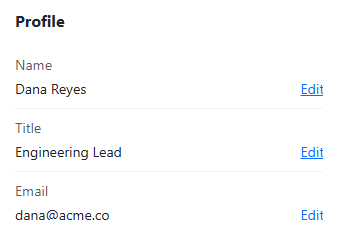
- 1Load the snippetThree profile fields show as plain text with an "Edit" link next to each.
- 2Click "Edit" next to NameIt switches to an input pre-filled with the current value, already focused and selected.
- 3Click "Edit" next to Title without saving Name firstThe Name editor closes automatically (discarding its unsaved edit) and the Title editor opens instead.
- 4Type a new value and press EnterIt saves immediately, exactly like clicking the visible Save button.
- 5Open an editor and press EscapeIt closes without saving, reverting to the field's last saved value.
- 6Open an editor, clear the input completely, and click SaveThe field keeps its previous value rather than being saved as blank.
Real-world uses
Common Use Cases
Got questions?
Frequently Asked Questions
It's discarded — closeAllExcept() closes every other open editor without saving whenever a new one opens, so only ever one field is being edited, and switching away from an unsaved edit intentionally abandons it.
No — the save handler checks that the trimmed input is non-empty before committing it; an empty save silently closes the editor and keeps the field's previous value unchanged.
Yes — the keydown listener calls .click() on the row's own real Save button rather than duplicating its logic, so there is exactly one implementation of what saving actually does.
Yes. Track which field id (if any) is currently being edited in component state, along with each field's saved value, and conditionally render the display or editor per row based on whether its id matches the currently-editing one.