



Bootstrap File Upload With Progress — Free HTML CSS JS Snippet
Bootstrap File Upload With Progress · Forms · Plain HTML, CSS & JS · Live preview
Copy & paste
Source Code
<div class="container py-5 d-flex justify-content-center">
<div class="card bsprog-card">
<div class="card-body p-4">
<label class="form-label small fw-semibold">Upload a document</label>
<input type="file" class="form-control mb-3" id="bsprogInput">
<div class="d-none" id="bsprogRow">
<div class="d-flex justify-content-between small mb-1">
<span id="bsprogName"> </span>
<span id="bsprogPercent">0%</span>
</div>
<div class="progress mb-2" style="height:8px;">
<div class="progress-bar" id="bsprogBar" role="progressbar" style="width:0%"></div>
</div>
<div class="d-flex gap-2">
<button type="button" class="btn btn-sm btn-outline-secondary" id="bsprogCancel">Cancel</button>
<button type="button" class="btn btn-sm btn-outline-danger d-none" id="bsprogRetry">Retry</button>
</div>
</div>
<p class="small mt-3 mb-0" id="bsprogStatus"> </p>
</div>
</div>
</div>.bsprog-card { width: 400px; max-width: 100%; border: 1px solid #eceef1; border-radius: 14px; }
#bsprogBar.bg-danger { background-color: #dc3545 !important; }
#bsprogStatus.text-success { color: #198754 !important; }
#bsprogStatus.text-danger { color: #dc3545 !important; }const input = document.getElementById('bsprogInput');
const row = document.getElementById('bsprogRow');
const name = document.getElementById('bsprogName');
const percent = document.getElementById('bsprogPercent');
const bar = document.getElementById('bsprogBar');
const cancelBtn = document.getElementById('bsprogCancel');
const retryBtn = document.getElementById('bsprogRetry');
const status = document.getElementById('bsprogStatus');
let timer = null;
let currentFile = null;
let cancelled = false;
function reset() {
clearInterval(timer);
timer = null;
}
function startUpload(file) {
currentFile = file;
cancelled = false;
reset();
row.classList.remove('d-none');
retryBtn.classList.add('d-none');
cancelBtn.classList.remove('d-none');
bar.classList.remove('bg-danger');
name.textContent = file.name;
status.textContent = '';
status.className = 'small mt-3 mb-0';
let progress = 0;
timer = setInterval(() => {
progress += Math.random() * 18;
if (progress >= 100) {
progress = 100;
bar.style.width = '100%';
percent.textContent = '100%';
reset();
cancelBtn.classList.add('d-none');
status.textContent = file.name + ' uploaded successfully.';
status.className = 'small mt-3 mb-0 text-success fw-semibold';
return;
}
bar.style.width = progress + '%';
percent.textContent = Math.round(progress) + '%';
}, 250);
}
input.addEventListener('change', () => {
if (input.files && input.files[0]) startUpload(input.files[0]);
});
cancelBtn.addEventListener('click', () => {
cancelled = true;
reset();
bar.classList.add('bg-danger');
cancelBtn.classList.add('d-none');
retryBtn.classList.remove('d-none');
status.textContent = 'Upload cancelled.';
status.className = 'small mt-3 mb-0 text-danger fw-semibold';
});
retryBtn.addEventListener('click', () => {
if (currentFile) startUpload(currentFile);
});Extend with AI
Take This Snippet Further With AI
The AI prompt for this one is for Patreon supporters ($3 a month), along with a site with no ads. Supporters enter the passcode once and it is remembered in this browser.
What's included
Features
About this UI Snippet
Bootstrap File Upload With Progress — HTML, CSS & JavaScript
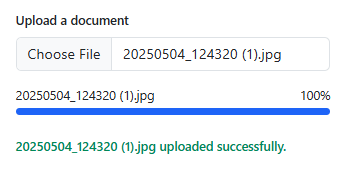
The progress bar advances in randomized, uneven increments (Math.random() * 18 per 250ms tick) rather than a perfectly smooth linear ramp, specifically because a real network upload never progresses at a perfectly constant rate — this reads closer to genuine upload behavior than a suspiciously mechanical straight line would.
Cancel and Retry both revolve around one currentFile reference and one timer interval, cleared through a single reset() function every time either action fires — that's what prevents the classic bug where cancelling mid-upload and then selecting a new file leaves an old interval still silently ticking in the background, fighting the new upload's own progress updates for control of the same bar.
Retry deliberately calls startUpload(currentFile) — the exact same function a fresh file selection calls — rather than a separate "resume" path, since this demo (like most real uploads without server-side resumable-upload support) restarts from zero rather than continuing from wherever it left off; the button is explicit about that by only appearing after a cancellation, never mid-upload.
Step by step
How to Use
- 1Choose a fileA progress row appears immediately with the file name and a 0% bar.
- 2Watch it uploadThe bar fills in uneven real-feeling increments, with the percentage updating alongside it.
- 3Click "Cancel" partway throughThe bar turns red, the interval stops immediately, and a Retry button appears in place of Cancel.
- 4Click "Retry"The same file restarts uploading from 0%, exactly like a fresh selection.
- 5Let an upload finish naturallyThe bar reaches 100%, Cancel disappears, and a green success message confirms the file name.
Real-world uses
Common Use Cases
Got questions?
Frequently Asked Questions
This demo cancels the simulated interval; wiring it to a real upload additionally means calling .abort() on the underlying XMLHttpRequest or aborting the fetch via an AbortController, alongside the same UI state changes shown here.
True resumable uploads need server-side support for partial uploads (like the tus protocol or S3 multipart uploads) — without that, restarting from zero is the only correct option, which is why Retry is explicit about starting over rather than implying a resume it can't actually do.
Yes. Keep the interval (or a real upload's progress handler) in a ref, track progress and status in component state, and drive the same startUpload/cancel/retry functions from your framework's event handlers.
Replace the setInterval simulation inside startUpload() with an XMLHttpRequest using its upload.onprogress event (or a fetch with a ReadableStream) to drive the same bar-width and percentage updates from real bytes transferred.