


Bootstrap Pricing Feature Comparison Table — Free Snippet
Bootstrap Pricing Feature Comparison Table · Pricing · Plain HTML, CSS & JS · Live preview
Copy & paste
Source Code
<div class="container py-5">
<h1 class="text-center bscmp-title mb-4">Compare plans</h1>
<div class="table-responsive">
<table class="table bscmp-table align-middle text-center">
<thead>
<tr>
<th class="text-start">Feature</th>
<th>Starter</th>
<th class="bscmp-featured">Pro</th>
<th>Team</th>
</tr>
</thead>
<tbody>
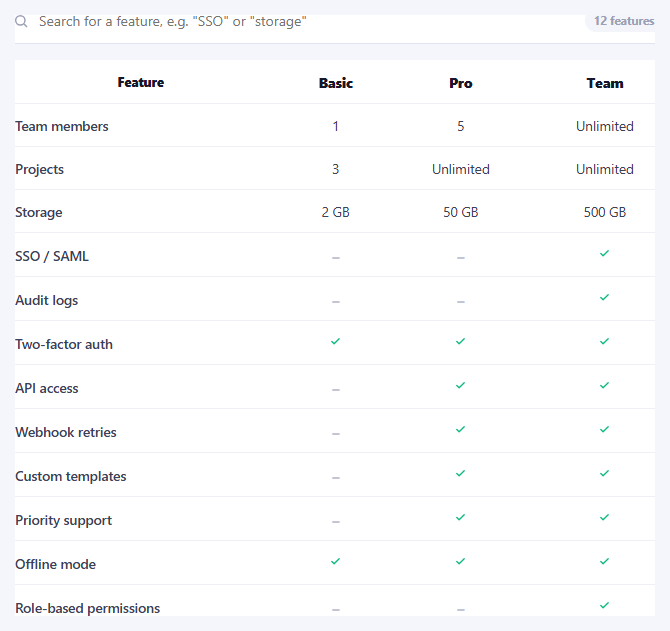
<tr><td class="text-start">Projects</td><td>1</td><td class="bscmp-featured">Unlimited</td><td class="bscmp-featured">Unlimited</td></tr>
<tr><td class="text-start">Storage</td><td>1 GB</td><td class="bscmp-featured">100 GB</td><td class="bscmp-featured">1 TB</td></tr>
<tr><td class="text-start">Team members</td><td>1</td><td class="bscmp-featured">5</td><td class="bscmp-featured">Unlimited</td></tr>
<tr><td class="text-start">Priority support</td><td>—</td><td class="bscmp-featured">✓</td><td class="bscmp-featured">✓</td></tr>
<tr><td class="text-start">SSO & audit log</td><td>—</td><td>—</td><td class="bscmp-featured">✓</td></tr>
<tr><td class="text-start">API access</td><td>—</td><td class="bscmp-featured">✓</td><td class="bscmp-featured">✓</td></tr>
<tr><td class="text-start fw-bold">Price</td><td>$0/mo</td><td class="bscmp-featured fw-bold">$24/mo</td><td class="bscmp-featured fw-bold">$79/mo</td></tr>
<tr><td></td><td><button class="btn btn-sm btn-outline-dark">Choose</button></td><td class="bscmp-featured"><button class="btn btn-sm btn-dark">Choose</button></td><td class="bscmp-featured"><button class="btn btn-sm btn-outline-dark">Choose</button></td></tr>
</tbody>
</table>
</div>
</div>.bscmp-title { font-weight: 800; letter-spacing: -0.01em; }
.bscmp-table th, .bscmp-table td { border-color: #eceef1; }
.bscmp-table thead th { font-size: 13px; text-transform: uppercase; letter-spacing: .04em; color: #6b7280; border-bottom-width: 2px; }
.bscmp-featured { background: #f8f9ff; }
.bscmp-table thead .bscmp-featured { color: #4338ca; font-weight: 700; }// Purely presentational — the featured "Pro" column is styled via the
// .bscmp-featured class already applied to every cell in that column. No
// JavaScript is needed for this snippet; it's included to keep the file
// shape consistent across the Bootstrap collection.Extend with AI
Take This Snippet Further With AI
The AI prompt for this one is for Patreon supporters ($3 a month, 7 days free), along with a site with no ads. Supporters enter the passcode once and it is remembered in this browser.
What's included
Features
About this UI Snippet
Bootstrap Pricing Feature Comparison Table — HTML, CSS & JavaScript

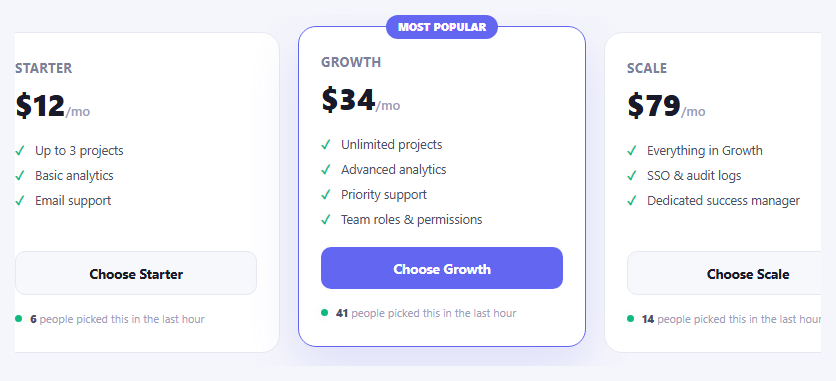
Three pricing cards side by side answer "what does each plan cost" — a table answers the harder question, "what exactly do I lose by picking the cheaper one." This snippet builds that comparison on real Bootstrap 5.3's .table component wrapped in .table-responsive, so a wide feature comparison scrolls horizontally on a narrow screen instead of breaking the layout.
Every cell in the recommended "Pro" column — including its header — carries a shared .bscmp-featured class, giving that entire column a distinct tint and bolder header without needing per-row logic; adding a new feature row just means adding three plain <td>s and one .bscmp-featured one, and the highlight stays consistent automatically.
Step by step
How to Use
- 1Load the snippetClick the snippet in the sidebar Library tab. The preview loads a 4-column feature comparison table.
- 2Scan the Pro columnIt's tinted and its header is bolded, drawing the eye toward the recommended plan.
- 3Shrink the preview widthThe table scrolls horizontally within its own container rather than breaking the page layout.
- 4Add a feature rowCopy a <tr> in the HTML panel, adding a fourth <td class="bscmp-featured"> for whichever column(s) should stay highlighted.
Real-world uses
Common Use Cases
Got questions?
Frequently Asked Questions
Yes — the actual .table component from Bootstrap 5.3, wrapped in .table-responsive so it scrolls horizontally on narrow screens instead of squeezing or breaking.
Every cell in that column, including its header, carries a shared .bscmp-featured class giving it a light background tint; the header additionally gets bold, accent-colored text.
Add a new <th> to the header row and a new <td> to every feature row (plus the price and CTA rows), keeping the same column order across every row.
It's meant to complement card-based pricing, not replace it — cards communicate the emotional pitch and headline price quickly, while a table answers detailed feature questions for a more deliberate buyer.
They're plain Bootstrap buttons with no handler attached in this demo — wire them to your real signup or checkout flow, matching each button to its column's plan.