



Pricing Cards with Live Plan Popularity Counter — Free HTML CSS JS Snippet
Pricing Cards with Live Plan Popularity Counter · Pricing · Plain HTML, CSS & JS · Live preview
Copy & paste
Source Code
<div class="ppc-wrap">
<div class="ppc-card">
<span class="ppc-name">Starter</span>
<div class="ppc-price">$12<small>/mo</small></div>
<ul class="ppc-features">
<li>Up to 3 projects</li>
<li>Basic analytics</li>
<li>Email support</li>
</ul>
<button type="button" class="ppc-cta ppc-cta-ghost">Choose Starter</button>
<div class="ppc-popularity">
<span class="ppc-pop-dot"></span>
<span><b class="ppc-pop-count" data-base="6" id="ppcCount0">6</b> people picked this in the last hour</span>
</div>
</div>
<div class="ppc-card ppc-card-featured">
<span class="ppc-badge">Most popular</span>
<span class="ppc-name">Growth</span>
<div class="ppc-price">$34<small>/mo</small></div>
<ul class="ppc-features">
<li>Unlimited projects</li>
<li>Advanced analytics</li>
<li>Priority support</li>
<li>Team roles & permissions</li>
</ul>
<button type="button" class="ppc-cta ppc-cta-solid">Choose Growth</button>
<div class="ppc-popularity">
<span class="ppc-pop-dot"></span>
<span><b class="ppc-pop-count" data-base="41" id="ppcCount1">41</b> people picked this in the last hour</span>
</div>
</div>
<div class="ppc-card">
<span class="ppc-name">Scale</span>
<div class="ppc-price">$79<small>/mo</small></div>
<ul class="ppc-features">
<li>Everything in Growth</li>
<li>SSO & audit logs</li>
<li>Dedicated success manager</li>
</ul>
<button type="button" class="ppc-cta ppc-cta-ghost">Choose Scale</button>
<div class="ppc-popularity">
<span class="ppc-pop-dot"></span>
<span><b class="ppc-pop-count" data-base="14" id="ppcCount2">14</b> people picked this in the last hour</span>
</div>
</div>
</div>*{box-sizing:border-box;margin:0;padding:0}
body{font-family:system-ui,-apple-system,sans-serif;background:#f5f6fb;display:flex;justify-content:center;padding:44px 20px}
.ppc-wrap{display:grid;grid-template-columns:repeat(3,1fr);gap:18px;max-width:900px;width:100%}
.ppc-card{position:relative;background:#fff;border:1.5px solid #e7e9f2;border-radius:18px;padding:26px 22px;display:flex;flex-direction:column}
.ppc-card-featured{border-color:#6366f1;box-shadow:0 20px 50px rgba(99,102,241,.16);transform:translateY(-6px)}
.ppc-badge{position:absolute;top:-12px;left:50%;transform:translateX(-50%);background:#6366f1;color:#fff;font-size:10.5px;font-weight:800;letter-spacing:.03em;text-transform:uppercase;padding:5px 12px;border-radius:99px;white-space:nowrap}
.ppc-name{font-size:13px;font-weight:700;color:#7b7f99;text-transform:uppercase;letter-spacing:.03em;margin-bottom:8px}
.ppc-price{font-size:30px;font-weight:800;color:#181a2a;margin-bottom:18px}
.ppc-price small{font-size:13px;color:#9aa0b8;font-weight:600}
.ppc-features{list-style:none;display:flex;flex-direction:column;gap:9px;margin-bottom:20px;flex:1}
.ppc-features li{font-size:12.5px;color:#4b4f66;padding-left:20px;position:relative}
.ppc-features li::before{content:'\2713';position:absolute;left:0;color:#10b981;font-weight:800}
.ppc-cta{width:100%;border-radius:10px;padding:12px;font-size:13.5px;font-weight:700;cursor:pointer;font-family:inherit;border:none;margin-bottom:16px}
.ppc-cta-ghost{background:#f7f8fc;color:#181a2a;border:1.5px solid #e7e9f2}
.ppc-cta-ghost:hover{background:#eef0fe}
.ppc-cta-solid{background:#6366f1;color:#fff}
.ppc-cta-solid:hover{background:#4f46e5}
.ppc-popularity{display:flex;align-items:center;gap:8px;font-size:11px;color:#9aa0b8;line-height:1.4}
.ppc-pop-dot{width:7px;height:7px;border-radius:50%;background:#10b981;flex-shrink:0;box-shadow:0 0 0 0 rgba(16,185,129,.5);animation:ppcPulse 2s infinite}
.ppc-pop-count{color:#4b4f66;font-weight:800;transition:color .3s}
.ppc-pop-count.ppc-pop-bump{color:#10b981}
@keyframes ppcPulse{
0%{box-shadow:0 0 0 0 rgba(16,185,129,.45)}
70%{box-shadow:0 0 0 6px rgba(16,185,129,0)}
100%{box-shadow:0 0 0 0 rgba(16,185,129,0)}
}
@media(max-width:760px){.ppc-wrap{grid-template-columns:1fr}.ppc-card-featured{transform:none}}// Each plan's popularity count starts from a real base number (data-base) and
// occasionally ticks up by a small random amount on an independent timer per
// card — simulating live activity without ever pretending the numbers are
// perfectly synchronized across cards, which real concurrent signups wouldn't be.
var counters = Array.prototype.slice.call(document.querySelectorAll('.ppc-pop-count'));
function scheduleNextBump(el) {
var delay = 4000 + Math.random() * 7000; // stagger each card's own rhythm
setTimeout(function () {
bump(el);
scheduleNextBump(el);
}, delay);
}
function bump(el) {
var current = parseInt(el.textContent, 10) || 0;
var increment = Math.random() < 0.7 ? 1 : 2; // occasionally jump by 2, mostly by 1
var next = current + increment;
el.textContent = String(next);
el.classList.add('ppc-pop-bump');
setTimeout(function () {
el.classList.remove('ppc-pop-bump');
}, 600);
}
counters.forEach(function (el) {
scheduleNextBump(el);
});Extend with AI
Take This Snippet Further With AI
The AI prompt for this one is for Patreon supporters ($3 a month, 7 days free), along with a site with no ads. Supporters enter the passcode once and it is remembered in this browser.
What's included
Features
About this UI Snippet
Pricing Cards with Live Popularity Counter — Independent Per-Card Activity Ticks
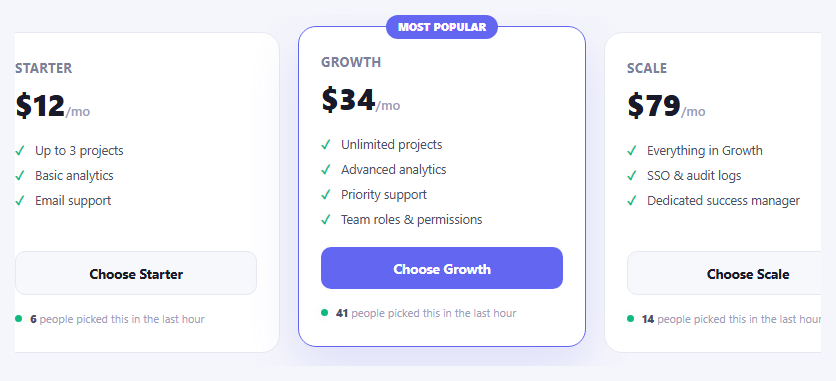
A "Most popular" badge on one card is a claim; a number that visibly moves is closer to evidence. This pricing grid gives every plan its own small live counter — "N people picked this in the last hour" — that ticks upward on its own independent, randomized rhythm, so the activity feels like real concurrent signups across three plans rather than one obviously scripted global timer.
Every card runs its own independent timer, deliberately unsynchronized
scheduleNextBump(el) is called once per counter and re-schedules itself recursively after each bump, with a randomized delay between 4 and 11 seconds (4000 + Math.random() * 7000) picked fresh every time. Because each of the three counters calls this independently, they never bump in lockstep — which is exactly what real, unrelated signups across three different plans would look like. A single shared setInterval ticking all three counters at once would have been simpler to write, but would visibly read as fake the moment two cards moved in perfect sync.
The base number is real content, not a placeholder
Each .ppc-pop-count starts from a data-base value baked into the HTML — 6, 41, and 14 for Starter, Growth, and Scale respectively — reflecting a plausible real distribution where the featured "Growth" plan gets picked far more often. The JavaScript only ever increments from whatever textContent currently reads via parseInt, so the starting numbers are genuinely the page's real content, not zero-state placeholders waiting for a script to fill in.
Mostly +1, occasionally +2, never a round jump
bump() increments by 1 seventy percent of the time and by 2 the other thirty percent (Math.random() < 0.7 ? 1 : 2), avoiding both a suspiciously mechanical "always +1 on a fixed timer" pattern and an unrealistic "sometimes jumps by 10" pattern that would draw attention to itself as obviously synthetic.
A brief color flash marks the moment of change
When a counter bumps, .ppc-pop-bump applies a green color for 600ms before being removed — a visitor who happens to be looking at a card when its number ticks gets a clear, brief acknowledgment that something just changed, without a distracting animation that would fire indefinitely.
The pulsing dot is a constant CSS animation, unrelated to the tick timing
The small dot beside each counter uses a CSS @keyframes pulse running continuously and independently of the JavaScript-driven number ticks — it signals "this is live" as ambient, constant motion, while the actual number change is the more meaningful (and rarer) event that draws a second glance.
Customizing it
Adjust each card's data-base value to reflect real signup numbers from your own analytics rather than fabricated ones — the honesty of this pattern depends entirely on starting from a real distribution. Change the 4000–11000 millisecond delay range in scheduleNextBump() to slow down or speed up the perceived tick rate; a much shorter range reads as busier but can feel artificial if overdone.
Step by step
How to Use
- 1Watch each card's counterNumbers tick up independently on staggered random timers — they will not move in sync.
- 2Notice the brief color flashEach counter flashes green for a moment right when it increments.
- 3Set real starting numbersEdit the data-base attribute and initial text on each .ppc-pop-count element to reflect your actual signup data.
- 4Adjust the tick frequencyChange the 4000 and 7000 millisecond values inside scheduleNextBump() in the JS panel.
- 5Change the increment patternEdit the 0.7 probability and the 1/2 increment values inside bump() in the JS panel.
- 6Export in your formatClick "HTML" for a standalone file, "JSX" for a React component, or "Tailwind" for a React + Tailwind version.
Real-world uses
Common Use Cases
Got questions?
Frequently Asked Questions
No, deliberately not. Each counter calls its own scheduleNextBump() with a freshly randomized delay between 4 and 11 seconds every time it fires, so the three cards bump at unrelated moments — which is what real, independent signups across three different plans would actually look like, rather than one obviously synchronized global timer.
They are meant to be real: each .ppc-pop-count element starts with an actual number in its text content and a matching data-base attribute (6, 41, and 14 in this example). The JavaScript only increments from whatever the element currently displays via parseInt — it never resets or overwrites the base number you set, so replacing those starting values with your own real signup data is the entire integration step.
bump() increments by 1 about 70% of the time and by 2 the other 30%, controlled by Math.random() < 0.7. A counter that always incremented by exactly 1 on a fixed rhythm would start to look mechanical and scripted after a few ticks; the small amount of variation reads as more like genuinely independent real-world events.
When bump() runs, it adds a ppc-pop-bump class that turns the number green, then removes it after 600 milliseconds via setTimeout. It is a lightweight visual acknowledgment for a visitor who happens to be looking at the number right when it changes, without a persistent or distracting animation.
No — the dot uses a continuous CSS @keyframes animation that runs independently on a fixed loop, unrelated to the JavaScript-driven number ticks. It signals general "this is live" activity as constant ambient motion, while the counter number itself is the more meaningful, comparatively rare event.
No, it is a fully client-side simulation using setTimeout and Math.random() — no server connection is required. For a genuinely real-time count reflecting actual signups, you would replace the simulated bump() logic with periodic fetch calls to a real backend endpoint that returns current counts.