


Bootstrap Video Hero with Play Overlay — Free Snippet
Bootstrap Video Hero with Play Overlay · Heroes · Plain HTML, CSS & JS · Live preview
Copy & paste
Source Code
<section class="bsvhero-section">
  <div class="container py-5 text-center">
    <span class="badge rounded-pill bsvhero-badge mb-3">Product tour</span>
    <h1 class="bsvhero-title">See it in action</h1>
    <p class="bsvhero-sub mb-4">A 90-second walkthrough of the whole workflow, start to finish.</p>

    <div class="bsvhero-frame mx-auto" id="bsvheroFrame">
      <div class="bsvhero-cover" id="bsvheroCover">
        <button class="bsvhero-play" id="bsvheroPlay" aria-label="Play video">
          <svg width="22" height="22" viewBox="0 0 24 24" fill="currentColor"><path d="M8 5v14l11-7z"/></svg>
        </button>
        <span class="bsvhero-duration">1:32</span>
      </div>
      <div class="bsvhero-playing d-none" id="bsvheroPlaying">
        <div class="bsvhero-progress"><div class="bsvhero-progress-bar" id="bsvheroBar"></div></div>
        <span class="small">Playing demo…</span>
        <button class="btn btn-sm btn-light mt-2" id="bsvheroReset">Reset</button>
      </div>
    </div>
  </div>
</section>
body { margin: 0; }
.bsvhero-section { background: linear-gradient(180deg, #0f172a, #1e293b); color: #fff; }
.bsvhero-badge { background: rgba(255,255,255,.12); color: #fff; font-size: 12px; }
.bsvhero-title { font-weight: 800; letter-spacing: -0.02em; font-size: clamp(1.6rem, 1.3rem + 1.2vw, 2.4rem); }
.bsvhero-sub { color: rgba(255,255,255,.7); max-width: 460px; margin-inline: auto; }
.bsvhero-frame {
max-width: 640px;
aspect-ratio: 16/9;
border-radius: 14px;
overflow: hidden;
position: relative;
background: linear-gradient(135deg, #334155, #1e293b);
box-shadow: 0 30px 60px rgba(0,0,0,.4);
}
.bsvhero-cover { position: absolute; inset: 0; display: flex; align-items: center; justify-content: center; }
.bsvhero-play {
width: 62px; height: 62px; border-radius: 50%;
border: none; background: #fff; color: #0f172a;
display: flex; align-items: center; justify-content: center;
cursor: pointer; transition: transform .15s;
}
.bsvhero-play:hover { transform: scale(1.08); }
.bsvhero-duration { position: absolute; bottom: 12px; right: 14px; font-size: 12px; background: rgba(0,0,0,.5); padding: 2px 8px; border-radius: 6px; }
.bsvhero-playing {
position: absolute; inset: 0;
display: flex; flex-direction: column; align-items: center; justify-content: center; gap: 8px;
}
.bsvhero-progress { width: 70%; height: 4px; background: rgba(255,255,255,.2); border-radius: 4px; overflow: hidden; }
.bsvhero-progress-bar { height: 100%; width: 0%; background: #6366f1; transition: width .1s linear; }const cover = document.getElementById('bsvheroCover');
const playing = document.getElementById('bsvheroPlaying');
const playBtn = document.getElementById('bsvheroPlay');
const resetBtn = document.getElementById('bsvheroReset');
const bar = document.getElementById('bsvheroBar');
let timer = null;
playBtn.addEventListener('click', () => {
cover.classList.add('d-none');
playing.classList.remove('d-none');
let pct = 0;
bar.style.width = '0%';
timer = setInterval(() => {
pct += 2;
bar.style.width = Math.min(100, pct) + '%';
if (pct >= 100) clearInterval(timer);
}, 100);
});
resetBtn.addEventListener('click', () => {
clearInterval(timer);
playing.classList.add('d-none');
cover.classList.remove('d-none');
bar.style.width = '0%';
});Extend with AI
Take This Snippet Further With AI
The AI prompt for this one is for Patreon supporters ($3 a month, 7 days free), along with a site with no ads. Supporters enter the passcode once and it is remembered in this browser.
What's included
Features
About this UI Snippet
Bootstrap Video Hero with Play Overlay — HTML, CSS & JavaScript
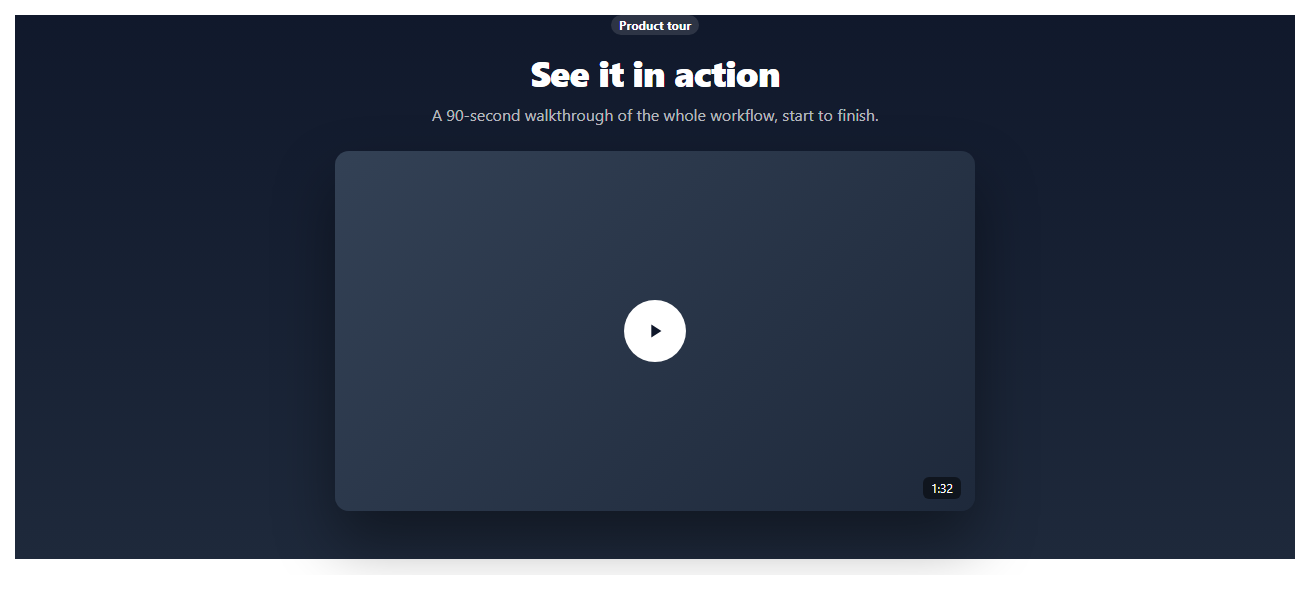
A product-tour hero usually centers on an embedded video, but a working demo shouldn't require shipping a real video file to be useful as a starting point. This snippet builds the interaction shape on real Bootstrap layout and utility classes: a dark hero, a framed thumbnail with a centered circular play button, and a click handler that swaps the static cover for a "playing" state with an animating progress bar — the exact structure you'd wire a real <video> or embedded player into.
The cover and the playing state are two separate absolutely-positioned layers inside one frame, toggled with Bootstrap's .d-none utility class — swap the progress-bar simulation for a real <video> element's timeupdate event and the rest of the show/hide logic needs no changes.
Step by step
How to Use
- 1Load the snippetClick the snippet in the sidebar Library tab. The preview loads a dark hero with a video thumbnail and a play button.
- 2Click the play buttonThe cover swaps out for a "Playing demo…" state with an animating progress bar.
- 3Let it finish or resetThe bar fills to 100% and stops, or click Reset to return to the play button.
- 4Swap in a real videoReplace the .bsvhero-cover thumbnail background and playing-state logic with an actual <video> element and its play()/timeupdate events.
Real-world uses
Common Use Cases
Got questions?
Frequently Asked Questions
No — it simulates the play interaction with an animating progress bar so the pattern is usable without shipping a real video file. Replace the playing-state markup with a real <video> element or embed to make it functional.
Replace .bsvhero-cover's background with your thumbnail, add a <video> element inside .bsvhero-playing, and call video.play() in the play button's click handler instead of starting the simulated progress interval.
Yes — on click, replace .bsvhero-playing's content with an <iframe> pointing at the embed URL (with autoplay=1) instead of toggling the simulated progress bar.
You would extend it to call video.pause() and reset video.currentTime = 0, or remove the iframe embed, alongside the existing cover/playing class toggle.
It's a real <button> with an aria-label, so it's reachable and understandable via keyboard and screen reader navigation.