





Dot Reveal Card — Free HTML CSS JS Canvas Hover Snippet
Dot Reveal Card · Scroll · Plain HTML, CSS & JS · Live preview
Copy & paste
Source Code
<div class="cr-grid" id="crGrid">
  <article class="cr-card" style="--c1:#6366f1;--c2:#22d3ee">
    <canvas class="cr-canvas"></canvas>
    <div class="cr-face"><span class="cr-icon">⚡</span></div>
    <div class="cr-hover"><h3>Fast</h3><p>Edge-deployed, sub-50ms responses worldwide.</p></div>
  </article>
  <article class="cr-card" style="--c1:#ec4899;--c2:#f59e0b">
    <canvas class="cr-canvas"></canvas>
    <div class="cr-face"><span class="cr-icon">🛡</span></div>
    <div class="cr-hover"><h3>Secure</h3><p>End-to-end encryption with zero-knowledge storage.</p></div>
  </article>
  <article class="cr-card" style="--c1:#34d399;--c2:#10b981">
    <canvas class="cr-canvas"></canvas>
    <div class="cr-face"><span class="cr-icon">∞</span></div>
    <div class="cr-hover"><h3>Scalable</h3><p>Autoscale from zero to millions without a config.</p></div>
  </article>
</div>*{box-sizing:border-box;margin:0;padding:0}
body{font-family:system-ui,-apple-system,sans-serif;background:#06060d;color:#fff;display:flex;justify-content:center;align-items:center;min-height:100vh;padding:24px}
.cr-grid{display:grid;grid-template-columns:repeat(3,1fr);gap:16px;width:100%;max-width:760px}
.cr-card{position:relative;aspect-ratio:4/5;border-radius:18px;border:1px solid #1f1f33;background:#0c0c18;overflow:hidden;cursor:pointer}
.cr-canvas{position:absolute;inset:0;width:100%;height:100%;opacity:0;transition:opacity .3s}
.cr-card:hover .cr-canvas{opacity:1}
.cr-face{position:absolute;inset:0;z-index:1;display:flex;align-items:center;justify-content:center;transition:opacity .3s}
.cr-card:hover .cr-face{opacity:0}
.cr-icon{width:60px;height:60px;border-radius:16px;background:#15152a;border:1px solid #2a2a44;display:flex;align-items:center;justify-content:center;font-size:28px}
.cr-hover{position:absolute;inset:0;z-index:2;display:flex;flex-direction:column;justify-content:flex-end;gap:6px;padding:22px;opacity:0;transform:translateY(10px);transition:opacity .35s,transform .35s}
.cr-card:hover .cr-hover{opacity:1;transform:none}
.cr-hover h3{font-size:22px;font-weight:800}
.cr-hover p{font-size:13px;color:rgba(255,255,255,.8);line-height:1.5}
@media(max-width:620px){.cr-grid{grid-template-columns:1fr}.cr-card{aspect-ratio:16/7}}var cards = Array.prototype.slice.call(document.querySelectorAll('.cr-card'));
cards.forEach(function (card) {
var canvas = card.querySelector('.cr-canvas');
var ctx = canvas.getContext('2d');
var cs = getComputedStyle(card);
var colors = [cs.getPropertyValue('--c1').trim(), cs.getPropertyValue('--c2').trim()];
var dots = [], raf = null, gap = 14, dpr = Math.min(devicePixelRatio || 1, 2);
function build() {
var w = canvas.clientWidth, h = canvas.clientHeight;
canvas.width = w * dpr; canvas.height = h * dpr;
ctx.setTransform(dpr, 0, 0, dpr, 0, 0);
dots = [];
for (var y = gap / 2; y < h; y += gap) {
for (var x = gap / 2; x < w; x += gap) {
dots.push({ x: x, y: y, c: colors[Math.floor(Math.random() * 2)],
// each dot has its own delay so the matrix fills in organically
delay: Math.random() * 600, t0: 0 });
}
}
}
function draw(now) {
var w = canvas.clientWidth, h = canvas.clientHeight;
ctx.clearRect(0, 0, w, h);
dots.forEach(function (d) {
var p = Math.max(0, Math.min(1, (now - d.t0 - d.delay) / 400));
if (p <= 0) return;
ctx.globalAlpha = p * 0.9;
ctx.fillStyle = d.c;
ctx.fillRect(d.x - 1, d.y - 1, 2, 2);
});
raf = requestAnimationFrame(draw);
}
card.addEventListener('pointerenter', function () {
var start = performance.now();
dots.forEach(function (d) { d.t0 = start; });
if (!raf) raf = requestAnimationFrame(draw);
});
card.addEventListener('pointerleave', function () {
cancelAnimationFrame(raf); raf = null;
ctx.clearRect(0, 0, canvas.clientWidth, canvas.clientHeight);
});
build();
window.addEventListener('resize', build);
});Extend with AI
Take This Snippet Further With AI
The AI prompt for this one is for Patreon supporters ($3 a month, 7 days free), along with a site with no ads. Supporters enter the passcode once and it is remembered in this browser.
What's included
Features
About this UI Snippet
Dot Reveal Card — Staggered Canvas Dot Matrix on Hover
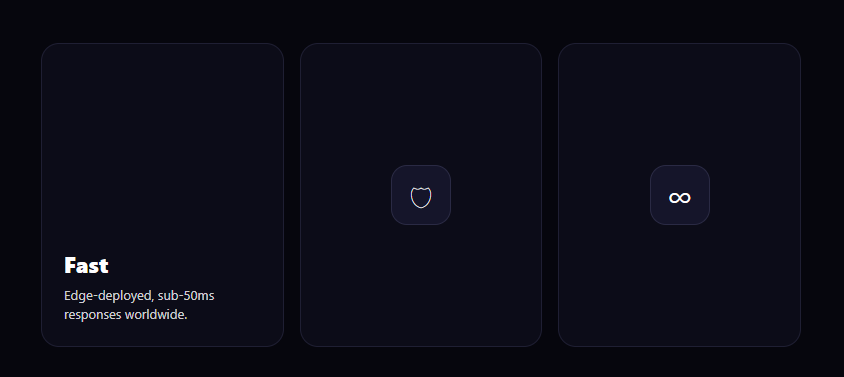
The dot-reveal card is the feature-grid interaction where hovering a card paints a matrix of tiny colored dots across it — each dot fading in on its own slight delay so the pattern materializes organically — while the resting icon dissolves into a heading and description. This snippet builds it with plain HTML, CSS, and a per-card HTML <canvas> driven by vanilla JavaScript.
A dot grid on canvas
Each card has its own <canvas> sized to the card with devicePixelRatio scaling (capped at 2) so the dots stay crisp on retina screens. On build, a double loop walks the canvas every gap pixels and creates a dot record at each position, assigning it one of the card's two theme colors (read from the --c1/--c2 CSS variables) at random. Storing dots as data — position, color, and timing — lets the animation be a simple replay over that array.
Staggered, organic fill-in
If every dot appeared at once, the reveal would look like a flat overlay flicking on. Instead, each dot gets a random delay up to 600ms. When you hover, all dots record the same start time t0, and each dot's fade progress is (now - t0 - delay) / 400 clamped to 0–1. Because the delays are random, dots wink on in a scattered order over roughly a second, so the matrix appears to assemble itself — the detail that makes it feel alive rather than mechanical.
The animation loop, started on demand
The requestAnimationFrame loop only runs while you're hovering. On pointerenter it stamps every dot's start time and kicks off the loop; on pointerleave it cancels the frame and clears the canvas. Running the loop on demand — not continuously for every card on the page — keeps a grid of these cards cheap, since idle cards do zero work.
Layered content transitions
Three stacked layers compose the card: the canvas at the back (fading in via CSS opacity on hover), the resting icon face in the middle (fading out), and the hover content on top (sliding up and in). The canvas opacity transition and the dot animation overlap, so the dots both fade in as a layer and individually stagger — a subtle double reveal. The heading and copy rise into place once the icon clears.
Why a canvas here
Hundreds of dots as DOM elements would be heavy and awkward to animate individually. A single canvas per card draws them all in one paint per frame, with per-dot alpha controlled in code, which is far more efficient and gives precise control over the stagger timing that CSS alone couldn't easily express.
Customizing it
Change gap for a denser or sparser matrix, adjust the 600ms delay spread and 400ms fade for a faster or slower assembly, set each card's --c1/--c2 to theme its dots, or change the dot size in fillRect. The grid collapses to a single column on narrow screens. Pair it with a glare card or a wobble card for a varied feature section.
Step by step
How to Use
- 1Paste HTML, CSS, and JSThree feature cards render, each showing an icon at rest.
- 2Hover a cardA matrix of colored dots fades in across the canvas.
- 3Watch the staggerDots wink on in a scattered order, assembling the pattern.
- 4See the contentThe icon dissolves and a heading and copy rise in.
- 5Theme the dotsSet each card's --c1 and --c2 colors.
- 6Tune the matrixAdjust the gap, delay spread, and fade duration.
Real-world uses
Common Use Cases
Got questions?
Frequently Asked Questions
Each dot is assigned a random delay up to 600ms. On hover, every dot records the same start time, and its fade progress is (now - start - delay) / 400 clamped to 0–1. Because the delays differ, dots wink on in a scattered order over about a second, so the matrix appears to assemble itself rather than flicking on as a flat layer.
A dense dot matrix would be hundreds of DOM nodes, which is heavy to create and animate individually. One canvas per card draws every dot in a single paint per frame, with per-dot alpha controlled in code. That's far more efficient and gives precise control over the stagger timing that CSS alone couldn't easily express.
No. The requestAnimationFrame loop starts on pointerenter and is cancelled on pointerleave, which also clears the canvas. Idle cards do zero work, so a whole grid of these cards stays cheap — only the card you're actively hovering animates.
Each card sets two CSS custom properties, --c1 and --c2. The script reads them with getComputedStyle and assigns each dot one of the two colors at random, so a card's dot matrix matches its theme. Change those variables per card to recolor the reveal without touching the JavaScript.
Render the cards and use a ref to each canvas. In a mount effect per card, build the dot array and wire pointerenter/pointerleave to start and stop the rAF loop, cancelling on unmount. Keep dots and the frame id in refs, not state. The CSS layer transitions port directly; in Tailwind, position the canvas absolute inset-0 behind the content layers.