



Checkbox Tree — Tri-State Parent/Child Checkboxes
Checkbox Tree · Forms · Plain HTML, CSS & JS · Live preview
Copy & paste
Source Code
<div class="ck-card">
<h3>Select permissions</h3>
<ul class="ck-tree" id="ckTree" role="tree">
<li role="treeitem" data-id="content">
<div class="ck-row"><button class="ck-tog" type="button" aria-label="Toggle"></button><label class="ck-lbl"><input type="checkbox"><span>Content</span></label></div>
<ul class="ck-children" role="group">
<li role="treeitem" data-id="content-read"><div class="ck-row"><span class="ck-spacer"></span><label class="ck-lbl"><input type="checkbox"><span>Read articles</span></label></div></li>
<li role="treeitem" data-id="content-write"><div class="ck-row"><span class="ck-spacer"></span><label class="ck-lbl"><input type="checkbox"><span>Write & edit</span></label></div></li>
<li role="treeitem" data-id="content-publish"><div class="ck-row"><span class="ck-spacer"></span><label class="ck-lbl"><input type="checkbox"><span>Publish</span></label></div></li>
</ul>
</li>
<li role="treeitem" data-id="billing">
<div class="ck-row"><button class="ck-tog" type="button" aria-label="Toggle"></button><label class="ck-lbl"><input type="checkbox"><span>Billing</span></label></div>
<ul class="ck-children" role="group">
<li role="treeitem" data-id="billing-view"><div class="ck-row"><span class="ck-spacer"></span><label class="ck-lbl"><input type="checkbox"><span>View invoices</span></label></div></li>
<li role="treeitem" data-id="billing-manage"><div class="ck-row"><span class="ck-spacer"></span><label class="ck-lbl"><input type="checkbox"><span>Manage payment methods</span></label></div></li>
</ul>
</li>
</ul>
<p class="ck-out" id="ckOut">0 selected</p>
</div>*{box-sizing:border-box;margin:0;padding:0}
body{font-family:system-ui,-apple-system,sans-serif;background:#f1f5f9;color:#0f172a;display:flex;justify-content:center;padding:36px 18px}
.ck-card{background:#fff;border:1px solid #e2e8f0;border-radius:16px;padding:20px 22px;width:100%;max-width:360px;box-shadow:0 12px 34px -22px rgba(0,0,0,.3)}
.ck-card h3{font-size:15px;font-weight:800;margin-bottom:12px}
.ck-tree,.ck-children{list-style:none}
.ck-children{overflow:hidden;transition:height .2s ease}
.ck-row{display:flex;align-items:center;gap:6px;padding:5px 6px;border-radius:8px}
.ck-row:hover{background:#f8fafc}
.ck-tog{width:18px;height:18px;border:none;background:none;cursor:pointer;flex-shrink:0;position:relative}
.ck-tog::before{content:'';position:absolute;inset:0;margin:auto;width:0;height:0;border-left:5px solid #94a3b8;border-top:4px solid transparent;border-bottom:4px solid transparent;transform:rotate(0);transition:transform .15s}
.ck-tog.ck-open::before{transform:rotate(90deg)}
.ck-spacer{width:18px;flex-shrink:0}
.ck-lbl{display:flex;align-items:center;gap:9px;font-size:13.5px;font-weight:500;cursor:pointer;user-select:none}
.ck-lbl input{width:17px;height:17px;accent-color:#6366f1;cursor:pointer}
.ck-out{margin-top:12px;padding-top:12px;border-top:1px solid #f1f5f9;font-size:12.5px;font-weight:700;color:#4f46e5}var tree = document.getElementById('ckTree');
var out = document.getElementById('ckOut');
var parents = Array.prototype.slice.call(tree.querySelectorAll(':scope > li[role=treeitem]'));
function childBoxes(li) { return Array.prototype.slice.call(li.querySelectorAll('.ck-children input[type=checkbox]')); }
function parentBox(li) { return li.querySelector(':scope > .ck-row input[type=checkbox]'); }
// Set a parent's checkbox to checked / unchecked / indeterminate based on children.
function refreshParent(li) {
var kids = childBoxes(li);
var on = kids.filter(function (c) { return c.checked; }).length;
var box = parentBox(li);
box.checked = on === kids.length && kids.length > 0;
box.indeterminate = on > 0 && on < kids.length;
}
function selectedLeaves() {
return Array.prototype.slice.call(tree.querySelectorAll('.ck-children input:checked')).length;
}
function report() { var n = selectedLeaves(); out.textContent = n + ' selected'; }
parents.forEach(function (li) {
var pbox = parentBox(li);
// Parent toggles all children.
pbox.addEventListener('change', function () {
childBoxes(li).forEach(function (c) { c.checked = pbox.checked; });
pbox.indeterminate = false;
report();
});
// Children update the parent's tri-state.
childBoxes(li).forEach(function (c) {
c.addEventListener('change', function () { refreshParent(li); report(); });
});
// Expand / collapse with height animation.
var tog = li.querySelector(':scope > .ck-row .ck-tog');
var group = li.querySelector(':scope > .ck-children');
tog.classList.add('ck-open');
group.style.height = 'auto';
tog.addEventListener('click', function () {
var open = tog.classList.toggle('ck-open');
if (open) { group.style.height = group.scrollHeight + 'px'; group.addEventListener('transitionend', function te() { group.style.height = 'auto'; group.removeEventListener('transitionend', te); }); }
else { group.style.height = group.scrollHeight + 'px'; requestAnimationFrame(function () { group.style.height = '0px'; }); }
});
refreshParent(li);
});
report();Extend with AI
Take This Snippet Further With AI
The AI prompt for this one is for Patreon supporters ($3 a month), along with a site with no ads. Supporters enter the passcode once and it is remembered in this browser.
What's included
Features
About this UI Snippet
Checkbox Tree — Indeterminate Tri-State Parent and Child Checkboxes
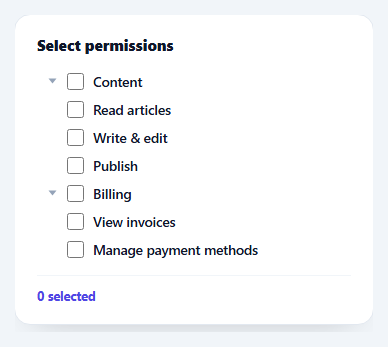
A checkbox tree is a hierarchy of checkboxes where ticking a parent selects all its children, and a parent shows an indeterminate state when only some children are ticked. It's the control for permission grids, category pickers, and file selectors. This snippet builds an accessible, animated one with correct tri-state logic and collapsible groups, in plain HTML, CSS, and vanilla JavaScript.
The tri-state that everyone gets wrong
A parent checkbox has three visual states, not two: checked (all children on), unchecked (none on), and indeterminate (some on). The indeterminate state is a real DOM property (checkbox.indeterminate = true) — it can't be set in HTML, only JavaScript — and it shows as a dash rather than a tick. After any child change, refreshParent counts the ticked children and sets the parent to checked, unchecked, or indeterminate accordingly, so the parent always summarises its group at a glance.
Two-way propagation
Selection flows both directions. Ticking a parent cascades down: every child is set to match and the parent's indeterminate flag clears. Ticking a child propagates up: the parent recomputes its tri-state. Keeping both directions in sync is what makes the control feel coherent — you can select a whole group with one click, then untick one item and watch the parent flip to the dash automatically.
Animated expand/collapse
Each group expands and collapses with a height animation. Because you can't transition to height: auto, the script measures scrollHeight, animates to that pixel value, then sets height: auto on transitionend so the group can still reflow if content changes — and reverses the trick to collapse. A rotating caret indicates the open/closed state. Groups start expanded so the full hierarchy is visible.
Accessible structure
The tree uses role="tree", role="treeitem", and role="group", and every checkbox is a real <input> inside a <label>, so clicking the text toggles it and screen readers announce the checked/mixed state natively. accent-color themes the checkboxes without replacing them, keeping native keyboard behaviour (Space to toggle, Tab to move) for free.
Reporting the selection
A live summary counts the selected leaf items, demonstrating how to read the tree's value — in real use you'd collect the checked leaves' ids to submit. The whole component is compact and dependency-free, a clean reference for the tri-state checkbox-tree pattern that's surprisingly easy to get subtly wrong.
Step by step
How to Use
- 1Paste HTML, CSS, and JSA permissions tree renders with expandable parent groups.
- 2Tick a parentChecking a parent selects all of its children at once.
- 3Tick some childrenThe parent shows an indeterminate dash when only some are on.
- 4Expand or collapseClick the caret to animate a group open or closed.
- 5Read the selectionThe summary counts selected leaves; collect their ids to submit.
- 6Extend the treeAdd more treeitem groups — the logic works per parent.
Real-world uses
Common Use Cases
indeterminate property for mixed parents.Got questions?
Frequently Asked Questions
It is a third visual state — shown as a dash — that means "some but not all children are selected." It is not available in HTML; you set it in JavaScript with checkbox.indeterminate = true. Here a parent becomes indeterminate whenever the number of ticked children is greater than zero but less than the total, so the parent always summarises its group accurately.
Both ways. Ticking a parent cascades down — every child is set to match and the parent's indeterminate flag clears. Ticking a child propagates up — the parent recounts its children and updates to checked, unchecked, or indeterminate. Keeping both directions synchronised is what makes the tree behave predictably.
You cannot CSS-transition to height: auto, so to animate a group open the script measures its scrollHeight, transitions to that pixel value, then sets height: auto on transitionend so the group can reflow later. Collapsing reverses it. This gives a smooth expand/collapse while still letting the content resize naturally when expanded.
Collect the checked leaf inputs — the ones inside .ck-children — and read their data-id (or value). The parent checkboxes are summaries, so you usually submit only the leaves. The demo counts them for the summary line; in a form you would gather the ids into an array or a hidden field.
Model the tree as data (nodes with children and a checked flag) and derive each parent's checked/indeterminate from its children in render. Set the indeterminate DOM property via a ref/directive since it is not a normal attribute — useEffect in React, a ref in Vue, or [indeterminate] binding in Angular. Update children on parent change and recompute parents on child change. Tailwind users swap the classes for utilities.