



Cursor Particle Brush Trail — Free Canvas Lingering Trail Snippet
Cursor Particle Brush Trail · Animations · Plain HTML, CSS & JS · Live preview
Copy & paste
Source Code
<section class="ctp-wrap">
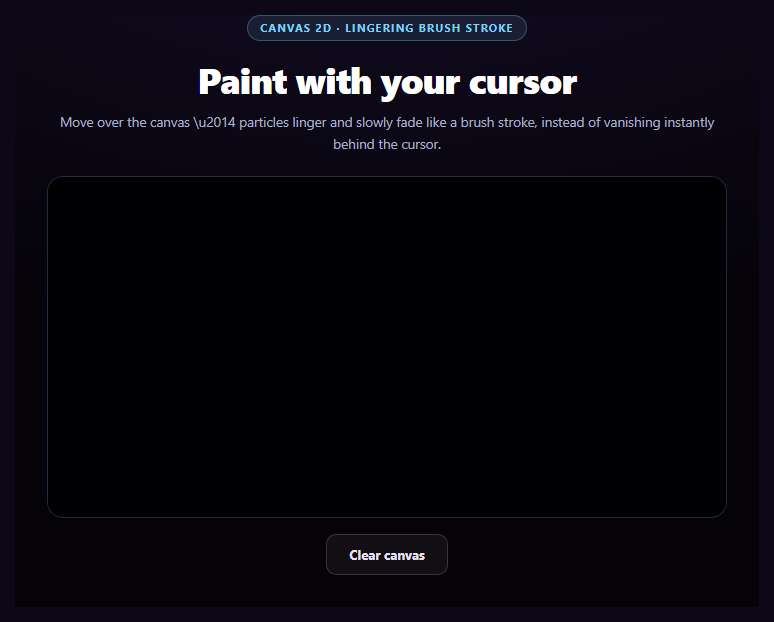
  <span class="ctp-tag">canvas 2d · lingering brush stroke</span>
  <h1>Paint with your cursor</h1>
  <p>Move over the canvas \u2014 particles linger and slowly fade like a brush stroke, instead of vanishing instantly behind the cursor.</p>

  <div class="ctp-stage">
    <canvas class="ctp-canvas" id="ctpCanvas"></canvas>
  </div>

  <button type="button" class="ctp-clear" id="ctpClear">Clear canvas</button>
</section>*{box-sizing:border-box;margin:0;padding:0}
body{font-family:system-ui,-apple-system,sans-serif;background:radial-gradient(120% 90% at 50% 0%,#150e28,#050308 60%);color:#fff;min-height:100vh;display:flex;align-items:center;justify-content:center;padding:26px}
.ctp-wrap{width:100%;max-width:680px;text-align:center}
.ctp-tag{display:inline-block;font-size:10.5px;font-weight:700;letter-spacing:.14em;text-transform:uppercase;color:#7dd3fc;background:rgba(125,211,252,.1);border:1px solid rgba(125,211,252,.3);padding:5px 12px;border-radius:99px;margin-bottom:14px}
.ctp-wrap h1{font-size:clamp(26px,5.5vw,36px);font-weight:800;letter-spacing:-.02em}
.ctp-wrap p{font-size:13.5px;color:#a9b0c9;margin-top:8px;line-height:1.6}
.ctp-stage{margin:22px 0 16px;border-radius:16px;overflow:hidden;border:1px solid rgba(125,211,252,.2);background:#050710}
.ctp-canvas{display:block;width:100%;height:340px;cursor:crosshair;touch-action:none}
.ctp-clear{padding:11px 22px;border-radius:10px;border:1px solid rgba(255,255,255,.16);background:rgba(255,255,255,.05);color:#e8e2f5;font:700 13px system-ui;cursor:pointer}
.ctp-clear:hover{background:rgba(255,255,255,.11)}var canvas = document.getElementById('ctpCanvas');
var ctx = canvas.getContext('2d');
var clearBtn = document.getElementById('ctpClear');
var DPR = Math.min(2, window.devicePixelRatio || 1);
var W = 0, H = 0;
function resize() {
var rect = canvas.getBoundingClientRect();
W = rect.width; H = rect.height;
canvas.width = W * DPR;
canvas.height = H * DPR;
ctx.setTransform(DPR, 0, 0, DPR, 0, 0);
}
window.addEventListener('resize', resize);
resize();
var HUES = [200, 260, 320, 20, 160];
var hueIndex = 0;
// Each particle is a persistent object with its own remaining life, unlike a
// typical instantaneous mouse trail that erases the previous frame entirely.
// Particles accumulate on a long-lived array and are painted with decreasing
// opacity every frame until their life reaches zero \u2014 a lingering brush
// stroke rather than a disappearing pointer trail.
var particles = [];
var MAX_LIFE = 90; // frames \u2014 roughly 1.5s at 60fps, a long linger
var last = null;
function spawn(x, y) {
var hue = HUES[hueIndex % HUES.length];
var n = 3;
for (var i = 0; i < n; i++) {
particles.push({
x: x + (Math.random() - 0.5) * 6,
y: y + (Math.random() - 0.5) * 6,
r: 3 + Math.random() * 4,
hue: hue + (Math.random() - 0.5) * 20,
life: MAX_LIFE,
maxLife: MAX_LIFE,
});
}
}
function pointFromEvent(e) {
var rect = canvas.getBoundingClientRect();
var t = e.touches ? e.touches[0] : e;
return { x: t.clientX - rect.left, y: t.clientY - rect.top };
}
function paintTo(x, y) {
if (last) {
// Interpolate along the segment from the last point so a fast swipe still
// paints a continuous stroke instead of sparse, disconnected dots.
var dist = Math.hypot(x - last.x, y - last.y);
var steps = Math.max(1, Math.floor(dist / 4));
for (var s = 0; s < steps; s++) {
var t = s / steps;
spawn(last.x + (x - last.x) * t, last.y + (y - last.y) * t);
}
} else {
spawn(x, y);
}
last = { x: x, y: y };
hueIndex++;
}
function frame() {
// Slow, additive fade: each frame paints over the existing pixels with a
// very low-alpha clear instead of a full clearRect, so old particles fade
// gradually rather than disappearing the instant the next frame draws.
ctx.fillStyle = 'rgba(5,7,16,0.06)';
ctx.fillRect(0, 0, W, H);
for (var i = particles.length - 1; i >= 0; i--) {
var p = particles[i];
p.life -= 1;
if (p.life <= 0) { particles.splice(i, 1); continue; }
var alpha = p.life / p.maxLife;
ctx.beginPath();
ctx.fillStyle = 'hsla(' + p.hue + ', 90%, 65%, ' + (alpha * 0.85) + ')';
ctx.arc(p.x, p.y, p.r * (0.5 + alpha * 0.5), 0, Math.PI * 2);
ctx.fill();
}
requestAnimationFrame(frame);
}
var pointerDown = false;
canvas.addEventListener('mousedown', function (e) { pointerDown = true; last = null; paintTo(pointFromEvent(e).x, pointFromEvent(e).y); });
canvas.addEventListener('mousemove', function (e) {
var p = pointFromEvent(e);
// Paint continuously on hover (matching a "brush that follows the cursor"),
// and still respond to an active mouse-down drag identically.
paintTo(p.x, p.y);
});
window.addEventListener('mouseup', function () { pointerDown = false; last = null; });
canvas.addEventListener('mouseleave', function () { last = null; });
canvas.addEventListener('touchstart', function (e) { e.preventDefault(); last = null; var p = pointFromEvent(e); paintTo(p.x, p.y); }, { passive: false });
canvas.addEventListener('touchmove', function (e) { e.preventDefault(); var p = pointFromEvent(e); paintTo(p.x, p.y); }, { passive: false });
canvas.addEventListener('touchend', function () { last = null; });
clearBtn.addEventListener('click', function () {
particles = [];
last = null;
ctx.clearRect(0, 0, W, H);
});
requestAnimationFrame(frame);Extend with AI
Take This Snippet Further With AI
The AI prompt for this one is for Patreon supporters ($3 a month, 7 days free), along with a site with no ads. Supporters enter the passcode once and it is remembered in this browser.
What's included
Features
About this UI Snippet
Cursor Particle Brush Trail — A Stroke That Lingers, Not a Trail That Vanishes
Most cursor-trail effects erase the previous frame completely and redraw, so the "trail" only ever spans the last few pixels behind the pointer. This snippet does the opposite on purpose: every particle it spawns has its own life counter and keeps rendering, fading gradually, for about 1.5 seconds — moving the cursor slowly leaves a visible, lingering stroke behind it, closer to a paintbrush than a comet tail.
Persistent particles with individual life, not a cleared-and-redrawn trail
Each particle pushed into the particles array carries its own life/maxLife pair. Every animation frame decrements every particle's life and removes it only once that reaches zero — particles from several frames ago are still being drawn (at lower opacity) alongside particles spawned this frame. That's the entire difference from a typical trail effect, where old points are gone the instant the next frame paints.
A near-transparent fill instead of clearRect
Rather than ctx.clearRect(), every frame paints ctx.fillRect() with a background color at a very low alpha (rgba(5,7,16,0.06)) over the whole canvas. Because that fill only partially obscures what's underneath, particles already on the canvas darken and fade gradually across many frames instead of disappearing in one step — the canvas equivalent of watercolor drying rather than a whiteboard eraser.
Interpolating between mouse positions
A fast swipe can jump many pixels between two consecutive mousemove events, which would otherwise paint sparse, disconnected dots. paintTo() measures the distance from the last painted point and spawns particles at evenly interpolated positions along that segment (roughly every 4px), so even a quick motion leaves a continuous stroke rather than a dashed line.
Opacity and radius both track remaining life
Each particle's alpha is simply life / maxLife, applied to its hsla fill color, and its radius shrinks slightly as life drains (r * (0.5 + alpha * 0.5)) — combining a fade with a subtle shrink is what makes a lingering particle read as dissipating paint rather than a static dot that abruptly blinks out.
Customizing it
Change MAX_LIFE for a shorter or longer-lingering stroke, adjust the background fill's alpha for a faster or slower fade, swap the HUES array for a different palette, or spawn more particles per point for a denser brush. Pair it with canvas audio frequency bars as another real-time canvas rendering reference, or hover image trail for an image-based cursor trail instead.
Step by step
How to Use
- 1Paste HTML, CSS, and JSAn empty dark canvas renders with a Clear canvas button.
- 2Move the cursor over the canvasColorful particles paint along the path and linger.
- 3Move slowly vs. quicklySlow motion leaves a dense stroke; fast motion a lighter one.
- 4Wait without movingThe existing stroke keeps fading gradually on its own.
- 5Click Clear canvasInstantly removes every particle and resets the canvas.
- 6Tune the lingerChange MAX_LIFE and the background fill's alpha.
Real-world uses
Common Use Cases
clearRect, lets older strokes age gradually while new ones draw on top.Got questions?
Frequently Asked Questions
Each particle object carries its own life and maxLife values. Every animation frame decrements every particle's life and only removes it from the array once life reaches zero — meaning particles spawned several frames ago are still drawn, just at progressively lower opacity, alongside particles spawned in the current frame. A typical instantaneous trail instead clears everything from the previous frame before drawing the new one, so nothing survives past a single frame.
clearRect wipes the canvas to fully transparent in one step, which would erase every particle immediately regardless of its own life value. Filling the whole canvas with a background color at a very low alpha each frame only partially obscures whatever was drawn underneath, so previously-painted particles darken and fade across many frames rather than vanishing the instant the next frame renders — this is what produces the "brush stroke drying" look instead of an instant wipe.
paintTo() measures the straight-line distance between the current pointer position and the last painted position, then spawns particles at several evenly-interpolated points along that segment (roughly one every 4px) instead of only at the two endpoints. Without this, a fast mouse movement that jumps many pixels between two mousemove events would leave visible gaps in the stroke.
Each particle's opacity is computed directly from its remaining life (life / maxLife) and applied to its hsla fill color, while its drawn radius also shrinks slightly as life drains. Combining a fade with a subtle shrink — rather than only fading, or only shrinking — is what reads as dissipating paint instead of a static dot abruptly blinking out at the end of its life.
Keep the particles array, the last-point reference, and the animation frame id in refs (not state), since they mutate every frame and should never trigger a re-render. Set up the canvas, resize listener, and requestAnimationFrame loop inside a mount effect, attach the pointer/touch listeners to the canvas ref, and cancel the animation frame and remove listeners in the effect's cleanup function.