



WebGL Gradient Shader Background — Free Raw GLSL Animated Gradient
WebGL Gradient Shader Background · Animations · Plain HTML, CSS & JS · Live preview
Copy & paste
Source Code
<section class="wgs-wrap">
  <canvas class="wgs-canvas" id="wgsCanvas"></canvas>
  <div class="wgs-content">
    <span class="wgs-tag">raw webgl1 · fragment shader</span>
    <h1>Rendered on the GPU</h1>
    <p>A full-screen triangle and a hand-written GLSL fragment shader animate this gradient — no Three.js, no library.</p>
    <button class="wgs-btn">Explore the docs</button>
  </div>
</section>*{box-sizing:border-box;margin:0;padding:0}
body{font-family:system-ui,-apple-system,sans-serif;background:#050514;color:#fff;min-height:100vh}
.wgs-wrap{position:relative;min-height:100vh;overflow:hidden;display:flex;align-items:center;justify-content:center}
.wgs-canvas{position:absolute;inset:0;width:100%;height:100%;display:block}
.wgs-content{position:relative;z-index:1;text-align:center;max-width:480px;padding:26px}
.wgs-tag{display:inline-block;font-size:10.5px;font-weight:700;letter-spacing:.14em;text-transform:uppercase;color:#e9d5ff;background:rgba(233,213,255,.12);border:1px solid rgba(233,213,255,.32);padding:5px 12px;border-radius:99px;margin-bottom:16px;backdrop-filter:blur(6px)}
.wgs-content h1{font-size:clamp(32px,7vw,56px);font-weight:800;letter-spacing:-.03em;text-shadow:0 6px 34px rgba(0,0,0,.5)}
.wgs-content p{font-size:14.5px;color:#dcd3f0;margin-top:12px;line-height:1.7;text-shadow:0 2px 14px rgba(0,0,0,.5)}
.wgs-btn{margin-top:28px;padding:14px 30px;border-radius:12px;border:1px solid rgba(255,255,255,.3);background:rgba(255,255,255,.08);color:#fff;font:700 14px system-ui;cursor:pointer;backdrop-filter:blur(6px);transition:background .18s}
.wgs-btn:hover{background:rgba(255,255,255,.16)}var canvas = document.getElementById('wgsCanvas');
var gl = canvas.getContext('webgl') || canvas.getContext('experimental-webgl');
if (!gl) {
// No WebGL support: fall back to a static CSS-visible gradient so the
// section still looks intentional rather than blank.
canvas.style.display = 'none';
document.querySelector('.wgs-wrap').style.background =
'radial-gradient(120% 90% at 50% 20%, #4c1d95, #050514 70%)';
} else {
runDemo();
}
function runDemo() {
// --- Shader sources -------------------------------------------------
// The vertex shader only needs to place three vertices that cover the
// whole viewport; all of the visuals live in the fragment shader.
var vertexSrc = [
'attribute vec2 a_position;',
'void main() {',
' gl_Position = vec4(a_position, 0.0, 1.0);',
'}'
].join('\n');
var fragmentSrc = [
'precision mediump float;',
'uniform vec2 u_resolution;',
'uniform float u_time;',
'',
'void main() {',
' vec2 uv = gl_FragCoord.xy / u_resolution.xy;',
' vec2 p = uv * 2.0 - 1.0;',
' p.x *= u_resolution.x / u_resolution.y;',
'',
' float t = u_time * 0.35;',
'',
' // A soft animated field built from a few offset sine/cosine terms —',
' // modest on purpose: no simplex noise, just enough to feel alive.',
' float wave1 = sin(p.x * 2.2 + t * 1.4) * 0.5 + 0.5;',
' float wave2 = cos(p.y * 2.6 - t * 1.1) * 0.5 + 0.5;',
' float wave3 = sin((p.x + p.y) * 1.8 + t * 0.8) * 0.5 + 0.5;',
' float swirl = sin(length(p) * 3.0 - t * 1.6) * 0.5 + 0.5;',
'',
' vec3 colorA = vec3(0.30, 0.14, 0.62);',
' vec3 colorB = vec3(0.86, 0.29, 0.62);',
' vec3 colorC = vec3(0.16, 0.75, 0.90);',
'',
' vec3 color = mix(colorA, colorB, wave1);',
' color = mix(color, colorC, wave2 * 0.6);',
' color += swirl * 0.12 * vec3(0.6, 0.4, 1.0);',
' color *= 0.75 + wave3 * 0.35;',
'',
' gl_FragColor = vec4(color, 1.0);',
'}'
].join('\n');
function compileShader(type, source) {
var shader = gl.createShader(type);
gl.shaderSource(shader, source);
gl.compileShader(shader);
if (!gl.getShaderParameter(shader, gl.COMPILE_STATUS)) {
console.error('Shader compile error:', gl.getShaderInfoLog(shader));
gl.deleteShader(shader);
return null;
}
return shader;
}
var vertexShader = compileShader(gl.VERTEX_SHADER, vertexSrc);
var fragmentShader = compileShader(gl.FRAGMENT_SHADER, fragmentSrc);
var program = gl.createProgram();
gl.attachShader(program, vertexShader);
gl.attachShader(program, fragmentShader);
gl.linkProgram(program);
if (!gl.getProgramParameter(program, gl.LINK_STATUS)) {
console.error('Program link error:', gl.getProgramInfoLog(program));
return;
}
gl.useProgram(program);
// --- Full-screen triangle --------------------------------------------
// Three vertices, each far enough outside the [-1, 1] clip space that the
// triangle they form fully covers the viewport after clipping — cheaper
// than a two-triangle quad because it's one draw call of three vertices
// with no shared-edge overdraw.
var positions = new Float32Array([
-1, -1,
3, -1,
-1, 3
]);
var buffer = gl.createBuffer();
gl.bindBuffer(gl.ARRAY_BUFFER, buffer);
gl.bufferData(gl.ARRAY_BUFFER, positions, gl.STATIC_DRAW);
var positionLoc = gl.getAttribLocation(program, 'a_position');
gl.enableVertexAttribArray(positionLoc);
gl.vertexAttribPointer(positionLoc, 2, gl.FLOAT, false, 0, 0);
var resolutionLoc = gl.getUniformLocation(program, 'u_resolution');
var timeLoc = gl.getUniformLocation(program, 'u_time');
var wrap = document.querySelector('.wgs-wrap');
function resize() {
var dpr = Math.min(window.devicePixelRatio || 1, 2);
var w = Math.round(wrap.clientWidth * dpr);
var h = Math.round(wrap.clientHeight * dpr);
if (canvas.width !== w || canvas.height !== h) {
canvas.width = w;
canvas.height = h;
gl.viewport(0, 0, w, h);
}
}
window.addEventListener('resize', resize);
resize();
var start = performance.now();
var reduceMotion = window.matchMedia && window.matchMedia('(prefers-reduced-motion: reduce)').matches;
function render(now) {
var elapsed = (now - start) / 1000;
gl.uniform2f(resolutionLoc, canvas.width, canvas.height);
gl.uniform1f(timeLoc, elapsed);
gl.drawArrays(gl.TRIANGLES, 0, 3);
if (!reduceMotion) requestAnimationFrame(render);
}
requestAnimationFrame(render);
// If reduced motion is requested, render a single frame at t = 0.6 (a
// pleasant mid-cycle frame) instead of looping forever.
if (reduceMotion) {
gl.uniform2f(resolutionLoc, canvas.width, canvas.height);
gl.uniform1f(timeLoc, 0.6);
gl.drawArrays(gl.TRIANGLES, 0, 3);
}
}Extend with AI
Take This Snippet Further With AI
The AI prompt for this one is for Patreon supporters ($3 a month, 7 days free), along with a site with no ads. Supporters enter the passcode once and it is remembered in this browser.
What's included
Features
About this UI Snippet
WebGL Gradient Shader Background — Raw GLSL, No Library
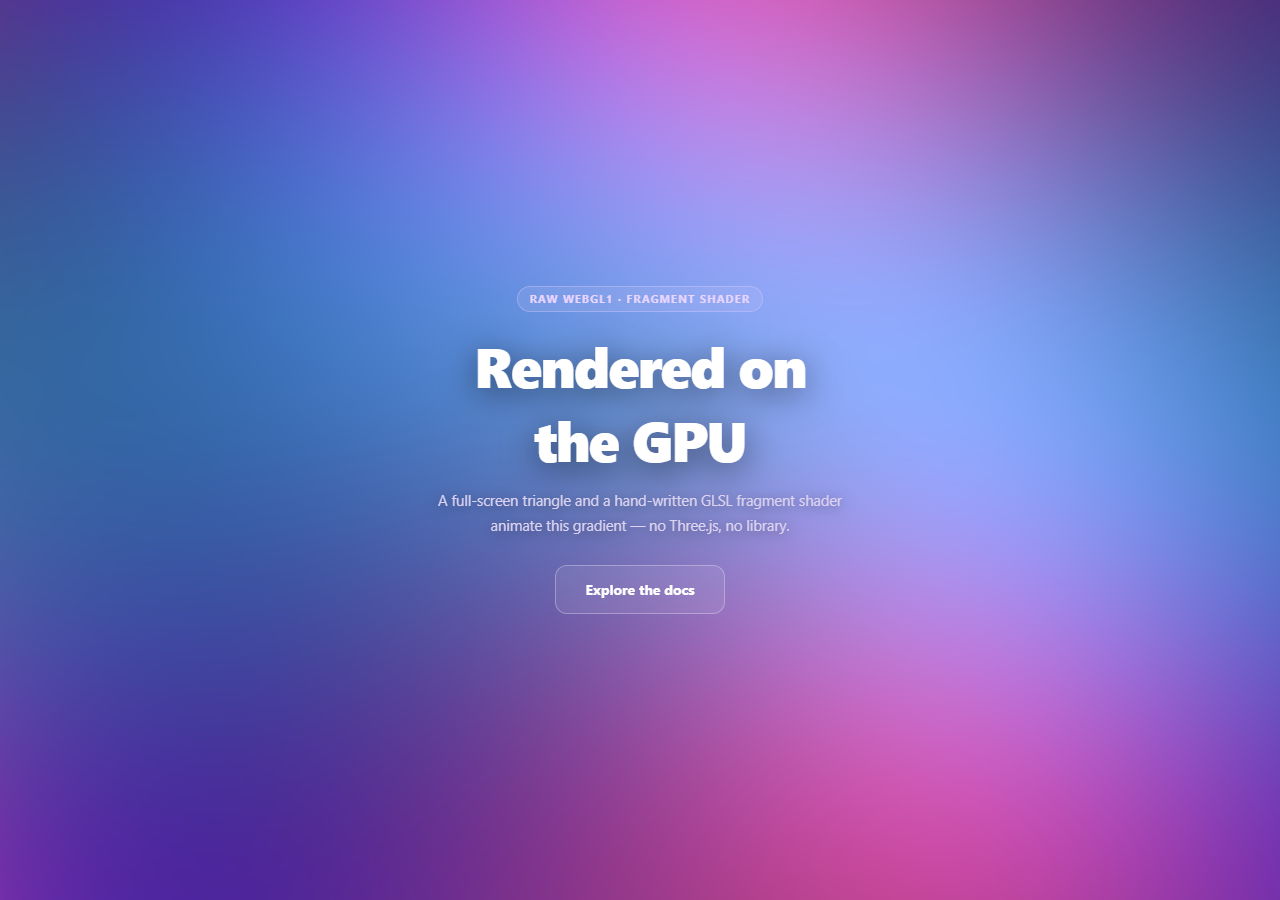
Almost every WebGL background on the web goes through Three.js or a similar engine. This snippet is the layer beneath that: the minimal, correct boilerplate to compile a vertex and fragment shader, bind a full-screen triangle, and run an animated GLSL gradient directly against the raw WebGL1 API — useful both as a lightweight background effect and as a reference for what a library like Three.js is actually doing under the hood.
A triangle, not a quad
Most tutorials draw a full-screen effect with two triangles forming a quad. This snippet uses one triangle with vertices at (-1,-1), (3,-1), and (-1,3) — coordinates that extend well past the [-1, 1] clip-space boundary. The GPU clips the oversized triangle down to exactly the viewport rectangle, so the visible result is identical to a quad, but it's a single draw call of three vertices with no shared diagonal edge to rasterize twice. It's a standard low-level trick precisely because it's marginally cheaper with zero downside.
All the visuals live in the fragment shader
The vertex shader does almost nothing — it just passes each triangle vertex straight through to gl_Position. Every pixel of color comes from the fragment shader, which runs once per pixel and receives gl_FragCoord, the pixel's screen coordinate. Dividing that by a u_resolution uniform normalizes it to a 0-1 UV space, and remapping to -1..1 and correcting for aspect ratio (p.x *= u_resolution.x / u_resolution.y) keeps the pattern from stretching on non-square viewports.
A modest animated field, not full noise
Rather than a full simplex or Perlin noise implementation, the fragment shader combines a handful of offset sin/cos terms at different frequencies and phase speeds — driven by a single u_time uniform — and blends three colors with mix() based on those wave values. It's the GLSL equivalent of the layered-sine technique used elsewhere in this library (see aurora background), just running per-pixel on the GPU instead of per-shape on a 2D canvas.
Compiling and linking, explicitly
compileShader() creates a shader object, sets its source, compiles it, and checks gl.getShaderParameter(shader, gl.COMPILE_STATUS) — a step it's easy to skip and then debug blind when nothing renders. The two compiled shaders are attached to a program, linked, and checked again with gl.getProgramParameter(..., gl.LINK_STATUS). Both checks log the real GLSL compiler error to the console, which is the only way to actually debug a broken shader.
Uniforms updated every frame, and a real fallback
Each frame, u_time (elapsed seconds since start) and u_resolution (current canvas size in device pixels) are pushed to the GPU before gl.drawArrays. If canvas.getContext('webgl') returns null — WebGL disabled or unsupported — the canvas is hidden and a static CSS radial-gradient takes its place, so the section never renders blank. It also honors prefers-reduced-motion, rendering one pleasant static frame instead of animating. Pair it with gradient mesh hero for a comparison against a 2D-canvas approach to the same aesthetic, or with three particle wave to see the same GPU ideas through a library.
Step by step
How to Use
- 1Paste HTML, CSS, and JSThe gradient compiles and starts animating immediately on load.
- 2Resize the windowThe canvas and viewport rescale for devicePixelRatio.
- 3Open devtools consoleAny GLSL syntax error would log a real compiler message here.
- 4Enable reduced motionA single static frame renders instead of a perpetual loop.
- 5Edit the fragment shaderChange colorA/B/C or the wave frequencies for a new palette/pace.
- 6Test WebGL failureForce gl to null to see the plain-CSS gradient fallback.
Real-world uses
Common Use Cases
u_time and u_resolution uniforms each frame.Got questions?
Frequently Asked Questions
The single triangle uses vertices positioned well outside the -1 to 1 clip-space range (at (-1,-1), (3,-1) and (-1,3)), so the GPU's clipping stage trims it down to exactly the viewport rectangle — visually identical to a quad. It requires only one draw call of three vertices and avoids the extra shared diagonal edge a two-triangle quad has to rasterize, which is a standard, low-cost optimization for full-screen shader passes.
u_resolution holds the canvas's current size in device pixels and is used to convert each pixel's gl_FragCoord into a normalized 0-1 UV coordinate (and to correct for aspect ratio so the pattern doesn't stretch). u_time holds the elapsed seconds since the page loaded and is what drives every sin/cos term in the fragment shader, so the gradient animates continuously — both uniforms are re-sent to the GPU every frame before the draw call.
WebGL does not throw JavaScript exceptions when a shader fails to compile or a program fails to link — it fails silently and the canvas just renders nothing (or garbage) with no error in the normal sense. Explicitly checking COMPILE_STATUS and LINK_STATUS and logging gl.getShaderInfoLog / gl.getProgramInfoLog is the only way to see the actual GLSL compiler error message, which is essential for debugging a shader that isn't rendering.
canvas.getContext('webgl') (with an 'experimental-webgl' fallback for older browsers) returns null if WebGL cannot be created. The code checks for that explicitly, hides the canvas, and applies a static CSS radial-gradient to the wrapper instead, so the section still looks like an intentional, finished background rather than an empty box.
Move the context creation, shader compilation, program linking, and buffer setup into a mount effect referencing the canvas via a ref, store the requestAnimationFrame id, and cancel it along with removing the resize listener in the cleanup function. Because WebGL resources (buffers, shaders, the program) are tied to the specific GL context, avoid recreating them on every re-render — set them up once and only update uniforms per frame.