

Fan-Expand Card Carousel — HTML CSS JS Snippet
Fan-Expand Card Carousel · Carousels · Plain HTML, CSS & JS · Live preview
What's included
Features
About this UI Snippet
Fan-Expand Card Carousel — Width, Not Position, Does the Work
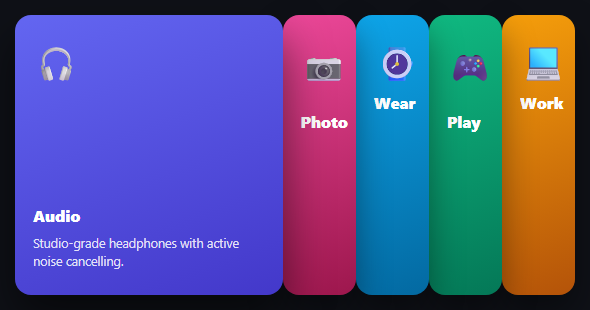
Most carousels move cards *sideways*. This one keeps every card's left position derived from the *widths* of everything before it — so opening one card doesn't slide it into view, it makes it physically wider while its neighbors compress to make room, the way a hand of playing cards fans open around the one you pull forward.
Position as a running total of width
layout() walks the cards left to right, keeping a running x offset. Each card is placed at the current x, then x increases by *that card's own width* — openW for the active one, collapsedW for every other. Because position is derived from width rather than the two being set independently, a card can never overlap its neighbor or leave a gap: the math guarantees a perfect edge-to-edge fan every time, at any open index.
Responsive without a media query
Rather than hardcoding breakpoints, layout() computes a scale factor from the wrapper's *actual* rendered width divided by the fan's natural total width, and multiplies every card's width by it. The fan always fits its container exactly, on any screen size, without a single @media rule — and it re-runs on resize so it stays exact if the container itself changes size.
Step by step
How to Use
- 1Paste HTML, CSS, and JSFive narrow cards appear side by side, the first one already open and showing its description.
- 2Click any collapsed cardIt widens smoothly while the others compress to make room — a real fan-open motion.
- 3Click the open card's neighborThe fan re-centers on the new card, closing the previous one back to its narrow width.
- 4Resize the windowThe whole fan rescales to keep fitting its container, with no layout break.
- 5Add a sixth cardAdd one more .fec-card — the width math adapts automatically to fit six cards instead of five.
Real-world uses
Common Use Cases
Got questions?
Frequently Asked Questions
Change the initial value of the openIndex variable at the top of the JS (zero-based) before layout() first runs.
Change the collapsedW and openW constants (in pixels) — layout() derives everything else, including the responsive scale factor, from those two values.
Yes — each card is a real clickable element, so tapping works identically to clicking. No drag gesture is required to open a card.
Yes — swap left/width for top/height in both the CSS and the layout() function, and switch the wrapper to a fixed width with a computed height instead.
Each card is a clickable element — for full accessibility, change them to real <button> elements (or add role="button" and tabindex="0" with an Enter/Space key handler) and add aria-expanded reflecting each card's open state.
Build with AI
Build, Understand, Optimize, and Extend It With AI
Paste this snippet's HTML, CSS, and JS into an AI coding assistant like Claude and ask it to explain why layout() computes every card's left position from a running total of the widths before it, rather than each card knowing its own position independently — and what would break if that running total were replaced with fixed, hardcoded left values per card. It's also worth asking the assistant to convert the clickable divs into real, keyboard-accessible buttons with proper aria-expanded state, or to add a subtle auto-cycle that opens each card in turn on a timer, pausing on user interaction.
Prompt to recreate it
Copy this into your AI assistant of choice to build the effect from scratch, or as a jumping-off point for your own variant:
Build a fan-expand card carousel in plain HTML, CSS, and vanilla JavaScript where a stack of narrow cards fans open by widening the clicked card and compressing the others — no library.

Requirements:
- A row of card elements, each with a fixed collapsed width, all positioned absolutely inside a relatively-positioned wrapper.
- A single layout function that computes every card's horizontal position by walking through the cards in order and accumulating a running total of the widths of all preceding cards — the currently "open" card uses a wider width constant in this running total, every other card uses the narrow collapsed width constant. No card's position may be hardcoded independently of this running total.
- Clicking any card must set it as the new "open" card and re-run the layout function, causing it to animate to its wider width while every other card animates back to (or stays at) the narrow collapsed width, with all position changes flowing automatically from the updated running total.
- The open card's extra width must visually push its later neighbors to the right in the same animation, and the open card must render above its neighbors via z-index.
- The whole fan must be responsive without using media queries: compute a scale factor from the wrapper's actual current rendered width divided by the fan's natural (unscaled) total width, and multiply both the collapsed and open width constants by that scale factor every time the layout function runs, including on window resize.
- The open card must reveal additional content (e.g. a description paragraph) that stays hidden (via opacity) while that card is collapsed.
Want to tighten it up first? Run this prompt through the AI Prompt Studio to score it across 8 quality dimensions, catch anti-patterns, and tune the wording for Claude, ChatGPT, or Gemini before you paste it in.
Source Code
<div class="fec-wrap" id="fecWrap">
  <div class="fec-card" data-i="0" style="background:linear-gradient(160deg,#6366f1,#4338ca)"><span class="fec-icon">🎧</span><h3>Audio</h3><p>Studio-grade headphones with active noise cancelling.</p></div>
  <div class="fec-card" data-i="1" style="background:linear-gradient(160deg,#ec4899,#9d174d)"><span class="fec-icon">📷</span><h3>Photo</h3><p>Full-frame mirrorless with a 45MP stacked sensor.</p></div>
  <div class="fec-card" data-i="2" style="background:linear-gradient(160deg,#0ea5e9,#0369a1)"><span class="fec-icon">⌚</span><h3>Wear</h3><p>Always-on display with a week of real battery life.</p></div>
  <div class="fec-card" data-i="3" style="background:linear-gradient(160deg,#10b981,#047857)"><span class="fec-icon">🎮</span><h3>Play</h3><p>4K/120fps console with instant resume across titles.</p></div>
  <div class="fec-card" data-i="4" style="background:linear-gradient(160deg,#f59e0b,#b45309)"><span class="fec-icon">💻</span><h3>Work</h3><p>All-day laptop battery with a fanless silent chassis.</p></div>
</div>*{box-sizing:border-box;margin:0;padding:0}
body{font-family:system-ui,-apple-system,sans-serif;background:#0f1117;min-height:100vh;display:flex;align-items:center;justify-content:center;padding:24px}
.fec-wrap{position:relative;width:100%;max-width:560px;height:280px}
.fec-card{position:absolute;top:0;width:150px;height:280px;border-radius:16px;padding:24px 18px;display:flex;flex-direction:column;cursor:pointer;box-shadow:0 16px 34px rgba(0,0,0,.4);transition:left .45s cubic-bezier(.4,0,.2,1),width .45s cubic-bezier(.4,0,.2,1),box-shadow .3s}
.fec-icon{font-size:34px;margin-bottom:auto}
.fec-card h3{color:#fff;font-size:16px;font-weight:800;margin-bottom:8px}
.fec-card p{color:rgba(255,255,255,.85);font-size:12.5px;line-height:1.5;opacity:0;transition:opacity .3s}
.fec-card.fec-open p{opacity:1}
.fec-card.fec-open{box-shadow:0 22px 46px rgba(0,0,0,.55)}var cards = document.querySelectorAll('.fec-card');
var wrap = document.getElementById('fecWrap');
var count = cards.length;
var collapsedW = 82;
var openW = 300;
var openIndex = 0;
function layout() {
var totalCollapsed = collapsedW * (count - 1) + openW;
var wrapWidth = Math.min(560, wrap.getBoundingClientRect().width || 560);
var scale = Math.min(1, wrapWidth / totalCollapsed);
var cw = collapsedW * scale;
var ow = openW * scale;
var x = 0;
cards.forEach(function (card, i) {
var isOpen = i === openIndex;
card.classList.toggle('fec-open', isOpen);
card.style.left = x + 'px';
card.style.width = (isOpen ? ow : cw) + 'px';
card.style.zIndex = isOpen ? 10 : (count - Math.abs(i - openIndex));
x += isOpen ? ow : cw;
});
}
cards.forEach(function (card, i) {
card.addEventListener('click', function () { openIndex = i; layout(); });
});
window.addEventListener('resize', layout);
layout();