


Region & Currency Availability Footer — Free Snippet
Region & Currency Availability Footer · Footers · Plain HTML, CSS & JS · Live preview
Copy & paste
Source Code
<div class="frc-page">
<main class="frc-content"><p>↑ Page content above the footer</p></main>
<footer class="frc">
<div class="frc-inner">
<div class="frc-notice" id="frcNotice">
<div class="frc-notice-text">
<b>Prices shown in <span id="frcCurrentCurrency">USD</span></b>
<p id="frcRegionText">Detecting your region…</p>
</div>
<button class="frc-change" id="frcChangeBtn">Change region</button>
</div>
<div class="frc-picker" id="frcPicker" hidden>
<p class="frc-picker-label">Select your region</p>
<div class="frc-options" id="frcOptions"></div>
</div>
<div class="frc-bottom">
<div class="frc-col">
<p class="frc-brand">Northline</p>
<p class="frc-copy">© 2026 Northline Inc.</p>
</div>
<ul class="frc-links">
<li><a href="#">Pricing</a></li>
<li><a href="#">Docs</a></li>
<li><a href="#">Privacy</a></li>
</ul>
</div>
</div>
</footer>
</div>*{box-sizing:border-box;margin:0;padding:0}
body{font-family:system-ui,-apple-system,sans-serif;background:#fafaf9}
.frc-page{min-height:100vh;display:flex;flex-direction:column}
.frc-content{flex:1;display:flex;align-items:center;justify-content:center;color:#a8a29e;font-size:13px;padding:50px 20px}
.frc{background:#fff;border-top:1px solid #e2e8f0}
.frc-inner{max-width:820px;margin:0 auto;padding:30px 24px 26px}
.frc-notice{display:flex;align-items:center;justify-content:space-between;gap:14px;flex-wrap:wrap;background:#eef2ff;border:1px solid #c7d2fe;border-radius:14px;padding:14px 18px}
.frc-notice-text b{font-size:13.5px;color:#312e81}
.frc-notice-text p{font-size:12px;color:#4338ca;margin-top:2px}
.frc-change{flex-shrink:0;background:#4f46e5;color:#fff;border:none;border-radius:10px;padding:9px 16px;font-size:12.5px;font-weight:700;cursor:pointer;font-family:inherit;transition:background .15s}
.frc-change:hover{background:#4338ca}
.frc-picker{margin-top:10px;background:#f8fafc;border:1px solid #e2e8f0;border-radius:14px;padding:14px 16px;animation:frcDrop .18s ease}
@keyframes frcDrop{from{opacity:0;transform:translateY(-6px)}to{opacity:1;transform:none}}
.frc-picker-label{font-size:11.5px;font-weight:700;color:#64748b;text-transform:uppercase;letter-spacing:.4px;margin-bottom:10px}
.frc-options{display:grid;grid-template-columns:repeat(2,1fr);gap:8px}
.frc-option{display:flex;align-items:center;gap:9px;background:#fff;border:1.5px solid #e2e8f0;border-radius:10px;padding:9px 12px;cursor:pointer;font-family:inherit;text-align:left;font-size:12.5px;color:#1e293b;transition:border-color .15s}
.frc-option:hover{border-color:#a5b4fc}
.frc-option.selected{border-color:#4f46e5;background:#eef2ff}
.frc-option-flag{font-size:16px}
.frc-option-name{font-weight:600}
.frc-option-currency{margin-left:auto;font-size:11px;color:#94a3b8;font-weight:700}
.frc-bottom{display:flex;align-items:center;justify-content:space-between;flex-wrap:wrap;gap:12px;padding-top:20px;margin-top:20px;border-top:1px solid #f1f5f9}
.frc-brand{color:#0f172a;font-weight:800;font-size:14px;margin-bottom:4px}
.frc-copy{font-size:11.5px;color:#94a3b8}
.frc-links{list-style:none;display:flex;gap:16px;flex-wrap:wrap}
.frc-links a{color:#64748b;text-decoration:none;font-size:12.5px}
.frc-links a:hover{color:#0f172a}
@media (max-width:480px){ .frc-options{grid-template-columns:1fr} .frc-notice{flex-direction:column;align-items:stretch} .frc-change{width:100%} }var regions = [
{ code: 'US', name: 'United States', currency: 'USD', flag: '\uD83C\uDDFA\uD83C\uDDF8' },
{ code: 'EU', name: 'European Union', currency: 'EUR', flag: '\uD83C\uDDEA\uD83C\uDDFA' },
{ code: 'GB', name: 'United Kingdom', currency: 'GBP', flag: '\uD83C\uDDEC\uD83C\uDDE7' },
{ code: 'IN', name: 'India', currency: 'INR', flag: '\uD83C\uDDEE\uD83C\uDDF3' },
{ code: 'JP', name: 'Japan', currency: 'JPY', flag: '\uD83C\uDDEF\uD83C\uDDF5' },
{ code: 'AU', name: 'Australia', currency: 'AUD', flag: '\uD83C\uDDE6\uD83C\uDDFA' }
];
var currentCode = 'US';
var currencyEl = document.getElementById('frcCurrentCurrency');
var regionTextEl = document.getElementById('frcRegionText');
var changeBtn = document.getElementById('frcChangeBtn');
var picker = document.getElementById('frcPicker');
var optionsEl = document.getElementById('frcOptions');
function findRegion(code) {
return regions.filter(function (r) { return r.code === code; })[0];
}
function applyRegion(code) {
currentCode = code;
var region = findRegion(code);
currencyEl.textContent = region.currency;
regionTextEl.textContent = 'Showing pricing for ' + region.name + '. Availability and tax may vary by region.';
renderOptions();
}
function renderOptions() {
optionsEl.innerHTML = regions.map(function (r) {
var selected = r.code === currentCode ? ' selected' : '';
return '<button class="frc-option' + selected + '" data-code="' + r.code + '">' +
'<span class="frc-option-flag">' + r.flag + '</span>' +
'<span class="frc-option-name">' + r.name + '</span>' +
'<span class="frc-option-currency">' + r.currency + '</span>' +
'</button>';
}).join('');
}
changeBtn.addEventListener('click', function () {
picker.hidden = !picker.hidden;
});
optionsEl.addEventListener('click', function (e) {
var btn = e.target.closest('.frc-option');
if (!btn) return;
applyRegion(btn.dataset.code);
picker.hidden = true;
});
setTimeout(function () { applyRegion('US'); }, 500);Extend with AI
Take This Snippet Further With AI
The AI prompt for this one is for Patreon supporters ($3 a month), along with a site with no ads. Supporters enter the passcode once and it is remembered in this browser.
What's included
Features
About this UI Snippet
Region & Currency Footer Notice — Detected Region with a Working Picker
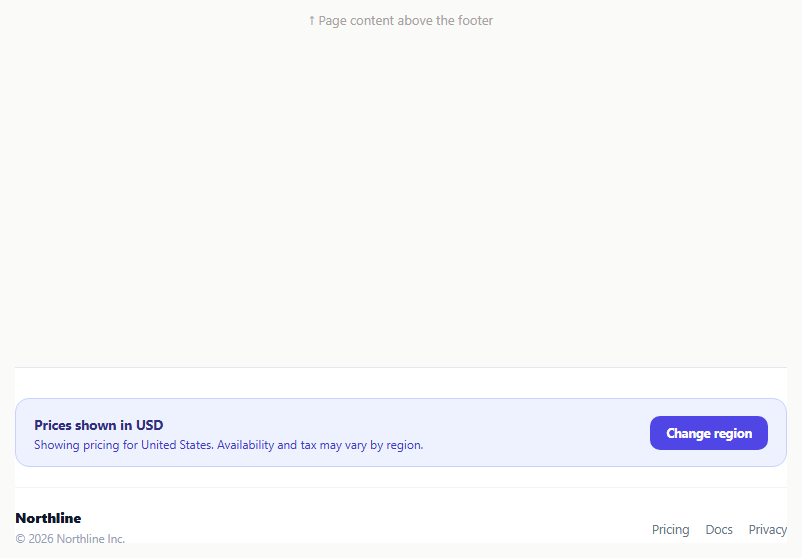
Showing a price without stating the currency or region it applies to leaves an international visitor guessing whether $49 means US dollars, and whether the product is even available where they are. This snippet adds a small footer notice stating the currently detected region and currency plainly, with a "Change region" control that opens a real picker grid rather than a static disclaimer sentence.
A notice that states its assumption out loud
#frcNotice reads "Prices shown in USD" with a sub-line naming the specific region and flagging that availability and tax may vary. Stating the assumption explicitly — rather than silently showing region-specific pricing with no label — is what actually earns trust from a visitor browsing from outside the assumed region, since a wrong silent guess reads as a bug while a wrong stated guess is just one click away from being corrected.
One array driving both the notice and the picker
The regions array holds { code, name, currency, flag } objects. applyRegion(code) looks the region up with findRegion() and updates the notice's currency and region text directly from that one object — no separate currency-to-region mapping to keep synchronized elsewhere in the code.
A picker grid, not a plain dropdown
Clicking "Change region" toggles #frcPicker, revealing a responsive grid of .frc-option buttons built by renderOptions(), each showing a flag emoji, region name, and currency code. A native <select> would work, but a visible grid lets a visitor confirm both the region name and its currency together at a glance before picking, rather than reading a flat list of currency codes alone.
Selecting closes the picker and updates state in one step
Clicking any .frc-option calls applyRegion() with that option's data-code, which updates currentCode, re-renders the notice text, re-renders the options grid (so the newly selected region gets the .selected highlight), and hides the picker — all from one function, so the notice and the picker's own selected-state marker can never disagree about which region is active.
Simulated geo-detection
The notice starts with "Detecting your region…" and calls applyRegion('US') after a setTimeout, standing in for a real IP-based geolocation lookup. This avoids the notice flashing a wrong default region before detection completes, and gives an obvious place to plug in a real geo-IP service.
Wiring it to real detection and persistence
Replace the setTimeout stand-in with a real call to an IP-geolocation API (or a server-set header your frontend reads) to pick the initial currentCode, and persist an explicit user override in localStorage or a cookie so a visitor who manually picks a different region does not get reset to the detected one on their next visit.
Step by step
How to Use
- 1Paste HTML, CSS, and JSThe notice shows "Detecting your region…" then settles on United States / USD after a short simulated delay.
- 2Click "Change region"A grid of region options with flags, names, and currency codes drops open below the notice.
- 3Click a different regionThe notice text, currency label, and the picker's selected highlight all update together, and the picker closes.
- 4Add a new regionAdd a { code, name, currency, flag } object to the regions array in the JS panel.
- 5Wire it to real geolocationReplace the setTimeout stand-in with a real IP-geolocation API call to set the initial detected region.
- 6Persist a manual overrideSave the user's chosen currentCode to localStorage so it survives their next visit instead of resetting to the detected region.
Real-world uses
Common Use Cases
Got questions?
Frequently Asked Questions
In this demo, applyRegion('US') is called after a simulated delay via setTimeout, standing in for a real IP-based geolocation lookup. Replace that call with a real geo-IP API result (or a server-set region header your frontend reads) to detect the visitor's actual region.
Both are re-rendered from the same currentCode variable inside applyRegion(): the notice text is set directly from the matched region object, and renderOptions() re-builds the picker grid, adding the selected class only to the option whose code matches currentCode.
Not in this demo by itself — it updates the notice's currency label and region text. Wire real price values (or a currency-conversion call) to update alongside currentCode wherever prices are rendered on the page.
Add or remove a { code, name, currency, flag } object in the regions array in the JS panel. Both the notice and the picker grid read from this array, so no other markup needs to change.
Not in this demo — it resets to the detected default on reload. Persist currentCode to localStorage or a cookie when applyRegion() is called from a user click (versus the initial detection call) to remember an explicit override.
Yes. Keep regions as a constant array, track currentCode in state, derive the notice text and each option's selected styling from a comparison against that state, and call your real geolocation API inside an effect on mount to set the initial value.