



Developer Hero with Typing Code Window — Free HTML CSS JS Snippet
Developer Hero with Typing Code Window · Heroes · Plain HTML, CSS & JS · Live preview
Copy & paste
Source Code
<section class="cwh-hero">
  <div class="cwh-copy">
    <span class="cwh-eyebrow">Built for developers</span>
    <h1 class="cwh-h1">Ship APIs your<br>team actually enjoys</h1>
    <p class="cwh-sub">Type-safe, self-documenting, and fast to integrate. Watch the SDK write itself below.</p>
    <a href="#" class="cwh-cta">Read the docs</a>
  </div>

  <div class="cwh-window">
    <div class="cwh-topbar">
      <span class="cwh-dot cwh-dot-r"></span>
      <span class="cwh-dot cwh-dot-y"></span>
      <span class="cwh-dot cwh-dot-g"></span>
      <span class="cwh-filename" id="cwhFilename">client.ts</span>
    </div>
    <pre class="cwh-code"><code id="cwhCode"></code><span class="cwh-cursor" id="cwhCursor"></span></pre>
  </div>
</section>*{box-sizing:border-box;margin:0;padding:0}
body{font-family:system-ui,-apple-system,sans-serif;background:#0a0c12;color:#f1f5f9}
.cwh-hero{min-height:100vh;display:flex;flex-direction:column;align-items:center;justify-content:center;gap:48px;padding:80px 24px}
.cwh-copy{text-align:center;display:flex;flex-direction:column;align-items:center;gap:16px;max-width:600px}
.cwh-eyebrow{font-size:12px;font-weight:700;letter-spacing:.08em;text-transform:uppercase;color:#4ade80}
.cwh-h1{font-size:clamp(30px,5.2vw,52px);font-weight:800;line-height:1.12;letter-spacing:-.02em}
.cwh-sub{font-size:15.5px;color:#94a3b8;line-height:1.7;max-width:480px}
.cwh-cta{margin-top:4px;background:#4ade80;color:#052e13;font-weight:700;font-size:15px;padding:12px 26px;border-radius:9px;text-decoration:none;transition:transform .15s}
.cwh-cta:hover{transform:translateY(-2px)}
.cwh-window{width:min(640px,92vw);border-radius:14px;overflow:hidden;background:#0d1117;border:1px solid rgba(255,255,255,.09);box-shadow:0 24px 60px rgba(0,0,0,.5)}
.cwh-topbar{display:flex;align-items:center;gap:8px;padding:11px 16px;background:#161b22;border-bottom:1px solid rgba(255,255,255,.06)}
.cwh-dot{width:10px;height:10px;border-radius:50%}
.cwh-dot-r{background:#f87171}
.cwh-dot-y{background:#facc15}
.cwh-dot-g{background:#4ade80}
.cwh-filename{margin-left:8px;font-family:ui-monospace,SFMono-Regular,Menlo,monospace;font-size:12.5px;color:#8b949e}
.cwh-code{padding:22px;font-family:ui-monospace,SFMono-Regular,Menlo,Consolas,monospace;font-size:13.5px;line-height:1.7;min-height:220px;white-space:pre-wrap;word-break:break-word}
.cwh-cursor{display:inline-block;width:8px;height:16px;background:#4ade80;vertical-align:middle;margin-left:1px;animation:cwhBlink 1s step-end infinite}
@keyframes cwhBlink{0%,100%{opacity:1}50%{opacity:0}}
.tok-kw{color:#ff7b72}
.tok-fn{color:#d2a8ff}
.tok-str{color:#a5d6ff}
.tok-com{color:#8b949e;font-style:italic}
.tok-prop{color:#79c0ff}
.tok-punc{color:#c9d1d9}// Real character-by-character typing animation, cycling through multiple syntax-highlighted snippets.
const codeEl = document.getElementById('cwhCode');
const filenameEl = document.getElementById('cwhFilename');
// Each snippet is pre-marked up with token spans; typing reveals it character by character
// by walking the HTML string safely (splitting on tags so we never cut a tag in half).
const snippets = [
{
filename: 'client.ts',
html: '<span class="tok-kw">import</span> { createClient } <span class="tok-kw">from</span> <span class="tok-str">\'@acme/sdk\'</span>;\n\n<span class="tok-kw">const</span> client = <span class="tok-fn">createClient</span>({\n <span class="tok-prop">apiKey</span>: <span class="tok-str">process.env.ACME_KEY</span>,\n});\n\n<span class="tok-kw">const</span> user = <span class="tok-kw">await</span> client.<span class="tok-fn">users</span>.<span class="tok-fn">get</span>(<span class="tok-str">\'usr_123\'</span>);\n<span class="tok-com">// -> { id, name, email, createdAt }</span>',
},
{
filename: 'webhook.ts',
html: '<span class="tok-kw">export function</span> <span class="tok-fn">handler</span>(req, res) {\n <span class="tok-kw">const</span> event = client.<span class="tok-fn">webhooks</span>.<span class="tok-fn">verify</span>(req);\n\n <span class="tok-kw">if</span> (event.<span class="tok-prop">type</span> === <span class="tok-str">\'payment.succeeded\'</span>) {\n <span class="tok-fn">fulfillOrder</span>(event.<span class="tok-prop">data</span>);\n }\n\n res.<span class="tok-fn">status</span>(<span class="tok-str">200</span>).<span class="tok-fn">send</span>(<span class="tok-str">\'ok\'</span>);\n}',
},
];
let snippetIndex = 0;
let charIndex = 0;
let typingTimer = null;
// Strip HTML tags to get the plain-text length we're "typing" through.
function plainTextOf(html) {
const div = document.createElement('div');
div.innerHTML = html;
return div.textContent || '';
}
// Reveal the HTML up to a given plain-text character count, preserving open tags.
function htmlUpTo(html, count) {
let out = '';
let plainCount = 0;
let i = 0;
while (i < html.length && plainCount < count) {
if (html[i] === '<') {
const close = html.indexOf('>', i);
if (close === -1) break;
out += html.slice(i, close + 1);
i = close + 1;
} else {
out += html[i];
plainCount++;
i++;
}
}
return out;
}
function typeCurrentSnippet() {
const snippet = snippets[snippetIndex];
const total = plainTextOf(snippet.html).length;
filenameEl.textContent = snippet.filename;
function step() {
charIndex++;
codeEl.innerHTML = htmlUpTo(snippet.html, charIndex);
if (charIndex < total) {
typingTimer = setTimeout(step, 18 + Math.random() * 30);
} else {
typingTimer = setTimeout(eraseCurrentSnippet, 2200);
}
}
typingTimer = setTimeout(step, 200);
}
function eraseCurrentSnippet() {
const snippet = snippets[snippetIndex];
function step() {
charIndex--;
codeEl.innerHTML = htmlUpTo(snippet.html, charIndex);
if (charIndex > 0) {
typingTimer = setTimeout(step, 6);
} else {
snippetIndex = (snippetIndex + 1) % snippets.length;
typeCurrentSnippet();
}
}
typingTimer = setTimeout(step, 10);
}
typeCurrentSnippet();Extend with AI
Take This Snippet Further With AI
The AI prompt for this one is for Patreon supporters ($3 a month), along with a site with no ads. Supporters enter the passcode once and it is remembered in this browser.
What's included
Features
About this UI Snippet
Developer Hero with Typing Code Window — Real Character-by-Character Typing
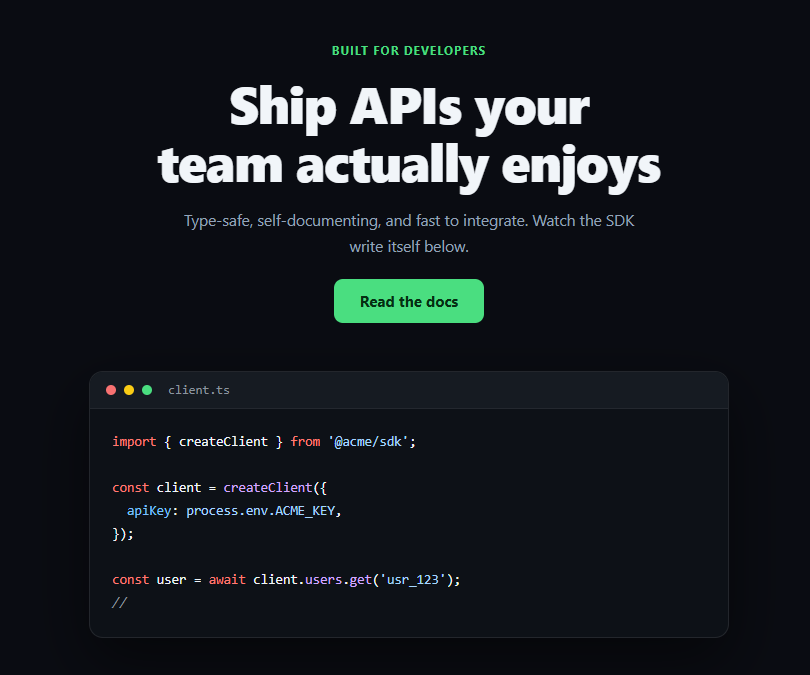
Developer-tool landing pages lean hard on a "code window" centerpiece — but a static screenshot doesn't demonstrate anything. This snippet types syntax-highlighted code into a fake editor window one real character at a time via setTimeout, then erases it and cycles to the next snippet, looping indefinitely.
Typing through HTML safely
Each snippet is authored as an HTML string with token <span> elements already baked in for syntax coloring (.tok-kw, .tok-fn, .tok-str, etc.). The naive approach — typing the raw HTML string character by character — would render broken half-tags mid-animation. Instead, htmlUpTo(html, count) walks the string, and whenever it encounters a <, it copies the *entire* tag to the next > in one step without incrementing the visible character count, only incrementing count for actual text characters. That's what lets the highlighting colors appear correctly *as* each character is typed, instead of the markup only rendering once typing finishes.
Variable typing speed, real timers
Each character's delay is randomized between 18–48ms (18 + Math.random() * 30) via a fresh setTimeout scheduled at the end of the previous one — a real recursive timer chain, not a CSS steps() animation with a fixed cadence, which is why the rhythm feels slightly human rather than mechanically uniform.
A full type → pause → erase → next-snippet cycle
After the last character types, a 2.2s pause lets the reader actually read the finished snippet, then eraseCurrentSnippet() runs the same character-count logic in reverse — decrementing charIndex on a fast timer — before advancing snippetIndex and starting the next snippet's type-in. This is a genuinely stateful loop (snippetIndex, charIndex, and a live typingTimer handle), not a looping GIF-style CSS animation.
A blinking cursor that's actually decorative-only
The blinking block cursor (.cwh-cursor) is a separate always-blinking element via CSS @keyframes, positioned after the code with display: inline-block — it doesn't need to sync with the typing logic because it visually reads as "waiting to type here" regardless of whether a character just landed.
Realistic editor chrome
The three colored dots and a filename tab (which updates per snippet) sell the "real editor window" framing that makes the typing animation land as a live demo rather than an abstract text effect.
Customizing it
Add more snippets to the snippets array (each just needs a filename and pre-marked-up html), adjust the per-character delay range or the pause/erase timings, or swap the color tokens for a different syntax theme. Pair it with typing code for a standalone version, or startup hero for a non-developer alternative layout.
Step by step
How to Use
- 1Paste HTML, CSS, and JSThe first snippet begins typing automatically on load.
- 2Watch it type, pause, and eraseAfter finishing, it pauses ~2.2s, erases, then types the next snippet.
- 3Add your own snippetPush a { filename, html } object onto the snippets array with token spans.
- 4Adjust typing speedChange the 18 + Math.random() * 30 range in step().
- 5Adjust pause durationChange the 2200ms delay before eraseCurrentSnippet() is called.
- 6Restyle the tokensEdit .tok-kw, .tok-fn, .tok-str, .tok-com, .tok-prop colors.
Real-world uses
Common Use Cases
htmlUpTo() guaranteeing that a half-typed tag is never rendered broken mid-keystroke.setTimeout chain rather than CSS steps().Got questions?
Frequently Asked Questions
Each snippet is authored with syntax-highlighting spans already in its HTML string. Rather than typing that raw string character by character (which would render broken half-open tags), htmlUpTo() walks the string and, whenever it hits a '<', copies the entire tag through to its closing '>' in one step without counting it toward the visible character total — only real text characters increment the count. That's why colors appear correctly as each character lands instead of only after typing finishes.
It's a real recursive setTimeout chain: step() increments charIndex, re-renders the revealed HTML, and schedules itself again with a randomized 18-48ms delay if there are characters left. Because each delay is randomized rather than fixed, the rhythm doesn't feel mechanically uniform the way a CSS steps() animation would.
After the last character of a snippet types, a setTimeout pauses for 2200ms so the reader can read it, then eraseCurrentSnippet() runs the same htmlUpTo() logic in reverse on a fast timer to visually delete the text. Once charIndex reaches 0, snippetIndex advances (wrapping via modulo) and typeCurrentSnippet() starts the next snippet — a real state machine with snippetIndex, charIndex, and a live typingTimer handle, not a looping GIF or CSS animation.
Push a new object onto the snippets array with a filename string and an html string containing your code with .tok-kw/.tok-fn/.tok-str/.tok-com/.tok-prop spans around the parts you want colored. No other JavaScript changes are needed — the typing and erase logic reads from the array by index.
The block cursor is a separate element driven purely by a CSS @keyframes opacity animation, deliberately decoupled from the typing state. It reads correctly either way — as "actively writing" during typing or "waiting to continue" during the pause — without needing extra JavaScript to toggle it on and off in sync with the typing timers.