



Lane Runner Endless Game — HTML Canvas Neon 3D Runner
Lane Runner Endless Game · Games · Plain HTML, CSS & JS · Live preview
For supporters
Source Code
Want the source code?
Play the game for free. Become a WebDevPuneet supporter to unlock the complete HTML, CSS and JavaScript source code, the exports (HTML, React, Vue, Angular, Tailwind) and Fork.
Extend with AI
Take This Snippet Further With AI
The AI prompt for this one is for Patreon supporters ($3 a month), along with a site with no ads. Supporters enter the passcode once and it is remembered in this browser.
What's included
Features
About this UI Snippet
Lane Runner — A Pseudo-3D Endless Runner with Perspective Track, Coins, Shields and Swipe Controls
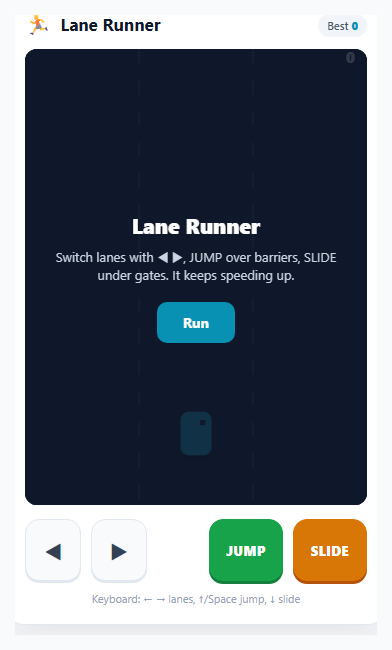
Endless runners are the most touch-native game genre there is: the whole game is a handful of instant decisions — left, right, jump, slide — against an obstacle stream that never stops speeding up. This snippet builds a complete, polished one on a single HTML5 <canvas>: a synthwave track in perspective, a runner with a real run cycle, three obstacle types that each demand a different move, coins, a shield power-up, swipe and tap controls, synthesized sound, pause and a saved high score.
Pseudo-3D from one formula
There is no 3D engine. Every object has a distance d ahead of the runner, and one function turns it into a scale: t = FOCAL / (FOCAL + d). At the runner t is 1; far away it shrinks toward 0 at the horizon. Screen y is HORIZON + (BASE_Y − HORIZON) × t and screen x is the lane offset multiplied by t, so lanes converge on the vanishing point and objects accelerate toward you naturally. The track is drawn as scrolling quads between depth slices, alternating two shades with dashed lane markers, and a magenta grid, a glowing edge, a retro striped sun and a parallax skyline complete the scene.
Three obstacles, three verbs
A green barrier must be jumped, an amber overhead gate must be slid under, and red blocks fill every lane but one, so you must switch lanes. Some rows span all three lanes and force a jump or slide. Collisions are simple depth checks: an obstacle only matters when its d is within about ±1.3 of the runner and its lane is within 0.55 of the runner's smoothed lane position. Jump and slide are timed windows, and sliding in mid-air cancels the jump so the runner drops immediately, which makes the controls feel responsive.
Controls built for thumbs
Every action is a one-shot event, not a held key. The on-screen buttons fire on pointerdown, the keyboard uses ← → ↑ ↓ plus WASD and Space, and the track itself accepts swipes: a horizontal swipe changes lane, up jumps, down slides, and a short tap jumps. The lane is an integer used for logic while the drawn position eases toward it, so lane changes slide instead of snapping. Arrow and Space keys call preventDefault so the page never scrolls while you play.
Coins, shield and fair spawning
Rows are chosen from patterns: single obstacles with coins in the free lanes, double blocks with coins in the open lane, full-width walls, pure coin lines and an occasional shield. The gap between rows is tied to speed (speed × 0.62 plus a little randomness), so there is always time to react at high speed. A shield absorbs one hit, gives 1.3 seconds of blink-invulnerability and pops with a particle ring. Score is distance in metres plus ten per coin, and speed ramps smoothly with distance up to a cap, shown as a bar in the HUD.
An autopilot demo behind the title screen
While you are on the start screen the game plays itself: a few lines of autopilot look ahead at the next obstacle in the current lane, jump a barrier, slide a gate or pick the nearest free lane for a block. The same update code runs with crashes disabled, so the title screen shows a live scene instead of a static image.
Juice, sound and accessibility
Coins spin by squashing their width with a cosine, speed lines streak from the vanishing point as you accelerate, crashes flash, shake and burst into particles, and dust and a shadow ground the runner. Sound is synthesized with the Web Audio API (jump, slide, lane tick, coin pitch that rises with your streak, shield, crash) with a saved mute toggle, created on the first click. The canvas is scaled by devicePixelRatio for sharp lines, the game pauses on blur or a hidden tab, and prefers-reduced-motion disables screen shake. For related canvas games see the Dodge the falling blocks game and the Frog crossing game.
Step by step
How to Use
- 1Start runningClick "Run" (or press Enter, Space or ↑). The title screen already shows an autopilot demo of the game. The runner auto-advances, you only steer and dodge.
- 2Switch lanesPress ← → (or A and D), tap ◀ ▶, or swipe left or right on the track. The runner eases smoothly into the new lane.
- 3Jump the green barriersPress ↑, Space or JUMP, tap the track or swipe up. Timing matters: the jump is a fixed window, so clear the barrier before you land.
- 4Slide under the amber gatesPress ↓ or S, tap SLIDE, or swipe down. If you are in the air a slide drops you straight down, which helps you chain moves quickly.
- 5Dodge blocks, grab coins and shieldsRed blocks fill all lanes but one. Collect coins for 10 points each and the cyan shield to survive one crash. Your coin streak raises the pitch of the pickup sound.
- 6Beat your bestScore is metres plus coins. The speed bar in the corner fills as you accelerate. P or Esc pauses, M mutes, and your best is saved in localStorage under lane-runner-best.
Real-world uses
Common Use Cases
Got questions?
Frequently Asked Questions
Every object stores its distance ahead of the runner. The scale is t = FOCAL / (FOCAL + d), screen y is HORIZON + (BASE_Y - HORIZON) * t and screen x is the lane offset times t. Objects therefore shrink toward a vanishing point and speed up as they approach, exactly like old arcade racers.
Every action is instantaneous: a lane change nudges an index, and jump and slide start fixed-length timers. Nothing depends on a key staying pressed, so buttons, swipes and keys all share the same handlers.
The lane is an integer used for collision, and the drawn lane position eases toward it with laneF += (lane - laneF) * k each frame. Collision uses the smoothed value, so a runner halfway between lanes is only hit by an obstacle that is close enough.
Pressing slide while jumping cancels the jump so the runner drops immediately, then starts the slide. It makes the game more responsive than forcing the player to wait until landing.
Speed rises with distance up to a cap, and the gap between obstacle rows is set from the current speed, so the time to react never collapses. Rows always leave at least one safe move.
In the idle state the normal update runs with crashes and scoring disabled and a small autopilot looks at the nearest obstacle in the runner's lane. It jumps barriers, slides gates and steers to a free lane around blocks.
Yes. The best score is stored in localStorage under lane-runner-best and read on load, wrapped in try/catch so the game still runs where storage is blocked.
Render the canvas and overlays, create the context in a mount effect and run the requestAnimationFrame loop there, keeping game state in refs. Cancel the loop and remove the key, pointer and visibility listeners in the cleanup. Use the export buttons on this page for the markup and styles.