

Quill Rich Text Editor with Custom Toolbar and Character Limit

CodeMirror JSON Editor with Validation Gutter

CodeMirror Code Editor with Line Numbers, Folding and Themes

Marked + DOMPurify Live Markdown Preview

FilePond Image Upload with Preview and Reorder

Cropper.js Aspect-Ratio Presets for Social Posts
Local Font Access Picker — Free queryLocalFonts with Curated Fallback
Local Font Access Picker · Forms · Plain HTML, CSS & JS · Live preview
Copy & paste
Source Code
<section class="lfp-wrap">
  <span class="lfp-tag">window.queryLocalFonts · local font access api</span>
  <h1>Font picker</h1>
  <p id="lfpStatus">Browse your installed fonts, or pick from a curated list of common system fonts.</p>

  <div class="lfp-card">
    <button class="lfp-btn primary" id="lfpBrowseBtn">Browse local fonts</button>

    <label class="lfp-label" for="lfpSearch">Search fonts</label>
    <input class="lfp-input" id="lfpSearch" type="text" placeholder="Type to filter…" />

    <select class="lfp-select" id="lfpSelect" size="6"></select>

    <div class="lfp-preview" id="lfpPreview">
      <span class="lfp-preview-name" id="lfpPreviewName">Georgia</span>
      <p id="lfpPreviewText">The quick brown fox jumps over the lazy dog — 0123456789</p>
    </div>
  </div>

  <p class="lfp-note">queryLocalFonts() is Chromium-only and needs an explicit permission grant — most browsers, and any sandboxed preview iframe, will show the curated system-font list below instead, in the exact same searchable dropdown and live-preview UI.</p>
</section>*{box-sizing:border-box;margin:0;padding:0}
body{font-family:system-ui,-apple-system,sans-serif;background:radial-gradient(120% 90% at 50% 0%,#1a1408,#0a0805 60%);color:#fff;min-height:100vh;display:flex;align-items:center;justify-content:center;padding:26px}
.lfp-wrap{width:100%;max-width:440px;text-align:center}
.lfp-tag{display:inline-block;font-size:10.5px;font-weight:700;letter-spacing:.14em;text-transform:uppercase;color:#fbbf24;background:rgba(251,191,36,.1);border:1px solid rgba(251,191,36,.3);padding:5px 12px;border-radius:99px;margin-bottom:14px}
.lfp-wrap h1{font-size:clamp(24px,6vw,32px);font-weight:800;letter-spacing:-.02em}
.lfp-wrap p{font-size:13.5px;color:#c2ac81;margin-top:8px;line-height:1.6}
.lfp-card{margin-top:22px;border-radius:16px;border:1px solid rgba(251,191,36,.18);background:#141006;padding:20px;text-align:left}
.lfp-btn{width:100%;padding:11px 14px;border-radius:10px;border:1px solid rgba(255,255,255,.14);background:rgba(255,255,255,.04);color:#f5ead1;font:600 13px system-ui;cursor:pointer;transition:background .15s}
.lfp-btn:hover{background:rgba(255,255,255,.09)}
.lfp-btn.primary{background:linear-gradient(135deg,#fbbf24,#f97316);border-color:transparent;color:#241601;font-weight:700}
.lfp-label{display:block;font-size:11px;font-weight:700;letter-spacing:.05em;text-transform:uppercase;color:#a68c5e;margin:16px 0 6px}
.lfp-input{width:100%;padding:9px 12px;border-radius:9px;border:1px solid rgba(255,255,255,.14);background:rgba(255,255,255,.04);color:#fff;font:13px system-ui;outline:none;transition:border-color .15s}
.lfp-input:focus{border-color:#fbbf24}
.lfp-select{width:100%;margin-top:10px;border-radius:9px;border:1px solid rgba(255,255,255,.14);background:rgba(255,255,255,.03);color:#f0e2c2;font:13.5px system-ui;padding:4px}
.lfp-select option{padding:6px 8px}
.lfp-preview{margin-top:16px;padding:16px;border-radius:12px;background:rgba(251,191,36,.06);border:1px solid rgba(251,191,36,.16)}
.lfp-preview-name{display:block;font-size:11px;font-weight:700;letter-spacing:.05em;text-transform:uppercase;color:#c99a3c;margin-bottom:8px}
.lfp-preview p{font-size:22px;line-height:1.4;color:#fff8ea}
.lfp-note{font-size:11.5px;color:#5a4b2b;max-width:400px;margin:16px auto 0;line-height:1.6}var statusEl = document.getElementById("lfpStatus");
var browseBtn = document.getElementById("lfpBrowseBtn");
var searchInput = document.getElementById("lfpSearch");
var selectEl = document.getElementById("lfpSelect");
var previewName = document.getElementById("lfpPreviewName");
var previewText = document.getElementById("lfpPreviewText");
// --- Curated fallback list: common system font stacks that render
// consistently without needing any permission at all. This is what most
// visitors of this demo will actually browse.
var CURATED_FONTS = [
{ name: "Arial", stack: "Arial, Helvetica, sans-serif" },
{ name: "Helvetica", stack: "Helvetica, Arial, sans-serif" },
{ name: "Georgia", stack: "Georgia, 'Times New Roman', serif" },
{ name: "Times New Roman", stack: "'Times New Roman', Times, serif" },
{ name: "Courier New", stack: "'Courier New', Courier, monospace" },
{ name: "Verdana", stack: "Verdana, Geneva, sans-serif" },
{ name: "Trebuchet MS", stack: "'Trebuchet MS', sans-serif" },
{ name: "Garamond", stack: "Garamond, Baskerville, serif" },
{ name: "Segoe UI", stack: "'Segoe UI', Tahoma, sans-serif" },
{ name: "Tahoma", stack: "Tahoma, Geneva, sans-serif" },
{ name: "Palatino", stack: "Palatino, 'Palatino Linotype', serif" },
{ name: "Impact", stack: "Impact, 'Arial Narrow Bold', sans-serif" },
];
var allFonts = CURATED_FONTS.slice();
var usingRealApi = false;
function populateSelect(fonts) {
selectEl.innerHTML = "";
fonts.forEach(function (font) {
var opt = document.createElement("option");
opt.value = font.name;
opt.textContent = font.name;
opt.style.fontFamily = font.stack;
selectEl.appendChild(opt);
});
if (fonts.length) selectEl.selectedIndex = 0;
}
function applyPreview(font) {
if (!font) return;
previewName.textContent = font.name;
previewText.style.fontFamily = font.stack;
}
function findFont(name) {
for (var i = 0; i < allFonts.length; i++) {
if (allFonts[i].name === name) return allFonts[i];
}
return null;
}
selectEl.addEventListener("change", function () {
applyPreview(findFont(selectEl.value));
});
searchInput.addEventListener("input", function () {
var q = searchInput.value.trim().toLowerCase();
var filtered = q ? allFonts.filter(function (f) { return f.name.toLowerCase().indexOf(q) !== -1; }) : allFonts;
populateSelect(filtered);
if (filtered.length) applyPreview(filtered[0]);
});
async function browseLocalFonts() {
if (!("queryLocalFonts" in window)) {
statusEl.textContent = "Local Font Access isn't supported in this browser — showing a curated list of common system fonts instead.";
return;
}
try {
statusEl.textContent = "Requesting local font access permission\u2026";
var localFonts = await window.queryLocalFonts();
if (!localFonts || localFonts.length === 0) {
statusEl.textContent = "No local fonts were returned — showing the curated list instead.";
return;
}
// Deduplicate by family name, keep it sorted and reasonably sized.
var seen = {};
var mapped = [];
localFonts.forEach(function (f) {
var family = f.family;
if (!seen[family]) {
seen[family] = true;
mapped.push({ name: family, stack: '"' + family + '"' });
}
});
mapped.sort(function (a, b) { return a.name.localeCompare(b.name); });
allFonts = mapped;
usingRealApi = true;
populateSelect(allFonts);
applyPreview(allFonts[0]);
statusEl.textContent = "Loaded " + allFonts.length + " real local fonts from your system via queryLocalFonts().";
browseBtn.textContent = "Local fonts loaded";
browseBtn.disabled = true;
} catch (err) {
// NotAllowedError (permission denied), or the call is disallowed inside
// a sandboxed preview iframe (a permissions-policy block is common here).
statusEl.textContent = "Couldn't access local fonts (" + (err && err.name ? err.name : "blocked") + ") — showing the curated list of common system fonts instead.";
}
}
browseBtn.addEventListener("click", browseLocalFonts);
populateSelect(allFonts);
applyPreview(allFonts[2]); // start on Georgia to match the initial preview markupExtend with AI
Take This Snippet Further With AI
The AI prompt for this one is for Patreon supporters ($3 a month, 7 days free), along with a site with no ads. Supporters enter the passcode once and it is remembered in this browser.
What's included
Features
About this UI Snippet
Local Font Access Picker — Real System Fonts, or a Curated List in the Same UI
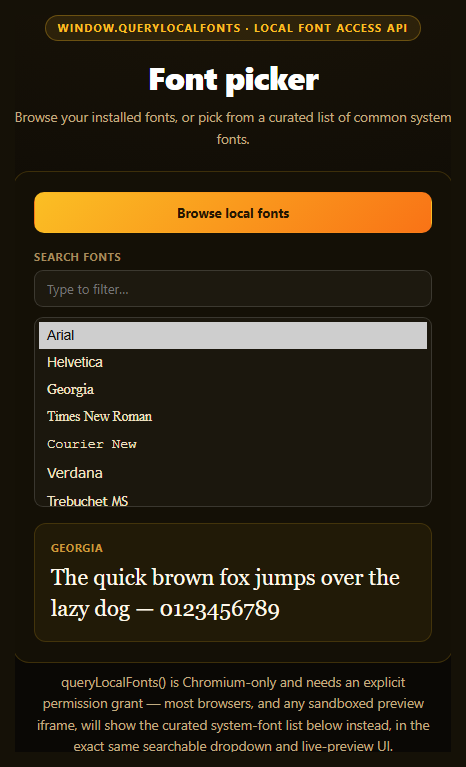
The Local Font Access API's window.queryLocalFonts() lets a page enumerate every font actually installed on a user's device — design tools and creative software are the obvious use case. It's also one of the most tightly gated capabilities available to the web: Chromium-only, behind an explicit permission prompt, and disabled by default inside most embedded and sandboxed contexts. This snippet's design goal is that the picker UI — search box, list, live preview — looks and behaves identically whether it's listing your real fonts or a curated fallback.
The real enumeration path
browseLocalFonts() checks 'queryLocalFonts' in window before calling it, wrapped in a try/catch since the call can reject with a NotAllowedError if the permission prompt is denied. On success, it deduplicates the returned FontData array by family name, sorts it alphabetically, and repopulates the same <select> and preview elements the curated list uses — there's no separate "real font" rendering path.
A curated list that's a real feature, not an apology
CURATED_FONTS is a hand-picked set of the common cross-platform system font stacks — Arial, Georgia, Times New Roman, Courier New, Verdana, and others — each paired with a proper CSS fallback stack ('Times New Roman', Times, serif) so they render sensibly even on a device that happens to lack the exact named font. This list populates the picker by default and stays fully searchable, filterable, and previewable, because for the overwhelming majority of visitors — anyone not on a permission-granted Chromium session — this curated list *is* the font picker, not a degraded stand-in for one.
One rendering path, two data sources
populateSelect() and applyPreview() don't know or care whether allFonts currently holds real queryLocalFonts() results or the curated defaults — both paths funnel through the identical functions, the same discipline used in this library's canvas audio frequency bars snippet, where simulated and real audio data drive one shared drawing routine. That's what keeps the two modes visually indistinguishable.
Live preview, either way
Selecting any font — real or curated — immediately updates a sample sentence's font-family, giving instant visual feedback. Searching filters the currently active list (real or curated) by substring match against the font name. Pair this with a dark mode toggle for a settings panel, or a native popover API demo for the picker's dropdown behavior pattern.
Customizing it
Expand the curated list with more web-safe stacks, group fonts by category (serif/sans/mono), or add a "download from Google Fonts" fallback tier for names the curated list doesn't cover.
Step by step
How to Use
- 1Paste HTML, CSS, and JSA searchable dropdown of curated system fonts renders with a live preview.
- 2Click "Browse local fonts"On Chromium with permission granted, real installed fonts load instead.
- 3Search the listFilters whichever font source is currently active.
- 4Select a fontThe sample sentence's font-family updates immediately.
- 5Deny or lack the permissionThe status explains it and the curated list stays fully usable.
- 6Swap in your own sample textEdit the preview paragraph to test your own copy.
Real-world uses
Common Use Cases
queryLocalFonts(), with deduplicated and sorted family names.populateSelect and applyPreview functions for both real and curated data.Got questions?
Frequently Asked Questions
window.queryLocalFonts() is implemented only in Chromium-based browsers and requires an explicit permission grant through a browser prompt — if it's unsupported, denied, or blocked (which is the common case inside a sandboxed preview iframe like the one likely rendering this demo, since the local-fonts permission is rarely granted to embedded frames), the picker simply keeps showing its curated list of common system fonts, which is a fully functional picker in its own right.
Browsers treat this as a meaningful privacy-sensitive permission, since your exact set of installed fonts can be used as a device fingerprinting signal. That's why queryLocalFonts() requires an explicit one-time permission prompt the user must actively approve, unlike most other font-related browser APIs, and why it's disabled by default in many embedded and sandboxed contexts.
The curated list includes common cross-platform system fonts like Arial, Georgia, Times New Roman, Courier New, Verdana, Segoe UI, and others that have shipped with Windows, macOS, or both for years, each paired with a proper CSS fallback stack. They were chosen because they're highly likely to render as intended regardless of the visitor's actual operating system, even without any font-detection capability at all.
No — the search input filters whichever list is currently active (allFonts) by a case-insensitive substring match against each font's name, using the exact same filtering and re-rendering logic regardless of whether that list holds real queryLocalFonts() results or the curated defaults. There's no separate code path for either source.
Keep the current font list and selected font in component state, and call the same queryLocalFonts()-checking logic from your "Browse" button's click handler, updating state on success instead of touching the DOM directly. Drive both the dropdown options and the live preview's font-family style from that same state so the two data sources (real and curated) continue to render through one shared path.