
Marquee Footer — Free HTML CSS Auto-Scrolling Text Footer Snippet
Marquee Footer · Footers · Plain HTML & CSS · Live preview
Copy & paste
Source Code
<footer class="mqf">
  <div class="mqf-marquee" aria-hidden="true">
    <div class="mqf-track">
      <span>Start building</span><span class="mqf-dot">·</span>
      <span>Ship faster</span><span class="mqf-dot">·</span>
      <span>Start building</span><span class="mqf-dot">·</span>
      <span>Ship faster</span><span class="mqf-dot">·</span>
      <span>Start building</span><span class="mqf-dot">·</span>
      <span>Ship faster</span><span class="mqf-dot">·</span>
      <span>Start building</span><span class="mqf-dot">·</span>
      <span>Ship faster</span><span class="mqf-dot">·</span>
    </div>
  </div>

  <div class="mqf-inner">
    <span class="mqf-brand">◆ Fluxly</span>
    <nav class="mqf-links" aria-label="Footer">
      <a href="#">Product</a><a href="#">Pricing</a><a href="#">Docs</a><a href="#">Blog</a><a href="#">Contact</a>
    </nav>
    <span class="mqf-copy">© 2026 Fluxly, Inc.</span>
  </div>
</footer>*{box-sizing:border-box;margin:0;padding:0}
body{font-family:system-ui,-apple-system,sans-serif;background:#0a0f1e}
.mqf{border-top:1px solid rgba(255,255,255,0.08);overflow:hidden}
.mqf-marquee{width:100%;overflow:hidden;padding:26px 0;border-bottom:1px solid rgba(255,255,255,0.08);
-webkit-mask:linear-gradient(90deg,transparent,#000 8%,#000 92%,transparent);
mask:linear-gradient(90deg,transparent,#000 8%,#000 92%,transparent)}
.mqf-track{display:flex;align-items:center;width:max-content;animation:mqfScroll 22s linear infinite}
.mqf-track span{font-size:clamp(28px,5vw,48px);font-weight:800;letter-spacing:-.02em;color:#f1f5f9;white-space:nowrap;padding:0 10px}
.mqf-dot{color:#6366f1 !important;font-weight:400}
@keyframes mqfScroll{from{transform:translateX(0)}to{transform:translateX(-50%)}}
.mqf:hover .mqf-track{animation-play-state:paused}
.mqf-inner{max-width:960px;margin:0 auto;padding:20px 24px;display:flex;align-items:center;justify-content:space-between;gap:20px;flex-wrap:wrap}
.mqf-brand{font-weight:800;color:#f1f5f9;font-size:14px}
.mqf-links{display:flex;gap:20px;flex-wrap:wrap}
.mqf-links a{font-size:13px;color:#94a3b8;text-decoration:none;transition:color .15s}
.mqf-links a:hover{color:#f1f5f9}
.mqf-copy{font-size:12px;color:#475569}
@media (max-width:640px){
.mqf-inner{flex-direction:column;text-align:center}
}
@media (prefers-reduced-motion: reduce){
.mqf-track{animation:none}
.mqf-marquee{overflow-x:auto}
}Extend with AI
Take This Snippet Further With AI
The AI prompt for this one is for Patreon supporters ($3 a month), along with a site with no ads. Supporters enter the passcode once and it is remembered in this browser.
What's included
Features
About this UI Snippet
Marquee Footer — A Continuously Scrolling Band, Built With Zero JavaScript
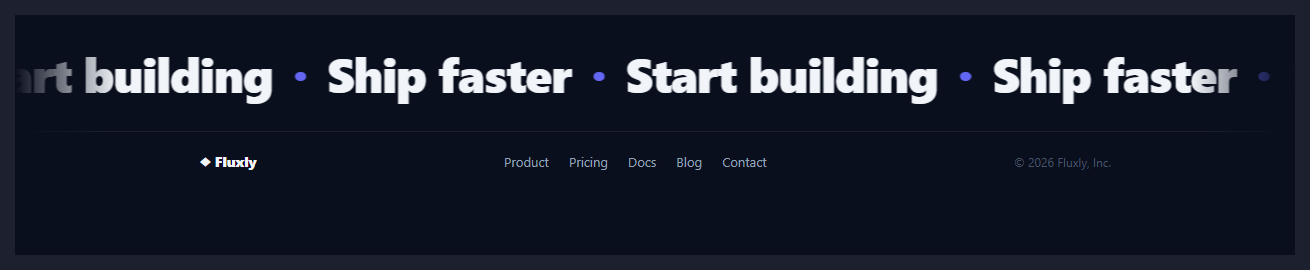
The oversized, endlessly scrolling word band has become a recognisable closing gesture on agency and product sites — it's motion with no functional job beyond signalling "this brand has energy," which makes it a good fit specifically for a footer, where there's no content hierarchy left to protect. This snippet builds the effect the same way the site's standalone Marquee does, scaled up to footer-headline size and paired with a slim, conventional link row underneath.
Duplicate the content once, animate to exactly -50%
The core trick is deceptively simple: .mqf-track contains the same sequence of words twice in a row, laid out with display: flex; width: max-content so the track is exactly twice as wide as one copy of the content. A @keyframes animation moves it from translateX(0) to translateX(-50%) — precisely one copy's width — over 22 seconds, linear. Because the second copy is identical to the first, the instant the animation resets from -50% back to 0%, the visual is indistinguishable from where it started; there's no visible seam or jump, just an apparently infinite loop built from a track that's secretly only two repeats long.
Why width: max-content isn't optional
Without width: max-content, the flex track would shrink or grow to fit its parent's width rather than its content's natural width, which breaks the "-50% equals exactly one copy" math the whole animation depends on. max-content forces the track to be exactly as wide as its content demands, so the halfway point of the animation always lands exactly where the first copy ends and the second begins.
Masking the hard edges
-webkit-mask / mask: linear-gradient(90deg, transparent, #000 8%, #000 92%, transparent) fades the marquee's opacity to zero at both edges of its container. Without this, words would appear to be cut off mid-character at the left and right boundaries as they scroll past — the mask gives the illusion that text is fading into the page edges rather than being clipped by a hard rectangle.
Pausing on hover, and turning it off entirely
.mqf:hover .mqf-track { animation-play-state: paused } freezes the scroll the moment a cursor enters the footer, which matters for a footer specifically because it often contains real, clickable content (the link row below) that a user might be trying to read or interact with while the marquee is technically still "behind" their attention. A separate prefers-reduced-motion: reduce query removes the animation and switches the track to overflow-x: auto, so motion-sensitive users get a manually scrollable strip instead of continuous, uncontrollable movement.
Step by step
How to Use
- 1Paste HTML and CSSA large, continuously scrolling word band renders above a standard link row — no JavaScript is used.
- 2Hover the footerThe marquee pauses while your cursor is anywhere inside the footer, then resumes when you leave.
- 3Edit the marquee wordsReplace the repeated span content — keep the sequence duplicated exactly twice for the loop to stay seamless.
- 4Adjust the scroll speedChange the 22s duration in @keyframes mqfScroll — shorter is faster, longer is slower.
- 5Update the link row and copyrightReplace the brand, footer links, and copyright text in .mqf-inner with your own.
- 6Export in your formatClick HTML, JSX, or Tailwind to download the version you need.
Real-world uses
Common Use Cases
Got questions?
Frequently Asked Questions
The animation moves the track exactly -50% of its total width, which by construction equals the width of one copy of the content. Because the second copy is identical to the first, the loop point is invisible — the track appears to scroll forever even though only two repeats actually exist in the DOM.
Without it, the flex track would size itself to its parent container rather than to the natural width of its content, which breaks the assumption that -50% equals exactly one copy's width. max-content forces the track to be exactly as wide as the doubled content requires.
Edit the duration in the @keyframes mqfScroll animation declaration (default 22s) — a shorter duration scrolls faster, a longer one scrolls slower. The distance travelled (-50%) does not need to change.
It scrolls continuously by default, but pauses the instant the cursor enters the footer via animation-play-state: paused on hover, and stops entirely for users with prefers-reduced-motion: reduce enabled, who get a manually scrollable strip instead.
A CSS mask (linear-gradient from transparent to opaque to transparent) is applied to the marquee's container, fading its opacity toward both edges. Without it, characters would appear abruptly clipped by the container's hard rectangular boundary as they scroll past.
Click JSX, Vue, or Angular to download the converted component. Since the animation is pure CSS with no JavaScript behaviour, the conversion is a direct markup and class-name translation — just keep the duplicated content sequence intact.