





Matrix Rain — Free HTML CSS JS Canvas Snippet
Matrix Rain · Animations · Plain HTML, CSS & JS · Live preview
Copy & paste
Source Code
<canvas id="canvas"></canvas>
<div class="overlay-text">
  <div class="code">WAKE UP</div>
  <div class="sub">The Matrix has you...</div>
</div>
* { box-sizing: border-box; margin: 0; padding: 0; }
body { background: #000; overflow: hidden; }
canvas { position: fixed; inset: 0; }
.overlay-text { position: fixed; inset: 0; display: flex; flex-direction: column; align-items: center; justify-content: center; pointer-events: none; gap: 12px; }
.code { font-family: 'Courier New', monospace; font-size: clamp(32px,8vw,64px); font-weight: 900; color: #0f0; text-shadow: 0 0 30px #0f0; letter-spacing: 8px; animation: flicker 3s ease infinite; }
.sub { font-family: 'Courier New', monospace; font-size: 14px; color: rgba(0,255,0,0.5); letter-spacing: 3px; }
@keyframes flicker { 0%,100%{opacity:1} 92%{opacity:1} 93%{opacity:0.3} 94%{opacity:1} 96%{opacity:0.5} 97%{opacity:1} }const canvas = document.getElementById('canvas');
const ctx = canvas.getContext('2d');
const chars = 'アイウエオカキクケコサシスセソタチツテトナニヌネノ0123456789ABCDEFGHIJKLMNOPQRSTUVWXYZ';
let W, H, cols, drops;
function init() {
W = canvas.width = window.innerWidth;
H = canvas.height = window.innerHeight;
const fontSize = 14;
cols = Math.floor(W / fontSize);
drops = Array(cols).fill(1);
}
function draw() {
ctx.fillStyle = 'rgba(0,0,0,0.05)';
ctx.fillRect(0, 0, W, H);
ctx.fillStyle = '#0f0';
ctx.font = '14px Courier New';
drops.forEach((y, i) => {
const ch = chars[Math.floor(Math.random() * chars.length)];
ctx.fillStyle = Math.random() > 0.98 ? '#fff' : '#0f0';
ctx.fillText(ch, i * 14, y * 14);
if (y * 14 > H && Math.random() > 0.975) drops[i] = 0;
drops[i]++;
});
}
window.addEventListener('resize', init);
init();
setInterval(draw, 40);Extend with AI
Take This Snippet Further With AI
The AI prompt for this one is for Patreon supporters ($3 a month), along with a site with no ads. Supporters enter the passcode once and it is remembered in this browser.
What's included
Features
About this UI Snippet
Matrix Rain — Canvas Column Drops, Character Pool & Fade-Trail Technique
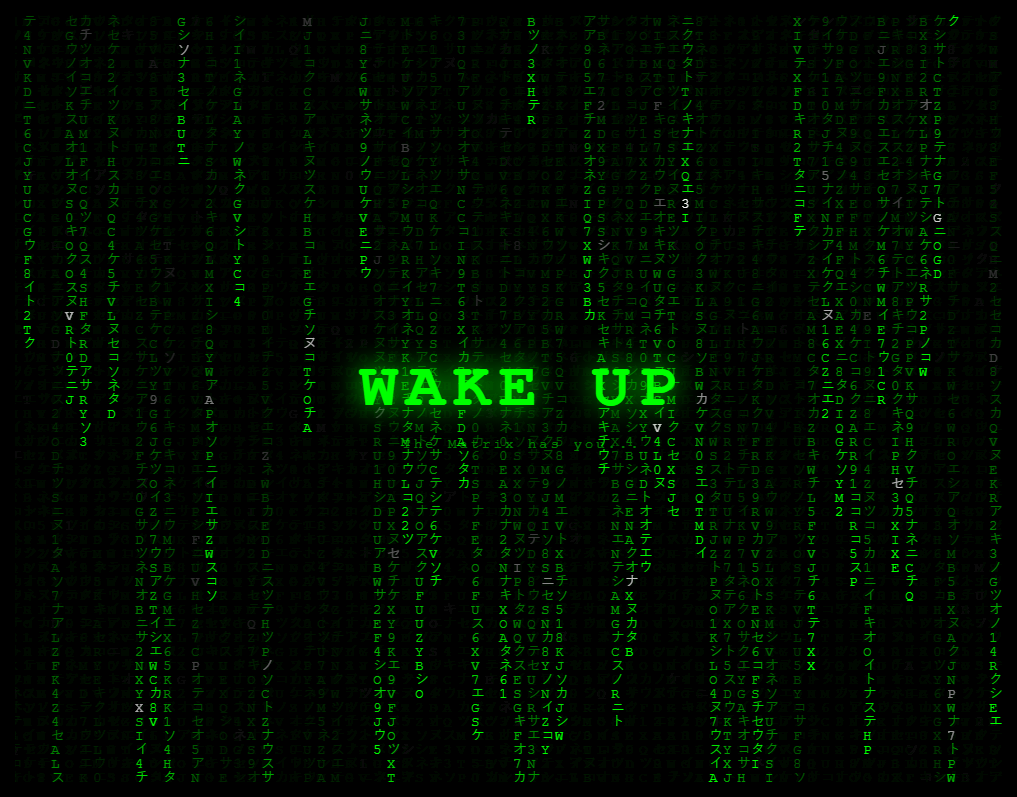
The matrix rain effect — falling columns of green characters — is the defining visual of the cyberpunk/hacker aesthetic, alongside glitch text, the text scramble decode, and neon glow buttons. This snippet implements it on a fullscreen canvas using the classic drop-array technique.
The drop array
drops is an array with one entry per column (Math.floor(W / fontSize)). Each entry is a Y position (in character units) representing the current head of that column. On each frame, a random character is drawn at (col * fontSize, drops[col] * fontSize). Then drops[col]++. When a drop reaches the bottom or by random chance, it resets to 0.
The fade-trail technique
Rather than clearing the canvas each frame, a semi-transparent black rectangle is drawn over the entire canvas: ctx.fillStyle = "rgba(0,0,0,0.05)". This darkens existing characters slightly each frame without erasing them — characters drawn earlier appear progressively darker, creating the fading trail effect without any per-character tracking.
The character pool
The chars string mixes Katakana characters (アイウエオ...) with digits and ASCII uppercase for variety. Each frame a random character is drawn for each column head.
The Canvas column system
The canvas width is divided into columns of 16px each. An array drops[] tracks the Y position of the falling character in each column — initialised to random starting positions for a natural staggered start. Each frame, every column draws a character at its Y position, then increments Y by 16px. When Y exceeds the canvas height it resets to 0, creating the continuous rain effect. Characters draw in bright green with older trail characters drawn darker, achieved by drawing a semi-transparent black rectangle each frame (rgba(0,0,0,0.05)) rather than clearing the canvas — this darkens existing characters gradually without erasing them.
Customising the effect
Change the character set by updating the chars string — use binary (01), hex (0-9A-F), or domain-specific symbols like network packets or DNA bases. Change the colour by updating ctx.fillStyle from bright green to cyan, amber, or any hue. Adjust the animation speed by changing the character pool density or the interval timing. The effect scales to any canvas size — resize the canvas element to match the viewport for a full-screen background.
Performance note
Canvas 2D text drawing is not GPU-composited. For very large canvases on mobile, reduce the character pool size or increase column width to reduce the per-frame character count. Using setInterval at 50ms instead of requestAnimationFrame reduces power consumption while keeping the visual smooth enough for decorative background use.
The Canvas column system
The canvas width is divided into columns of 16px each. An array drops[] tracks the Y position of the falling character in each column — initialised to random starting positions for a natural staggered start. Each frame, every column draws a character at its Y position, then increments Y by 16px. When Y exceeds the canvas height it resets to 0, creating the continuous rain effect. Characters draw in bright green with older trail characters drawn darker, achieved by drawing a semi-transparent black rectangle each frame (rgba(0,0,0,0.05)) rather than clearing the canvas — this darkens existing characters gradually without erasing them.
Customising the effect
Change the character set by updating the chars string — use binary (01), hex (0-9A-F), or domain-specific symbols like network packets or DNA bases. Change the colour by updating ctx.fillStyle from bright green to cyan, amber, or any hue. Adjust the animation speed by changing the character pool density or the interval timing. The effect scales to any canvas size — resize the canvas element to match the viewport for a full-screen background.
Performance note
Canvas 2D text drawing is not GPU-composited. For very large canvases on mobile, reduce the character pool size or increase column width to reduce the per-frame character count. Using setInterval at 50ms instead of requestAnimationFrame reduces power consumption while keeping the visual smooth enough for decorative background use.
Step by step
How to Use
- 1Watch the matrix rainThe canvas fills with falling columns of Katakana and ASCII characters with a fading green trail.
- 2Change the character setIn the JS panel, update the chars string — remove Katakana and use binary (01) or hex for a different aesthetic.
- 3Change rain colourUpdate ctx.fillStyle on the character draw from #0f0 (bright green) to any colour.
- 4Adjust fade trail speedUpdate 0.05 in rgba(0,0,0,0.05) — higher values (0.1) fade faster for shorter trails; lower values (0.02) leave longer trails.
- 5Change font size and column densityUpdate fontSize = 14 in the JS. Smaller values create more columns and denser rain.
- 6Export in your formatClick "HTML" for a standalone file, "JSX" for a React component, or "Tailwind" for a React + Tailwind version.
Real-world uses
Common Use Cases
Got questions?
Frequently Asked Questions
Instead of clearing the canvas each frame (which would show no trail), a semi-transparent black rectangle is drawn over the entire canvas: ctx.fillStyle = "rgba(0,0,0,0.05)". This darkens all existing characters by 5% each frame. Characters drawn many frames ago are nearly black; recent ones are bright.
The drops array has one entry per column. Each entry is the current Y position (in character units) of that column's head. Each frame, a character is drawn at drops[col] * fontSize. Then drops[col]++. When it reaches the bottom or by random chance, drops[col] = 0 resets it.
Update the chars string in the JS panel. Remove the Katakana characters and replace with any characters. Binary (01) creates a different aesthetic; pure hex creates a memory dump effect.
Store a colour per column in a separate array. Use ctx.fillStyle = columnColors[col] before drawing each character. Cycle through colours for a multi-colour matrix.
Yes. Click "JSX" for a React component. Use useRef on the canvas element and useEffect to initialise and start the animation loop. Clean up the rAF handle and resize listener in the useEffect return function.
Add a div with position: fixed; inset: 0; display: flex; align-items: center; justify-content: center; pointer-events: none over the canvas. The pointer-events: none allows canvas mouse interaction to pass through.