


Mega CTA Banner — Free HTML CSS JS Gradient Call to Action
Mega CTA Banner · Heroes · Plain HTML, CSS & JS · Live preview
Copy & paste
Source Code
<section class="mc-banner" id="mcBanner">
  <div class="mc-glow" id="mcGlow"></div>
  <div class="mc-grid"></div>
  <div class="mc-content">
    <span class="mc-eyebrow">✦ Limited beta</span>
    <h2 class="mc-title">Ship your next idea<br/>before the weekend.</h2>
    <p class="mc-sub">Spin up production-ready infrastructure in minutes. No credit card, no config — just deploy.</p>
    <form class="mc-form" id="mcForm">
      <input type="email" class="mc-input" placeholder="[email protected]" required aria-label="Work email" />
      <button type="submit" class="mc-btn">Get early access</button>
    </form>
    <p class="mc-note" id="mcNote">Join 12,400+ developers on the waitlist.</p>
  </div>
</section>*{box-sizing:border-box;margin:0;padding:0}
body{font-family:system-ui,-apple-system,sans-serif;background:#06070d;display:flex;justify-content:center;align-items:center;min-height:100vh;padding:24px}
.mc-banner{position:relative;width:min(680px,96vw);border-radius:26px;overflow:hidden;padding:48px 40px;background:linear-gradient(135deg,#1a1040,#2a0e3a 55%,#0d1b3e);border:1px solid rgba(255,255,255,.1);isolation:isolate}
/* Cursor-tracking glow behind the content. */
.mc-glow{position:absolute;width:480px;height:480px;border-radius:50%;left:var(--gx,50%);top:var(--gy,30%);transform:translate(-50%,-50%);background:radial-gradient(circle,rgba(139,92,246,.5),transparent 62%);filter:blur(20px);z-index:-1;transition:left .2s ease-out,top .2s ease-out;pointer-events:none}
/* Faint perspective grid. */
.mc-grid{position:absolute;inset:0;z-index:-1;background-image:linear-gradient(rgba(255,255,255,.05) 1px,transparent 1px),linear-gradient(90deg,rgba(255,255,255,.05) 1px,transparent 1px);background-size:38px 38px;-webkit-mask:radial-gradient(ellipse 70% 60% at 50% 40%,#000,transparent);mask:radial-gradient(ellipse 70% 60% at 50% 40%,#000,transparent)}
.mc-content{position:relative;text-align:center}
.mc-eyebrow{display:inline-block;font-size:12px;font-weight:700;letter-spacing:.06em;color:#d8b4fe;background:rgba(168,85,247,.16);border:1px solid rgba(168,85,247,.32);padding:5px 13px;border-radius:999px}
.mc-title{color:#fff;font-size:clamp(28px,5vw,42px);line-height:1.12;letter-spacing:-.02em;margin:18px 0 14px;font-weight:800}
.mc-sub{color:#b6bdd8;font-size:16px;line-height:1.6;max-width:440px;margin:0 auto 26px}
.mc-form{display:flex;gap:10px;max-width:440px;margin:0 auto;flex-wrap:wrap}
.mc-input{flex:1;min-width:180px;background:rgba(255,255,255,.07);border:1px solid rgba(255,255,255,.16);border-radius:12px;padding:14px 16px;color:#fff;font-family:inherit;font-size:15px;outline:none;transition:border-color .16s,box-shadow .16s}
.mc-input::placeholder{color:#8089a8}
.mc-input:focus{border-color:#a855f7;box-shadow:0 0 0 4px rgba(168,85,247,.2)}
.mc-btn{background:linear-gradient(120deg,#a855f7,#6366f1);color:#fff;border:0;font-family:inherit;font-weight:700;font-size:15px;padding:14px 22px;border-radius:12px;cursor:pointer;white-space:nowrap;transition:transform .12s,box-shadow .2s;box-shadow:0 8px 24px rgba(124,58,237,.45)}
.mc-btn:hover{transform:translateY(-1px)}
.mc-btn:active{transform:translateY(0) scale(.98)}
.mc-note{color:#8b93b5;font-size:13px;margin-top:16px}
.mc-note.is-ok{color:#86efac}var banner = document.getElementById('mcBanner');
var glow = document.getElementById('mcGlow');
// Move the glow toward the cursor for a living, interactive backdrop.
banner.addEventListener('mousemove', function (e) {
var r = banner.getBoundingClientRect();
glow.style.setProperty('--gx', (e.clientX - r.left) + 'px');
glow.style.setProperty('--gy', (e.clientY - r.top) + 'px');
});
banner.addEventListener('mouseleave', function () {
glow.style.setProperty('--gx', '50%');
glow.style.setProperty('--gy', '30%');
});
document.getElementById('mcForm').addEventListener('submit', function (e) {
e.preventDefault();
var note = document.getElementById('mcNote');
note.textContent = '✓ You\'re on the list — check your inbox!';
note.classList.add('is-ok');
this.reset();
});Extend with AI
Take This Snippet Further With AI
The AI prompt for this one is for Patreon supporters ($3 a month), along with a site with no ads. Supporters enter the passcode once and it is remembered in this browser.
What's included
Features
About this UI Snippet
Mega CTA Banner — A Gradient Conversion Block With a Living Glow

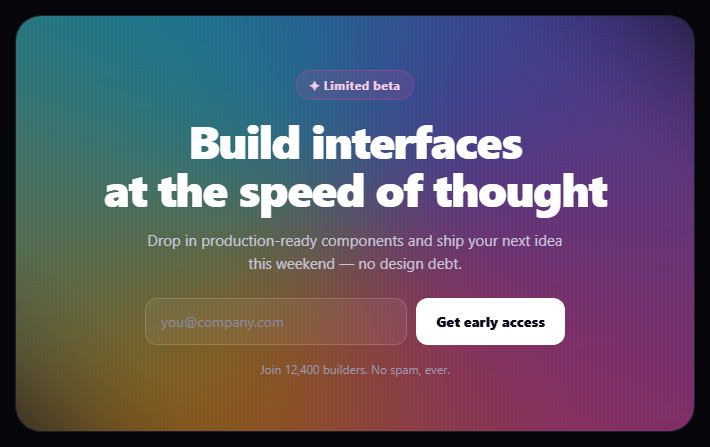
The mega CTA banner is the big, high-contrast call-to-action block at the bottom of a landing page — a rich gradient panel with an eyebrow, a bold headline, an inline email capture, and an interactive glow that follows the cursor. This snippet builds it with plain HTML, CSS, and a small vanilla JavaScript handler for the glow and form.
A layered gradient panel
The banner is a rounded, clipped section with a multi-stop diagonal gradient background and three stacked layers controlled with z-index: a cursor-tracking glow and a faint grid sit behind the content, which sits on top. isolation: isolate gives the banner its own stacking context so the negative z-index layers stay contained within it rather than slipping behind the page.
The cursor-following glow
A large, blurred radial circle (.mc-glow) is positioned by two CSS custom properties, --gx and --gy, which a mousemove handler updates to the cursor's location inside the banner. A short transition on left/top makes the glow ease toward the pointer with a slight lag, so it feels like a soft light drifting under the surface rather than snapping. On mouseleave it returns to a resting position, keeping the banner alive even when idle.
A masked perspective grid
A subtle technical grid is drawn purely in CSS from two repeating linear-gradients (horizontal and vertical 1px lines), then faded at the edges with a radial mask so it dissolves into the gradient instead of ending in a hard rectangle. This masked-grid technique is what gives modern developer-tool banners their "infinite surface" feel, and it costs nothing — no image, no SVG.
Inline email capture
The CTA is a real <form> with an email input and a gradient submit button that lifts on hover and presses on click. The input shows a proper focus ring, and the form wraps gracefully to two rows on narrow screens. On submit the handler prevents the default, swaps the supporting note to a green success message, and resets the field — the typical waitlist/early-access flow you'd wire to an API.
Responsive and legible
The headline uses clamp() so it scales smoothly between mobile and desktop without breakpoints, the content is centred with a constrained measure for readability, and the whole banner sizes to its container. Everything stays legible over the gradient because the content layer sits above the decorative glow and grid.
Customizing it
Change the gradient, the glow colour, the grid density, or the copy; replace the email capture with a pair of buttons; or post the email to your backend. Pair it with a newsletter signup, a waitlist signup, or an animated gradient CTA.
Step by step
How to Use
- 1Paste HTML, CSS, and JSA gradient CTA banner renders with a glow.
- 2Move the cursor over itThe glow drifts toward the pointer.
- 3Focus the email fieldA focus ring appears on the input.
- 4Submit the formThe note flips to a green confirmation.
- 5Edit the copyChange the eyebrow, headline, and note.
- 6Recolor itSwap the gradient and glow colors.
Real-world uses
Common Use Cases
--gx and --gy.isolation to contain the layers.Got questions?
Frequently Asked Questions
A large blurred radial circle is positioned by two CSS custom properties, --gx and --gy, which a mousemove handler updates to the cursor's location inside the banner. A short transition on left and top makes the glow ease toward the pointer with a slight lag, so it drifts like a soft light rather than snapping, and returns to rest on mouseleave.
The grid is drawn from two repeating linear-gradients — horizontal and vertical 1px lines — then faded at the edges with a radial mask so it dissolves into the gradient instead of ending in a hard rectangle. This masked-grid technique gives the modern infinite-surface look with no image or SVG.
The glow and grid sit at negative z-index so they fall behind the content. isolation: isolate gives the banner its own stacking context, which keeps those negative-z-index layers contained within the banner rather than slipping behind the page background. Without it, the decorative layers could disappear under the page.
The submit handler prevents the default navigation, swaps the supporting note to a green success message, and resets the input — the typical waitlist or early-access flow. In production you would post the email to your backend or email service inside that handler before showing the confirmation.
Render the markup as a component and bind the email input to state with onChange/v-model/ngModel. Handle submit to call your API and toggle a submitted flag that switches the note text and class. Update the glow position by writing --gx and --gy to a ref on mouse move, imperatively, to avoid re-rendering per move. The gradient, grid, and glow CSS port unchanged.