




Bundle Savings Card — Free Product Bundle Discount Widget (HTML/CSS/JS)
Bundle Savings Card · Pricing · Plain HTML, CSS & JS · Live preview
Copy & paste
Source Code
<div class="bsc-card">
  <div class="bsc-head">
    <h3>Build your bundle</h3>
    <p>Uncheck anything you don't need — the price updates live</p>
  </div>

  <ul class="bsc-items" id="bscItems">
    <li class="bsc-item" data-price="15" data-bundle="10.50">
      <label>
        <input type="checkbox" class="bsc-check" checked />
        <span class="bsc-item-info">
          <span class="bsc-item-name">Design System Kit</span>
          <span class="bsc-item-desc">200+ components, Figma + code</span>
        </span>
      </label>
      <span class="bsc-item-price">$15</span>
    </li>
    <li class="bsc-item" data-price="22" data-bundle="15.40">
      <label>
        <input type="checkbox" class="bsc-check" checked />
        <span class="bsc-item-info">
          <span class="bsc-item-name">Icon Pack Pro</span>
          <span class="bsc-item-desc">1,200 icons, SVG + web font</span>
        </span>
      </label>
      <span class="bsc-item-price">$22</span>
    </li>
    <li class="bsc-item" data-price="18" data-bundle="12.60">
      <label>
        <input type="checkbox" class="bsc-check" checked />
        <span class="bsc-item-info">
          <span class="bsc-item-name">Illustration Set</span>
          <span class="bsc-item-desc">80 editable scenes, SVG</span>
        </span>
      </label>
      <span class="bsc-item-price">$18</span>
    </li>
  </ul>

  <div class="bsc-summary">
    <div class="bsc-row">
      <span>Individual total</span>
      <span class="bsc-strike" id="bscIndividual">$55.00</span>
    </div>
    <div class="bsc-row bsc-bundle-row">
      <span>Bundle price</span>
      <b id="bscBundle">$38.50</b>
    </div>
    <div class="bsc-savings" id="bscSavings">You save $16.50 <span id="bscSavingsPct">(30%)</span></div>
  </div>
</div>*{box-sizing:border-box;margin:0;padding:0}
body{font-family:system-ui,-apple-system,sans-serif;background:#0c0a14;min-height:100vh;display:flex;align-items:center;justify-content:center;padding:24px}
.bsc-card{background:#141222;border:1px solid #2a2444;border-radius:18px;padding:24px;width:100%;max-width:420px;box-shadow:0 20px 50px rgba(0,0,0,.45)}
.bsc-head h3{font-size:18px;font-weight:800;color:#f5f3fd}
.bsc-head p{font-size:12px;color:#8f89b3;margin-top:4px;margin-bottom:18px}
.bsc-items{list-style:none;display:flex;flex-direction:column;gap:8px;margin-bottom:18px}
.bsc-item{display:flex;align-items:center;justify-content:space-between;gap:10px;background:#1a1730;border:1px solid #2e2850;border-radius:11px;padding:11px 13px;transition:opacity .15s}
.bsc-item:has(.bsc-check:not(:checked)){opacity:.45}
.bsc-item label{display:flex;align-items:center;gap:10px;cursor:pointer;flex:1;min-width:0}
.bsc-check{width:17px;height:17px;flex-shrink:0;accent-color:#a855f7;cursor:pointer}
.bsc-item-info{display:flex;flex-direction:column;gap:1px;min-width:0}
.bsc-item-name{font-size:13px;font-weight:700;color:#ede9fb}
.bsc-item-desc{font-size:10.5px;color:#7f7aa3}
.bsc-item-price{font-size:12.5px;font-weight:700;color:#a3a0c9;white-space:nowrap}
.bsc-summary{display:flex;flex-direction:column;gap:8px;padding:14px 15px;background:#1a1730;border:1px solid #2e2850;border-radius:12px}
.bsc-row{display:flex;align-items:baseline;justify-content:space-between;font-size:12.5px;color:#8f89b3}
.bsc-strike{text-decoration:line-through;text-decoration-color:#4a4370}
.bsc-bundle-row{padding-top:8px;border-top:1px dashed #2e2850;font-size:14px;color:#ede9fb;font-weight:700}
.bsc-bundle-row b{color:#c4b5fd;font-size:19px;font-variant-numeric:tabular-nums}
.bsc-savings{text-align:center;font-size:12.5px;font-weight:700;color:#4ade80;background:rgba(74,222,128,.1);border-radius:8px;padding:8px;margin-top:2px}
.bsc-savings span{font-weight:800}var itemEls = Array.prototype.slice.call(document.querySelectorAll('.bsc-item'));
var individualEl = document.getElementById('bscIndividual');
var bundleEl = document.getElementById('bscBundle');
var savingsEl = document.getElementById('bscSavings');
var savingsPctEl = document.getElementById('bscSavingsPct');
function fmtMoney(n) {
return '$' + n.toLocaleString(undefined, { minimumFractionDigits: 2, maximumFractionDigits: 2 });
}
function render() {
var selected = itemEls.filter(function (el) {
return el.querySelector('.bsc-check').checked;
});
// Individual total: sum of each selected item's standalone price.
var individualTotal = selected.reduce(function (sum, el) {
return sum + Number(el.dataset.price);
}, 0);
// Bundle total: sum of each selected item's price WITHIN the bundle
// (its proportional share of the discounted bundle price).
var bundleTotal = selected.reduce(function (sum, el) {
return sum + Number(el.dataset.bundle);
}, 0);
var savings = individualTotal - bundleTotal;
var savingsPct = individualTotal > 0 ? Math.round((savings / individualTotal) * 100) : 0;
individualEl.textContent = fmtMoney(individualTotal);
bundleEl.textContent = fmtMoney(bundleTotal);
if (selected.length === 0) {
savingsEl.hidden = true;
} else {
savingsEl.hidden = false;
savingsEl.innerHTML = 'You save ' + fmtMoney(savings) + ' <span id="bscSavingsPct">(' + savingsPct + '%)</span>';
}
}
itemEls.forEach(function (el) {
el.querySelector('.bsc-check').addEventListener('change', render);
});
render();Extend with AI
Take This Snippet Further With AI
The AI prompt for this one is for Patreon supporters ($3 a month), along with a site with no ads. Supporters enter the passcode once and it is remembered in this browser.
What's included
Features
About this UI Snippet
Bundle Savings Card — Real Savings Math That Updates as Items Are Toggled
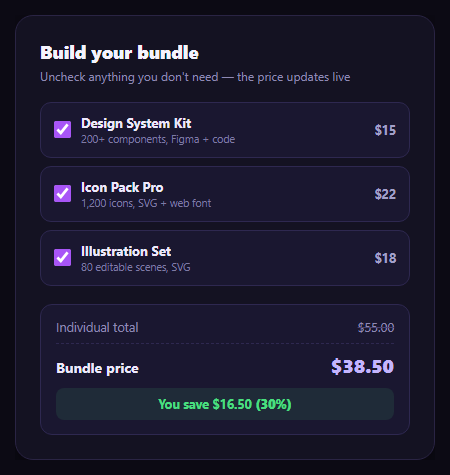
Bundle pricing pages usually show one fixed "buy all 3 for $X" price and let it go stale the moment a customer only wants two of the three items. This snippet keeps the math honest: three products with real individual prices, a discounted bundle price, and a savings figure that recalculates correctly the instant an item is checked or unchecked.
Two prices per item, not one
Each product carries both data-price (its standalone price) and data-bundle (its proportional share of the discounted bundle price) as data attributes. The three products are $15, $22, and $18 individually — summing to $55 — and their bundle-share prices are $10.50, $15.40, and $12.60, which sum to exactly $38.50, the full bundle price. Because every item carries its own bundle-share price, removing an item removes *its own* discounted share too, not an arbitrary fraction of the total.
Verified 30% off, at every level
$55 individually vs. $38.50 bundled is a $16.50 saving, and $16.50 ÷ $55 = 30% — exactly the discount rate applied. Because each item's bundle price is that same item's individual price × 0.7 ($15 × 0.7 = $10.50, $22 × 0.7 = $15.40, $18 × 0.7 = $12.60), the 30% savings percentage stays mathematically consistent whether all three items are selected or only one — uncheck any two and the remaining item alone still shows the same 30% saving, because the math is proportional rather than a single fixed discount applied to a fixed set.
Full recompute on every toggle
render() filters to the currently checked items, sums their standalone prices for the individual total and their bundle-share prices for the bundle total, and derives both the dollar savings and the percentage fresh — never adjusting a previous total in place. Toggling an item off immediately drops both the crossed-out individual total and the bundle total by that item's own two prices.
A clear before/after presentation
The individual total is shown with a strikethrough next to the bold bundle price, and a separate savings callout states both the dollar amount and the percentage — the same before/after pattern as a pricing card's struck-through price, applied to a multi-item bundle instead of a single plan.
Where it fits
Pair it with an annual savings badge if the bundle also has a monthly/annual choice, follow it with a promo code input for stacking an extra discount, or place it beside a pricing card grid as an add-on bundle offer.
Customizing it
Swap in your real products and prices — keep each item's bundle-share price proportional to its individual price if you want the savings percentage to stay constant across selections, or make it non-proportional if certain items should carry a bigger discount than others.
Step by step
How to Use
- 1Paste HTML, CSS, and JSAll three items are checked; totals show $55.00 vs. $38.50.
- 2Uncheck an itemBoth totals drop by that item's own two prices.
- 3Read the savings line"You save $16.50 (30%)" recalculates for whatever is selected.
- 4Verify the math$55.00 − $38.50 = $16.50, and $16.50 / $55.00 = 30%.
- 5Uncheck everythingThe savings callout hides rather than showing a $0.00 saving.
- 6Wire up real productsSet each item's data-price and proportional data-bundle price.
Real-world uses
Common Use Cases
Got questions?
Frequently Asked Questions
Each item stores its own bundle-share price (its individual price × 0.7) rather than the page applying one discount to whatever total happens to be selected. Design System Kit is $15 individually and $10.50 in the bundle, Icon Pack Pro is $22 and $15.40, and Illustration Set is $18 and $12.60 — those three bundle-share prices sum to exactly $38.50, the full bundle price.
Because every item's bundle-share price is exactly 70% of its individual price, the 30% discount is proportional rather than a single fixed amount spread across whatever is selected. Whether all three items are checked or only one, that item's individual price minus its bundle-share price is always 30% of its individual price, so the percentage line stays consistent.
render() detects zero selected items and hides the entire savings callout rather than showing a "You save $0.00 (0%)" line, which would read as broken. The individual and bundle totals both show $0.00 in that state.
The individual total sums each selected item's standalone price: $15 + $22 + $18 = $55.00. The bundle total sums each item's bundle-share price: $10.50 + $15.40 + $12.60 = $38.50. Savings is the difference, $55.00 − $38.50 = $16.50, and the percentage is $16.50 divided by $55.00, which is exactly 30%.
Model items as an array of {name, description, price, bundlePrice, selected} objects. Derive individualTotal and bundleTotal with a memoized reduce over the selected items, and savings/savingsPct as further derived values — the arithmetic is pure and needs no DOM access at all.