
Pricing Currency Switcher — Free HTML CSS JS Snippet
Pricing Card Currency Switcher · Pricing · Plain HTML, CSS & JS · Live preview
Copy & paste
Source Code
<div class="pricing-page">
<div class="pricing-header">
<h2>Simple, transparent pricing</h2>
<div class="currency-switch" id="currency-switch" role="group" aria-label="Select display currency">
<button class="currency-opt active" data-currency="USD">USD</button>
<button class="currency-opt" data-currency="EUR">EUR</button>
<button class="currency-opt" data-currency="GBP">GBP</button>
<button class="currency-opt" data-currency="INR">INR</button>
</div>
</div>
<div class="pricing-grid">
<div class="plan-card" data-base-price="9">
<p class="plan-name">Starter</p>
<p class="plan-price"><span class="price-amount">$9</span><span class="price-period">/mo</span></p>
<p class="plan-blurb">For individuals getting started</p>
<ul class="plan-features">
<li>1 project</li>
<li>5GB storage</li>
<li>Community support</li>
</ul>
<button class="plan-cta">Choose Starter</button>
</div>
<div class="plan-card featured" data-base-price="29">
<span class="popular-tag">Most popular</span>
<p class="plan-name">Growth</p>
<p class="plan-price"><span class="price-amount">$29</span><span class="price-period">/mo</span></p>
<p class="plan-blurb">For growing teams shipping fast</p>
<ul class="plan-features">
<li>Unlimited projects</li>
<li>100GB storage</li>
<li>Priority support</li>
<li>Team roles & permissions</li>
</ul>
<button class="plan-cta primary">Choose Growth</button>
</div>
<div class="plan-card" data-base-price="79">
<p class="plan-name">Scale</p>
<p class="plan-price"><span class="price-amount">$79</span><span class="price-period">/mo</span></p>
<p class="plan-blurb">For larger orgs with custom needs</p>
<ul class="plan-features">
<li>Unlimited everything</li>
<li>1TB storage</li>
<li>Dedicated support</li>
<li>SSO & audit logs</li>
</ul>
<button class="plan-cta">Choose Scale</button>
</div>
</div>
<p class="billing-disclosure" id="billing-disclosure">Prices shown in USD, billed in USD.</p>
</div>* { box-sizing: border-box; margin: 0; padding: 0; }
body { font-family: system-ui, sans-serif; background: #f8fafc; min-height: 100vh; }
.pricing-page { max-width: 920px; margin: 0 auto; padding: 40px 24px; }
.pricing-header { text-align: center; margin-bottom: 32px; }
.pricing-header h2 { font-size: 24px; font-weight: 800; color: #0f172a; margin-bottom: 18px; }
.currency-switch {
display: inline-flex; gap: 2px;
background: #eef2f7; padding: 3px; border-radius: 10px;
}
.currency-opt {
border: none; background: transparent;
padding: 7px 16px; font-family: inherit; font-size: 12.5px; font-weight: 700;
color: #64748b; border-radius: 8px; cursor: pointer;
transition: background 0.15s, color 0.15s;
}
.currency-opt:hover { color: #1e293b; }
.currency-opt.active { background: #fff; color: #6366f1; box-shadow: 0 1px 4px rgba(15,23,42,0.1); }
.pricing-grid {
display: grid; grid-template-columns: repeat(auto-fit, minmax(220px, 1fr));
gap: 20px;
}
.plan-card {
position: relative;
background: #fff; border: 1.5px solid #eef2f7; border-radius: 18px;
padding: 26px 24px; display: flex; flex-direction: column;
}
.plan-card.featured { border-color: #6366f1; box-shadow: 0 12px 32px rgba(99,102,241,0.14); transform: translateY(-4px); }
.popular-tag {
position: absolute; top: -12px; left: 50%; transform: translateX(-50%);
background: #6366f1; color: #fff; font-size: 10.5px; font-weight: 700;
padding: 4px 12px; border-radius: 20px; white-space: nowrap;
}
.plan-name { font-size: 13px; font-weight: 700; color: #6366f1; text-transform: uppercase; letter-spacing: 0.04em; margin-bottom: 12px; }
.plan-price { display: flex; align-items: baseline; gap: 4px; margin-bottom: 6px; }
.price-amount { font-size: 32px; font-weight: 800; color: #0f172a; font-variant-numeric: tabular-nums; transition: opacity 0.15s; }
.price-period { font-size: 13px; color: #94a3b8; font-weight: 600; }
.plan-blurb { font-size: 12.5px; color: #94a3b8; margin-bottom: 20px; line-height: 1.5; }
.plan-features { list-style: none; display: flex; flex-direction: column; gap: 10px; margin-bottom: 24px; flex: 1; }
.plan-features li { font-size: 13px; color: #334155; padding-left: 22px; position: relative; }
.plan-features li::before {
content: ''; position: absolute; left: 0; top: 3px;
width: 15px; height: 15px; border-radius: 50%;
background: #eef2ff;
background-image: url("data:image/svg+xml,%3Csvg xmlns='http://www.w3.org/2000/svg' viewBox='0 0 24 24' fill='none' stroke='%236366f1' stroke-width='3' stroke-linecap='round' stroke-linejoin='round'%3E%3Cpolyline points='20 6 9 17 4 12'/%3E%3C/svg%3E");
background-repeat: no-repeat; background-position: center; background-size: 9px;
}
.plan-cta {
border: 1.5px solid #e2e8f0; background: #fff; color: #1e293b;
padding: 11px; border-radius: 10px; font-family: inherit; font-size: 13.5px; font-weight: 700;
cursor: pointer; transition: all 0.15s;
}
.plan-cta:hover { border-color: #6366f1; color: #6366f1; }
.plan-cta.primary { background: #6366f1; border-color: #6366f1; color: #fff; }
.plan-cta.primary:hover { background: #4f46e5; }
.billing-disclosure {
text-align: center; margin-top: 24px;
font-size: 12px; color: #94a3b8;
}// Small hardcoded exchange-rate table (illustrative, not live rates).
// Real products should fetch rates from a currency API on an interval
// or at build time, and cache them — never hardcode rates that drift
// out of date in a way that misleads shoppers.
const RATES = {
USD: { rate: 1, locale: 'en-US' },
EUR: { rate: 0.92, locale: 'de-DE' },
GBP: { rate: 0.78, locale: 'en-GB' },
INR: { rate: 83.1, locale: 'en-IN' },
};
const switcher = document.getElementById('currency-switch');
const disclosure = document.getElementById('billing-disclosure');
const cards = document.querySelectorAll('.plan-card');
function formatPrice(baseUsd, currency) {
const { rate, locale } = RATES[currency];
const converted = baseUsd * rate;
// Whole-dollar plans stay whole-number in every currency for a clean
// display; Intl.NumberFormat handles the symbol, grouping, and
// decimal conventions correctly per locale (e.g. ₹ vs € placement).
const rounded = Math.round(converted);
return new Intl.NumberFormat(locale, {
style: 'currency',
currency,
maximumFractionDigits: 0,
}).format(rounded);
}
function applyCurrency(currency) {
cards.forEach((card) => {
const baseUsd = parseFloat(card.dataset.basePrice);
const amountEl = card.querySelector('.price-amount');
amountEl.style.opacity = '0';
setTimeout(() => {
amountEl.textContent = formatPrice(baseUsd, currency);
amountEl.style.opacity = '1';
}, 90);
});
disclosure.textContent =
currency === 'USD'
? 'Prices shown in USD, billed in USD.'
: 'Prices shown in ' + currency + ', billed in USD. Your bank may apply its own conversion rate.';
switcher.querySelectorAll('.currency-opt').forEach((btn) => {
btn.classList.toggle('active', btn.dataset.currency === currency);
});
}
switcher.addEventListener('click', (e) => {
const btn = e.target.closest('.currency-opt');
if (!btn) return;
applyCurrency(btn.dataset.currency);
});
applyCurrency('USD');Extend with AI
Take This Snippet Further With AI
The AI prompt for this one is for Patreon supporters ($3 a month, 7 days free), along with a site with no ads. Supporters enter the passcode once and it is remembered in this browser.
What's included
Features
About this UI Snippet
Pricing Card Currency Switcher — Live Multi-Currency Display, Intl.NumberFormat & Billing Transparency
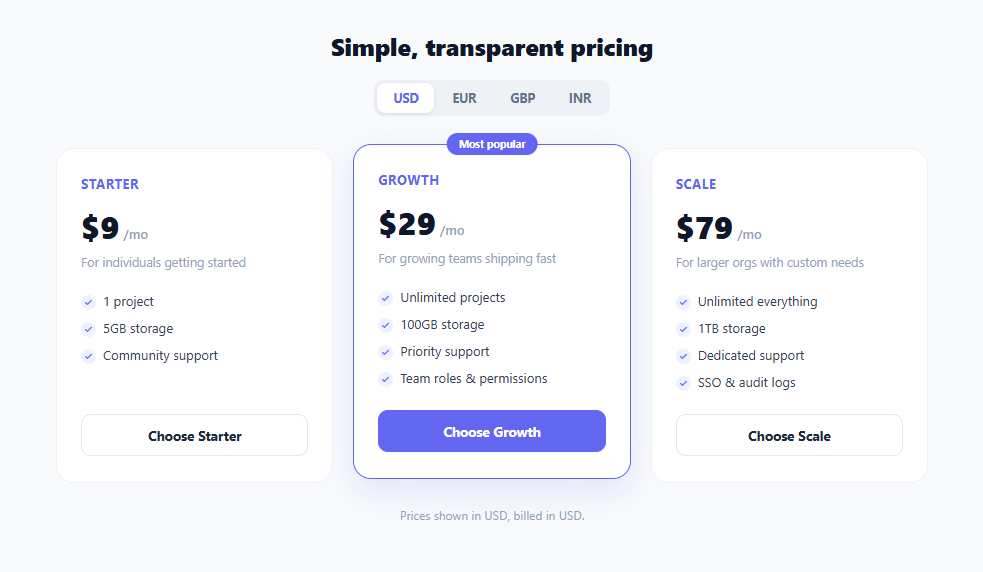
International SaaS pricing pages routinely show prices in a visitor's local currency to reduce the mental friction of converting an unfamiliar figure before deciding to buy — a shopper in Mumbai reads ₹749 far faster than $9.00. This snippet builds a working currency switcher for a three-tier pricing table: a segmented control lets the user pick USD, EUR, GBP, or INR, and every card's displayed price updates simultaneously using a small hardcoded exchange-rate table and locale-correct currency formatting.
Storing one source of truth per plan
Each .plan-card element carries its true price as a data-base-price attribute in US dollars (e.g. data-base-price="29"), which is the single source of truth the switcher always converts *from*, regardless of which currency is currently displayed. This matters because repeatedly converting a previously-converted price (EUR back to GBP, for instance) compounds rounding error — always recomputing from the original USD base avoids that entirely.
A small rate table and Intl.NumberFormat
The RATES object maps each supported currency code to an illustrative conversion rate and an appropriate locale string (en-US, de-DE, en-GB, en-IN). formatPrice() multiplies the USD base by the target rate, rounds to a whole number for clean display, and hands the result to Intl.NumberFormat(locale, { style: 'currency', currency, maximumFractionDigits: 0 }). This single built-in browser API — no library, no manual symbol lookup table — correctly handles everything locale-specific about currency display: the right symbol ($, €, £, ₹), its position relative to the digits (prefix in most locales, but placement and spacing rules genuinely differ), thousands-grouping conventions, and decimal separators. Hardcoding a symbol-and-concatenate approach ('$' + amount) would get every one of those details wrong for at least one of the four supported currencies.
Updating every card at once
Clicking a currency option calls applyCurrency(currency), which iterates every .plan-card, reads its base price, and rewrites the .price-amount text via formatPrice() — all three cards update together in a single pass, so the pricing table never shows a mix of currencies mid-transition. A brief opacity fade (amountEl.style.opacity) on each price during the swap gives a small moment of visual feedback that the numbers actually changed, rather than an instant, easy-to-miss text swap.
The billing disclosure — a small detail with outsized trust impact
Most SaaS billing systems still charge the customer's card in a single base currency (commonly USD) even when the marketing site *displays* prices in the visitor's local currency for convenience — the local-currency figure is an estimate, and the actual charge amount and any bank-side conversion fee depend on the card issuer's own exchange rate at the time of the transaction. Silently showing a EUR price with no clarification about what currency will actually be charged is a subtle trust violation that surfaces painfully at the moment a customer sees an unexpected amount on their statement. This snippet surfaces that reality directly: the disclosure line beneath the pricing grid reads "Prices shown in EUR, billed in USD. Your bank may apply its own conversion rate." whenever a non-USD currency is selected — a small piece of copy that meaningfully improves billing transparency and reduces support tickets and chargebacks from surprised customers.
Why this matters for 2026 trust-driven UX
Transparent, honest pricing disclosure is a core pillar of trust-driven UX: showing a number without the context of what actually gets charged is a dark pattern by omission, even if unintentional. Pairing a genuinely useful convenience feature (localized price display) with an equally visible disclosure about the underlying billing currency is the correct way to implement this pattern — convenience without hidden surprises.
Step by step
How to Use
- 1Click a currency option to switchThe #currency-switch segmented control listens for clicks via event delegation. Clicking any .currency-opt button calls applyCurrency(currency), which updates the .active class and re-renders every card's price.
- 2Understand the base-price data attributeEach .plan-card stores its true USD price as data-base-price (e.g. data-base-price="29"). formatPrice() always converts from this original USD figure, never from a previously displayed currency, to avoid compounding rounding error.
- 3See the live Intl.NumberFormat conversionformatPrice(baseUsd, currency) multiplies the base by RATES[currency].rate and formats the result with new Intl.NumberFormat(locale, { style: "currency", currency }) — producing correctly symbol-placed, locale-formatted output like €26 or ₹2,409 with zero manual string concatenation.
- 4Read the billing disclosure updateSwitching away from USD updates #billing-disclosure to explicitly state prices are billed in USD regardless of display currency, via the ternary inside applyCurrency(). This is a required transparency detail, not just a stylistic footnote.
- 5Add a new currencyAdd an entry to the RATES object with a rate and matching Intl locale string, e.g. JPY: { rate: 147.2, locale: "ja-JP" }, and add a matching <button class="currency-opt" data-currency="JPY">JPY</button> inside #currency-switch.
- 6Connect to a live exchange-rate APIReplace the hardcoded RATES object with rates fetched from a currency API (refreshed periodically and cached, e.g. hourly) so displayed conversions stay accurate rather than drifting from real market rates over time.
Real-world uses
Common Use Cases
Got questions?
Frequently Asked Questions
Most SaaS billing providers (Stripe, Paddle, and similar) settle merchant payouts in a single base currency, and many merchants choose to charge customers in that same base currency to avoid holding multi-currency balances and reconciling exchange-rate exposure. The local-currency price shown on the page is a convenience estimate to help the visitor understand roughly what they'll pay in familiar terms — the disclosure line makes this explicit so there's no surprise on the customer's actual statement.
Currency formatting rules genuinely differ by locale and currency: symbol placement (before vs. after the number), spacing, thousands-grouping characters (comma vs. period vs. space), and decimal conventions are not the same across USD, EUR, GBP, and INR. Intl.NumberFormat(locale, { style: 'currency', currency }) is a built-in, zero-dependency browser API that handles all of this correctly per the CLDR (Unicode Common Locale Data Repository) standard, which a manual string-concatenation approach would get wrong for at least one supported currency.
This snippet keeps the rate table static and clearly commented as illustrative to keep the demo self-contained with no network dependency. In production, hardcoded rates will drift from real market rates over time and should be replaced with rates fetched periodically from a currency-exchange API (refreshed hourly or daily is typical for a marketing pricing page, since sub-minute freshness isn't necessary for display-only estimates) and cached to avoid rate-limiting a live API on every page load.
Always convert from a single, unchanging source-of-truth value — this snippet stores the true USD price in each card's data-base-price attribute and recomputes formatPrice(baseUsd, currency) fresh from that original value on every switch, rather than converting the currently-displayed number again. Converting an already-converted, already-rounded number repeatedly (USD to EUR, then that EUR figure to GBP) compounds rounding error and can visibly drift from the correct value after a few switches.
Many production pricing pages default to a geolocation-based guess (via IP lookup or the Accept-Language header) rather than always defaulting to USD, since most visitors never manually change the currency switcher even when a more relevant option is available. If you add this, still leave the switcher visible and interactive — some visitors travel, use VPNs, or simply prefer a different display currency than their detected region.