
Rhythm Tap Game – Free HTML, CSS & JS Snippet with Combos
Rhythm Tap Game · Games · Plain HTML, CSS & JS · Live preview
For supporters
Source Code
Want the source code?
Play the game for free. Become a WebDevPuneet supporter to unlock the complete HTML, CSS and JavaScript source code, the exports (HTML, React, Vue, Angular, Tailwind) and Fork.
Extend with AI
Take This Snippet Further With AI
The AI prompt for this one is for Patreon supporters ($3 a month), along with a site with no ads. Supporters enter the passcode once and it is remembered in this browser.
What's included
Features
About this UI Snippet
Rhythm Tap Game — Falling Notes, Combo Multipliers, Synth Sound & Rank Grades
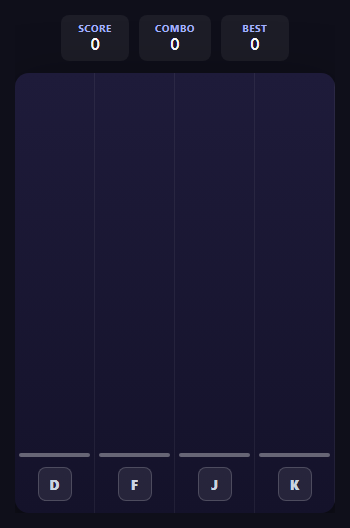
Rhythm games boil down to one core mechanic done well: judging how close a player's input is to a moving target in time, then turning that closeness into a graded, satisfying result. This snippet is a four-lane falling-note rhythm game with no audio files and no libraries: requestAnimationFrame, delta-time movement, a nearest-note matching algorithm, a tiny Web Audio synth and a handful of CSS animations that make every hit feel good.
Falling notes with a rising difficulty curve
Every note is a small div inside its lane's track, advanced each frame by speed * dt, where dt is the real elapsed time since the previous frame. This is the same delta-time approach as the Flap & Dodge Obstacle Game, so fall speed is constant on any refresh rate. Both speed and the gap between spawns are interpolated from the share of notes already spawned, so a 40-note run starts gentle and ends fast. After the first quarter of the run, a spawn can also drop a second note in a different lane (a chord), and pickLane() never allows three notes in a row on the same lane.
Judging a hit: nearest note, graded by distance
When a lane is pressed, laneKeyDown() scans every unhit note in that lane and picks the one whose center is closest to the center of the hit line. Within GOOD_WINDOW it counts as a hit, and within the tighter PERFECT_WINDOW it becomes a Perfect. A note that slides past the window unhit is registered as a Miss on the next frame by the game loop. Pressing a lane with no note nearby is a harmless air tap.
Combo multiplier, heat and milestones
Every consecutive hit raises the combo, and each 10 hits raises the multiplier (up to x4), which scales the 100 or 50 points a Perfect or Good is worth. The multiplier badge bumps when it increases, the stage glow changes colour through a data-heat attribute, and combos of 10, 20, 30 and 40 trigger a callout and a short arpeggio. A Miss resets the combo, drops the multiplier back to x1 and shakes the stage.
Sound and juice, no assets required
Each lane is tuned to a note of a C major chord (C4, E4, G4, C5), and tone() plays it through an OscillatorNode and a GainNode with a quick decay, so every hit adds to a melody. Perfect hits add an octave sparkle, misses play a falling sawtooth, and a mute button turns everything off. Visual feedback comes from lane colours, a glow on the pressed lane, particle sparks created and removed per hit, and a 3-2-1-GO countdown.
Ending the run and ranking the player
The run ends when all 40 notes have been spawned and resolved. gradeFor() turns accuracy and the share of Perfects into an S, A, B, C or D rank, shown with the score, Perfect/Good/Miss breakdown and best combo. The best combo is saved to localStorage (inside a try/catch so it also works in sandboxed iframes), and a "New best combo!" line appears when it was beaten.
Step by step
How to Use
- 1Start a runClick "Start". A 3-2-1-GO countdown plays, then notes begin falling toward the hit line in four colour-coded lanes.
- 2Play the lanesThe lanes are mapped to D, F, J and K, shown as key caps at the bottom. On a touch screen, tap the lane itself. Each lane plays its own note when you hit it, so you make the music.
- 3Time your hitsPress the lane as a note crosses the hit line. laneKeyDown() finds the closest unhit note in that lane and grades it Perfect or Good, with sparks and a flash on the lane.
- 4Build the multiplierConsecutive hits grow your combo. Every 10 hits raises the multiplier up to x4, the stage glow gets hotter and milestone callouts like "On fire!" appear.
- 5Survive the ramp-upNotes get faster and closer together as the run progresses, and chords (two notes at once) start appearing. A missed note resets your combo and multiplier and shakes the stage.
- 6Check your rankAfter all 40 notes, you get an S to D rank, your Perfect/Good/Miss breakdown, accuracy and best combo, which is saved with localStorage.
Real-world uses
Common Use Cases
Got questions?
Frequently Asked Questions
laneKeyDown() finds the closest unhit note in the pressed lane by comparing the center of each note with the center of the hit line. Within PERFECT_WINDOW (16px) it is a Perfect worth 100 points times the multiplier, within GOOD_WINDOW (34px) it is a Good worth 50 times the multiplier. If no note in that lane is inside GOOD_WINDOW, the press is an air tap with no penalty.
A Miss is only registered when a note slides past the hit line unhit, checked every frame in the game loop. Pressing a lane with no note in range just plays a quiet note, which keeps the lanes feeling like an instrument and avoids punishing exploratory taps.
tone() creates an OscillatorNode and a GainNode with the Web Audio API, sets a frequency, fades the gain to near zero and stops the oscillator. Each lane has its own frequency from LANE_FREQS (C4, E4, G4 and C5). The AudioContext is created inside the Start click so browsers allow sound, and the mute button simply makes tone() return early.
Each frame the loop computes t as the share of notes already spawned, then interpolates speed between BASE_SPEED and MAX_SPEED and the spawn gap between BASE_INTERVAL and MIN_INTERVAL. Change those four constants, or TOTAL_NOTES, to make the run easier, harder or longer. Chords are added in spawnStep() once t passes 0.25.
When a new record is reached, saveBest() writes it to localStorage under rhythm-tap-best-combo. Accessing localStorage throws a SecurityError in sandboxed iframes and some private modes, so both loadBest() and saveBest() are wrapped in try/catch. If storage is blocked, the game still runs and just does not remember the best combo.
Yes. Add a key to LANE_KEYS, a colour to LANE_COLORS and a frequency to LANE_FREQS, then duplicate a .rt-lane block in the HTML with the next track id, a --c colour and a key label, and extend the tracks array. Replace the 4 in pickLane() and spawnStep() with your lane count.