





Scroll-Scrubbed GLB Motion Trail — Free GSAP ScrollTrigger + Three.js Skeletal Animation
Scroll-Scrubbed GLB Motion Trail · Scroll · Plain HTML, CSS & JS · Live preview
Copy & paste
Source Code
<section class="gmt-intro"><h1>Scroll to scrub a real skeletal animation with a live motion trail</h1><p>Two translucent "ghost" poses trail behind the current scroll position, sampled straight from the same real glTF animation clip.</p></section>
<section class="gmt-pin" id="gmtPin">
<canvas id="gmtCanvas"></canvas>
<div class="gmt-hud">
<div class="gmt-bar"><div class="gmt-bar-fill" id="gmtBarFill"></div></div>
<div class="gmt-label" id="gmtLabel">Frame 0%</div>
</div>
<div class="gmt-hint">Drag to orbit · plain scroll always scrolls the page · Ctrl/Cmd + scroll to zoom</div>
<div class="gmt-zoom">
<span class="gmt-zoom-label">+</span>
<input type="range" id="gmtZoom" class="gmt-zoom-slider" min="0" max="100" step="1" />
<span class="gmt-zoom-label">−</span>
</div>
</section>
<section class="gmt-outro"><p>End of the animation clip — scroll back up to rewind the trail.</p></section>*{box-sizing:border-box;margin:0;padding:0}
body{font-family:system-ui,-apple-system,sans-serif;color:#fff;background:#0a0b12}
.gmt-intro,.gmt-outro{min-height:70vh;display:flex;flex-direction:column;justify-content:center;align-items:center;text-align:center;gap:10px;padding:24px}
.gmt-intro h1{font-size:clamp(28px,6vw,50px);letter-spacing:-.02em}
.gmt-intro p,.gmt-outro p{color:#9aa0b8;font-size:15px;max-width:460px}
.gmt-pin{position:relative;height:100vh;overflow:hidden;background:radial-gradient(60% 60% at 50% 55%,#1a1330,#0a0b12)}
#gmtCanvas{display:block;width:100%;height:100%;cursor:grab}
#gmtCanvas:active{cursor:grabbing}
.gmt-hud{position:absolute;left:50%;bottom:30px;transform:translateX(-50%);display:flex;flex-direction:column;align-items:center;gap:8px;width:min(320px,80vw)}
.gmt-bar{width:100%;height:5px;border-radius:999px;background:rgba(255,255,255,.14);overflow:hidden}
.gmt-bar-fill{width:0%;height:100%;background:linear-gradient(90deg,#c084fc,#7c3aed);border-radius:999px}
.gmt-label{font-size:12px;font-weight:700;letter-spacing:.06em;text-transform:uppercase;color:#e9d5ff}
.gmt-hint{position:absolute;top:24px;left:50%;transform:translateX(-50%);font-size:12px;font-weight:600;color:#c9c3e0;background:rgba(12,10,20,.55);padding:8px 16px;border-radius:999px;backdrop-filter:blur(6px);border:1px solid rgba(255,255,255,.08)}
.gmt-zoom{position:absolute;right:22px;top:74px;bottom:74px;width:34px;display:flex;flex-direction:column;align-items:center;gap:8px;background:rgba(12,10,20,.55);border:1px solid rgba(255,255,255,.1);border-radius:999px;padding:10px 0;backdrop-filter:blur(6px)}
.gmt-zoom-label{font-size:13px;font-weight:700;color:#c9c3e0;line-height:1;user-select:none}
.gmt-zoom-slider{flex:1;width:6px;-webkit-appearance:slider-vertical;writing-mode:vertical-lr;direction:rtl;accent-color:#c084fc;cursor:pointer}gsap.registerPlugin(ScrollTrigger);
const canvas = document.getElementById('gmtCanvas');
const barFill = document.getElementById('gmtBarFill');
const label = document.getElementById('gmtLabel');
const renderer = new THREE.WebGLRenderer({ canvas, antialias: true, alpha: true });
renderer.setPixelRatio(Math.min(window.devicePixelRatio, 2));
const scene = new THREE.Scene();
const camera = new THREE.PerspectiveCamera(45, 1, 0.1, 100);
camera.position.set(2.2, 1.5, 3.0);
// OrbitControls only ever moves the CAMERA. Scroll, below, only ever
// scrubs each rig's own AnimationMixer time. Two completely separate
// systems acting on two completely separate things, so dragging to orbit
// and scrolling to scrub the trail never need any coordination code.
const controls = new THREE.OrbitControls(camera, renderer.domElement);
controls.enableDamping = true;
controls.dampingFactor = 0.08;
controls.target.set(0, 0.9, 0);
controls.minDistance = 1.4;
controls.maxDistance = 9;
// OrbitControls' own wheel-zoom is turned off on purpose: left on, it calls
// preventDefault() on every wheel event over the canvas — including a plain
// scroll — which would silently swallow the page scroll this whole demo
// depends on. Zoom is reimplemented below as an explicit, opt-in gesture
// (a slider, and Ctrl/Cmd + scroll) instead of hijacking the default wheel.
controls.enableZoom = false;
const zoomSlider = document.getElementById('gmtZoom');
function setZoomDistance(distance) {
const clamped = THREE.MathUtils.clamp(distance, controls.minDistance, controls.maxDistance);
const offset = camera.position.clone().sub(controls.target);
offset.setLength(clamped || 0.001);
camera.position.copy(controls.target).add(offset);
const t = (clamped - controls.minDistance) / (controls.maxDistance - controls.minDistance);
zoomSlider.value = String(Math.round((1 - t) * 100));
}
setZoomDistance(camera.position.distanceTo(controls.target));
zoomSlider.addEventListener('input', () => {
const t = 1 - Number(zoomSlider.value) / 100;
setZoomDistance(controls.minDistance + t * (controls.maxDistance - controls.minDistance));
});
canvas.addEventListener('wheel', (e) => {
if (!e.ctrlKey && !e.metaKey) return; // plain scroll always passes through to the page
e.preventDefault();
const current = camera.position.distanceTo(controls.target);
setZoomDistance(current + e.deltaY * 0.01);
}, { passive: false });
scene.add(new THREE.AmbientLight(0x453a66, 0.7));
const key = new THREE.DirectionalLight(0xffffff, 2.0);
key.position.set(3, 5, 4);
scene.add(key);
const fill = new THREE.DirectionalLight(0xc084fc, 0.5);
fill.position.set(-3, 1, -2);
scene.add(fill);
const ground = new THREE.Mesh(
new THREE.CircleGeometry(3, 48),
new THREE.MeshStandardMaterial({ color: 0x181022, roughness: 1 })
);
ground.rotation.x = -Math.PI / 2;
scene.add(ground);
// Three rigs sharing one clip: the live rig (fully opaque, driven by the
// current scroll position) plus two "ghost" rigs offset slightly earlier
// in the same clip, rendered translucent — a real, readable motion trail
// built from the actual baked animation data, not a fake afterimage shader.
const RIG_COUNT = 3;
const GHOST_LAG = 0.045; // fraction of the clip's duration each ghost trails by
const rigs = []; // { mixer, action, opacity }
let clipDuration = 1;
let ready = false;
// Khronos' official sample-asset "Cesium Man" — a real, freely-licensed
// .glb with an embedded skeletal walk/run AnimationClip, chosen here
// specifically as a different animated asset than the Fox used in the
// turntable-family walk-cycle snippet, so a motion trail has clean,
// full-body baked motion to sample from at several trailing offsets.
const MODEL_URL = 'https://cdn.jsdelivr.net/gh/KhronosGroup/glTF-Sample-Assets@main/Models/CesiumMan/glTF-Binary/CesiumMan.glb';
const loader = new THREE.GLTFLoader();
loader.load(
MODEL_URL,
(gltf) => {
const sourceScene = gltf.scene;
const clip = gltf.animations && gltf.animations[0];
// Auto-fit rather than a hardcoded scale factor: different .glb exports
// (and loader versions) can decode the same source asset at wildly
// different raw sizes, so measuring the loaded geometry and scaling it
// to a known target height is far more reliable than guessing a number.
const box = new THREE.Box3().setFromObject(sourceScene);
const size = box.getSize(new THREE.Vector3());
const maxDim = Math.max(size.x, size.y, size.z) || 1;
const targetScale = 1.8 / maxDim;
for (let i = 0; i < RIG_COUNT; i++) {
// THREE.SkeletonUtils.clone() is required (rather than Object3D's own
// .clone()) for skinned meshes: it correctly rebuilds each clone's own
// independent skeleton and bone bindings, so each rig's mixer can be
// scrubbed to a different pose without the others snapping in sync.
const rigScene = THREE.SkeletonUtils.clone(sourceScene);
rigScene.scale.setScalar(targetScale);
const fitted = new THREE.Box3().setFromObject(rigScene);
rigScene.position.y += -fitted.min.y;
const isGhost = i > 0;
rigScene.traverse((node) => {
if (node.isMesh) {
node.material = node.material.clone();
node.material.transparent = true;
node.material.opacity = isGhost ? 0.22 - i * 0.05 : 1;
node.material.color.lerp(new THREE.Color(0xc084fc), isGhost ? 0.55 : 0);
node.material.depthWrite = !isGhost;
}
});
scene.add(rigScene);
const mixer = new THREE.AnimationMixer(rigScene);
let action = null;
if (clip) {
clipDuration = clip.duration || 1;
action = mixer.clipAction(clip);
action.play();
// Left unpaused deliberately: pausing an action also blocks Three.js's
// internal pose evaluation on setTime(), not just its own per-frame
// time advance. The render loop below never calls mixer.update(delta) —
// scroll's mixer.setTime() calls remain the only thing driving it.
}
rigs.push({ mixer, action, lag: i * GHOST_LAG });
}
ready = true;
},
undefined,
(err) => {
// Honest failure state: if the CDN model can't load, show a simple
// placeholder so the scene is never just an empty void. The motion
// trail HUD still works since it reads scroll progress directly.
console.error('GLB failed to load, showing a placeholder instead:', err);
const placeholder = new THREE.Mesh(
new THREE.CapsuleGeometry(0.35, 1.1, 8, 16),
new THREE.MeshStandardMaterial({ color: 0xc084fc, roughness: 0.5 })
);
placeholder.position.y = 0.9;
scene.add(placeholder);
}
);
function setClipTime(progress) {
rigs.forEach((rig) => {
if (!rig.action) return;
const t = THREE.MathUtils.clamp(progress - rig.lag, 0, 1) * clipDuration;
// Setting the mixer's time directly (rather than advancing it with
// update(delta) on a real-time loop) turns each rig into an independent
// scrubbable pose sampler — scroll progress maps straight onto a point
// inside the clip, offset per rig, so the trail always reads correctly
// whether scrolling forward or back.
rig.mixer.setTime(t);
});
}
ScrollTrigger.create({
trigger: '#gmtPin',
start: 'top top',
end: '+=2800',
pin: true,
scrub: 0.35,
onUpdate(self) {
barFill.style.width = (self.progress * 100).toFixed(0) + '%';
label.textContent = 'Frame ' + Math.round(self.progress * 100) + '%';
if (!ready) return;
setClipTime(self.progress);
},
});
function resize() {
const w = canvas.clientWidth, h = canvas.clientHeight;
renderer.setSize(w, h, false);
camera.aspect = w / h;
camera.updateProjectionMatrix();
}
function animate() {
requestAnimationFrame(animate);
controls.update();
renderer.render(scene, camera);
}
resize();
window.addEventListener('resize', resize);
animate();Extend with AI
Take This Snippet Further With AI
The AI prompt for this one is for Patreon supporters ($3 a month, 7 days free), along with a site with no ads. Supporters enter the passcode once and it is remembered in this browser.
What's included
Features
About this UI Snippet
Scroll-Scrubbed GLB Motion Trail — Three Independent Rigs, One Shared Clip
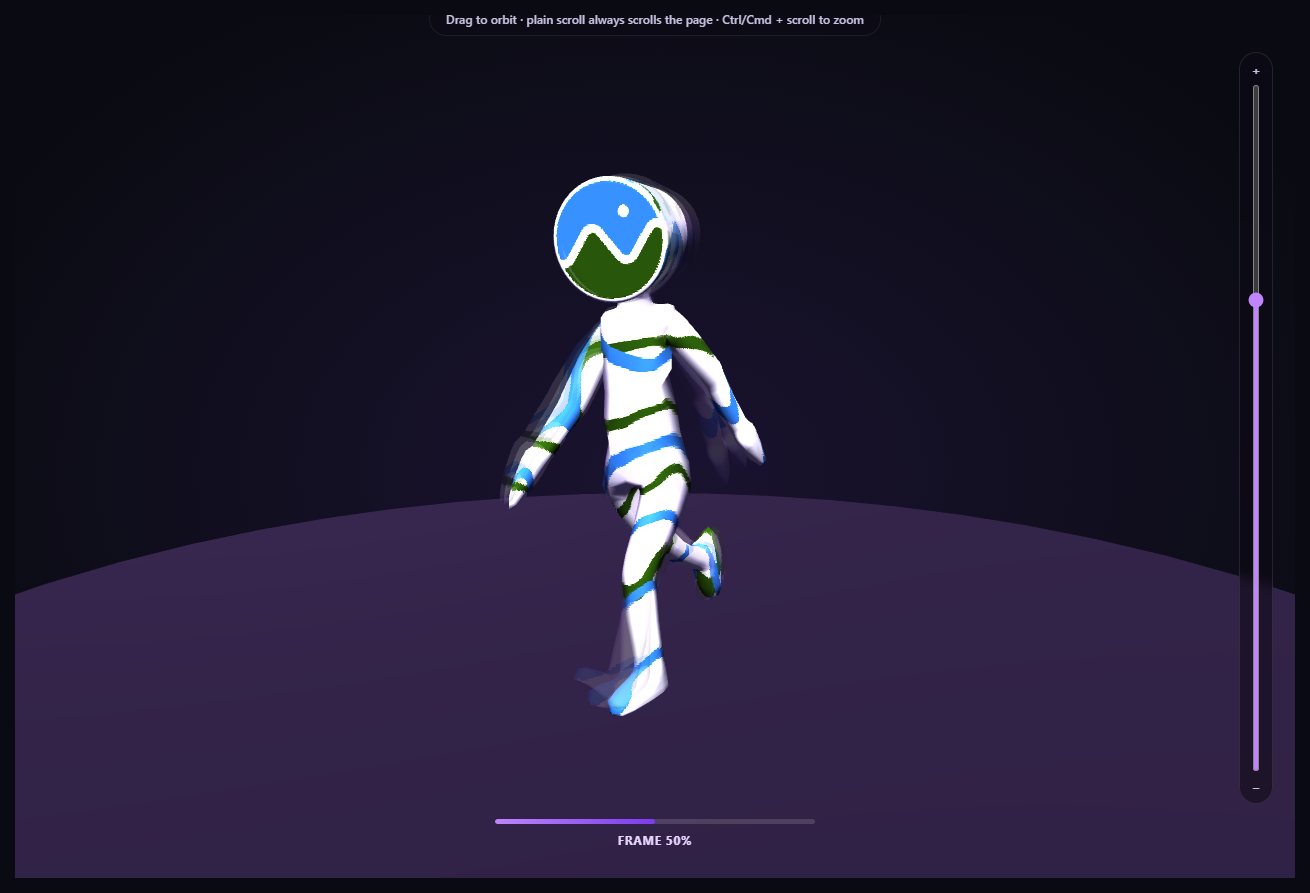
A single scrubbed skeletal pose reads clearly, but it loses all sense of *motion* — you can't tell which way a limb was moving a moment ago. This snippet fixes that by cloning the same rigged model three times, giving each clone its own independent AnimationMixer, and scrubbing all three from the same scroll position at slightly staggered offsets — producing a real, readable motion trail built entirely from genuine baked animation data, not a fake shader-based afterimage effect.
Why SkeletonUtils.clone(), not Object3D.clone()
A skinned mesh's pose depends on its skeleton — a hierarchy of bone objects the mesh's vertices are weighted against. Three.js's plain Object3D.clone() performs a shallow clone that does *not* correctly rebuild an independent skeleton and re-bind the cloned mesh to it; all clones would end up sharing (and fighting over) the same bones. THREE.SkeletonUtils.clone() — loaded here as a fourth Three.js addon script — exists specifically to solve this, producing a real, independently-posable rig from a single source scene.
Three mixers, one shared clip
Each of the three cloned rigs gets its own THREE.AnimationMixer and its own clipAction() built from the exact same loaded AnimationClip — the animation *data* is shared (there's only one clip, decoded once), but each mixer's playback time is entirely independent, which is what lets the trailing ghosts sit at a different point in the clip than the live rig.
mixer.setTime(), offset per rig
setClipTime(progress) calls rig.mixer.setTime() for all three rigs on every scroll update, but subtracts each rig's own lag value (a small fraction of the clip's duration) from the current scroll progress before converting to clip time. The live rig has lag = 0; the two ghosts trail 4.5% and 9% of the clip behind it — close enough to read as a genuine, connected motion trail rather than three disconnected poses.
Translucent, non-depth-writing ghost materials
Each ghost rig's mesh materials are cloned (never shared with the live rig or each other), tinted toward purple, and set to a low opacity with depthWrite = false — the last part matters because a fully opaque, depth-writing ghost mesh directly overlapping the live mesh would produce ugly z-fighting artifacts; disabling depth writes on the translucent ghosts lets them blend cleanly behind and around the live pose instead.
The unpaused-action rule still applies, per rig
Every rig's action.play() call is left unpaused for the same reason as the single-rig walk-cycle snippet: pausing an AnimationAction also blocks Three.js's internal pose evaluation inside setTime(), not just its own per-frame advance. Since the render loop never calls any rig's mixer.update(delta), nothing auto-advances any of the three rigs on its own — scroll's setTime() calls remain the only thing driving all three.
A different asset than the Fox turntable snippet, deliberately
This snippet loads Khronos' Cesium Man sample asset rather than the Fox used in scroll-scrubbed GLB walk cycle — a different real skeletal rig and clip, specifically to demonstrate the technique generalizes rather than being tied to one specific sample file.
Zoom is opt-in, not a hijacked scroll wheel
OrbitControls' built-in wheel-zoom is turned off, with zoom reimplemented as a slider plus Ctrl/Cmd + scroll, exactly like every other snippet in this family, so a plain scroll always advances the page.
Customizing it
Adjust RIG_COUNT and GHOST_LAG for a longer or tighter trail, swap MODEL_URL for any other animated .glb, or pair this with scroll GLB camera flythrough for a longer scroll narrative around a real animated character.
Step by step
How to Use
- 1Add all six CDN scriptsthree.min.js, GLTFLoader.js, OrbitControls.js, SkeletonUtils.js, gsap, and ScrollTrigger.
- 2Paste HTML, CSS, and JSThe Cesium Man rig loads at frame 0, with two faint ghost poses layered behind it.
- 3Scroll into the pinned sectionAll three rigs scrub forward together, the ghosts trailing slightly behind.
- 4Scroll back upThe whole trail scrubs backward exactly, since setTime is direction-agnostic.
- 5Drag on the canvas at any pointThe camera orbits freely and independently — the trail keeps scrubbing normally.
- 6Use the slider or Ctrl/Cmd + scroll to zoomPlain scroll always advances the page; zoom is a separate, opt-in gesture.
- 7Swap in your own animated .glbUpdate MODEL_URL — SkeletonUtils.clone() works on any skinned rig.
Real-world uses
Common Use Cases
SkeletonUtils.clone() giving each of three rigs its own independent skeleton.mixer.setTime() mapped directly from scroll progress.Got questions?
Frequently Asked Questions
A skinned mesh's pose is driven by its skeleton — a hierarchy of bone Object3D instances the mesh's vertices are weighted against. Three.js's built-in Object3D.clone() only performs a shallow copy that does not correctly rebuild an independent skeleton or re-bind the cloned mesh's skin to it, so multiple clones made that way would all end up sharing (and visually fighting over) the exact same bones. SkeletonUtils.clone(), loaded as its own addon script, exists specifically to produce a real, independently-posable rig from one source scene.
Each rig stores a small lag value — a fixed fraction of the clip's total duration. Every scroll update calls mixer.setTime() on all three rigs using the same current scroll progress, but subtracts that rig's own lag before converting to clip time first. Because all three lag values are fixed fractions of the same clip, the trail's spacing stays visually consistent throughout the entire scrub, whether scrolling forward or backward.
The ghost rigs occupy nearly the same 3D space as the live rig, just slightly offset in pose. If a translucent ghost mesh still wrote to the depth buffer as if it were opaque, it would incorrectly occlude parts of the live mesh behind it, producing visible z-fighting and flickering artifacts. Disabling depth writes on the ghost materials lets their transparency blend correctly without interfering with what should render in front of or behind them.
Deliberately, to demonstrate the multi-rig scrubbing and SkeletonUtils cloning technique generalizes to any skinned glTF character rig, not just one specific sample asset already used elsewhere in this snippet family. Cesium Man ships its own baked AnimationClip with clean, readable full-body motion, which is what a motion trail needs to look convincing.
Set up the renderer, scene, GLTFLoader call, OrbitControls, and the rigs array (with each rig's mixer, action, and lag) inside a mount effect, keeping them in refs so the ScrollTrigger onUpdate callback can reach current values. Call controls.dispose(), renderer.dispose(), and the ScrollTrigger instance's .kill() in the cleanup function; the mixers themselves need no explicit disposal beyond letting them be garbage-collected.