





Scroll-Scrubbed GLB Walk Cycle — Free GSAP ScrollTrigger + Three.js Skeletal Animation
Scroll-Scrubbed GLB Walk Cycle · Scroll · Plain HTML, CSS & JS · Live preview
Copy & paste
Source Code
<section class="gfw-intro"><h1>Scroll to scrub a real skeletal animation, frame by frame</h1><p>This fox's embedded walk-cycle clip is driven directly by scroll position — drag to orbit the camera independently, any time.</p></section>
<section class="gfw-pin" id="gfwPin">
<canvas id="gfwCanvas"></canvas>
<div class="gfw-hud">
<div class="gfw-bar"><div class="gfw-bar-fill" id="gfwBarFill"></div></div>
<div class="gfw-label" id="gfwLabel">Frame 0%</div>
</div>
<div class="gfw-hint">Drag to orbit · plain scroll always scrolls the page · Ctrl/Cmd + scroll to zoom</div>
<div class="gfw-zoom">
<span class="gfw-zoom-label">+</span>
<input type="range" id="gfwZoom" class="gfw-zoom-slider" min="0" max="100" step="1" />
<span class="gfw-zoom-label">−</span>
</div>
</section>
<section class="gfw-outro"><p>End of the walk cycle — scroll back up to rewind it.</p></section>*{box-sizing:border-box;margin:0;padding:0}
body{font-family:system-ui,-apple-system,sans-serif;color:#fff;background:#0c0f0b}
.gfw-intro,.gfw-outro{min-height:70vh;display:flex;flex-direction:column;justify-content:center;align-items:center;text-align:center;gap:10px;padding:24px}
.gfw-intro h1{font-size:clamp(28px,6vw,50px);letter-spacing:-.02em}
.gfw-intro p,.gfw-outro p{color:#9fae8e;font-size:15px;max-width:460px}
.gfw-pin{position:relative;height:100vh;overflow:hidden;background:radial-gradient(60% 60% at 50% 55%,#1a2413,#0c0f0b)}
#gfwCanvas{display:block;width:100%;height:100%;cursor:grab}
#gfwCanvas:active{cursor:grabbing}
.gfw-hud{position:absolute;left:50%;bottom:30px;transform:translateX(-50%);display:flex;flex-direction:column;align-items:center;gap:8px;width:min(320px,80vw)}
.gfw-bar{width:100%;height:5px;border-radius:999px;background:rgba(255,255,255,.14);overflow:hidden}
.gfw-bar-fill{width:0%;height:100%;background:linear-gradient(90deg,#a3e635,#65a30d);border-radius:999px}
.gfw-label{font-size:12px;font-weight:700;letter-spacing:.06em;text-transform:uppercase;color:#d9f99d}
.gfw-hint{position:absolute;top:24px;left:50%;transform:translateX(-50%);font-size:12px;font-weight:600;color:#c8d6b8;background:rgba(12,15,11,.55);padding:8px 16px;border-radius:999px;backdrop-filter:blur(6px);border:1px solid rgba(255,255,255,.08)}
.gfw-zoom{position:absolute;right:22px;top:74px;bottom:74px;width:34px;display:flex;flex-direction:column;align-items:center;gap:8px;background:rgba(12,15,11,.55);border:1px solid rgba(255,255,255,.1);border-radius:999px;padding:10px 0;backdrop-filter:blur(6px)}
.gfw-zoom-label{font-size:13px;font-weight:700;color:#c8d6b8;line-height:1;user-select:none}
.gfw-zoom-slider{flex:1;width:6px;-webkit-appearance:slider-vertical;writing-mode:vertical-lr;direction:rtl;accent-color:#a3e635;cursor:pointer}gsap.registerPlugin(ScrollTrigger);
const canvas = document.getElementById('gfwCanvas');
const barFill = document.getElementById('gfwBarFill');
const label = document.getElementById('gfwLabel');
const renderer = new THREE.WebGLRenderer({ canvas, antialias: true, alpha: true });
renderer.setPixelRatio(Math.min(window.devicePixelRatio, 2));
const scene = new THREE.Scene();
const camera = new THREE.PerspectiveCamera(45, 1, 0.1, 100);
camera.position.set(2.6, 1.6, 3.4);
// OrbitControls only ever moves the CAMERA. Scroll, below, only ever
// scrubs the loaded animation clip's own internal time. Two completely
// separate systems acting on two completely separate things — the same
// conflict-free pattern as the turntable snippet, just applied to a real
// skeletal animation instead of a simple object rotation.
const controls = new THREE.OrbitControls(camera, renderer.domElement);
controls.enableDamping = true;
controls.dampingFactor = 0.08;
controls.target.set(0, 0.5, 0);
controls.minDistance = 1.5;
controls.maxDistance = 9;
// OrbitControls' own wheel-zoom is turned off on purpose: left on, it calls
// preventDefault() on every wheel event over the canvas — including a plain
// scroll — which would silently swallow the page scroll this whole demo
// depends on. Zoom is reimplemented below as an explicit, opt-in gesture
// (a slider, and Ctrl/Cmd + scroll) instead of hijacking the default wheel.
controls.enableZoom = false;
const zoomSlider = document.getElementById('gfwZoom');
function setZoomDistance(distance) {
const clamped = THREE.MathUtils.clamp(distance, controls.minDistance, controls.maxDistance);
const offset = camera.position.clone().sub(controls.target);
offset.setLength(clamped || 0.001);
camera.position.copy(controls.target).add(offset);
const t = (clamped - controls.minDistance) / (controls.maxDistance - controls.minDistance);
zoomSlider.value = String(Math.round((1 - t) * 100));
}
setZoomDistance(camera.position.distanceTo(controls.target));
zoomSlider.addEventListener('input', () => {
const t = 1 - Number(zoomSlider.value) / 100;
setZoomDistance(controls.minDistance + t * (controls.maxDistance - controls.minDistance));
});
canvas.addEventListener('wheel', (e) => {
if (!e.ctrlKey && !e.metaKey) return; // plain scroll always passes through to the page
e.preventDefault();
const current = camera.position.distanceTo(controls.target);
setZoomDistance(current + e.deltaY * 0.01);
}, { passive: false });
scene.add(new THREE.AmbientLight(0x4a5540, 0.7));
const key = new THREE.DirectionalLight(0xfff2d0, 2.0);
key.position.set(3, 5, 4);
scene.add(key);
const fill = new THREE.DirectionalLight(0x86efac, 0.5);
fill.position.set(-3, 1, -2);
scene.add(fill);
const ground = new THREE.Mesh(
new THREE.CircleGeometry(3, 48),
new THREE.MeshStandardMaterial({ color: 0x1c2417, roughness: 1 })
);
ground.rotation.x = -Math.PI / 2;
scene.add(ground);
let mixer = null;
let walkAction = null;
let clipDuration = 1;
// Khronos' official sample-asset "Fox" — a real, freely-licensed .glb with
// an embedded skeletal AnimationClip (a genuine walk cycle baked by an
// artist), chosen specifically because scroll-scrubbing needs a clip with
// enough motion to actually read as a walk when scrubbed frame by frame.
const MODEL_URL = 'https://cdn.jsdelivr.net/gh/KhronosGroup/glTF-Sample-Assets@main/Models/Fox/glTF-Binary/Fox.glb';
const loader = new THREE.GLTFLoader();
loader.load(
MODEL_URL,
(gltf) => {
const fox = gltf.scene;
fox.scale.setScalar(0.018);
scene.add(fox);
if (gltf.animations && gltf.animations.length) {
mixer = new THREE.AnimationMixer(fox);
// The Fox sample ships three clips (Survey, Walk, Run); prefer one
// whose name contains "walk" (case-insensitive), else fall back to
// the first clip so the demo still works if the asset ever changes.
const clip = gltf.animations.find((c) => /walk/i.test(c.name)) || gltf.animations[0];
clipDuration = clip.duration || 1;
walkAction = mixer.clipAction(clip);
walkAction.play();
// Left unpaused deliberately: pausing an action also blocks Three.js's
// internal pose evaluation on setTime(), not just its own per-frame
// time advance. Since the render loop below never calls
// mixer.update(delta), nothing advances the clip on its own anyway —
// scroll's mixer.setTime() calls remain the only thing driving it.
}
},
undefined,
(err) => {
console.error('GLB failed to load, showing a placeholder instead:', err);
const placeholder = new THREE.Mesh(
new THREE.ConeGeometry(0.5, 1, 4),
new THREE.MeshStandardMaterial({ color: 0xf97316, roughness: 0.5 })
);
placeholder.position.y = 0.5;
scene.add(placeholder);
}
);
ScrollTrigger.create({
trigger: '#gfwPin',
start: 'top top',
end: '+=2600',
pin: true,
scrub: 0.35,
onUpdate(self) {
barFill.style.width = (self.progress * 100).toFixed(0) + '%';
label.textContent = 'Frame ' + Math.round(self.progress * 100) + '%';
if (!mixer || !walkAction) return;
// Setting the mixer's time directly (rather than advancing it with
// update(delta) on a real-time loop) is what turns a normal animation
// into a scrubbable one: scroll progress maps straight onto a point
// inside the clip's own duration, so scrolling up plays it backwards.
mixer.setTime(self.progress * clipDuration);
},
});
function resize() {
const w = canvas.clientWidth, h = canvas.clientHeight;
renderer.setSize(w, h, false);
camera.aspect = w / h;
camera.updateProjectionMatrix();
}
function animate() {
requestAnimationFrame(animate);
controls.update();
renderer.render(scene, camera);
}
resize();
window.addEventListener('resize', resize);
animate();Extend with AI
Take This Snippet Further With AI
The AI prompt for this one is for Patreon supporters ($3 a month, 7 days free), along with a site with no ads. Supporters enter the passcode once and it is remembered in this browser.
What's included
Features
About this UI Snippet
Scroll-Scrubbed GLB Walk Cycle — Real Skeletal Animation Driven by Scroll
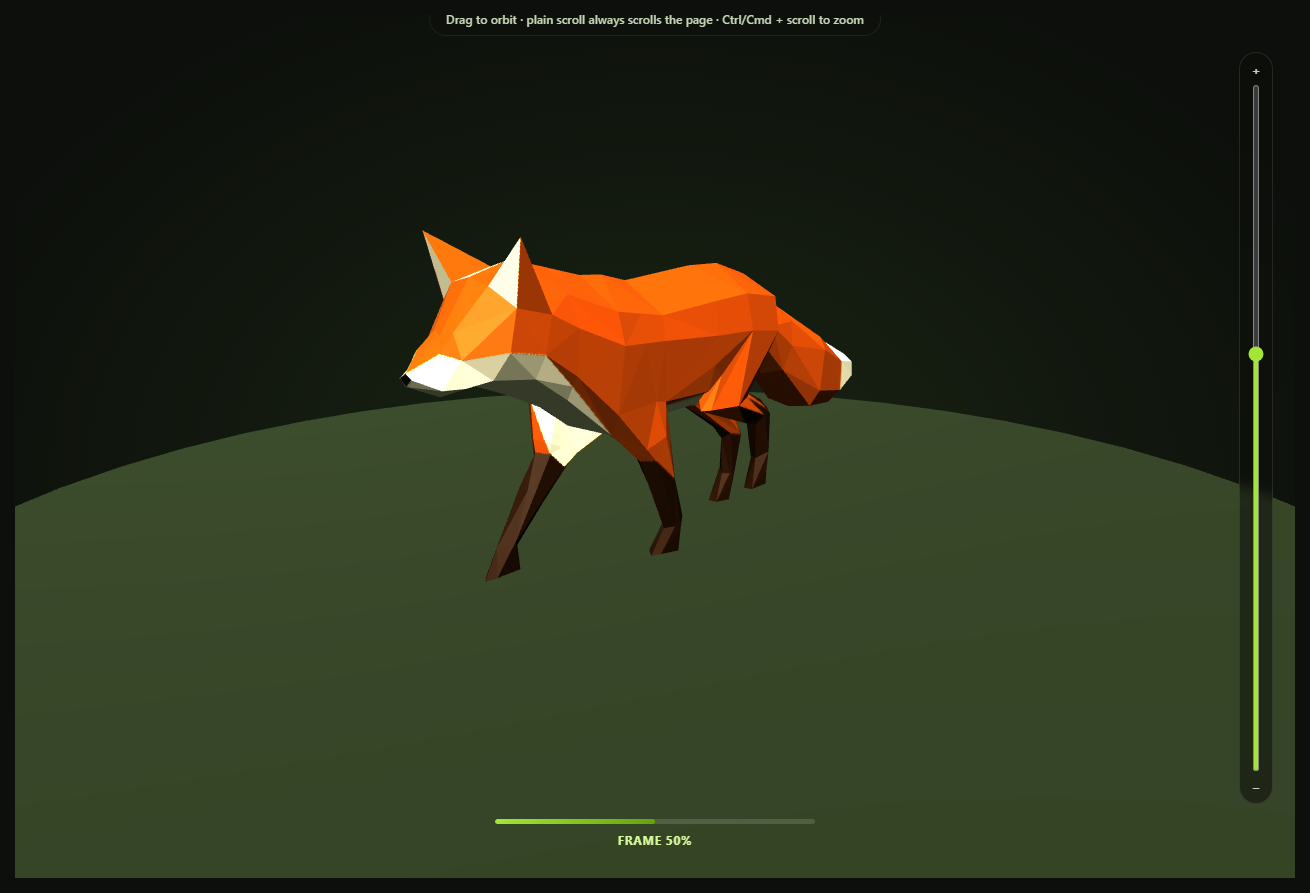
Most "scroll-controls-a-3D-model" demos rotate a static mesh. This one goes a step further: it loads a real glTF model with an embedded, artist-authored skeletal walk-cycle animation, and scrubs that actual animation clip — bones and all — directly from scroll position, frame by frame, forward and backward, while a visitor can still freely orbit the camera by dragging at any moment.
A real AnimationClip, not a fake one
The loaded Fox sample asset ships three baked animation clips (Survey, Walk, Run) as part of the .glb file itself. The snippet picks whichever clip's name matches /walk/i, falling back to the first available clip if the asset's naming ever changes, and builds a THREE.AnimationMixer around it with mixer.clipAction(clip).play(). The action is deliberately left unpaused: Three.js's internal pose evaluation skips a paused action even when it's driven by setTime(), not just its own per-frame advance — and since the render loop below never calls mixer.update(delta), there's no automatic playback to guard against pausing in the first place.
mixer.setTime() is the whole trick
A normal Three.js animation loop calls mixer.update(delta) every frame, advancing playback at real-world speed. This snippet never does that. Instead, ScrollTrigger's onUpdate calls mixer.setTime(progress * clipDuration) — setting the mixer to an exact point inside the clip's own duration, computed straight from scroll progress. Scroll down and the fox walks forward, one bone-pose at a time; scroll back up and the exact same walk cycle plays in reverse, because setTime doesn't care about direction or elapsed real time, only the value you give it.
Object-space animation, camera-space orbiting — no coordination needed
Scroll only ever touches the mixer's internal clip time. OrbitControls only ever touches the camera's position. Neither system reads or writes anything the other owns, so — exactly like the turntable rotation version of this idea — there's no flag, no pause-on-drag handler, no handoff logic required at all. Drag the canvas mid-scroll and the walk cycle keeps scrubbing exactly as scroll dictates, from whatever new angle you chose.
A named, honest fallback if the model fails
If GLTFLoader can't fetch the .glb (offline, CDN outage, blocked request), the real error is logged to the console and a simple placeholder cone stands in, so the scene never silently renders empty. The HUD progress bar and frame-percentage label still work regardless, since they read directly off scroll progress rather than off the model.
Zoom is opt-in, not a hijacked scroll wheel
OrbitControls' built-in wheel-zoom is deliberately turned off (controls.enableZoom = false) — left on, it calls preventDefault() on every wheel event over the canvas, silently swallowing the page scroll this whole demo depends on. Zoom is reimplemented as two explicit, opt-in gestures instead: a vertical slider next to the canvas, and Ctrl/Cmd + scroll wheel (the same convention embedded Google Maps and most map widgets use). Both call the same setZoomDistance() helper, which clamps to controls.minDistance/maxDistance and keeps the slider in sync no matter which input triggered the change.
Customizing it
Swap in any .glb with a baked AnimationClip — the /walk/i clip-name matcher and the mixer.setTime scrubbing logic work unchanged for any skeletal or morph-target animation. Pair it with scroll GLB camera flythrough for the checkpoint-touring variant of this same GLB-plus-scroll family, or scroll-scrubbed GLB turntable for the simplest version.
Step by step
How to Use
- 1Add all five CDN scriptsthree.min.js, GLTFLoader.js, OrbitControls.js, gsap, and ScrollTrigger.
- 2Paste HTML, CSS, and JSThe fox loads standing at frame 0 of its walk cycle.
- 3Scroll into the pinned sectionThe walk cycle plays forward, frame by frame, tied to scroll position.
- 4Scroll back upThe exact same clip scrubs backward, since setTime is direction-agnostic.
- 5Drag on the canvas at any pointThe camera orbits freely and independently — the walk cycle keeps scrubbing normally.
- 6Use the slider or Ctrl/Cmd + scroll to zoomPlain scroll always advances the page; zoom is a separate, opt-in gesture.
- 7Swap in your own animated .glbUpdate MODEL_URL and adjust the clip-name matcher if needed.
Real-world uses
Common Use Cases
mixer.setTime() mapping scroll progress onto exact frames and playback reversing exactly when scrolling up.AnimationClip, compared with the camera approach in scroll GLB helmet camera flythrough.Got questions?
Frequently Asked Questions
Rotating a model only ever changes one transform property (rotation.y). Scrubbing a real AnimationClip means setting the exact playback time of a baked, multi-bone skeletal animation via mixer.setTime() — the fox's legs, tail, and body all pose correctly for that exact instant in the walk cycle, forward or backward, because the animation data itself (not a simple formula) defines the pose at every point in time.
Because here scroll only ever writes to the AnimationMixer's clip time, and OrbitControls only ever writes to the camera's position — two completely separate objects, so there's nothing for the two systems to fight over. The camera-flythrough snippet needs explicit pause-on-drag logic specifically because scroll and OrbitControls both want to control the same camera.position property there. Zoom follows the same discipline: OrbitControls' own wheel-zoom is turned off so a plain scroll always advances the page, and zooming is reimplemented as an explicit slider plus Ctrl/Cmd + scroll.
update(delta) advances animation playback at real-world speed, independent of scroll — useful for a normal looping animation, but not for scrubbing. setTime(t) jumps the mixer directly to an exact point in the clip, which is what lets scroll progress map onto animation progress one-to-one, including playing the clip backward when scrolling up.
The code checks gltf.animations.length before building a mixer at all, so a model with no animations simply renders statically with no errors. If animations exist but none match /walk/i, it falls back to gltf.animations[0] — the first available clip — rather than failing, so the demo keeps working even if the asset's clip names ever change.
Set up the renderer, scene, GLTFLoader call, AnimationMixer, and ScrollTrigger inside a mount effect, keeping the mixer, action, and clipDuration in refs so the onUpdate callback can reach current values. Call controls.dispose(), renderer.dispose(), and the ScrollTrigger instance's .kill() in the cleanup function; the mixer itself needs no explicit disposal beyond letting it be garbage-collected.