





Scroll-Synced Odometer — Free Scroll-Scrubbed Mechanical Digit Roll
Scroll-Synced Odometer · Scroll · Plain HTML, CSS & JS · Live preview
Copy & paste
Source Code
<section class="od-intro"><h1>Scroll ↓</h1><p>Digits roll like a mechanical odometer — but scroll position drives the roll directly, not a timer.</p></section>
<section class="od-wrap" id="odWrap">
  <div class="od-panel">
    <div class="od-label">Total distance traveled</div>
    <div class="od-odometer" id="odOdometer"></div>
    <div class="od-unit">kilometers</div>
  </div>
</section>
<section class="od-outro"><p>Scroll back up — every digit unrolls exactly in reverse.</p></section>*{box-sizing:border-box;margin:0;padding:0}
body{font-family:system-ui,-apple-system,sans-serif;background:#0a0b13;color:#fff}
.od-intro,.od-outro{min-height:70vh;display:flex;flex-direction:column;justify-content:center;align-items:center;text-align:center;gap:10px;padding:24px}
.od-intro h1{font-size:clamp(34px,7vw,64px);letter-spacing:-.02em}
.od-intro p,.od-outro p{color:#9aa0b8;font-size:16px;max-width:480px}
.od-wrap{height:320vh;position:relative}
.od-panel{position:sticky;top:0;height:100vh;display:flex;flex-direction:column;justify-content:center;align-items:center;gap:14px}
.od-label{font-size:13px;font-weight:700;letter-spacing:.14em;text-transform:uppercase;color:#7c8cff}
.od-odometer{display:flex;gap:4px;padding:18px 22px;border-radius:16px;background:linear-gradient(160deg,#171c30,#0e1020);border:1px solid #262d44;box-shadow:0 30px 60px rgba(0,0,0,.4)}
.od-digit{position:relative;width:44px;height:64px;overflow:hidden;border-radius:6px;background:#0a0c18}
.od-digit-strip{position:absolute;top:0;left:0;width:100%;will-change:transform}
.od-digit-strip span{display:flex;align-items:center;justify-content:center;height:64px;font-size:40px;font-weight:800;font-variant-numeric:tabular-nums;color:#e6e8f4}
.od-digit::before,.od-digit::after{content:'';position:absolute;left:0;right:0;height:16px;pointer-events:none;z-index:2}
.od-digit::before{top:0;background:linear-gradient(180deg,#0a0c18,transparent)}
.od-digit::after{bottom:0;background:linear-gradient(0deg,#0a0c18,transparent)}
.od-unit{font-size:13px;color:#8a90a8;letter-spacing:.06em;text-transform:uppercase}(function () {
var wrap = document.getElementById('odWrap');
var odometer = document.getElementById('odOdometer');
var TARGET = 184260; // final displayed number
var digitsStr = String(TARGET);
var DIGIT_HEIGHT = 64;
// Build one reel per digit: a vertical strip showing 0-9 stacked, so
// "rolling" a digit is just translating its strip up.
var strips = [];
for (var i = 0; i < digitsStr.length; i++) {
var digitEl = document.createElement('div');
digitEl.className = 'od-digit';
var strip = document.createElement('div');
strip.className = 'od-digit-strip';
for (var n = 0; n <= 9; n++) {
var span = document.createElement('span');
span.textContent = n;
strip.appendChild(span);
}
digitEl.appendChild(strip);
odometer.appendChild(digitEl);
strips.push({ el: strip, finalDigit: parseInt(digitsStr[i], 10) });
}
var ticking = false;
function update() {
ticking = false;
var rect = wrap.getBoundingClientRect();
var scrollable = rect.height - window.innerHeight;
var progress = scrollable > 0 ? (-rect.top) / scrollable : 0;
progress = Math.max(0, Math.min(1, progress));
// Each digit's roll position is a direct function of scroll progress,
// not a timed animation: at progress p, a digit whose final value is
// finalDigit sits at "position" p * finalDigit reels down from 0,
// so scrolling partway shows the strip partway through its roll and
// scrolling backward reverses it exactly, digit by digit.
strips.forEach(function (d) {
var position = progress * d.finalDigit;
strip_translate(d.el, position);
});
}
function strip_translate(stripEl, position) {
stripEl.style.transform = 'translateY(-' + (position * DIGIT_HEIGHT).toFixed(2) + 'px)';
}
function onScroll() {
if (!ticking) {
ticking = true;
requestAnimationFrame(update);
}
}
window.addEventListener('scroll', onScroll, { passive: true });
window.addEventListener('resize', onScroll);
update();
})();Extend with AI
Take This Snippet Further With AI
The AI prompt for this one is for Patreon supporters ($3 a month, 7 days free), along with a site with no ads. Supporters enter the passcode once and it is remembered in this browser.
What's included
Features
About this UI Snippet
Scroll-Synced Odometer — Digits That Roll in Exact Sync With Scroll
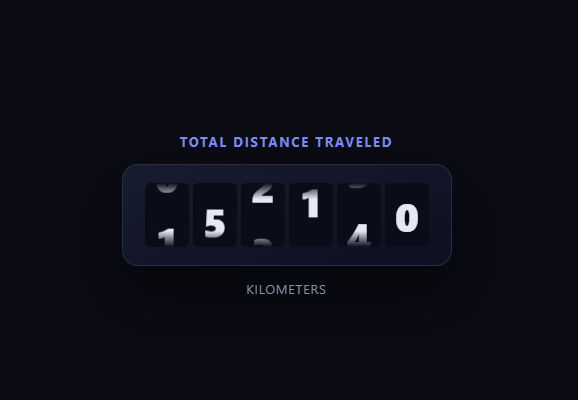
A typical odometer count-up plays over a fixed duration once triggered — press play, watch it spin, done. This one has no duration and no timer at all: each digit's roll position is calculated directly from the current scroll progress on every scroll event, so scrolling exactly a third of the way through the section shows every digit exactly a third of the way through its roll, and scrolling backward reverses it precisely, digit by digit. Built with vanilla JavaScript reading getBoundingClientRect(), no animation library required.
A real reel per digit
For each digit of the target number, the code builds a .od-digit-strip containing all ten numerals 0 through 9 stacked vertically, clipped inside a fixed-height .od-digit window with overflow: hidden — the same physical structure a real mechanical odometer wheel has. "Rolling" a digit is just translating its strip upward by a multiple of the digit's pixel height; no digit ever needs its text content swapped, only its transform.
Roll position as a direct function of scroll
The core formula is position = progress * finalDigit, where progress is the 0–1 scroll fraction through the tall wrapper section and finalDigit is that digit's target value (0–9). At progress = 0.5, a digit whose final value is 8 sits translated to show digit 4 — exactly halfway through its roll from 0 to 8. This is what makes the effect a true scrub rather than a triggered animation: there's no requestAnimationFrame easing loop advancing toward a target over time, only a recalculation from the current scroll position on every scroll event.
Genuinely reversible, no reset logic needed
Because the transform is recomputed fresh from progress every time rather than accumulated, scrolling back up doesn't need any special-cased "reverse" branch — the same formula that rolled the digit forward naturally rolls it back as progress decreases. This is the same underlying pattern as a scroll SVG line chart draw, just applied to digit reels instead of a stroke offset.
Fade masks for realism
Small top and bottom gradient overlays (::before/::after) on each digit window fade the numeral into the background near the edges, mimicking the subtle motion blur and depth a real mechanical reel window has, without any extra JavaScript.
Customizing it
Change TARGET to any number, add a comma-separated thousands grouping between digit groups, or use Math.floor on position if you'd rather have digits click into place at whole-number scroll increments instead of continuously interpolating between them. Pair it with gsap-scroll-number-counter or odometer stat counter to compare against a timed roll.
Step by step
How to Use
- 1Paste HTML, CSS, and JSAn intro, a sticky odometer panel, and an outro render.
- 2Scroll into the odometer sectionDigits roll upward toward their final values as you scroll.
- 3Scroll slowly and watchEach digit's position tracks scroll progress exactly, not a timer.
- 4Scroll back upDigits unroll in exact reverse, with no reset needed.
- 5Change the target numberEdit the TARGET constant to any value.
- 6Adjust the scroll distanceChange .od-wrap's height for a longer or shorter roll.
Real-world uses
Common Use Cases
Got questions?
Frequently Asked Questions
It is genuinely scroll-driven. There is no requestAnimationFrame easing loop advancing toward a target over a fixed duration; instead, on every scroll event the code measures the current scroll progress and directly sets each digit strip's transform to progress times that digit's final value times the digit height. Scrolling to exactly the halfway point of the section leaves every digit exactly halfway through its individual roll.
Because the transform is a pure function recomputed from the current scroll progress rather than an accumulated or eased value, decreasing progress naturally decreases the computed translateY on every strip — the same formula that rolled digits forward rolls them back when scroll direction reverses, with no special-cased reverse logic required anywhere in the code.
For each digit of the target number, the code creates a .od-digit-strip element and appends ten span children showing 0 through 9 in order, then places that strip inside a fixed-height .od-digit container with overflow: hidden. Rolling the digit is simply translating the strip upward by a multiple of one digit's pixel height (DIGIT_HEIGHT) — the numeral text content is never swapped, only the strip's position.
Continuous interpolation (position = progress * finalDigit, without rounding) makes the roll feel physically connected to your exact scroll speed and position, similar to a real mechanical odometer wheel mid-turn between two numerals. If you prefer digits to click into whole values only, wrap the position calculation in Math.floor or Math.round before applying the transform.
Generate the digit strips in a mount effect (or render them declaratively from an array of 0-9 per digit), attach refs to each strip element, and in the same effect attach the passive scroll and resize listeners running the same rAF-gated progress calculation, writing transforms directly to the ref elements. Return a cleanup that removes both listeners.