




Scroll Perspective Cards — Free GSAP 3D Scroll Snippet
Scroll Perspective Cards · Scroll · Plain HTML, CSS & JS · Live preview
Copy & paste
Source Code
<section class="pc-top"><p>Scroll ↓</p></section>
<section class="pc-stage" id="pcStage">
  <div class="pc-scene" id="pcScene">
    <div class="pc-card" style="--d:0"><h3>Tunnel I</h3></div>
    <div class="pc-card" style="--d:1"><h3>Tunnel II</h3></div>
    <div class="pc-card" style="--d:2"><h3>Tunnel III</h3></div>
    <div class="pc-card" style="--d:3"><h3>Tunnel IV</h3></div>
    <div class="pc-card" style="--d:4"><h3>Tunnel V</h3></div>
  </div>
</section>
<section class="pc-bottom"><p>You flew through the cards in 3D.</p></section>*{box-sizing:border-box;margin:0;padding:0}
body{font-family:system-ui,-apple-system,sans-serif;background:#06070d;color:#fff}
.pc-top,.pc-bottom{min-height:70vh;display:flex;justify-content:center;align-items:center;color:#8a90a8;font-size:15px;letter-spacing:.1em;text-transform:uppercase}
.pc-stage{height:100vh;display:flex;align-items:center;justify-content:center;overflow:hidden;perspective:600px}
.pc-scene{position:relative;width:min(420px,80vw);height:min(280px,52vh);transform-style:preserve-3d}
.pc-card{position:absolute;inset:0;display:flex;align-items:center;justify-content:center;border-radius:22px;background:linear-gradient(150deg,rgba(40,52,96,.9),rgba(16,20,34,.92));border:1px solid rgba(140,160,255,.3);box-shadow:0 30px 80px rgba(0,0,0,.5);backface-visibility:hidden;will-change:transform,opacity}
.pc-card h3{font-size:clamp(22px,4vw,38px);letter-spacing:.02em;color:#dfe6ff}gsap.registerPlugin(ScrollTrigger);
var cards = gsap.utils.toArray('.pc-card');
var GAP = 420; // z-distance between cards in px
// Place cards receding into depth, then fly the whole scene forward on scroll.
cards.forEach(function (card) {
var d = parseInt(card.style.getPropertyValue('--d'), 10);
gsap.set(card, { z: -d * GAP });
});
gsap.to('#pcScene', {
z: (cards.length - 1) * GAP, // travel until the last card reaches you
ease: 'none',
scrollTrigger: {
trigger: '#pcStage',
start: 'top top',
end: '+=220%',
scrub: true,
pin: true
}
});
// Fade each card in as it nears the camera and out as it passes.
cards.forEach(function (card, i) {
gsap.fromTo(card, { opacity: 0 }, {
opacity: 1, ease: 'none',
scrollTrigger: {
trigger: '#pcStage',
start: 'top top',
end: '+=220%',
scrub: true,
onUpdate: function (self) {
var p = self.progress * (cards.length - 1);
var dist = Math.abs(p - i);
card.style.opacity = String(Math.max(0, 1 - dist * 0.8));
}
}
});
});Extend with AI
Take This Snippet Further With AI
The AI prompt for this one is for Patreon supporters ($3 a month), along with a site with no ads. Supporters enter the passcode once and it is remembered in this browser.
What's included
Features
About this UI Snippet
Scroll Perspective Cards — Fly Through Cards in 3D on Scroll
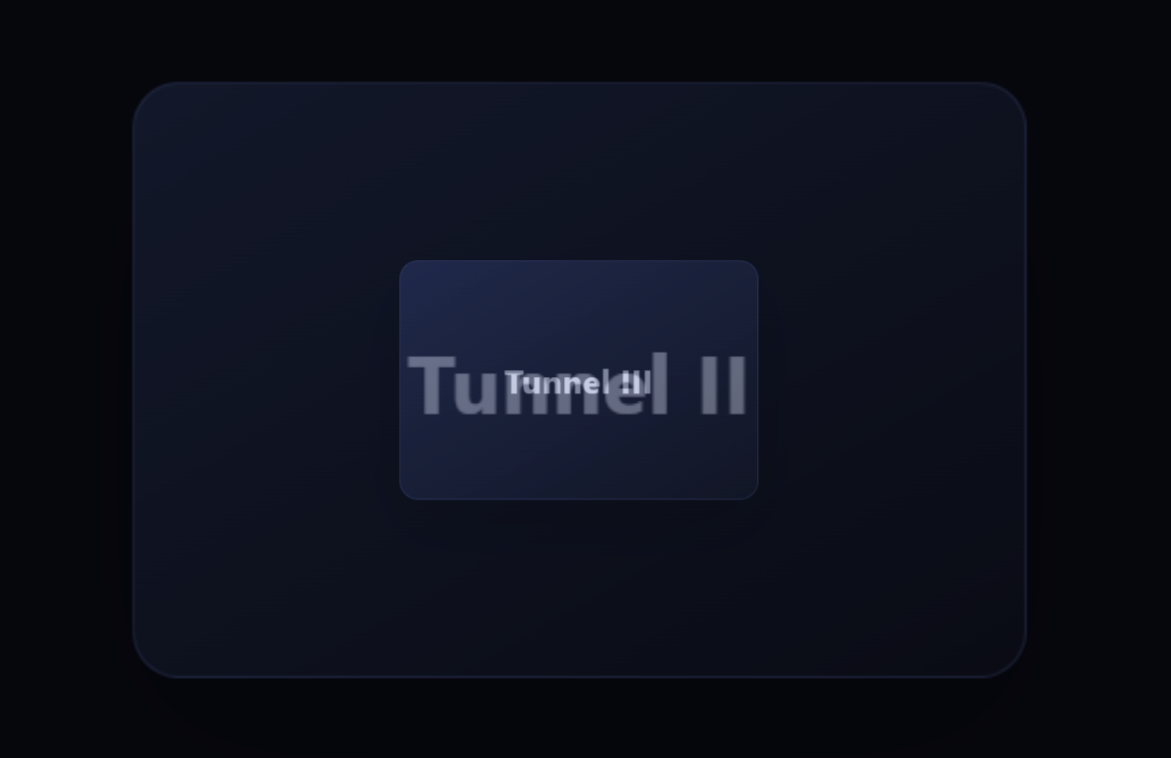
Scroll perspective cards is the immersive effect where cards are arranged one behind another in 3D space and you appear to fly forward through them as you scroll — a "tunnel" of content that rushes toward the camera. This snippet builds it with GSAP and ScrollTrigger (from a CDN) and CSS 3D, with each card placed and faded by depth.
Depth from z-translation
The stage sets perspective: 600px and the inner scene uses transform-style: preserve-3d, so children can be positioned along the z-axis. Each card declares a depth index (--d) and is pushed back with z: -d × GAP on load, so they line up receding into the screen like a stack of panes seen edge-on. The perspective value controls how dramatic the convergence looks — smaller is more extreme.
Flying the scene forward
Rather than moving each card, the whole scene is tweened on its z-axis from 0 to (count − 1) × GAP, pinned and scrubbed over end: '+=220%'. As the scene's z increases, the far cards rush toward the camera and the near ones pass behind you — exactly the sensation of flying down a corridor. Moving one parent is cheaper and keeps the cards' relative spacing fixed.
Depth-based fading
A per-card onUpdate computes how close each card is to the "camera plane" from the scroll progress: it maps progress to a position along the line of cards, measures each card's distance from that point, and sets opacity to fade cards in as they approach and out as they pass. This is what stops the effect from being a confusing wall of overlapping panels — only the card near the focal depth is solid, the rest dissolve into the distance.
Scrubbed, reversible flight
Everything is scrub: true with ease: 'none', so the flight speed matches scroll speed and reverses cleanly when you scroll up — you fly backward out of the tunnel. The pin holds the stage so the 220% of scroll is spent travelling through the cards rather than scrolling the section past.
Composited 3D
Only transform (z) and opacity animate, both GPU-composited, and backface-visibility: hidden plus will-change keep the 3D rendering crisp. Because the heavy lifting is one parent tween plus light per-card opacity math, it stays smooth.
Customizing it
Add cards (each with the next --d), change the GAP for tighter or looser spacing, the perspective for more or less drama, or the fade falloff; add a slight x/y offset per card for a scattered tunnel. Pair it with scroll 3d cards, a scroll horizontal pin, or a coverflow carousel.
Step by step
How to Use
- 1Add the GSAP CDNsInclude gsap and ScrollTrigger from the CDN panel.
- 2Paste HTML, CSS, and JSCards line up receding into 3D depth.
- 3Scroll downYou fly forward through the cards.
- 4Watch the fadesEach card solidifies near the camera.
- 5Scroll back upYou fly backward — motion is scrubbed.
- 6Tune the tunnelChange GAP and perspective for the feel.
Real-world uses
Common Use Cases
Got questions?
Frequently Asked Questions
The stage sets perspective: 600px and the scene uses transform-style: preserve-3d, so children can sit along the z-axis. Each card has a depth index --d and is pushed back with z: -d times GAP on load, lining them up receding into the screen. The perspective value controls how strongly they converge.
Instead of moving each card, the whole scene is tweened on its z-axis from 0 to (count − 1) times GAP, pinned and scrubbed over +=220%. As the scene's z grows, far cards rush toward the camera and near ones pass behind, creating the corridor-flight sensation. Moving one parent is cheaper and keeps spacing fixed.
A per-card onUpdate maps scroll progress to a position along the line of cards, measures each card's distance from that focal point, and sets opacity to fade cards in as they approach and out as they pass. Without this, the effect would be a confusing wall of overlapping panels; the fade keeps only the focal card solid.
Yes. Only transform (z) and opacity animate, both GPU-composited, with backface-visibility: hidden and will-change keeping rendering crisp. The work is one parent z-tween plus light per-card opacity math, so it stays smooth even with several cards and on every scroll frame.
In a mount effect, register ScrollTrigger, set each card's z by its depth via refs, and create the scene z-tween plus the per-card opacity triggers. Return a cleanup that reverts the GSAP context so the pin is removed on unmount. Keep perspective and preserve-3d in CSS; the markup ports unchanged.