





Scroll Text Clip Reveal — Free GSAP Word Highlight Snippet
Scroll Text Clip Reveal · Scroll · Plain HTML, CSS & JS · Live preview
Copy & paste
Source Code
<section class="tc-spacer"><p>Scroll down ↓</p></section>
<section class="tc-stage" id="tcStage">
  <h2 class="tc-text" id="tcText">We design calm, fast, human interfaces that people actually enjoy using every single day.</h2>
</section>
<section class="tc-spacer"><p>Keep scrolling ↑</p></section>*{box-sizing:border-box;margin:0;padding:0}
body{font-family:system-ui,-apple-system,sans-serif;background:#0a0a10;color:#fff}
.tc-spacer{min-height:80vh;display:flex;justify-content:center;align-items:center;color:#6b7290;font-size:15px;letter-spacing:.08em;text-transform:uppercase}
.tc-stage{min-height:100vh;display:flex;align-items:center;justify-content:center;padding:clamp(24px,8vw,140px)}
.tc-text{font-size:clamp(26px,5vw,58px);font-weight:800;line-height:1.18;letter-spacing:-.02em;max-width:1000px}
/* Each word starts dim; GSAP brightens it as it scrolls through. */
.tc-word{color:#2a2d3a;transition:none;display:inline-block;will-change:color}gsap.registerPlugin(ScrollTrigger);
// Split the heading into per-word spans so each can light up independently.
var el = document.getElementById('tcText');
el.innerHTML = el.textContent.trim().split(/\s+/).map(function (w) {
return '<span class="tc-word">' + w + '</span>';
}).join(' ');
var words = el.querySelectorAll('.tc-word');
// Pin the stage and reveal words across the scroll with a staggered scrub.
gsap.to(words, {
color: '#ffffff',
ease: 'none',
stagger: { each: 1 },
scrollTrigger: {
trigger: '#tcStage',
start: 'top top',
end: '+=' + (words.length * 60 + 400),
scrub: true,
pin: true
}
});Extend with AI
Take This Snippet Further With AI
The AI prompt for this one is for Patreon supporters ($3 a month, 7 days free), along with a site with no ads. Supporters enter the passcode once and it is remembered in this browser.
What's included
Features
About this UI Snippet
Scroll Text Clip Reveal — Brighten a Headline Word by Word
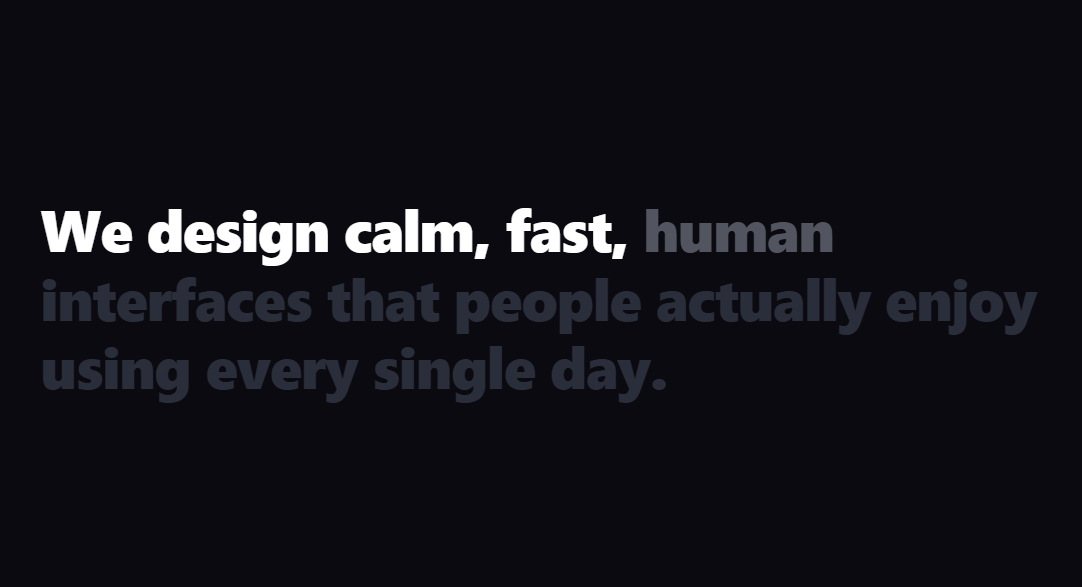
The scroll text reveal is the editorial effect where a big statement is dim until you scroll, then its words light up one after another as the section holds in place — the "read along with the scroll" technique from agency and storytelling sites. This snippet builds it with GSAP and ScrollTrigger (from a CDN), plus plain HTML and CSS.
Splitting into words
On load the script reads the heading's text, splits it on whitespace, and rebuilds it as a sequence of <span class="tc-word"> elements. Wrapping each word in its own inline-block span is what lets every word be animated independently — you can't target individual words inside a plain text node. The split is done in JavaScript so the markup stays clean and the effect works on any sentence you drop in.
Staggered scrub
A single gsap.to animates all the word spans from a dim grey to white, but with stagger: { each: 1 } so they don't all change at once — each word's tween is offset along the timeline. Tying that timeline to a ScrollTrigger with scrub: true means the stagger plays out across the scroll distance: as you scroll, the "bright" boundary sweeps word by word through the sentence, and scrolling back dims them again in reverse.
Pinning to hold the sentence
The stage pins with pin: true so the heading stays centered while the words reveal, giving the reader time to take in the line rather than it flying past. The end is computed from the word count (words.length × 60 + 400), so longer sentences get a proportionally longer scroll window — the reveal pace stays consistent regardless of how much text you use.
Color, not clip, for crispness
Animating each word's color from a muted tone to white (rather than masking) keeps the text perfectly crisp at every step and is cheap for the browser, since only paint changes. ease: 'none' keeps each word's transition linear so the sweep feels mechanically tied to the scrollbar. The dim resting color still leaves the words faintly legible, hinting at the full sentence before it's revealed.
Why ScrollTrigger
Doing this by hand means measuring scroll, mapping it to a per-word progress, and handling reverse and resize — exactly the bookkeeping ScrollTrigger's scrub and pin remove. GSAP's stagger turns "reveal N words in sequence" into one declarative tween, so the snippet stays short.
Customizing it
Change the dim and bright colors, the per-word stagger spacing, or the scroll length; reveal by opacity or a vertical rise instead of color; or split by character for a finer sweep. Pair it with a text reveal scroll, a split text entrance, or a scroll image mask.
Step by step
How to Use
- 1Add the GSAP CDNsInclude gsap and ScrollTrigger from the CDN panel.
- 2Paste HTML, CSS, and JSA dim heading sits between two spacers.
- 3Scroll into the stageIt pins and words brighten one by one.
- 4Scroll backThe words dim again in reverse.
- 5Change the sentenceEdit the heading — the split adapts.
- 6Tune the paceAdjust the stagger and the end distance.
Real-world uses
Common Use Cases
Got questions?
Frequently Asked Questions
On load the script splits the heading's text on whitespace and rebuilds it as a series of span.tc-word elements. Wrapping each word in its own inline-block span lets GSAP target words individually — impossible inside a plain text node. The split happens in JavaScript so the source markup stays a clean sentence.
One gsap.to animates all the word spans to white but with stagger: { each: 1 }, offsetting each word along the timeline. Tied to a ScrollTrigger with scrub: true, the stagger plays across the scroll distance, so the bright boundary moves through the sentence as you scroll and reverses when you scroll up.
pin: true keeps the heading centered while the words light up, so the reader can take in the line instead of it scrolling past mid-reveal. The end distance is derived from the word count, so a longer sentence holds for a proportionally longer scroll and the reveal pace stays consistent.
Animating each word's color from a muted tone to white keeps the text perfectly crisp at every frame and is cheap because only paint changes — no layout or compositing of a mask. The dim resting color also leaves the words faintly legible, hinting at the full statement before it is revealed.
Render the heading, then in a mount effect split it into word spans on a ref and build the staggered tween, registering ScrollTrigger once. Return a cleanup that reverts the GSAP context so the pin and triggers are removed on unmount. In frameworks that re-render, guard the split so it only runs once. The CSS ports unchanged.