



Scroll Zipper Reveal: GSAP Unzip Section Transition
Scroll Zipper Reveal: GSAP Unzip Section Transition · Scroll · Plain HTML, CSS & JS · Live preview
Copy & paste
Source Code
<section class="zp-stage" id="zpStage">
<div class="zp-back">
<p class="zp-kicker">Unzipped</p>
<h1>Everything was packed inside</h1>
<p class="zp-sub">Scroll drags the pull down the page and the fabric peels open in a widening V.</p>
<div class="zp-chips"><span>Pockets</span><span>Lining</span><span>Hidden seams</span></div>
</div>
<div class="zp-half zp-left" id="zpLeft"></div>
<div class="zp-half zp-right" id="zpRight"></div>
<svg class="zp-teeth" id="zpTeeth" viewBox="0 0 100 100" preserveAspectRatio="none" aria-hidden="true">
<line id="zpTL" x1="50" y1="0" x2="50" y2="0"/>
<line id="zpTR" x1="50" y1="0" x2="50" y2="0"/>
<line id="zpTC" x1="50" y1="0" x2="50" y2="100"/>
</svg>
<div class="zp-pull" id="zpPull" aria-hidden="true"><span></span></div>
<p class="zp-hint" id="zpHint">Scroll to unzip ↓</p>
</section>
<section class="zp-after"><p>The cover has slid away, so the page carries on as normal.</p></section>*{box-sizing:border-box;margin:0;padding:0}
body{font-family:system-ui,-apple-system,sans-serif;background:#f4efe6;color:#1d2330}
.zp-stage{position:relative;height:100vh;overflow:hidden;background:#f4efe6}
.zp-back{position:absolute;inset:0;display:flex;flex-direction:column;align-items:center;justify-content:flex-start;text-align:center;gap:14px;padding:14vh 24px 24px}
.zp-kicker{font-size:12px;font-weight:700;letter-spacing:.16em;text-transform:uppercase;color:#c2410c}
.zp-back h1{font-size:clamp(30px,6vw,62px);letter-spacing:-.025em;max-width:14ch;line-height:1.05}
.zp-sub{color:#5b6173;font-size:15px;max-width:420px}
.zp-chips{display:flex;gap:8px;flex-wrap:wrap;justify-content:center}
.zp-chips span{padding:7px 14px;border-radius:999px;background:#fff;border:1px solid #e3dccd;font-size:13px;font-weight:600}
.zp-half{position:absolute;inset:0;background:repeating-linear-gradient(45deg,#16213a 0 7px,#1b2848 7px 14px);will-change:transform,clip-path}
.zp-teeth{position:absolute;inset:0;width:100%;height:100%;pointer-events:none}
.zp-teeth line{stroke:#d9dde8;stroke-width:7;stroke-dasharray:4 4;vector-effect:non-scaling-stroke}
.zp-teeth #zpTC{stroke:#aab1c4}
.zp-pull{position:absolute;left:50%;top:0;width:0;height:0;pointer-events:none}
.zp-pull span{position:absolute;left:-14px;top:-6px;width:28px;height:54px;border-radius:8px 8px 14px 14px;background:linear-gradient(#f5c451,#d99a1f);box-shadow:0 6px 14px rgba(0,0,0,.4)}
.zp-pull span::after{content:'';position:absolute;left:8px;bottom:6px;width:12px;height:12px;border-radius:50%;border:3px solid #7a5200}
.zp-hint{position:absolute;left:0;right:0;bottom:7vh;text-align:center;font-size:14px;font-weight:600;letter-spacing:.04em;color:#c9d0e4}
.zp-after{min-height:70vh;display:grid;place-items:center;padding:24px;text-align:center;color:#5b6173;font-size:15px}gsap.registerPlugin(ScrollTrigger);
var stage = document.getElementById('zpStage');
var left = document.getElementById('zpLeft');
var right = document.getElementById('zpRight');
var pull = document.getElementById('zpPull');
var hint = document.getElementById('zpHint');
var teeth = document.getElementById('zpTeeth');
var tl = document.getElementById('zpTL');
var tr = document.getElementById('zpTR');
var tc = document.getElementById('zpTC');
var G = 22; // half-width of the opening at the top edge, in % of the stage
var state = { p: 0 };
// One number (0 to 1) describes the whole zip. draw() turns it into
// clip-paths, SVG teeth and the pull position, so scrubbing backward re-zips exactly.
function draw(p) {
// The pull reaches the bottom edge at 90% progress. In the last 10% (t: 0 to 1)
// it keeps travelling below the screen while the opening widens past the sides,
// so the teeth stay glued to the fabric edge and the cloth is pushed completely
// away the moment the zip is done. Nothing slides separately.
var END = 0.9;
var z = Math.min(1, p / END);
var t = Math.max(0, (p - END) / (1 - END));
var y = z * 100 + t * 100;
var g = Math.min(1, z * 8) * (G + z * 14) + t * 80;
left.style.clipPath = 'polygon(0 0,' + (50 - g) + '% 0,50% ' + y + '%,50% 100%,0 100%)';
right.style.clipPath = 'polygon(' + (50 + g) + '% 0,100% 0,100% 100%,50% 100%,50% ' + y + '%)';
tl.setAttribute('x1', 50 - g); tl.setAttribute('y2', y);
tr.setAttribute('x1', 50 + g); tr.setAttribute('y2', y);
tc.setAttribute('y1', y);
gsap.set(pull, { y: y / 100 * stage.clientHeight });
hint.style.opacity = Math.max(0, 1 - z * 9);
}
if (window.matchMedia('(prefers-reduced-motion: reduce)').matches) {
draw(1); // no pinned scrub: show the opened page straight away
} else {
draw(0);
ScrollTrigger.create({
trigger: stage,
start: 'top top',
end: '+=2200',
pin: true,
scrub: 0.4,
animation: gsap.to(state, { p: 1, ease: 'none', onUpdate: function () { draw(state.p); } }),
invalidateOnRefresh: true
});
}Extend with AI
Take This Snippet Further With AI
Paste this snippet into an AI coding assistant and ask it to explain how one scrubbed progress value is turned into two clip-path polygons, SVG tooth lines and a moving pull, and why that makes the zip reversible. Good follow-ups: a horizontal zipper that opens left to right, a version where the opened gap shows a video instead of text, or a snap point at half-open. Ask it to keep reduced-motion behaviour when it changes anything.
Prompt to recreate it
Copy this into your AI assistant of choice to build the effect from scratch, or as a jumping-off point for your own variant:
Build a "scroll zipper reveal" in plain HTML, CSS and JavaScript using GSAP with ScrollTrigger (from a CDN).

Requirements:
- A full-viewport pinned stage. Behind a dark fabric cover sits the content to reveal (kicker, headline, short paragraph and a few chips). After the stage comes a normal section so the page continues.
- The cover is two absolutely positioned halves with a repeating diagonal stripe texture. A gold zipper pull sits on the centre line and moves from the top edge to the bottom as the user scrolls.
- Drive everything from one object {p:0} tweened to 1 by a pinned ScrollTrigger (pin: true, scrub about 0.4, end: '+=2200'). A single draw(p) function updates every visual so scrubbing backward re-zips exactly.
- In draw(p), clip each half with a polygon so the notch tip sits at y = p*100% and the notch is wider at the top edge than at the tip (a V). Mirror the polygon on the right half.
- Draw the teeth as three SVG lines (viewBox 0 0 100 100, preserveAspectRatio none) with stroke-dasharray and vector-effect non-scaling-stroke: two along the open edges and one along the closed seam below the pull.
- Fade the "Scroll to unzip" hint out early. Let the pull reach the bottom at 90% progress, then in the last 10% keep moving it below the screen while widening the opening (do not slide the halves separately, or the teeth detach from the fabric edge) until no fabric remains.
- If prefers-reduced-motion is set, call draw(1) and skip the pin.
Want to tighten it up first? Run this prompt through the AI Prompt Studio to score it across 8 quality dimensions, catch anti-patterns, and tune the wording for Claude, ChatGPT, or Gemini before you paste it in.
What's included
Features
About this UI Snippet
Scroll Zipper Reveal: Unzip One Section to Show the Next
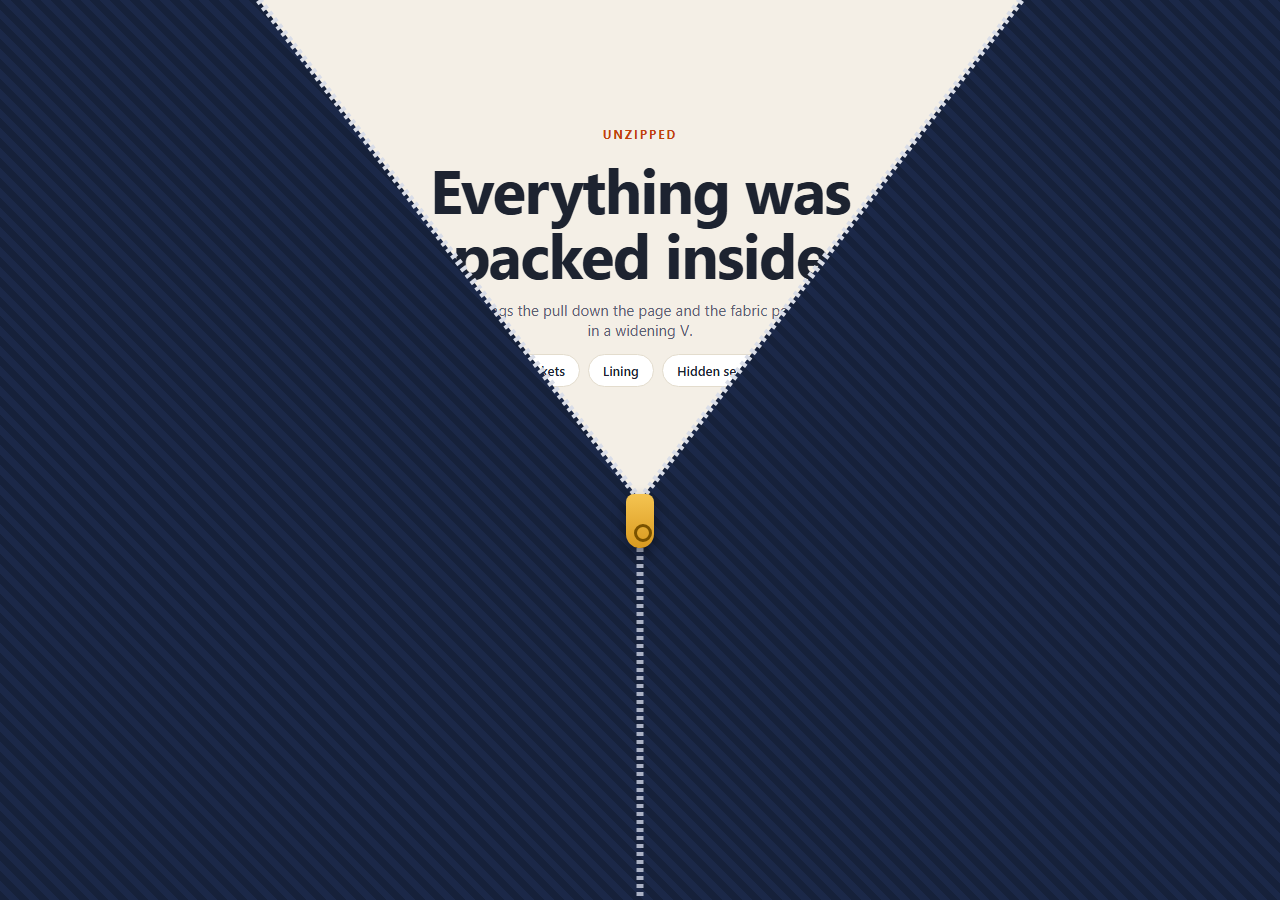
This snippet covers the first screen like a zipped jacket. While the stage is pinned, scroll progress drags a zipper pull from the top edge to the bottom, and the fabric peels back in a widening V so the section underneath shows through the opening. When the pull reaches the hem, both halves slide off-screen and the page scrolls on normally.
One number drives everything
A plain object { p: 0 } is tweened to 1 by a pinned ScrollTrigger with scrub: 0.4. A single draw(p) function turns that number into every visual change: the clip-paths, the SVG teeth and the pull's position. Nothing else animates, so scrolling back up re-zips the jacket exactly as it opened.
The V opening is a clip-path
The cover is two full-size layers. The left layer is clipped with polygon(0 0, (50-g)% 0, 50% y%, 50% 100%, 0 100%) and the right layer mirrors it. As y follows the pull down, the notch grows longer, and g makes it wider at the top, so the opening reads as a V rather than a slit.
Teeth are dashed SVG lines
Three <line> elements use stroke-dasharray: 4 4 and vector-effect: non-scaling-stroke. The dash size stays in real pixels even though the SVG is stretched over the stage. Two lines trace the open edges and one traces the still-closed seam below the pull.
Pinned scroll distance
end: '+=2200' sets how much scrolling one full unzip takes. Raise it for a slower, more deliberate zip. Once the pull reaches the bottom edge (90% of the scroll), it keeps going below the screen and the opening widens to match, so the teeth stay attached to the fabric edge until no fabric is left covering the content.
Motion preferences and content
The revealed section is ordinary HTML, readable without the animation. With prefers-reduced-motion, the script calls draw(1) and skips the pin entirely. To restyle it, change the G constant for the opening width, the stripe colours of .zp-half, or the pull's gradient. A scroll curtain reveal or thread stitch reveal makes a good neighbour on the same page.
Step by step
How to Use
- 1Add the GSAP CDNsInclude gsap and ScrollTrigger from the CDN panel.
- 2Paste HTML, CSS and JSA fabric cover with a zipper sits over the section you want to reveal.
- 3Put your content in .zp-backWhatever lives in that layer is what the zip uncovers.
- 4Scroll downThe pull slides down and the fabric opens in a V behind it.
- 5Tune the feelChange end: '+=2200' for zip length and G for the width of the opening.
- 6Scroll back upThe zip closes again because the whole effect is driven by one progress value.
Real-world uses
Common Use Cases
Got questions?
Frequently Asked Questions
Each half is a full-size layer clipped by a polygon. The notch's tip is at the pull's y position, and its top corners sit g percent either side of the centre line. Increasing g with progress makes the opening wider near the top, which gives the V.
Tweening clip-paths, SVG attributes and the pull separately would need matching timelines. A single object that goes from 0 to 1, rendered by draw(p), keeps everything in sync and makes scrubbing in either direction exact.
Yes. The end value of the ScrollTrigger, '+=2200', is the scroll distance for the whole zip. A larger number means more scrolling per unzip. Lower scrub values feel snappier, higher ones lag more.
Run the setup inside a mount effect with refs for the stage, halves and pull. Keep the ScrollTrigger returned by create() and kill it in the cleanup so pins don't stack up when the component re-renders.