


Share Menu — Copy Link & Social Share Snippet
Share Menu with Copy Link and Social Options · Buttons · Plain HTML, CSS & JS · Live preview
Copy & paste
Source Code
<div class="demo">
  <div class="share-wrap" id="shareWrap">
    <button class="share-trigger" id="shareTrigger" onclick="toggleMenu()" aria-haspopup="true" aria-expanded="false">
      <svg width="15" height="15" viewBox="0 0 24 24" fill="none" stroke="currentColor" stroke-width="2" stroke-linecap="round" stroke-linejoin="round"><circle cx="18" cy="5" r="3"/><circle cx="6" cy="12" r="3"/><circle cx="18" cy="19" r="3"/><line x1="8.6" y1="10.6" x2="15.4" y2="6.4"/><line x1="8.6" y1="13.4" x2="15.4" y2="17.6"/></svg>
      Share
    </button>
    <div class="menu" id="shareMenuPanel" role="menu">
      <div class="menu-head">Share this page</div>
      <div class="link-row">
        <input type="text" id="linkInput" value="https://webdevpuneet.com/ui-snippets/share-menu/" readonly>
        <button class="copy-btn" id="copyBtn" onclick="copyLink()">Copy</button>
      </div>
      <div class="social-grid">
        <button class="social-item" onclick="shareTo('X')">
          <span class="social-icon si-x">𝕏</span> X
        </button>
        <button class="social-item" onclick="shareTo('LinkedIn')">
          <span class="social-icon si-li">in</span> LinkedIn
        </button>
        <button class="social-item" onclick="shareTo('Email')">
          <span class="social-icon si-mail">
            <svg width="13" height="13" viewBox="0 0 24 24" fill="none" stroke="#fff" stroke-width="2.2"><rect x="2" y="4" width="20" height="16" rx="2"/><path d="M2 7l10 6 10-6"/></svg>
          </span> Email
        </button>
        <button class="social-item" onclick="shareTo('WhatsApp')">
          <span class="social-icon si-wa">
            <svg width="13" height="13" viewBox="0 0 24 24" fill="#fff"><path d="M12 2a10 10 0 00-8.6 15L2 22l5.1-1.3A10 10 0 1012 2zm5.7 14.3c-.2.7-1.4 1.3-2 1.4-.5.1-1.1.1-1.8-.1-.4-.1-1-.3-1.7-.6-3-1.3-5-4.3-5.1-4.5-.1-.2-1.2-1.6-1.2-3.1s.8-2.2 1.1-2.5c.3-.3.6-.4.8-.4h.6c.2 0 .4 0 .6.5.2.5.7 1.8.8 1.9.1.1.1.3 0 .5-.1.2-.1.3-.3.5-.1.2-.3.4-.4.5-.2.2-.3.4-.1.7.2.3.8 1.3 1.7 2.1 1.2 1 2.1 1.4 2.5 1.5.3.1.5.1.7-.1.2-.2.7-.8.9-1.1.2-.3.4-.2.6-.1.2.1 1.5.7 1.8.8.3.1.5.2.5.3.1.2.1.6-.1 1.2z"/></svg>
          </span> WhatsApp
        </button>
      </div>
    </div>
  </div>
  <p class="log" id="shareLog"></p>
</div>
* { box-sizing: border-box; margin: 0; padding: 0; }
body { font-family: system-ui, sans-serif; background: #f8f9fa; display: flex; align-items: center; justify-content: center; min-height: 100vh; padding: 60px 20px; }
.demo { text-align: center; }
.share-wrap { position: relative; display: inline-block; }
.share-trigger { display: inline-flex; align-items: center; gap: 7px; padding: 9px 16px; border: 1px solid #d1d5db; border-radius: 9px; background: #fff; font-size: 13.5px; font-weight: 600; color: #374151; cursor: pointer; }
.share-trigger:hover { background: #f9fafb; }
.menu { position: absolute; top: calc(100% + 8px); left: 50%; transform: translateX(-50%) translateY(-6px); width: 280px; background: #fff; border: 1px solid #e5e7eb; border-radius: 14px; box-shadow: 0 16px 40px rgba(0,0,0,0.14); padding: 14px; opacity: 0; visibility: hidden; transition: opacity 0.15s, transform 0.15s, visibility 0.15s; z-index: 30; text-align: left; }
.menu.open { opacity: 1; visibility: visible; transform: translateX(-50%) translateY(0); }
.menu-head { font-size: 12.5px; font-weight: 700; color: #111827; margin-bottom: 10px; }
.link-row { display: flex; gap: 6px; margin-bottom: 14px; }
.link-row input { flex: 1; min-width: 0; padding: 8px 10px; border: 1px solid #e5e7eb; border-radius: 8px; font-size: 12px; color: #6b7280; background: #f9fafb; }
.copy-btn { padding: 8px 12px; border: none; border-radius: 8px; background: #2563eb; color: #fff; font-size: 12px; font-weight: 700; cursor: pointer; flex-shrink: 0; transition: background 0.15s; }
.copy-btn:hover { background: #1d4ed8; }
.copy-btn.copied { background: #16a34a; }
.social-grid { display: grid; grid-template-columns: repeat(2, 1fr); gap: 8px; }
.social-item { display: flex; align-items: center; gap: 8px; padding: 8px 10px; border: 1px solid #f0f0f0; border-radius: 9px; background: #fff; font-size: 12.5px; font-weight: 600; color: #374151; cursor: pointer; }
.social-item:hover { background: #f9fafb; }
.social-icon { width: 20px; height: 20px; border-radius: 6px; display: flex; align-items: center; justify-content: center; font-size: 11px; font-weight: 700; color: #fff; flex-shrink: 0; }
.si-x { background: #000; }
.si-li { background: #0a66c2; }
.si-mail { background: #6b7280; }
.si-wa { background: #25d366; }
.log { margin-top: 14px; font-size: 12.5px; color: #6b7280; min-height: 16px; }var menu = document.getElementById('shareMenuPanel');
var trigger = document.getElementById('shareTrigger');
var log = document.getElementById('shareLog');
function toggleMenu() {
var open = menu.classList.toggle('open');
trigger.setAttribute('aria-expanded', String(open));
}
function copyLink() {
var input = document.getElementById('linkInput');
var btn = document.getElementById('copyBtn');
navigator.clipboard.writeText(input.value).then(function() {
btn.textContent = 'Copied!';
btn.classList.add('copied');
log.textContent = 'Link copied to clipboard';
setTimeout(function() {
btn.textContent = 'Copy';
btn.classList.remove('copied');
}, 1800);
}).catch(function() {
input.select();
log.textContent = 'Press Ctrl/Cmd+C to copy';
});
}
function shareTo(network) {
log.textContent = 'Opening share dialog for ' + network + '...';
menu.classList.remove('open');
trigger.setAttribute('aria-expanded', 'false');
}
document.addEventListener('click', function(e) {
if (!e.target.closest('#shareWrap')) {
menu.classList.remove('open');
trigger.setAttribute('aria-expanded', 'false');
}
});
document.addEventListener('keydown', function(e) {
if (e.key === 'Escape') {
menu.classList.remove('open');
trigger.setAttribute('aria-expanded', 'false');
}
});Extend with AI
Take This Snippet Further With AI
The AI prompt for this one is for Patreon supporters ($3 a month, 7 days free), along with a site with no ads. Supporters enter the passcode once and it is remembered in this browser.
What's included
Features
About this UI Snippet
Share Menu — Copy-Link Field with Clipboard Fallback and Social Options
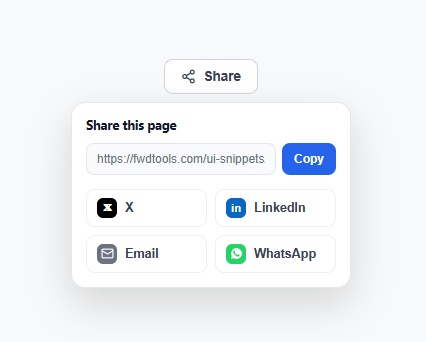
A share menu combines the two most common ways people actually share a link — copying the URL directly, and posting to a specific platform — into one compact dropdown, rather than the older pattern of a full row of always-visible social icons cluttering the page. This snippet builds both halves, plus the details that make each one work reliably.
The copy-link field
The URL sits in a read-only <input readonly>, not a plain <span> — using a real input means a user can still manually select and copy the text if the clipboard button fails for any reason, and readonly (rather than disabled) keeps it focusable and selectable while preventing edits. The Copy button calls navigator.clipboard.writeText(), which returns a promise, and on success swaps its own label to "Copied!" with a green background for 1.8 seconds before reverting — direct, in-place feedback rather than a separate toast notification.
The clipboard fallback
navigator.clipboard is only available in secure contexts (HTTPS or localhost) and can be blocked by browser permissions or older browsers entirely. The .catch() handler covers that case by calling input.select(), which highlights the URL text so the user can copy it manually with Ctrl/Cmd+C — a small status message explains what to do next. Skipping this fallback is a common reason "Copy" buttons silently do nothing for a subset of users.
Why the menu, not the whole page, holds the share options
Collapsing every share destination behind one "Share" trigger keeps the primary UI uncluttered, and it scales — adding a fifth or sixth platform to the grid costs one more .social-item button, not another permanently visible icon competing for space in the page header.
Centered dropdown positioning
Unlike a typical dropdown anchored to one edge, this menu centers itself under its trigger with left: 50%; transform: translateX(-50%), which looks more balanced for a compact, icon-led trigger button than a left- or right-anchored panel would.
Brand-colored social icons
Each platform's icon sits in a small rounded square using that platform's actual brand color (#000 for X, #0a66c2 for LinkedIn, #25d366 for WhatsApp) — consistent, recognizable brand colors help users find their preferred platform at a glance inside a 2×2 grid faster than uniformly-colored icons would.
Wiring real share URLs
The demo's shareTo() only logs which platform was clicked; a production version should open each platform's actual share-intent URL in a new tab or popup window. Common patterns: X is https://twitter.com/intent/tweet?url= + encoded URL + &text= + encoded message; LinkedIn is https://www.linkedin.com/sharing/share-offsite/?url= + encoded URL; Email is a plain mailto:?subject=...&body= link (no popup needed); WhatsApp is https://wa.me/?text= + encoded message with the URL included in the text.
Accessibility and dismissal
The trigger carries aria-haspopup="true" and aria-expanded, flipped by toggleMenu(). Two independent listeners close the menu — a document click check using closest('#shareWrap'), and an Escape keydown handler — the same dual dismissal pattern used by every other dropdown-style component in this library.
See also the copy button snippet for the standalone clipboard-copy pattern used here, and the download button for another action button with distinct idle/success feedback states.
Step by step
How to Use
- 1Copy the share-wrap structureThe .share-wrap holds the trigger button and the .menu dropdown containing the link-copy row and the social-icon grid.
- 2Set the real URLReplace the demo #linkInput value with your page's actual URL, generated dynamically from window.location.href if the menu is reused across many pages.
- 3Wire real share-intent URLsReplace the shareTo() logging with window.open() calls to each platform's share-intent URL, or a plain mailto: link for the Email option.
- 4Add or remove platformsEach platform is one .social-item button in the .social-grid — add a new one with its own brand-colored icon, or remove any that don't apply to your audience.
- 5Test the clipboard fallbackTry Copy in a non-HTTPS context or with clipboard permissions denied to confirm the input.select() fallback correctly highlights the URL for manual copying.
Real-world uses
Common Use Cases
navigator.clipboard.writeText() changing the button label and colour in place.Got questions?
Frequently Asked Questions
It already does, via navigator.clipboard.writeText(input.value) — just replace the demo #linkInput value with your page's real URL, ideally set dynamically from window.location.href.
navigator.clipboard requires a secure context (HTTPS or localhost) and can be blocked by browser permission settings. The .catch() handler calls input.select() so the user can still copy the text manually, instead of the button silently failing with no feedback.
Replace the logging in shareTo() with window.open() calls to each platform's share-intent URL, built from your page URL and optionally a message — for example X uses https://twitter.com/intent/tweet?url=... and LinkedIn uses https://www.linkedin.com/sharing/share-offsite/?url=... Email can be a plain mailto: link.
navigator.share() is a good addition for mobile browsers that support it, since it opens the OS-native share sheet — check for its existence and offer it as an extra option, but keep this custom menu as the fallback for desktop browsers and platforms it does not cover.
Open the Export menu on the snippet page for a React component managing open state and clipboard copy as hooks, a React + Tailwind version, a Vue 3 SFC, or an Angular standalone component — all preserve the copy-fallback logic and outside-click/Escape dismissal.