
Copy Button — Free HTML CSS JS Clipboard Snippet
Copy to Clipboard Button · Buttons · Plain HTML, CSS & JS · Live preview
Copy & paste
Source Code
<div class="demo">
  <div class="code-block">
    <pre id="code">npm install @webdevpuneet/ui-snippets</pre>
    <button class="copy-btn" id="copy-btn" onclick="copyCode()">
      <svg class="icon-copy" width="15" height="15" viewBox="0 0 24 24" fill="none" stroke="currentColor" stroke-width="2" stroke-linecap="round"><rect x="9" y="9" width="13" height="13" rx="2"/><path d="M5 15H4a2 2 0 0 1-2-2V4a2 2 0 0 1 2-2h9a2 2 0 0 1 2 2v1"/></svg>
      <svg class="icon-check" width="15" height="15" viewBox="0 0 24 24" fill="none" stroke="currentColor" stroke-width="2.5" stroke-linecap="round"><polyline points="20 6 9 17 4 12"/></svg>
    </button>
  </div>

  <div class="tokens">
    <div class="token-row">
      <span class="token-label">API Key</span>
      <code class="token-val">sk-fwd-xxxxxxxxxxxxxxxxxxxx</code>
      <button class="small-copy" onclick="copyText(this,'sk-fwd-xxxxxxxxxxxxxxxxxxxx')">Copy</button>
    </div>
    <div class="token-row">
      <span class="token-label">Webhook URL</span>
      <code class="token-val">https://api.webdevpuneet.com/hook/v1</code>
      <button class="small-copy" onclick="copyText(this,'https://api.webdevpuneet.com/hook/v1')">Copy</button>
    </div>
  </div>
</div>
* { box-sizing: border-box; margin: 0; padding: 0; }
body { font-family: system-ui, sans-serif; background: #f8fafc; display: flex; align-items: center; justify-content: center; min-height: 100vh; padding: 20px; }
.demo { display: flex; flex-direction: column; gap: 16px; width: 380px; }
.code-block { display: flex; align-items: center; justify-content: space-between; background: #1e293b; border-radius: 10px; padding: 14px 16px; gap: 12px; }
pre { font-family: 'Courier New', monospace; font-size: 13px; color: #4ade80; flex: 1; white-space: nowrap; overflow: hidden; text-overflow: ellipsis; }
.copy-btn { width: 32px; height: 32px; border-radius: 7px; background: rgba(255,255,255,0.08); border: 1px solid rgba(255,255,255,0.1); color: #94a3b8; cursor: pointer; display: flex; align-items: center; justify-content: center; flex-shrink: 0; transition: background 0.15s, color 0.15s; }
.copy-btn:hover { background: rgba(255,255,255,0.15); color: #f1f5f9; }
.copy-btn.copied { background: rgba(74,222,128,0.15); border-color: rgba(74,222,128,0.3); color: #4ade80; }
.icon-check { display: none; }
.copy-btn.copied .icon-copy { display: none; }
.copy-btn.copied .icon-check { display: block; }
.tokens { background: #fff; border-radius: 10px; overflow: hidden; border: 1px solid #e2e8f0; }
.token-row { display: flex; align-items: center; gap: 10px; padding: 11px 14px; border-bottom: 1px solid #f1f5f9; }
.token-row:last-child { border-bottom: none; }
.token-label { font-size: 11px; font-weight: 600; color: #94a3b8; flex-shrink: 0; width: 80px; }
.token-val { flex: 1; font-family: monospace; font-size: 11px; color: #475569; overflow: hidden; text-overflow: ellipsis; white-space: nowrap; }
.small-copy { padding: 4px 10px; font-size: 11px; font-weight: 600; background: #f8fafc; border: 1px solid #e2e8f0; border-radius: 5px; color: #64748b; cursor: pointer; font-family: inherit; flex-shrink: 0; transition: all 0.15s; }
.small-copy:hover { border-color: #6366f1; color: #6366f1; }
.small-copy.ok { background: #f0fdf4; border-color: #86efac; color: #16a34a; }function copyCode() {
const text = document.getElementById('code').textContent;
navigator.clipboard.writeText(text).catch(() => {});
const btn = document.getElementById('copy-btn');
btn.classList.add('copied');
setTimeout(() => btn.classList.remove('copied'), 2000);
}
function copyText(btn, text) {
navigator.clipboard.writeText(text).catch(() => {});
btn.textContent = '✓ Copied'; btn.classList.add('ok');
setTimeout(() => { btn.textContent = 'Copy'; btn.classList.remove('ok'); }, 2000);
}Extend with AI
Take This Snippet Further With AI
The AI prompt for this one is for Patreon supporters ($3 a month, 7 days free), along with a site with no ads. Supporters enter the passcode once and it is remembered in this browser.
What's included
Features
About this UI Snippet
Copy Button — Clipboard API, SVG Icon Swap, Timeout Reset & Token Row Pattern
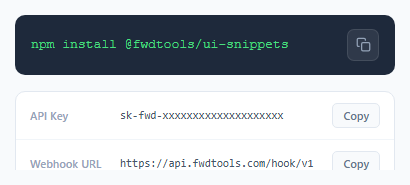
A copy to clipboard button is one of the most-used micro-interactions in developer-facing products. Any interface that displays a code snippet, API key, access token, webhook URL, terminal command, or share link needs a one-click copy mechanism — requiring users to manually select and copy text causes unnecessary friction and increases the chance of copying errors. This snippet implements two common copy button patterns: an icon button inside a dark code block, and inline text buttons in a credential list.
The Clipboard API and async promise handling
navigator.clipboard.writeText(text) is the modern Clipboard API. It's asynchronous — it returns a Promise that resolves when the text is successfully written to the clipboard. The .catch(() => {}) handles the case where clipboard access is denied — this happens in non-HTTPS contexts (except localhost), in browser privacy modes, or when the user has denied clipboard permission. For maximum compatibility, a fallback using document.execCommand('copy') can be placed inside the catch block: create a temporary textarea, set its value, select it, call execCommand, then remove it.
The SVG icon swap visual feedback
The copy button contains two SVG icons: a copy icon (.icon-copy) and a checkmark icon (.icon-check). In the default state, .icon-check { display: none }. When .copied is added: .copy-btn.copied .icon-copy { display: none } and .copy-btn.copied .icon-check { display: block }. This pure CSS icon swap requires no DOM manipulation — just a class toggle. Simultaneously, .copy-btn.copied applies a green background tint (rgba(74,222,128,0.15)) and a green border, providing a clear colour-coded confirmation state.
The setTimeout reset cycle
copyCode() calls btn.classList.add('copied') immediately on click, then setTimeout(() => btn.classList.remove('copied'), 2000) schedules the reset 2 seconds later. The 2-second window gives the user enough time to notice the confirmation feedback while keeping the button ready for repeated copying. If a user clicks copy again within the 2 seconds, the existing timeout is still active — the next call to classList.add adds the class that is already present (no visual change) and sets a new 2-second timeout, effectively extending the confirmation display.
The token row pattern
The second part of the demo shows a different copy pattern: small inline text buttons in a credential list. The copyText(btn, text) function takes the button reference and the text value directly. On click, it sets btn.textContent = '✓ Copied' and adds the .ok class for green styling, then resets after 2 seconds. This pattern is used in API key dashboards, environment variable panels, and developer settings pages where multiple copyable values are shown in a list.
Step by step
How to Use
- 1Click the copy icon button in the code blockClick the copy icon button in the top-right of the dark code block. The icon immediately swaps from a copy icon to a green checkmark, and the button background changes to a green tint. After 2 seconds, it resets to the default copy icon state ready for the next click.
- 2Click the small Copy text buttons in the token listClick the Copy button next to the API Key or Webhook URL rows in the credential list below the code block. The button text changes to '✓ Copied' and turns green. After 2 seconds it resets. This demonstrates the inline text-button copy pattern used in API dashboard and credentials pages.
- 3Update the code block content to your own snippetIn the HTML panel, change the text inside the <pre id='code'> element to your own terminal command, code snippet, or configuration text. The copyCode() function reads pre.textContent, so whatever text you put in the pre element is what gets copied to the clipboard.
- 4Change the timeout duration for the Copied stateIn the JS panel, find the two setTimeout calls. Change the 2000 millisecond value to adjust how long the confirmation state displays. 1500ms feels snappier, 3000ms gives more time for users to read the confirmation. Use the same value in both setTimeout calls for consistency across both copy patterns.
- 5Add the copy button to multiple code blocks on a pageFor multiple independent copy buttons, refactor copyCode() to accept an element ID parameter: function copyCode(id) { const text = document.getElementById(id).textContent; navigator.clipboard.writeText(text).catch(()=>{}); const btn = document.querySelector('[data-target="' + id + '"]'); btn.classList.add('copied'); setTimeout(() => btn.classList.remove('copied'), 2000); }. Each button passes its target ID via onclick='copyCode("myCodeId")'.
- 6Export and integrate into your documentation or dashboardClick HTML for a standalone file, JSX for a React component with a useCopyButton() hook that manages the copied state, or Tailwind for a styled React version. The JSX export uses useState for the copied boolean and useEffect with a cleanup to handle unmounting during the timeout window.
Real-world uses
Common Use Cases
Got questions?
Frequently Asked Questions
navigator.clipboard.writeText(text) is an asynchronous function that uses the Permissions API to request clipboard write access, then writes the text to the system clipboard. It returns a Promise that resolves with undefined on success. It rejects (and the .catch() fires) in three cases: the page is not served over HTTPS (except localhost), the browser's clipboard permission for the site is denied in browser settings, or the browser doesn't support the Clipboard API (very old browsers). For a fallback, inside the catch block: const ta = document.createElement('textarea'); ta.value = text; document.body.appendChild(ta); ta.select(); document.execCommand('copy'); document.body.removeChild(ta).
The button contains two SVG icons with classes .icon-copy and .icon-check. The default CSS hides the checkmark: .icon-check { display: none }. When .copied is added to the button, two CSS rules fire simultaneously: .copy-btn.copied .icon-copy { display: none } hides the copy icon, and .copy-btn.copied .icon-check { display: block } shows the checkmark. No JavaScript DOM manipulation is needed for the icon swap — just the single classList.add('copied') call, and CSS handles the rest. The button background and border also change via .copy-btn.copied { background: rgba(74,222,128,0.15); border-color: rgba(74,222,128,0.3); color: #4ade80 } for a green confirmation state.
Refactor copyCode() to accept a target element ID: function copyCode(id) { const text = document.getElementById(id).textContent; navigator.clipboard.writeText(text).catch(()=>{}); const btn = event.currentTarget; btn.classList.add('copied'); setTimeout(() => btn.classList.remove('copied'), 2000); }. Pass the code block ID from the onclick: onclick='copyCode("example-1")'. Each code block gets a unique ID, and each copy button targets its own block. For a React implementation, use a ref on the pre element and pass it to the click handler.
Yes, in production. navigator.clipboard.writeText() requires either HTTPS or the localhost origin. It will not work on HTTP pages in modern browsers. During development, localhost (including ports like localhost:3000) works without HTTPS. On HTTP production sites, the API throws a NotAllowedError. The document.execCommand('copy') fallback works on HTTP but is deprecated and may be removed from browsers in future. The standard solution is to serve your site over HTTPS — all major hosting platforms (Netlify, Vercel, Cloudflare) provide HTTPS automatically.