
Like Button in HTML, CSS & JS — Heart Burst, Double-Tap
Like / Favorite Button · Buttons · Plain HTML, CSS & JS · Live preview
Copy & paste
Source Code
<div class="fav-demo">
  <button type="button" class="fav big" data-id="demo-like" data-base="127" data-on="Liked" data-off="Like" aria-pressed="false" style="--c:#f43f5e;--spin:0deg">
    <span class="fav-icon"><svg viewBox="0 0 24 24" width="22" height="22" aria-hidden="true"><path d="M19 14c1.49-1.46 3-3.21 3-5.5A5.5 5.5 0 0 0 16.5 3c-1.76 0-3 .5-4.5 2-1.5-1.5-2.74-2-4.5-2A5.5 5.5 0 0 0 2 8.5c0 2.29 1.49 4.04 3 5.5l7 7Z"/></svg></span>
    <span class="fav-label">Like</span>
    <span class="fav-count">128</span>
  </button>

  <div class="fav-row">
    <button type="button" class="fav mini" data-id="demo-star" data-base="1249" aria-pressed="false" style="--c:#f59e0b;--spin:-72deg">
      <span class="fav-icon"><svg viewBox="0 0 24 24" width="18" height="18" aria-hidden="true"><path d="m12 2.5 2.9 6 6.6.9-4.8 4.6 1.2 6.5-5.9-3.1-5.9 3.1 1.2-6.5L2.5 9.4l6.6-.9L12 2.5Z"/></svg></span>
      <span class="sr">Favorite</span><span class="fav-count">1.2k</span>
    </button>
    <button type="button" class="fav mini" data-id="demo-save" data-base="41" aria-pressed="false" style="--c:#818cf8;--spin:0deg">
      <span class="fav-icon"><svg viewBox="0 0 24 24" width="18" height="18" aria-hidden="true"><path d="M6 3h12a1 1 0 0 1 1 1v17l-7-4-7 4V4a1 1 0 0 1 1-1Z"/></svg></span>
      <span class="sr">Save</span><span class="fav-count">42</span>
    </button>
    <button type="button" class="fav mini liked" data-id="demo-helpful" data-base="8" aria-pressed="true" style="--c:#38bdf8;--spin:-20deg">
      <span class="fav-icon"><svg viewBox="0 0 24 24" width="18" height="18" aria-hidden="true"><path d="M15 5.88 14 10h5.83a2 2 0 0 1 1.92 2.56l-2.33 8A2 2 0 0 1 17.5 22H4a2 2 0 0 1-2-2v-8a2 2 0 0 1 2-2h2.76a2 2 0 0 0 1.79-1.11L12 2a3.13 3.13 0 0 1 3 3.88Z"/></svg></span>
      <span class="sr">Helpful</span><span class="fav-count">9</span>
    </button>
  </div>

  <figure class="photo" id="photo">
    <div class="photo-img">
      <svg class="dbl" id="dbl" viewBox="0 0 24 24" aria-hidden="true"><path d="M19 14c1.49-1.46 3-3.21 3-5.5A5.5 5.5 0 0 0 16.5 3c-1.76 0-3 .5-4.5 2-1.5-1.5-2.74-2-4.5-2A5.5 5.5 0 0 0 2 8.5c0 2.29 1.49 4.04 3 5.5l7 7Z"/></svg>
    </div>
    <figcaption>
      <div><b>Golden hour, Lisbon</b><span>Double-tap the photo to like</span></div>
      <button type="button" class="fav mini" id="demoPhoto" data-id="demo-photo" data-base="2310" aria-pressed="false" style="--c:#f43f5e;--spin:0deg">
        <span class="fav-icon"><svg viewBox="0 0 24 24" width="18" height="18" aria-hidden="true"><path d="M19 14c1.49-1.46 3-3.21 3-5.5A5.5 5.5 0 0 0 16.5 3c-1.76 0-3 .5-4.5 2-1.5-1.5-2.74-2-4.5-2A5.5 5.5 0 0 0 2 8.5c0 2.29 1.49 4.04 3 5.5l7 7Z"/></svg></span>
        <span class="sr">Like photo</span><span class="fav-count">2.3k</span>
      </button>
    </figcaption>
  </figure>
</div>*{box-sizing:border-box;margin:0;padding:0}
body{font-family:system-ui,-apple-system,sans-serif;background:#0f172a;min-height:100vh;display:flex;align-items:center;justify-content:center;padding:24px}
.fav-demo{display:flex;flex-direction:column;align-items:center;gap:20px}
.sr{position:absolute;width:1px;height:1px;overflow:hidden;clip:rect(0 0 0 0);white-space:nowrap}
.fav{--c:#f43f5e;position:relative;display:inline-flex;align-items:center;gap:9px;background:#1e293b;border:1px solid #334155;color:#cbd5e1;font-family:inherit;font-size:15px;font-weight:700;padding:11px 18px;border-radius:999px;cursor:pointer;transition:border-color .2s,background .2s,color .2s,transform .1s;-webkit-tap-highlight-color:transparent}
.fav:hover{border-color:#475569}
.fav:active{transform:scale(.95)}
.fav:focus-visible{outline:2px solid var(--c);outline-offset:3px}
.fav.liked{border-color:var(--c);background:color-mix(in srgb,var(--c) 14%,transparent);color:color-mix(in srgb,var(--c) 70%,#fff)}
.fav.mini{font-size:13px;padding:8px 13px;gap:6px}
.fav-icon{display:inline-flex;position:relative}
.fav-icon svg{fill:none;stroke:currentColor;stroke-width:2;stroke-linejoin:round;stroke-linecap:round;transition:fill .2s}
.fav.liked .fav-icon svg{fill:var(--c);stroke:var(--c);animation:fav-pop .45s cubic-bezier(.2,1.6,.4,1)}
@keyframes fav-pop{0%{transform:scale(.2) rotate(var(--spin))}45%{transform:scale(1.35) rotate(0)}70%{transform:scale(.9)}100%{transform:scale(1)}}
.fav-count{display:inline-block;font-variant-numeric:tabular-nums;min-width:1ch}
.fav-count.roll-up{animation:roll-up .32s cubic-bezier(.2,.8,.2,1)}
.fav-count.roll-down{animation:roll-down .32s cubic-bezier(.2,.8,.2,1)}
@keyframes roll-up{from{transform:translateY(80%);opacity:0}to{transform:none;opacity:1}}
@keyframes roll-down{from{transform:translateY(-80%);opacity:0}to{transform:none;opacity:1}}
.fav-row{display:flex;gap:12px;justify-content:center}
.particle{position:absolute;left:50%;top:50%;width:7px;height:7px;border-radius:50%;pointer-events:none;transform:translate(-50%,-50%);animation:burst .6s ease-out forwards}
@keyframes burst{0%{opacity:1;transform:translate(-50%,-50%) scale(1)}100%{opacity:0;transform:translate(calc(-50% + var(--tx)),calc(-50% + var(--ty))) scale(.2)}}
.ring{position:absolute;left:50%;top:50%;width:18px;height:18px;border-radius:50%;border:3px solid var(--c);transform:translate(-50%,-50%);pointer-events:none;animation:ring .5s ease-out forwards}
@keyframes ring{0%{opacity:.9;width:8px;height:8px}100%{opacity:0;width:54px;height:54px;border-width:1px}}
/* double-tap photo */
.photo{width:300px;background:#1e293b;border:1px solid #334155;border-radius:18px;overflow:hidden;user-select:none;-webkit-user-select:none;cursor:pointer}
.photo-img{position:relative;height:150px;display:flex;align-items:center;justify-content:center;
background:radial-gradient(circle at 70% 78%,#fde68a 0 9%,transparent 10%),linear-gradient(160deg,#6366f1,#ec4899 55%,#f97316)}
.dbl{width:78px;height:78px;fill:#fff;filter:drop-shadow(0 6px 18px rgba(0,0,0,.35));opacity:0;transform:scale(.3);pointer-events:none}
.dbl.show{animation:dbl .8s cubic-bezier(.2,1.4,.4,1) forwards}
@keyframes dbl{0%{opacity:0;transform:scale(.3)}25%{opacity:1;transform:scale(1.2)}45%{transform:scale(.95)}70%{opacity:1;transform:scale(1)}100%{opacity:0;transform:scale(1.1)}}
.photo figcaption{display:flex;align-items:center;justify-content:space-between;gap:10px;padding:11px 12px 11px 14px;cursor:default}
.photo figcaption b{display:block;font-size:13.5px;color:#f1f5f9}
.photo figcaption span:not(.fav-icon):not(.sr):not(.fav-count){font-size:11.5px;color:#64748b}
@media (prefers-reduced-motion:reduce){
.fav.liked .fav-icon svg,.fav-count.roll-up,.fav-count.roll-down,.dbl.show{animation:none}
.dbl.show{opacity:1;transform:none}
}var reduceMotion = window.matchMedia('(prefers-reduced-motion: reduce)').matches;
// localStorage can be blocked (private mode, embedded frames), so every use is guarded.
function save(id, liked) { try { localStorage.setItem('fav-' + id, liked ? '1' : '0'); } catch (e) {} }
function saved(id) { try { return localStorage.getItem('fav-' + id); } catch (e) { return null; } }
function format(n) { return n >= 1000 ? (n / 1000).toFixed(1).replace(/\.0$/, '') + 'k' : String(n); }
// The count is always base + (liked ? 1 : 0), so it never drifts and "1.2k" still changes on every tap.
function render(btn, dir) {
var liked = btn.classList.contains('liked');
var count = btn.querySelector('.fav-count');
count.textContent = format(+btn.dataset.base + (liked ? 1 : 0));
var label = btn.querySelector('.fav-label');
if (label) label.textContent = liked ? btn.dataset.on : btn.dataset.off;
if (dir) {
count.classList.remove('roll-up', 'roll-down');
void count.offsetWidth; // restart the animation on rapid taps
count.classList.add(dir);
}
}
function setLiked(btn, liked, byUser) {
btn.classList.toggle('liked', liked);
btn.setAttribute('aria-pressed', String(liked));
render(btn, byUser ? (liked ? 'roll-up' : 'roll-down') : null);
save(btn.dataset.id, liked);
if (liked && byUser && !reduceMotion) burst(btn);
}
function burst(btn) {
var icon = btn.querySelector('.fav-icon');
var ring = document.createElement('span');
ring.className = 'ring';
icon.appendChild(ring);
ring.addEventListener('animationend', function () { ring.remove(); });
// particles use the button's own colour, a lighter tint of it, and white
var tints = ['var(--c)', 'color-mix(in srgb, var(--c) 55%, #fff)', '#fff'];
for (var i = 0; i < 12; i++) {
var p = document.createElement('span');
p.className = 'particle';
var angle = (Math.PI * 2 * i) / 12 + (Math.random() - 0.5);
var dist = 26 + Math.random() * 18;
p.style.setProperty('--tx', Math.cos(angle) * dist + 'px');
p.style.setProperty('--ty', Math.sin(angle) * dist + 'px');
p.style.background = tints[i % 3];
p.style.animationDelay = Math.random() * 0.05 + 's';
icon.appendChild(p);
p.addEventListener('animationend', function () { this.remove(); });
}
}
// Restore saved state, then listen for taps on every .fav button
document.querySelectorAll('.fav').forEach(function (btn) {
var s = saved(btn.dataset.id);
if (s !== null) {
btn.classList.toggle('liked', s === '1');
btn.setAttribute('aria-pressed', String(s === '1'));
}
render(btn, null);
});
document.addEventListener('click', function (e) {
var btn = e.target.closest('.fav');
if (btn) setLiked(btn, !btn.classList.contains('liked'), true);
});
// Double-tap the photo to like (never un-likes, like Instagram)
var photo = document.getElementById('photo');
var dbl = document.getElementById('dbl');
var photoBtn = document.getElementById('demoPhoto');
var lastTap = 0;
photo.addEventListener('click', function (e) {
if (e.target.closest('figcaption')) return;
var now = Date.now();
if (now - lastTap < 320) {
lastTap = 0;
dbl.classList.remove('show');
void dbl.getBoundingClientRect();
dbl.classList.add('show');
if (!photoBtn.classList.contains('liked')) setLiked(photoBtn, true, true);
} else {
lastTap = now;
}
});Extend with AI
Take This Snippet Further With AI
The AI prompt for this one is for Patreon supporters ($3 a month, 7 days free), along with a site with no ads. Supporters enter the passcode once and it is remembered in this browser.
What's included
Features
About this UI Snippet
Like / Favorite Button — Particle Burst, Four Icon Variants, Saved State and Double-Tap
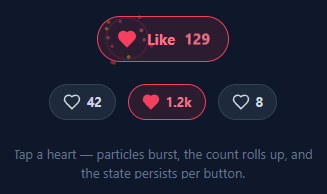
The like button is one of the most-tapped controls on the web, and the difference between a flat colour change and a good one is a few hundred milliseconds of feedback. This snippet is a complete set built in plain HTML, CSS and vanilla JavaScript: a primary Like pill, compact Favorite, Save and Helpful buttons, and a photo card that likes on double-tap. Each tap springs the icon, fires a radial burst in the button's own colour and rolls the count; the liked state is remembered in localStorage, and none of it needs a library.
One handler, four personalities
Every button is the same .fav element with its own --c colour and --spin angle set inline. The liked style is color-mix of that colour, so a rose heart, amber star, indigo bookmark and sky-blue thumb all share one stylesheet. The pop keyframe starts rotated by --spin, which makes the star twist into place while the heart simply grows. Adding a fifth variant is a new button with a new colour and SVG path.
Spring pop, burst and ring
When .liked is added, the icon fills and a keyframe overshoots from scale(.2) to 1.35 and settles, with a cubic-bezier(.2,1.6,.4,1) curve. burst() then adds twelve particles at evenly spaced angles with random jitter, writes each target as --tx and --ty, and tints them with the button's colour, a lighter mix of it and white. A ring expands behind them. All of them remove themselves on animationend, so repeated taps never leave nodes behind. Un-liking is quiet: no burst, just the count rolling down.
A count that never drifts
The old approach parsed the displayed text, so "1.2k" plus one stayed "1.2k". Here each button stores a data-base number, the count excluding your own like, and render() always shows base + (liked ? 1 : 0). Liking then un-liking can never leave the number off by one. The count slides up when you like and down when you un-like, restarted with a forced reflow so rapid taps still animate.
Remembered state
setLiked() writes fav-<id> to localStorage and the page restores it on load before anything animates. Every access is wrapped in try/catch, because storage can be blocked, and the buttons still work without it. For real data, replace save() with a request to your API.
Double-tap to like
The photo card counts two clicks within 320ms as a double-tap, pops a large heart over the image and likes the linked button. Like Instagram, double-tap never un-likes. The same logic works with touch and mouse.
Accessibility and motion
Each toggle is a real button with aria-pressed, and icon-only buttons carry a visually hidden name such as "Favorite". Focus rings take the button's colour. With prefers-reduced-motion, the pop, roll and burst are skipped, while the count and pressed state still update.
Step by step
How to Use
- 1Paste HTML, CSS and JSA large Like pill, three compact buttons (the Helpful one already liked) and a gradient photo card appear on a dark background.
- 2Tap the big heartThe heart fills, springs, fires twelve rose-coloured particles and a ring, the label changes to "Liked" and the count slides up to 128.
- 3Tap it againThe icon resets quietly and the count slides down, with no burst when un-liking.
- 4Try the star, bookmark and thumbEach uses its own colour and starts its pop with a different rotation. The star's count moves from 1.2k to 1.3k when liked, and back again when un-liked.
- 5Double-tap the photoA large heart pops over the image and the corner button likes. Double-tapping again does not un-like.
- 6Reload the pageYour choices are restored from localStorage under fav-<id>, so give every button a unique data-id.
Real-world uses
Common Use Cases
Got questions?
Frequently Asked Questions
Displayed counts are often abbreviated, so "1.2k" plus one is still "1.2k" and the number drifts after several taps. Storing the count without your own like as data-base and always showing base plus one when liked keeps it exact, and un-liking returns to the original number.
Replace save() with a request, and update the UI first. If the request fails, call setLiked() again with the previous value to revert the icon and the count. Pass the server's total as the new data-base when it returns.
The photo remembers the time of the last click. A second click within 320ms counts as a double-tap, shows the big heart and likes the button once if it is not already liked. Single taps do nothing, so scrolling and links are unaffected.
Keep liked state and a base count per item, render count as base plus one when liked, and toggle a class for the pop. Spawn the burst from a ref in the click handler or an effect. The CSS, including the --c and --spin custom properties, moves over unchanged.