

Bootstrap Rate-Limited Action Button — Free HTML CSS JS Snippet
Bootstrap Rate-Limited Action Button · Buttons · Plain HTML, CSS & JS · Live preview
Copy & paste
Source Code
<div class="container py-5 d-flex justify-content-center">
  <div class="card bsrate-card">
    <div class="card-body p-4">
      <label class="form-label small fw-semibold">Invite a teammate</label>
      <div class="input-group mb-2">
        <input type="email" class="form-control" id="bsrateEmail" placeholder="[email protected]">
        <button type="button" class="btn btn-dark fw-bold" id="bsrateBtn">Send invite</button>
      </div>
      <p class="small text-muted mb-0" id="bsrateStatus">You can send up to 3 invites per minute.</p>
    </div>
  </div>
</div>
.bsrate-card { width: 380px; max-width: 100%; border: 1px solid #eceef1; border-radius: 14px; }
#bsrateStatus.text-danger { color: #dc3545 !important; }
#bsrateStatus.text-success { color: #198754 !important; }const LIMIT = 3;
const WINDOW_MS = 60 * 1000;
const DEMO_WINDOW_MS = 8 * 1000; // sped up so the cooldown is actually observable here
const btn = document.getElementById('bsrateBtn');
const email = document.getElementById('bsrateEmail');
const status = document.getElementById('bsrateStatus');
// Timestamps of recent sends. Rate limiting by "count within a sliding
// window" rather than a flat cooldown after every click — the first LIMIT
// clicks are instant, and only clicking faster than the limit allows starts
// blocking, which matches how real API rate limits typically behave.
let sentAt = [];
let cooldownTimer = null;
function prune() {
const cutoff = Date.now() - DEMO_WINDOW_MS;
sentAt = sentAt.filter(t => t > cutoff);
}
function msUntilNextSlot() {
prune();
if (sentAt.length < LIMIT) return 0;
return sentAt[0] + DEMO_WINDOW_MS - Date.now();
}
function updateButton() {
const wait = msUntilNextSlot();
clearInterval(cooldownTimer);
if (wait <= 0) {
btn.disabled = false;
btn.textContent = 'Send invite';
return;
}
btn.disabled = true;
const tick = () => {
const remaining = Math.ceil(msUntilNextSlot() / 1000);
if (remaining <= 0) {
clearInterval(cooldownTimer);
updateButton();
return;
}
btn.textContent = 'Wait ' + remaining + 's';
};
tick();
cooldownTimer = setInterval(tick, 250);
}
btn.addEventListener('click', () => {
if (!email.value.trim()) {
status.textContent = 'Enter an email address first.';
status.className = 'small text-danger mb-0';
return;
}
if (msUntilNextSlot() > 0) return;
sentAt.push(Date.now());
status.textContent = 'Invite sent to ' + email.value.trim() + '.';
status.className = 'small text-success mb-0';
email.value = '';
updateButton();
});
updateButton();Extend with AI
Take This Snippet Further With AI
The AI prompt for this one is for Patreon supporters ($3 a month, 7 days free), along with a site with no ads. Supporters enter the passcode once and it is remembered in this browser.
What's included
Features
About this UI Snippet
Bootstrap Rate-Limited Action Button — HTML, CSS & JavaScript
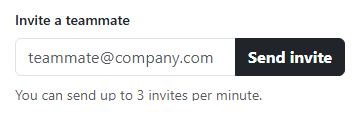
This models a genuinely different, more realistic pattern than a flat "disable for N seconds after every click" cooldown — sentAt records the timestamp of every recent click, and prune() discards any older than the sliding window before every check, so the button only ever blocks once LIMIT clicks have genuinely happened within that window. The first few clicks in a row fire instantly, one after another, exactly like a real API token-bucket or sliding-window rate limiter behaves — not like a resend-code button that always makes you wait the same fixed delay even for your very first click.
msUntilNextSlot() is the one function both the click handler and the countdown display read from — it returns 0 when there's room under the limit, or the exact number of milliseconds until the oldest recorded click ages out of the window and frees up a slot. Because both places call the same function, the button's disabled state and the countdown number it displays can never disagree about how long is actually left.
The countdown ticks every 250ms rather than a full second, re-deriving the remaining time from msUntilNextSlot() on every tick instead of counting down a separately stored number — which is what keeps the displayed countdown accurate even if the tab was backgrounded and timers were throttled, since it's always computed fresh from real timestamps rather than decremented blindly.
Step by step
How to Use
- 1Type an email and click "Send invite" three times in a row quicklyAll three sends go through instantly, one after another, with no waiting.
- 2Try clicking a fourth time immediatelyThe button disables and shows a live "Wait Ns" countdown instead of sending.
- 3Watch the countdownIt ticks down in real time until the oldest of your three sends ages out of the window.
- 4Wait for the countdown to reach zeroThe button re-enables itself automatically, ready for another send.
- 5Click "Send invite" with the email field emptyIt shows a validation message instead of counting toward the rate limit at all.
Real-world uses
Common Use Cases
Got questions?
Frequently Asked Questions
A flat cooldown blocks every single click equally, even the very first one in a session. This sliding-window approach allows a genuine burst of clicks up to the limit before blocking anything, only kicking in once that limit is actually exceeded — much closer to how real API rate limits (and their 429 responses) typically behave.
A plain decrementing counter can drift if the browser throttles background tab timers; recomputing msUntilNextSlot() from real Date.now() timestamps on every tick keeps the displayed countdown accurate regardless of any timer throttling that occurred in between.
No — the empty-email check happens before msUntilNextSlot() is even consulted for blocking, and a rejected empty submission never gets pushed into sentAt, so it doesn't consume one of the limited slots.
Yes. Keep sentAt in a ref (not state, since it updates on a timer without needing a full re-render for every millisecond) and mirror the computed disabled/label values into component state on each tick, the same way this snippet updates the DOM directly.