

Interact.js Draggable and Resizable Dashboard Panels with Snapping
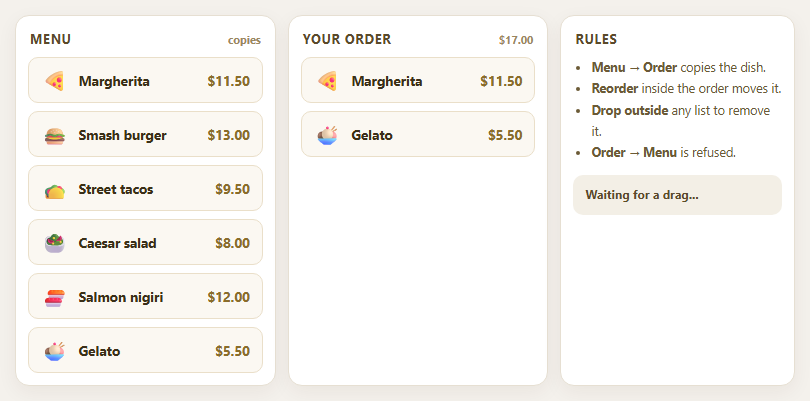
Dragula Copy vs Move Lists with Spill Control

SortableJS Shared Groups: Clone from a Palette into a Page Builder

SortableJS Drag Handle with Pinned and Locked Rows
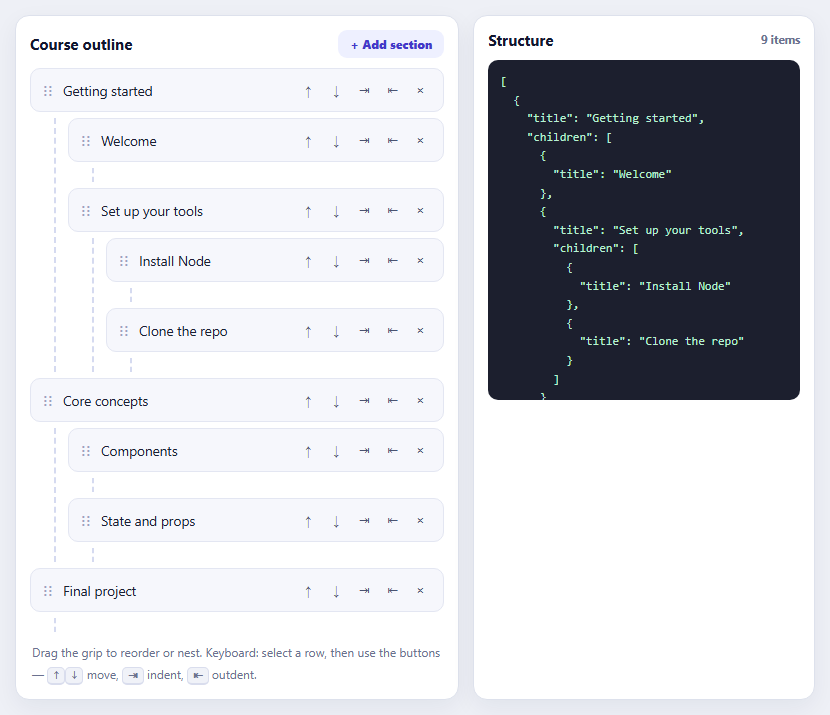
SortableJS Nested Sortable Tree with Keyboard Controls
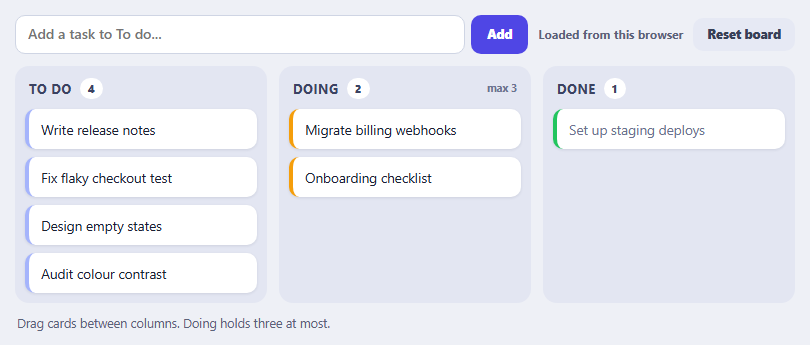
SortableJS Multi-List Kanban with Persistence and WIP Limit
Activity Feed — Free HTML CSS JS Timeline Snippet
Activity Feed · Dashboards · Plain HTML, CSS & JS · Live preview
Copy & paste
Source Code
<div class="wrap">
<div class="feed-header">
<h2 class="feed-title">Activity</h2>
<div class="filter-tabs">
<button class="ftab active" onclick="filterFeed(this,'all')">All</button>
<button class="ftab" onclick="filterFeed(this,'comment')">Comments</button>
<button class="ftab" onclick="filterFeed(this,'deploy')">Deploys</button>
<button class="ftab" onclick="filterFeed(this,'alert')">Alerts</button>
</div>
</div>
<div class="feed" id="feed">
<div class="item" data-type="deploy">
<div class="spine"></div>
<div class="icon-wrap deploy"><svg width="14" height="14" viewBox="0 0 24 24" fill="none" stroke="currentColor" stroke-width="2.5" stroke-linecap="round"><polyline points="16 18 22 12 16 6"/><polyline points="8 6 2 12 8 18"/></svg></div>
<div class="body">
<div class="item-top"><div class="av" style="background:linear-gradient(135deg,#6366f1,#a78bfa)">AJ</div><span class="name">Alex Johnson</span><span class="action">deployed</span><span class="target">main → production</span></div>
<div class="item-meta"><span class="time">2 min ago</span><span class="tag green">Success</span></div>
</div>
</div>
<div class="item" data-type="comment">
<div class="spine"></div>
<div class="icon-wrap comment"><svg width="14" height="14" viewBox="0 0 24 24" fill="none" stroke="currentColor" stroke-width="2.5" stroke-linecap="round"><path d="M21 15a2 2 0 0 1-2 2H7l-4 4V5a2 2 0 0 1 2-2h14a2 2 0 0 1 2 2z"/></svg></div>
<div class="body">
<div class="item-top"><div class="av" style="background:linear-gradient(135deg,#ec4899,#f97316)">SM</div><span class="name">Sara Miller</span><span class="action">commented on</span><span class="target">Design review PR #142</span></div>
<div class="comment-bubble">"Looks great, just one small nit on line 48 — the spacing feels off on mobile."</div>
<div class="item-meta"><span class="time">18 min ago</span></div>
</div>
</div>
<div class="item" data-type="alert">
<div class="spine"></div>
<div class="icon-wrap alert"><svg width="14" height="14" viewBox="0 0 24 24" fill="none" stroke="currentColor" stroke-width="2.5" stroke-linecap="round"><path d="M10.29 3.86L1.82 18a2 2 0 0 0 1.71 3h16.94a2 2 0 0 0 1.71-3L13.71 3.86a2 2 0 0 0-3.42 0z"/><line x1="12" y1="9" x2="12" y2="13"/><line x1="12" y1="17" x2="12.01" y2="17"/></svg></div>
<div class="body">
<div class="item-top"><div class="icon-av alert-av">⚠</div><span class="name">System</span><span class="action">triggered alert —</span><span class="target">API p95 latency > 800ms</span></div>
<div class="item-meta"><span class="time">34 min ago</span><span class="tag red">Critical</span></div>
</div>
</div>
<div class="item" data-type="deploy">
<div class="spine"></div>
<div class="icon-wrap deploy"><svg width="14" height="14" viewBox="0 0 24 24" fill="none" stroke="currentColor" stroke-width="2.5" stroke-linecap="round"><polyline points="16 18 22 12 16 6"/><polyline points="8 6 2 12 8 18"/></svg></div>
<div class="body">
<div class="item-top"><div class="av" style="background:linear-gradient(135deg,#10b981,#0ea5e9)">RP</div><span class="name">Raj Patel</span><span class="action">deployed</span><span class="target">feature/auth-v2 → staging</span></div>
<div class="item-meta"><span class="time">1 hr ago</span><span class="tag yellow">Preview</span></div>
</div>
</div>
<div class="item" data-type="comment">
<div class="spine"></div>
<div class="icon-wrap comment"><svg width="14" height="14" viewBox="0 0 24 24" fill="none" stroke="currentColor" stroke-width="2.5" stroke-linecap="round"><path d="M21 15a2 2 0 0 1-2 2H7l-4 4V5a2 2 0 0 1 2-2h14a2 2 0 0 1 2 2z"/></svg></div>
<div class="body">
<div class="item-top"><div class="av" style="background:linear-gradient(135deg,#f59e0b,#ef4444)">MK</div><span class="name">Maya K.</span><span class="action">approved</span><span class="target">PR #139 — Refactor billing module</span></div>
<div class="item-meta"><span class="time">2 hr ago</span><span class="tag green">Approved</span></div>
</div>
</div>
<div class="item no-spine" data-type="alert">
<div class="spine hidden"></div>
<div class="icon-wrap alert"><svg width="14" height="14" viewBox="0 0 24 24" fill="none" stroke="currentColor" stroke-width="2.5" stroke-linecap="round"><path d="M10.29 3.86L1.82 18a2 2 0 0 0 1.71 3h16.94a2 2 0 0 0 1.71-3L13.71 3.86a2 2 0 0 0-3.42 0z"/><line x1="12" y1="9" x2="12" y2="13"/><line x1="12" y1="17" x2="12.01" y2="17"/></svg></div>
<div class="body">
<div class="item-top"><div class="icon-av alert-av">⚠</div><span class="name">System</span><span class="action">resolved —</span><span class="target">Disk usage back to normal</span></div>
<div class="item-meta"><span class="time">3 hr ago</span><span class="tag blue">Resolved</span></div>
</div>
</div>
</div>
</div>* { box-sizing: border-box; margin: 0; padding: 0; }
body { font-family: system-ui, sans-serif; background: #f8fafc; min-height: 100vh; padding: 32px 20px; }
.wrap { max-width: 560px; margin: 0 auto; }
.feed-header { display: flex; justify-content: space-between; align-items: center; margin-bottom: 20px; flex-wrap: wrap; gap: 12px; }
.feed-title { font-size: 18px; font-weight: 800; color: #0f172a; }
.filter-tabs { display: flex; gap: 4px; background: #f1f5f9; border-radius: 8px; padding: 3px; }
.ftab { background: transparent; border: none; font-size: 12px; font-weight: 600; color: #64748b; padding: 5px 12px; border-radius: 6px; cursor: pointer; transition: all 0.15s; white-space: nowrap; }
.ftab.active { background: #fff; color: #0f172a; box-shadow: 0 1px 4px rgba(0,0,0,0.08); }
.feed { display: flex; flex-direction: column; }
/* Activity item */
.item { display: flex; gap: 0; position: relative; }
.item.hidden { display: none; }
/* Vertical spine connecting items */
.spine { width: 1px; background: #e2e8f0; margin: 0 20px; flex-shrink: 0; position: relative; }
.spine::before { content: ''; position: absolute; top: 4px; left: -3px; width: 7px; height: 7px; border-radius: 50%; background: #e2e8f0; }
.no-spine .spine { background: transparent; }
.hidden { visibility: hidden; }
/* Icon */
.icon-wrap { width: 28px; height: 28px; border-radius: 8px; display: flex; align-items: center; justify-content: center; flex-shrink: 0; margin-top: 12px; }
.icon-wrap.deploy { background: rgba(99,102,241,0.1); color: #6366f1; }
.icon-wrap.comment { background: rgba(14,165,233,0.1); color: #0ea5e9; }
.icon-wrap.alert { background: rgba(239,68,68,0.1); color: #ef4444; }
/* Content body */
.body { flex: 1; padding: 12px 0 20px 12px; border-bottom: 1px solid #f1f5f9; }
.no-spine .body { border-bottom: none; padding-bottom: 8px; }
.item-top { display: flex; align-items: center; gap: 6px; flex-wrap: wrap; }
.av { width: 22px; height: 22px; border-radius: 50%; font-size: 8px; font-weight: 800; color: #fff; display: flex; align-items: center; justify-content: center; flex-shrink: 0; }
.icon-av { width: 22px; height: 22px; border-radius: 50%; display: flex; align-items: center; justify-content: center; font-size: 11px; }
.alert-av { background: rgba(239,68,68,0.1); }
.name { font-size: 13px; font-weight: 700; color: #0f172a; }
.action { font-size: 13px; color: #64748b; }
.target { font-size: 13px; font-weight: 600; color: #475569; }
.comment-bubble { background: #f8fafc; border: 1px solid #e2e8f0; border-radius: 8px; padding: 8px 12px; margin-top: 8px; font-size: 12px; color: #475569; line-height: 1.6; font-style: italic; }
.item-meta { display: flex; align-items: center; gap: 8px; margin-top: 6px; }
.time { font-size: 11px; color: #94a3b8; }
.tag { font-size: 10px; font-weight: 700; padding: 2px 8px; border-radius: 20px; }
.tag.green { background: rgba(34,197,94,0.1); color: #16a34a; }
.tag.red { background: rgba(239,68,68,0.1); color: #dc2626; }
.tag.yellow { background: rgba(245,158,11,0.1); color: #b45309; }
.tag.blue { background: rgba(14,165,233,0.1); color: #0369a1; }function filterFeed(btn, type) {
document.querySelectorAll('.ftab').forEach(b => b.classList.remove('active'));
btn.classList.add('active');
document.querySelectorAll('.item').forEach(item => {
const match = type === 'all' || item.dataset.type === type;
item.classList.toggle('hidden', !match);
});
}Extend with AI
Take This Snippet Further With AI
The AI prompt for this one is for Patreon supporters ($3 a month, 7 days free), along with a site with no ads. Supporters enter the passcode once and it is remembered in this browser.
What's included
Features
About this UI Snippet
Activity Feed — Vertical Timeline, Event Type Icons, Avatar Actions & Filter Tabs
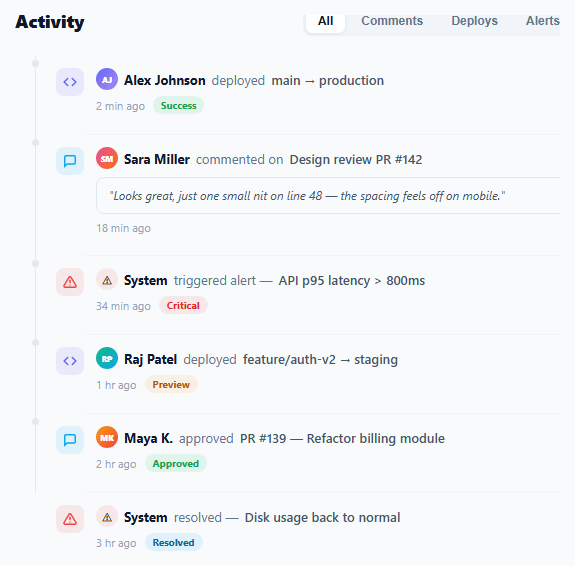
An activity feed is a chronological list of events that communicates what is happening in a system — who did what, when, and with what result. It is a standard component in admin dashboards, project management tools, CI/CD pipelines, team collaboration apps, and audit logs. This snippet provides a complete vertical timeline activity feed with three event types (deploy, comment, alert), a connecting spine with dot nodes, coloured event icons, avatar initials, action text, timestamps, status tags, comment bubbles, and filter tabs.
The vertical spine and dot nodes
The connecting spine between items is a 1px wide div with background: #e2e8f0. A ::before pseudo-element on each spine adds a 7px circle at the top — the timeline dot node. The last item has .no-spine which makes the spine transparent (preserving the layout without the visual line) and hides the dot. This creates the appearance of a timeline that ends cleanly at the last item.
Three event type icons
Three event types use coloured icon backgrounds: deploy (indigo, code brackets SVG), comment (cyan, speech bubble SVG), alert (red, warning triangle SVG). Each uses an rgba() tinted background matching the icon colour. All SVG icons are inline — no icon library required. The colour coding lets users scan event types without reading the action text.
The comment bubble
Comment events include a .comment-bubble div — a quoted text block with a light background, border, and italic style. This is a standard UI pattern for showing preview text without full content expansion, used in GitHub activity feeds and Slack notification previews.
Filter tabs
Four filter tabs (All, Comments, Deploys, Alerts) use the same pill tab switcher pattern as the leaderboard. filterFeed() toggles the .hidden class on items whose data-type attribute does not match the selected filter. The filter is client-side — no re-fetch needed for static feeds. For live feeds, trigger an API fetch with the filter parameter on tab click.
Relative timestamps
Timestamps use relative format ("2 min ago", "1 hr ago") — the standard for activity feeds. In production, calculate these from ISO timestamps: use the timeAgo() helper or a library like date-fns formatDistanceToNow(). Update timestamps every 60 seconds via setInterval for a live feel.
Step by step
How to Use
- 1Click the filter tabs to filter by event typeClick Comments, Deploys, or Alerts to filter the feed to that event type. Click All to show everything. The filter toggles the .hidden class on each item matching or not matching the data-type attribute.
- 2Add a new event itemDuplicate one of the .item divs in the HTML. Set data-type to "deploy", "comment", or "alert". Update the avatar initials and gradient, name, action text, target text, timestamp, and tag class and label.
- 3Add a new event typeAdd a new .icon-wrap class (e.g., .icon-wrap.merge) with a background and colour. Add a matching filter tab button with onclick="filterFeed(this,'merge')". Set data-type="merge" on the relevant items.
- 4Update avatar and action contentEdit each .item-top: change the .av gradient and initials, .name text, .action text (deployed/commented/approved), and .target text. For system events (no user), use .icon-av with a symbol instead of .av.
- 5Convert timestamps to relative formatReplace the hardcoded "2 min ago" strings with a timeAgo() function that computes relative time from an ISO timestamp. Call timeAgo(item.timestamp) and update all .time elements every 60 seconds via setInterval.
- 6Export in your formatClick "HTML" for a standalone file, "JSX" for a React component mapping an events array to activity items, or "Tailwind" for a React + Tailwind version.
Real-world uses
Common Use Cases
Got questions?
Frequently Asked Questions
Each .item has a .spine div that is 1px wide with a grey background colour — this is the vertical line between events. The ::before pseudo-element on .spine adds a 7px circle positioned at the top of the line: position: absolute; top: 4px; left: -3px (half of 7px to centre it on the 1px line); width/height: 7px; border-radius: 50%. The last item has .no-spine which sets the spine background to transparent and hides the dot, stopping the line at the last event.
Use Server-Sent Events or WebSocket to push new activity from your server. For SSE: const es = new EventSource("/api/activity-stream"); es.onmessage = e => { const item = JSON.parse(e.data); prependItem(item); }. In prependItem(), create a new .item element from a template string, insert it at the top of .feed with feed.insertBefore(newItem, feed.firstChild), and optionally animate in with a CSS keyframe from opacity: 0 and translateY(-8px).
function timeAgo(iso) { const s = Math.floor((Date.now() - new Date(iso)) / 1000); if (s < 60) return s + "s ago"; if (s < 3600) return Math.floor(s/60) + " min ago"; if (s < 86400) return Math.floor(s/3600) + " hr ago"; return Math.floor(s/86400) + "d ago"; } Call timeAgo on the timestamp string for each item. To keep timestamps current, call updateTimestamps() every 60 seconds via setInterval — re-compute all .time elements from their stored ISO data attribute.
Click "JSX" to download. Accept an events prop: an array of {id, type, user, action, target, time, tag, comment} objects. Map events to ActivityItem components. Manage activeFilter in useState. Filter the array with events.filter(e => activeFilter === "all" || e.type === activeFilter). For real-time updates, add new events to the array in a WebSocket onmessage handler and use state update: setEvents(prev => [newEvent, ...prev]).