


Changelog / Release Notes Feed — HTML CSS JS Snippet
Changelog / Release Notes · Cards · Plain HTML, CSS & JS · Live preview
Copy & paste
Source Code
<div class="wrap">
  <div class="header">
    <h1 class="title">What's New</h1>
    <p class="sub">Latest updates, features, and fixes.</p>
    <div class="filter-tabs" id="filterTabs">
      <button class="ftab active" data-filter="all" onclick="setFilter('all',this)">All</button>
      <button class="ftab" data-filter="feature" onclick="setFilter('feature',this)">Features</button>
      <button class="ftab" data-filter="improvement" onclick="setFilter('improvement',this)">Improvements</button>
      <button class="ftab" data-filter="fix" onclick="setFilter('fix',this)">Fixes</button>
    </div>
  </div>
  <div class="feed" id="feed"></div>
</div>
* { box-sizing: border-box; margin: 0; padding: 0; }
body { font-family: system-ui, sans-serif; background: #f8fafc; min-height: 100vh; padding: 40px 20px; }
.wrap { max-width: 680px; margin: 0 auto; }
.header { margin-bottom: 36px; }
.title { font-size: 28px; font-weight: 900; color: #0f172a; }
.sub { font-size: 15px; color: #64748b; margin-top: 6px; margin-bottom: 20px; }
.filter-tabs { display: flex; gap: 6px; }
.ftab { padding: 7px 16px; border-radius: 20px; border: 1.5px solid #e2e8f0; background: #fff; font-size: 13px; font-weight: 700; color: #64748b; cursor: pointer; transition: all 0.15s; }
.ftab.active { background: #0f172a; color: #fff; border-color: #0f172a; }
.ftab:hover:not(.active) { border-color: #94a3b8; color: #334155; }
.feed { position: relative; padding-left: 28px; }
.feed::before { content: ''; position: absolute; left: 6px; top: 8px; bottom: 8px; width: 2px; background: #e2e8f0; }
.entry { position: relative; margin-bottom: 32px; }
.entry::before { content: ''; position: absolute; left: -25px; top: 20px; width: 10px; height: 10px; border-radius: 50%; background: #e2e8f0; border: 2px solid #fff; }
.entry.new-entry::before { background: #6366f1; box-shadow: 0 0 0 3px rgba(99,102,241,0.2); }
.entry-card { background: #fff; border-radius: 16px; border: 1px solid #e2e8f0; padding: 20px 22px; }
.entry-header { display: flex; align-items: center; gap: 10px; flex-wrap: wrap; margin-bottom: 12px; }
.version { font-size: 13px; font-weight: 800; color: #0f172a; background: #f1f5f9; padding: 3px 10px; border-radius: 6px; font-family: ui-monospace, monospace; }
.type-badge { font-size: 11px; font-weight: 800; text-transform: uppercase; letter-spacing: 0.5px; padding: 3px 9px; border-radius: 6px; }
.type-feature { background: #ede9fe; color: #6d28d9; }
.type-improvement { background: #dbeafe; color: #1d4ed8; }
.type-fix { background: #dcfce7; color: #15803d; }
.type-security { background: #fee2e2; color: #dc2626; }
.date { font-size: 12px; color: #94a3b8; margin-left: auto; }
.entry-title { font-size: 16px; font-weight: 800; color: #0f172a; margin-bottom: 8px; }
.entry-body { font-size: 14px; color: #475569; line-height: 1.6; }
.items { margin-top: 10px; display: flex; flex-direction: column; gap: 6px; }
.item { display: flex; gap: 8px; font-size: 14px; color: #475569; }
.item::before { content: '–'; color: #94a3b8; flex-shrink: 0; }
.entry.hidden { display: none; }var entries = [
{
version: 'v3.4.0', type: 'feature', date: 'Jun 10, 2026', isNew: true,
title: 'AI-Powered Smart Suggestions',
body: "Get contextual suggestions as you type, powered by our new ML model trained on your team's past content.",
items: ['Real-time inline suggestions in all text fields',"Learns from your team's writing style over time",'Toggle off per-field or globally in Settings']
},
{
version: 'v3.3.2', type: 'fix', date: 'Jun 3, 2026', isNew: true,
title: 'Critical Bug Fixes',
body: 'Resolved three issues reported by users in the last release cycle.',
items: ['Fixed pagination resetting when applying filters','Fixed date picker not respecting user timezone','Resolved duplicate notification emails on bulk actions']
},
{
version: 'v3.3.0', type: 'improvement', date: 'May 22, 2026', isNew: false,
title: 'Dashboard Performance Overhaul',
body: 'The main dashboard now loads 3× faster thanks to query optimisation and incremental rendering.',
items: ['Initial load time reduced from 4.2s to 1.4s','Charts now render progressively as data arrives','Background data refresh no longer blocks UI interactions']
},
{
version: 'v3.2.1', type: 'fix', date: 'May 14, 2026', isNew: false,
title: 'Export and Permissions Fixes',
items: ['CSV export now correctly handles special characters in field values','Fixed admin role not being able to delete archived items','Corrected link preview not loading for HTTPS-only domains']
},
{
version: 'v3.2.0', type: 'feature', date: 'May 6, 2026', isNew: false,
title: 'Custom Workflows & Automations',
body: 'Build no-code automations with triggers, conditions, and actions across your workspace.',
items: ['20+ trigger types including field changes, due dates, and status updates','Multi-step action chains with conditional branching','Automation run history with per-step status and logs']
}
];
var activeFilter = 'all';
function renderFeed() {
var el = document.getElementById('feed');
el.innerHTML = entries.map(function(e) {
var hidden = activeFilter !== 'all' && e.type !== activeFilter;
var itemsHtml = e.items ? '<div class="items">' + e.items.map(function(i) { return '<div class="item">' + i + '</div>'; }).join('') + '</div>' : '';
return '<div class="entry ' + (e.isNew ? 'new-entry ' : '') + (hidden ? 'hidden' : '') + '">' +
'<div class="entry-card">' +
'<div class="entry-header">' +
'<span class="version">' + e.version + '</span>' +
'<span class="type-badge type-' + e.type + '">' + e.type + '</span>' +
'<span class="date">' + e.date + '</span>' +
'</div>' +
'<div class="entry-title">' + e.title + '</div>' +
(e.body ? '<div class="entry-body">' + e.body + '</div>' : '') +
itemsHtml +
'</div></div>';
}).join('');
}
function setFilter(filter, btn) {
activeFilter = filter;
document.querySelectorAll('.ftab').forEach(function(b) { b.classList.remove('active'); });
btn.classList.add('active');
renderFeed();
}
renderFeed();Extend with AI
Take This Snippet Further With AI
The AI prompt for this one is for Patreon supporters ($3 a month), along with a site with no ads. Supporters enter the passcode once and it is remembered in this browser.
What's included
Features
About this UI Snippet
Changelog Feed — Version Timeline, Type Badges & Filter Tabs
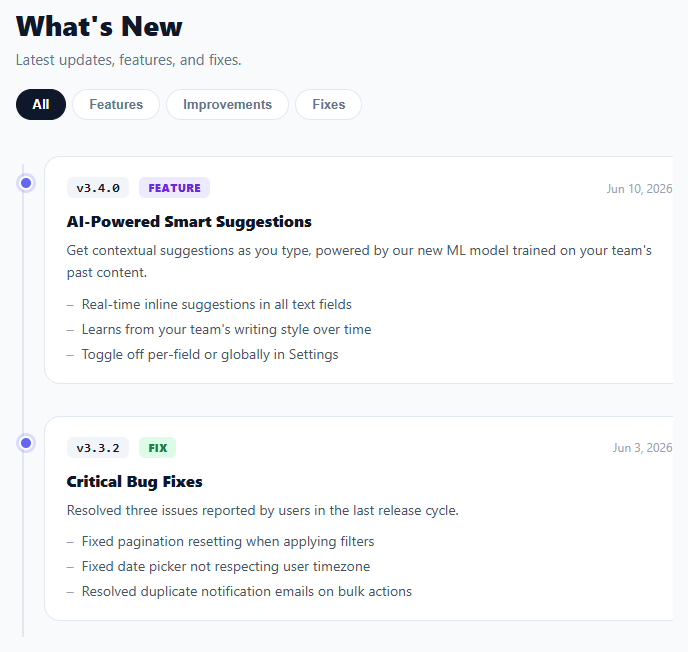
A changelog or release notes page is a high-search-intent component for SaaS products, developer tools, and open-source libraries because it is both a trust signal and a product communication channel — the forward-looking counterpart is the product roadmap, and the in-app version is the activity feed. This snippet provides a complete changelog feed with a vertical timeline, version number badges, type-coloured labels (feature, improvement, fix, security), per-entry bullet points, filter tabs to isolate a change type, and a "new" indicator on recent entries.
The data model
The entries array is the single source of truth: each entry has a version string, a type, a date, a title, an optional body paragraph, and an optional items array of bullet points. The renderer maps over this array to produce the HTML, so adding a release is as simple as prepending a new object. In production this array would be fetched from an API or loaded from a JSON file maintained alongside the product codebase.
Timeline connector
The feed container uses a left-border pseudo-element for the vertical timeline line, and each entry has a small circle pseudo-element positioned over that line. Recent entries (isNew: true) get a filled indigo circle with a glow ring; older entries get a neutral grey. This visual encoding gives readers an immediate at-a-glance sense of recency without reading the dates.
Type badges and filter tabs
Each entry is labelled with a colour-coded type badge: purple for features, blue for improvements, green for fixes, and red for security. The filter tabs at the top toggle the activeFilter variable and re-render the list, adding a hidden class to non-matching entries. This client-side filter is fast and requires no server round-trip for a typical changelog of 20–100 entries.
Version number styling
The version string is displayed in a monospace badge with a subtle dark background, matching the convention users expect from developer-facing changelogs and making the version easy to scan or search visually.
Accessibility and extensibility
The semantic structure (h1 header, version strings, dated entries, bullet lists) is easily crawlable for SEO and screenreader-readable. Extending the snippet with anchor-linked entries (id per version), a search input, or pagination for long changelogs are all natural next steps that fit the existing structure.
Step by step
How to Use
- 1Browse the timelineScroll through the release history. The timeline dot glows for recent entries and the version badge, type, and date are immediately visible.
- 2Filter by typeClick Features, Improvements, or Fixes to show only that change type. Click All to show the full history.
- 3Add a new releasePrepend a new object to the entries array with version, type, date, title, and optionally body and items. Set isNew: true to glow the timeline dot.
- 4Add a new typeAdd a new type value (e.g. "security"), define a .type-security CSS class with the appropriate colour, and use it in entries.
- 5Load from an APIReplace the entries array with a fetch() call to your releases endpoint. Render the feed in the fetch callback, applying the same template.
- 6Export for your frameworkClick "React" for a component with entries as props and filter state in useState. Click "Vue" for a Vue 3 SFC with a computed filteredEntries.
Real-world uses
Common Use Cases
Got questions?
Frequently Asked Questions
Replace the static entries array with a fetch() call in a DOMContentLoaded listener. Your API returns entries as JSON in the same shape. For Markdown, parse each file's frontmatter (version, type, date, title) into the object schema and the body into the body string. Store entries newest-first in the response so rendering order is correct without client-side sorting.
Add an id attribute to each entry card derived from the version string: id="v3-4-0" (replacing dots with dashes). The browser will scroll to the anchor on load. Optionally add a copy-link icon beside the version badge that writes location.origin + "#" + id to the clipboard, giving users a shareable deep link to any specific release.
Store a lastSeen ISO date in localStorage when the user closes the changelog (or on any page load). When rendering, compare each entry's date to lastSeen and set isNew accordingly. Add a badge count to the "What's new?" trigger showing how many unseen entries there are, and mark them as seen when the user opens the panel.
Accept entries as a prop (or fetch them in useEffect). Keep activeFilter in useState. Derive filteredEntries with useMemo(() => filter === "all" ? entries : entries.filter(e => e.type === filter), [entries, filter]). Map filteredEntries to JSX entry cards. The filter tabs call setFilter; the timeline dot styling applies based on entry.isNew. This pattern cleanly separates data from presentation. For the Tailwind version, click "Tailwind" to get the same markup with utility classes instead of a scoped stylesheet.