
Slot Reel Letters — Text That Spins Like a Slot Machine
Slot Reel Letters · Text Animation · Plain HTML, CSS & JS · Live preview
Copy & paste
Source Code
<main class="stage">
  <p class="label">Today's lucky word</p>
  <h1 class="board" id="board" aria-live="polite"></h1>
  <div class="picks" id="picks">
    <button type="button" class="pick on" data-w="JACKPOT">JACKPOT</button>
    <button type="button" class="pick" data-w="WINNER">WINNER</button>
    <button type="button" class="pick" data-w="LUCKY 7">LUCKY 7</button>
    <button type="button" class="pick" data-w="SPIN IT">SPIN IT</button>
  </div>
  <button type="button" class="spin" id="spin">Spin again</button>
</main>*{box-sizing:border-box;margin:0;padding:0}
body{min-height:100vh;display:grid;place-items:center;background:#120a1f;font-family:system-ui,sans-serif}
.stage{display:grid;justify-items:center;gap:22px;padding:28px 18px;width:100%}
.label{font-size:12px;letter-spacing:.3em;text-transform:uppercase;color:#a78bfa}
.board{display:flex;gap:8px;padding:16px 18px;border-radius:18px;background:linear-gradient(#2a1745,#1b0f31);border:2px solid #4c2a7a;box-shadow:0 0 0 5px #120a1f,0 0 0 7px #3a2060,0 18px 50px rgba(124,58,237,.35)}
.reel{--h:clamp(54px,11vw,92px);position:relative;width:calc(var(--h) * .74);height:var(--h);overflow:hidden;border-radius:10px;background:#fff7e0;box-shadow:inset 0 10px 14px rgba(0,0,0,.35),inset 0 -10px 14px rgba(0,0,0,.35)}
.reel.gap{background:transparent;box-shadow:none;width:calc(var(--h) * .3)}
.strip{display:flex;flex-direction:column;will-change:transform}
.strip span{display:grid;place-items:center;height:var(--h);font:800 calc(var(--h) * .68)/1 'Arial Black',Impact,sans-serif;color:#2b1750}
.picks{display:flex;flex-wrap:wrap;justify-content:center;gap:8px}
.pick{font:600 13px system-ui,sans-serif;color:#cdb8f5;background:#1d1230;border:1px solid #3a2060;border-radius:999px;padding:8px 16px;cursor:pointer}
.pick.on{background:#7c3aed;color:#fff;border-color:#7c3aed}
.pick:focus-visible,.spin:focus-visible{outline:2px solid #fbbf24;outline-offset:3px}
.spin{font:700 14px system-ui,sans-serif;color:#2b1750;background:#fbbf24;border:0;border-radius:10px;padding:12px 28px;cursor:pointer;box-shadow:0 4px 0 #b9850b}
.spin:active{transform:translateY(3px);box-shadow:0 1px 0 #b9850b}var board = document.getElementById('board');
var picks = document.getElementById('picks');
var word = 'JACKPOT';
var POOL = 'ABCDEFGHIJKLMNOPQRSTUVWXYZ0123456789';
var STEPS = 16; // random symbols that scroll past before each reel lands
var reduce = window.matchMedia('(prefers-reduced-motion: reduce)').matches;
function build(text) {
board.innerHTML = '';
board.setAttribute('aria-label', text);
text.split('').forEach(function (ch) {
var reel = document.createElement('span');
reel.className = 'reel';
reel.setAttribute('aria-hidden', 'true');
if (ch === ' ') { reel.className += ' gap'; board.appendChild(reel); return; }
var strip = document.createElement('span');
strip.className = 'strip';
for (var i = 0; i < STEPS; i++) {
var s = document.createElement('span');
s.textContent = POOL.charAt(Math.floor(Math.random() * POOL.length));
strip.appendChild(s);
}
var last = document.createElement('span');
last.textContent = ch;
strip.appendChild(last);
reel.appendChild(strip);
board.appendChild(reel);
});
}
function spin() {
build(word);
var strips = board.querySelectorAll('.strip');
strips.forEach(function (strip, i) {
var h = strip.parentNode.offsetHeight;
var end = -(STEPS * h);
if (reduce) { strip.style.transform = 'translateY(' + end + 'px)'; return; }
strip.style.transform = 'translateY(0)';
strip.getBoundingClientRect(); // commit the start position before the transition begins
strip.style.transition = 'transform ' + (1.1 + i * 0.22) + 's cubic-bezier(.2,.8,.25,1.05)';
strip.style.transform = 'translateY(' + end + 'px)';
});
}
picks.addEventListener('click', function (e) {
var b = e.target.closest('.pick');
if (!b) return;
picks.querySelectorAll('.pick').forEach(function (p) { p.classList.toggle('on', p === b); });
word = b.getAttribute('data-w');
spin();
});
document.getElementById('spin').addEventListener('click', spin);
spin();Extend with AI
Take This Snippet Further With AI
Ask an AI coding assistant to explain why spin() calls getBoundingClientRect() between setting the strip's start transform and its transition, and what would happen on a second spin without it. Another good question is why the per-letter duration grows with the index and how the cubic-bezier overshoot creates the stopping bounce.
Prompt to recreate it
Copy this into your AI assistant of choice to build the effect from scratch, or as a jumping-off point for your own variant:
Build a slot-machine text reveal in plain HTML, CSS and JavaScript where every letter of a word is its own spinning reel.

Requirements:
- Generate the reels from a string at runtime. Each letter gets a fixed-size window with overflow hidden and a tall vertical strip inside it, holding around sixteen random characters followed by the real letter as the last cell. Spaces become narrow empty gaps.
- To spin, reset each strip to translateY(0), force a layout read so the start position registers, then set a transform transition that moves the strip up so the real letter is in view.
- Stagger the landing: each reel's transition lasts longer than the previous one, and use a cubic-bezier whose end control value is slightly above 1 so each reel overshoots and settles.
- Style the board like a cabinet: a purple gradient frame with a layered outline, cream reel windows with inset top and bottom shadows to suggest a curved drum, and a heavy display font.
- Add chips to pick between several words and a "Spin again" button; changing the word rebuilds and respins.
- Expose the word once with aria-label on a polite live region, hide the reels from assistive technology, and under prefers-reduced-motion skip the animation and show the final word immediately.
Want to tighten it up first? Run this prompt through the AI Prompt Studio to score it across 8 quality dimensions, catch anti-patterns, and tune the wording for Claude, ChatGPT, or Gemini before you paste it in.
What's included
Features
aria-label on a live region, the reels are hidden from screen readers, and reduced-motion visitors get the final word at once.About this UI Snippet
Slot Reel Letters — Per-Letter Vertical Strips With Staggered Landing
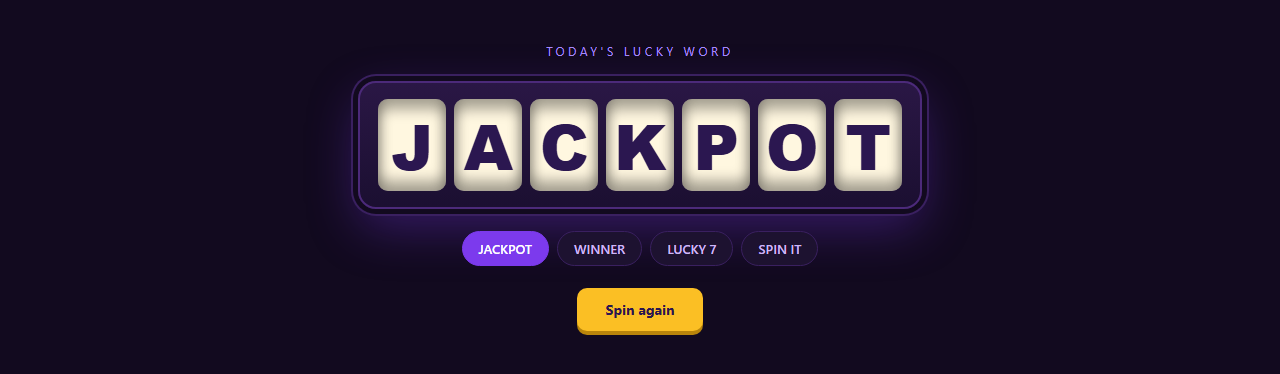
A slot machine doesn't reveal a word by fading it in; it makes you watch symbols blur past until each reel clicks into place. This snippet applies that to text. Every letter of the word is a small window with a tall strip behind it: sixteen random characters followed by the real one. The strip slides up so the real letter ends up in the window, and each reel takes a little longer than the one before it, so the word locks in from left to right.
One strip per letter, built at runtime
JavaScript creates the reels from whatever string you give it, so changing the word is changing one value. Each .strip is a flex column of equal-height cells, and the window around it is overflow:hidden with an inset shadow that fakes the curve of a drum. Spaces become narrow transparent gaps so multi-word phrases like "LUCKY 7" still read as two words.
Why the transition has a slight overshoot
The landing uses cubic-bezier(.2,.8,.25,1.05). The 1.05 end value overshoots by a few percent before settling, which is the small bounce a mechanical reel makes when it stops. Duration grows by 0.22s per letter, and that stagger is what turns sixteen separate transitions into one readable "landing" sequence.
Starting each spin cleanly
Before the transition is set, the code resets the strip to zero and calls getBoundingClientRect() to force a layout, so the browser registers the start position and animates rather than jumping. The board keeps aria-label with the real word, the reels are hidden from assistive tech, and users who prefer reduced motion see the final word immediately.
Step by step
How to Use
- 1Paste the HTML, CSS and JSA purple cabinet appears and spells JACKPOT by spinning seven reels, then offers three more words as chips and a gold "Spin again" button.
- 2Set your own wordChange the
wordvariable and thedata-wvalues on the chips. Letters, digits and spaces work; anything outside thePOOLstring simply lands correctly because the last cell is always the real character. - 3Make it longer or shorter
STEPSis how many random symbols scroll past. Raise it for a longer spin; lower it for a quick flick. Remember to keep the duration in step so it doesn't look too fast. - 4Change the staggerIn
spin(), the duration is1.1 + i * 0.22seconds. A smaller multiplier makes the reels land almost together; a larger one gives a slow left-to-right count-in. - 5Use it without the buttonsDelete the chips and button and call
spin()once on load, or when a section scrolls into view, to use it as a one-off headline reveal.
Real-world uses
Common Use Cases
Got questions?
Frequently Asked Questions
The number of letters and the final character are only known at runtime. JavaScript builds the strips and sets each transition's duration from the letter index, which keyframes with fixed values can't do.
The spin() function rebuilds the strips each time, so each starts at zero. If you reuse strips instead, reset the transform, force a layout with getBoundingClientRect(), then set the transition.
Yes. Replace the POOL string with an array of emoji and pick from it. Keep the cell height equal and give the cells a font that renders emoji evenly.
The last cell shows the character exactly as given, so lowercase and accents land correctly. Only the random filler comes from POOL, so add those characters there if you want the blur to match.