

Quill Rich Text Editor with Custom Toolbar and Character Limit

CodeMirror JSON Editor with Validation Gutter

CodeMirror Code Editor with Line Numbers, Folding and Themes

Marked + DOMPurify Live Markdown Preview

FilePond Image Upload with Preview and Reorder

Cropper.js Aspect-Ratio Presets for Social Posts
Restaurant Table Reservation Form — Free Booking Form Snippet
Restaurant Table Reservation Form · Forms · Plain HTML, CSS & JS · Live preview
Copy & paste
Source Code
<div class="trf-wrap">
  <form class="trf-form" id="trfForm">
    <h2 class="trf-heading">Reserve a table</h2>

    <div class="trf-field">
      <span class="trf-label">Party size</span>
      <div class="trf-stepper">
        <button type="button" class="trf-step-btn" id="trfMinus" aria-label="Decrease guests">−</button>
        <span class="trf-guests-value" id="trfGuests">2</span>
        <span class="trf-guests-suffix">guests</span>
        <button type="button" class="trf-step-btn" id="trfPlus" aria-label="Increase guests">+</button>
      </div>
    </div>

    <div class="trf-field">
      <label class="trf-label" for="trfDate">Date</label>
      <input class="trf-date" type="date" id="trfDate" name="date" required />
    </div>

    <div class="trf-field">
      <span class="trf-label">Time</span>
      <div class="trf-slots" id="trfSlots" role="radiogroup" aria-label="Reservation time">
        <button type="button" class="trf-slot" data-time="5:30 PM">5:30 PM</button>
        <button type="button" class="trf-slot" data-time="6:00 PM">6:00 PM</button>
        <button type="button" class="trf-slot" data-full="true" data-time="6:30 PM" disabled>6:30 PM</button>
        <button type="button" class="trf-slot" data-time="7:00 PM">7:00 PM</button>
        <button type="button" class="trf-slot" data-full="true" data-time="7:30 PM" disabled>7:30 PM</button>
        <button type="button" class="trf-slot" data-time="8:00 PM">8:00 PM</button>
        <button type="button" class="trf-slot" data-time="8:30 PM">8:30 PM</button>
        <button type="button" class="trf-slot" data-time="9:00 PM">9:00 PM</button>
      </div>
    </div>

    <div class="trf-field">
      <label class="trf-label" for="trfName">Name</label>
      <input class="trf-input" type="text" id="trfName" name="name" placeholder="Jordan Lee" required />
    </div>

    <button type="submit" class="trf-submit" id="trfSubmit" disabled>Confirm reservation</button>
  </form>

  <div class="trf-confirm" id="trfConfirm" hidden>
    <span class="trf-confirm-icon" aria-hidden="true">✓</span>
    <h2 class="trf-confirm-title">Table confirmed</h2>
    <div class="trf-confirm-row"><span>Name</span><strong id="trfSumName"></strong></div>
    <div class="trf-confirm-row"><span>Party</span><strong id="trfSumGuests"></strong></div>
    <div class="trf-confirm-row"><span>Date</span><strong id="trfSumDate"></strong></div>
    <div class="trf-confirm-row"><span>Time</span><strong id="trfSumTime"></strong></div>
    <button type="button" class="trf-new" id="trfNew">Book another table</button>
  </div>
</div>*{box-sizing:border-box;margin:0;padding:0}
body{font-family:system-ui,-apple-system,sans-serif;background:#0d0e16;color:#fff;min-height:100vh;display:flex;align-items:center;justify-content:center;padding:24px}
.trf-wrap{width:100%;max-width:420px}
.trf-form{background:#141724;border:1px solid #242a3d;border-radius:20px;padding:24px}
.trf-heading{font-size:20px;margin-bottom:20px;letter-spacing:-.01em}
.trf-field{margin-bottom:18px}
.trf-label{display:block;font-size:12.5px;font-weight:600;color:#9aa0b8;margin-bottom:8px}
.trf-stepper{display:flex;align-items:center;gap:12px;background:#1a1e2e;border:1px solid #2a3145;border-radius:12px;padding:8px 12px;width:fit-content}
.trf-step-btn{width:28px;height:28px;border-radius:8px;border:1px solid #2a3145;background:#232a3d;color:#fff;font-size:15px;cursor:pointer;transition:background .15s ease}
.trf-step-btn:hover{background:#2d3548}
.trf-step-btn:disabled{opacity:.4;cursor:not-allowed}
.trf-guests-value{font-size:16px;font-weight:700;min-width:14px;text-align:center}
.trf-guests-suffix{font-size:12px;color:#7a8199}
.trf-date,.trf-input{width:100%;padding:10px 12px;border-radius:10px;border:1px solid #2a3145;background:#1a1e2e;color:#fff;font-size:14px;font-family:inherit}
.trf-date:focus,.trf-input:focus{outline:none;border-color:#818cf8}
.trf-slots{display:grid;grid-template-columns:repeat(4,1fr);gap:8px}
.trf-slot{padding:9px 4px;border-radius:9px;border:1px solid #2a3145;background:#1a1e2e;color:#e2e4ee;font-size:12px;font-weight:600;cursor:pointer;transition:all .15s ease}
.trf-slot:hover:not(:disabled){border-color:#4b5468}
.trf-slot[aria-pressed="true"]{background:#4338ca;border-color:#6366f1;color:#fff}
.trf-slot:disabled{opacity:.35;cursor:not-allowed;text-decoration:line-through}
.trf-submit{width:100%;margin-top:6px;padding:13px;border-radius:12px;border:none;background:#6366f1;color:#fff;font-size:14px;font-weight:700;cursor:pointer;transition:background .2s ease,opacity .2s ease}
.trf-submit:hover:not(:disabled){background:#5457e5}
.trf-submit:disabled{opacity:.4;cursor:not-allowed}
.trf-confirm{background:#141724;border:1px solid #242a3d;border-radius:20px;padding:32px 24px;text-align:center}
.trf-confirm-icon{display:inline-flex;align-items:center;justify-content:center;width:52px;height:52px;border-radius:50%;background:#123a2a;color:#4ade80;font-size:24px;margin-bottom:14px}
.trf-confirm-title{font-size:19px;margin-bottom:18px}
.trf-confirm-row{display:flex;justify-content:space-between;font-size:13.5px;padding:9px 0;border-bottom:1px solid #232a3d;color:#9aa0b8}
.trf-confirm-row strong{color:#fff;font-weight:600}
.trf-new{margin-top:20px;width:100%;padding:11px;border-radius:12px;border:1px solid #2a3145;background:transparent;color:#e2e4ee;font-size:13.5px;font-weight:600;cursor:pointer}
.trf-new:hover{background:#1a1e2e}const form = document.getElementById('trfForm');
const minusBtn = document.getElementById('trfMinus');
const plusBtn = document.getElementById('trfPlus');
const guestsEl = document.getElementById('trfGuests');
const slots = document.querySelectorAll('.trf-slot');
const submitBtn = document.getElementById('trfSubmit');
const dateInput = document.getElementById('trfDate');
const nameInput = document.getElementById('trfName');
const confirmView = document.getElementById('trfConfirm');
const newBtn = document.getElementById('trfNew');
let guests = 2;
let selectedTime = null;
const minGuests = 1;
const maxGuests = 12;
function updateGuests() {
guestsEl.textContent = guests;
minusBtn.disabled = guests <= minGuests;
plusBtn.disabled = guests >= maxGuests;
}
minusBtn.addEventListener('click', () => {
if (guests > minGuests) { guests -= 1; updateGuests(); }
});
plusBtn.addEventListener('click', () => {
if (guests < maxGuests) { guests += 1; updateGuests(); }
});
slots.forEach((slot) => {
slot.addEventListener('click', () => {
slots.forEach((s) => s.setAttribute('aria-pressed', 'false'));
slot.setAttribute('aria-pressed', 'true');
selectedTime = slot.dataset.time;
validate();
});
});
function validate() {
const valid = Boolean(selectedTime && dateInput.value && nameInput.value.trim());
submitBtn.disabled = !valid;
}
dateInput.addEventListener('input', validate);
nameInput.addEventListener('input', validate);
updateGuests();
form.addEventListener('submit', (event) => {
event.preventDefault();
if (submitBtn.disabled) return;
document.getElementById('trfSumName').textContent = nameInput.value.trim();
document.getElementById('trfSumGuests').textContent = guests + (guests === 1 ? ' guest' : ' guests');
const parsedDate = new Date(dateInput.value + 'T00:00:00');
document.getElementById('trfSumDate').textContent = parsedDate.toLocaleDateString(undefined, { weekday: 'long', month: 'long', day: 'numeric' });
document.getElementById('trfSumTime').textContent = selectedTime;
form.hidden = true;
confirmView.hidden = false;
});
newBtn.addEventListener('click', () => {
form.reset();
guests = 2;
selectedTime = null;
updateGuests();
slots.forEach((s) => s.setAttribute('aria-pressed', 'false'));
submitBtn.disabled = true;
confirmView.hidden = true;
form.hidden = false;
});Extend with AI
Take This Snippet Further With AI
The AI prompt for this one is for Patreon supporters ($3 a month, 7 days free), along with a site with no ads. Supporters enter the passcode once and it is remembered in this browser.
What's included
Features
About this UI Snippet
Restaurant Table Reservation Form — Party Size, Date, Slots, Confirmation
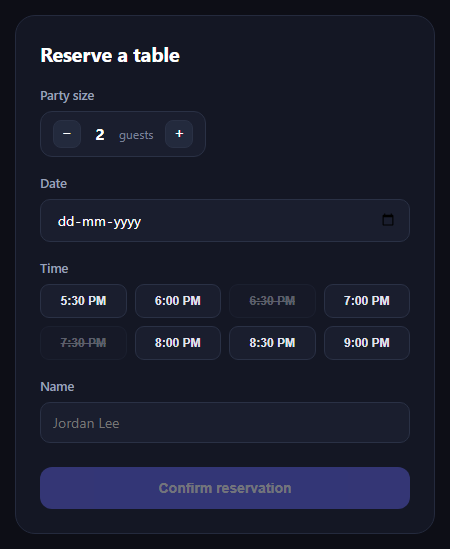
The table reservation form is the booking widget restaurant sites use to take a reservation in one screen — how many guests, which date, which time slot, and a name — before flipping to a confirmation summary. This snippet builds the whole flow in plain HTML, CSS, and JavaScript, no dependencies.
A stepper instead of a number input
Party size uses two buttons around a live count rather than a native <input type="number">, which is easier to tap on mobile and lets you clamp the range (1 to 12 here) with disabled states at each bound rather than relying on min/max validation messages that vary across browsers.
Time slots as a button grid, some disabled
Times render as a grid of toggle buttons rather than a <select>, so the full state is visible at a glance — full slots carry disabled plus data-full="true" and get a struck-through, dimmed style, while open slots toggle an aria-pressed state on click. Only one slot can be selected at a time; clicking a new one clears the previous aria-pressed flag first.
Validation gates the submit button
The confirm button starts disabled and validate() re-checks after every relevant change — date filled, a time slot chosen, a name typed — enabling the button only once all three are satisfied. This gives instant feedback without a separate error-message pass, appropriate for a short form like this one.
A real confirmation state, not just a toast
Submitting swaps the form out (hidden) for a confirmation card summarizing name, party size, formatted date, and time — mirroring what a real booking flow does before emailing a receipt. A "Book another table" button resets every piece of state (stepper, slots, form fields, disabled submit) and swaps back to the form.
Accessible by default
The time slot grid uses role="radiogroup" semantics via aria-pressed toggle buttons, guest stepper buttons carry aria-labels, and the date field is a native <input type="date"> so it gets the browser's own accessible date picker rather than a custom-built one.
Customizing it
Wire the slots to a real availability API, add a party-size cap per time slot, or add a special-requests textarea. Pair it with a time slot picker, availability scheduler, or date picker for related booking patterns.
Step by step
How to Use
- 1Paste HTML, CSS, and JSA reservation form with stepper, date, and slots renders.
- 2Adjust party size+/- buttons clamp between 1 and 12 guests.
- 3Pick a date and timeFull slots are disabled and struck through.
- 4Type a nameThe submit button enables once all fields are valid.
- 5Submit the formA confirmation card summarizes the booking.
- 6Book againThe reset button restores the form to its initial state.
Real-world uses
Common Use Cases
aria-pressed to ensure only one time is ever selected.Got questions?
Frequently Asked Questions
Full slot buttons carry both the disabled attribute and a data-full="true" flag, and CSS applies reduced opacity plus a struck-through text style when disabled. Because they're genuinely disabled buttons, they can't receive focus or clicks, so users can't accidentally select an unavailable time.
Each slot click handler first clears aria-pressed="false" on every slot, then sets aria-pressed="true" on the clicked one and records its time in a selectedTime variable — giving single-select toggle-button behavior without native radio inputs.
A validate() function runs after every relevant input (date change, slot click, name typed) and checks that selectedTime, the date value, and a non-empty trimmed name are all present, only then removing the disabled attribute from the submit button.
The form's submit handler prevents the default page reload, populates the confirmation card's summary fields (name, formatted party size, a human-readable date via toLocaleDateString, and the selected time), then hides the form and shows the confirmation view.
Render the slot buttons from your availability API response, marking any slot the API reports as full with the disabled attribute and data-full="true" instead of hardcoding it, and keep the same click handler logic for selection.