


Table Row Context Menu — Real Right-Click contextmenu Handling (JS)
Table Row Right-Click Context Menu · Tables · Plain HTML, CSS & JS · Live preview
Copy & paste
Source Code
<div class="rcm-wrap">
  <div class="rcm-bar">
    <h3>Projects</h3>
    <span class="rcm-hint">Right-click a row for actions</span>
  </div>
  <table class="rcm-table">
    <thead><tr><th>Name</th><th>Owner</th><th>Status</th></tr></thead>
    <tbody id="rcmBody"></tbody>
  </table>
</div>
<div class="rcm-menu" id="rcmMenu" hidden role="menu">
  <button type="button" class="rcm-item" data-action="edit" role="menuitem">
    <svg width="13" height="13" viewBox="0 0 24 24" fill="none" stroke="currentColor" stroke-width="2"><path d="M11 4H4a2 2 0 0 0-2 2v14a2 2 0 0 0 2 2h14a2 2 0 0 0 2-2v-7"/><path d="M18.5 2.5a2.12 2.12 0 0 1 3 3L12 15l-4 1 1-4 9.5-9.5z"/></svg>
    Edit
  </button>
  <button type="button" class="rcm-item" data-action="duplicate" role="menuitem">
    <svg width="13" height="13" viewBox="0 0 24 24" fill="none" stroke="currentColor" stroke-width="2"><rect x="9" y="9" width="13" height="13" rx="2"/><path d="M5 15H4a2 2 0 0 1-2-2V4a2 2 0 0 1 2-2h9a2 2 0 0 1 2 2v1"/></svg>
    Duplicate
  </button>
  <div class="rcm-sep"></div>
  <button type="button" class="rcm-item rcm-danger" data-action="delete" role="menuitem">
    <svg width="13" height="13" viewBox="0 0 24 24" fill="none" stroke="currentColor" stroke-width="2"><polyline points="3 6 5 6 21 6"/><path d="M19 6v14a2 2 0 0 1-2 2H7a2 2 0 0 1-2-2V6m3 0V4a2 2 0 0 1 2-2h4a2 2 0 0 1 2 2v2"/></svg>
    Delete
  </button>
</div>*{box-sizing:border-box;margin:0;padding:0}
body{font-family:system-ui,-apple-system,sans-serif;background:#0d1117;min-height:100vh;display:flex;align-items:flex-start;justify-content:center;padding:32px 20px}
.rcm-wrap{background:#161b22;border-radius:14px;width:100%;max-width:560px;box-shadow:0 18px 44px rgba(0,0,0,.5);overflow:hidden;border:1px solid #30363d}
.rcm-bar{display:flex;align-items:baseline;justify-content:space-between;padding:16px 18px;border-bottom:1px solid #30363d}
.rcm-bar h3{font-size:15px;font-weight:800;color:#e6edf3}
.rcm-hint{font-size:11px;font-weight:600;color:#6e7681}
.rcm-table{width:100%;border-collapse:collapse;font-size:13px}
.rcm-table th{text-align:left;padding:10px 14px;background:#0d1117;border-bottom:1px solid #30363d;font-size:10.5px;font-weight:800;text-transform:uppercase;letter-spacing:.03em;color:#7d8590}
.rcm-table td{padding:11px 14px;border-bottom:1px solid #21262d;color:#c9d1d9}
.rcm-table tbody tr{cursor:context-menu}
.rcm-table tbody tr:hover{background:#1c2129}
.rcm-table tbody tr.rcm-active{background:#1b2b45}
.rcm-pill{font-size:10.5px;font-weight:700;padding:2px 9px;border-radius:999px}
.rcm-active-p{background:#1f6feb33;color:#58a6ff}
.rcm-done{background:#23863633;color:#3fb950}
.rcm-hold{background:#9e6a0333;color:#d29922}
.rcm-menu{position:fixed;z-index:50;background:#21262d;border:1px solid #30363d;border-radius:9px;box-shadow:0 14px 36px rgba(0,0,0,.5);min-width:170px;padding:6px}
.rcm-menu[hidden]{display:none}
.rcm-item{display:flex;align-items:center;gap:9px;width:100%;background:none;border:none;text-align:left;padding:8px 10px;border-radius:6px;font-size:13px;font-weight:600;color:#c9d1d9;cursor:pointer;font-family:inherit}
.rcm-item:hover{background:#30363d}
.rcm-item svg{color:#7d8590;flex-shrink:0}
.rcm-danger{color:#f85149}
.rcm-danger svg{color:#f85149}
.rcm-danger:hover{background:#3d1418}
.rcm-sep{height:1px;background:#30363d;margin:5px 2px}var ROWS = [
{ id: 1, name: 'Nebula redesign', owner: 'Aisha Khan', status: 'Active' },
{ id: 2, name: 'API v3 migration', owner: 'Marco Rossi', status: 'Done' },
{ id: 3, name: 'Onboarding revamp', owner: 'Lena Park', status: 'On hold' },
{ id: 4, name: 'Billing dashboard', owner: 'Tom Becker', status: 'Active' },
];
var nextId = 5;
var body = document.getElementById('rcmBody');
var menu = document.getElementById('rcmMenu');
var targetId = null;
function pillClass(status) {
if (status === 'Active') return 'rcm-active-p';
if (status === 'Done') return 'rcm-done';
return 'rcm-hold';
}
function render() {
body.innerHTML = ROWS.map(function (r) {
return '<tr data-id="' + r.id + '"><td>' + r.name + '</td><td>' + r.owner + '</td>' +
'<td><span class="rcm-pill ' + pillClass(r.status) + '">' + r.status + '</span></td></tr>';
}).join('');
}
function closeMenu() {
menu.hidden = true;
var active = body.querySelector('.rcm-active');
if (active) active.classList.remove('rcm-active');
targetId = null;
}
function openMenu(x, y, id) {
targetId = id;
body.querySelectorAll('tr').forEach(function (tr) {
tr.classList.toggle('rcm-active', +tr.dataset.id === id);
});
menu.hidden = false;
// Position at the cursor, then clamp so the menu never renders off-screen.
var mw = menu.offsetWidth || 170, mh = menu.offsetHeight || 130;
var left = Math.min(x, window.innerWidth - mw - 8);
var top = Math.min(y, window.innerHeight - mh - 8);
menu.style.left = left + 'px';
menu.style.top = top + 'px';
}
body.addEventListener('contextmenu', function (e) {
var tr = e.target.closest('tr[data-id]');
if (!tr) return;
e.preventDefault(); // suppress the browser's native context menu
openMenu(e.clientX, e.clientY, +tr.dataset.id);
});
menu.addEventListener('click', function (e) {
var btn = e.target.closest('.rcm-item');
if (!btn || targetId == null) return;
var action = btn.dataset.action;
var idx = ROWS.findIndex(function (r) { return r.id === targetId; });
if (idx === -1) return;
if (action === 'edit') {
var name = prompt('Rename project:', ROWS[idx].name);
if (name && name.trim()) ROWS[idx].name = name.trim();
} else if (action === 'duplicate') {
var copy = Object.assign({}, ROWS[idx], { id: nextId++, name: ROWS[idx].name + ' (copy)' });
ROWS.splice(idx + 1, 0, copy);
} else if (action === 'delete') {
ROWS.splice(idx, 1);
}
render();
closeMenu();
});
document.addEventListener('click', function (e) {
if (!menu.hidden && !menu.contains(e.target)) closeMenu();
});
document.addEventListener('keydown', function (e) { if (e.key === 'Escape') closeMenu(); });
document.addEventListener('contextmenu', function (e) {
if (!e.target.closest('tr[data-id]')) closeMenu();
});
window.addEventListener('scroll', closeMenu, true);
render();Extend with AI
Take This Snippet Further With AI
The AI prompt for this one is for Patreon supporters ($3 a month), along with a site with no ads. Supporters enter the passcode once and it is remembered in this browser.
What's included
Features
About this UI Snippet
Table Row Context Menu — Right-Click a Row for a Real Custom Menu
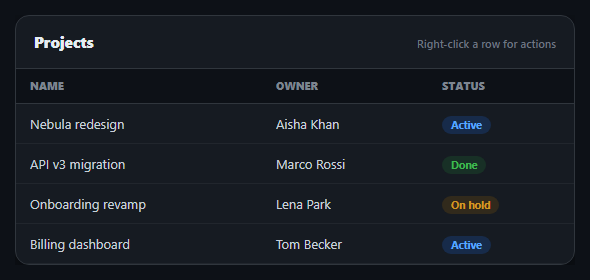
Desktop apps use right-click context menus constantly; most web tables ignore the gesture entirely and let the browser's generic menu appear instead. This snippet intercepts it properly: right-clicking a table row suppresses the native browser menu and opens a real custom one, positioned at the cursor, with Edit, Duplicate, and Delete actions that genuinely mutate the row data and re-render — all in plain HTML, CSS, and vanilla JavaScript.
Intercepting the real contextmenu event
The table body listens for the native contextmenu event and calls e.preventDefault() the moment it fires on a row — this is the one line that actually suppresses the browser's own right-click menu; without it, both menus would fight for the same click. Because it's the genuine contextmenu event (not a click-and-hold hack or a visible "⋮" button), the interaction feels native: right-click anywhere on the row, not just a specific icon, opens the menu.
Positioned at the cursor, clamped to the viewport
openMenu() reads e.clientX/e.clientY and sets the menu's position: fixed coordinates directly to the click point, so it opens exactly where the user right-clicked — then clamps both axes against window.innerWidth/innerHeight so a right-click near the edge of the screen never renders the menu partially off-screen, which is what a naive "always position at cursor" implementation gets wrong.
Real mutations, not decorative buttons
Each menu action operates on the actual ROWS array: Edit prompts for a new name and writes it back to the matching record by id; Duplicate splices a cloned row (with a fresh id) directly after the original; Delete splices the row out entirely. Every action is followed by render(), which rebuilds the table body from the mutated array — so the table you see after clicking Delete has genuinely lost that row from the underlying data, not just visually hidden it.
Closes the way users expect
The menu closes on an outside click, on Escape, on right-clicking elsewhere (so a new right-click doesn't stack a second menu on top), and on scroll (since a fixed-position menu would otherwise drift away from the row it belongs to). This set of dismissal paths is what separates a context menu that feels reliable from one that leaves stray panels floating on screen.
Visual feedback on the target row
The row under the cursor gets an rcm-active highlight while its menu is open, so it's unambiguous which row Edit/Duplicate/Delete will affect — important once a menu is positioned near the cursor rather than anchored to the row itself. Pair this with a selectable table for multi-row bulk actions, or a row detail panel for a left-click drill-down alongside this right-click menu.
Step by step
How to Use
- 1Paste HTML, CSS, and JSA projects table renders; the custom menu markup starts hidden.
- 2Right-click a rowThe browser's native menu is suppressed; a custom menu opens at your cursor.
- 3Choose EditA prompt lets you rename the row; the table re-renders with the change.
- 4Choose DuplicateA cloned row is inserted directly below the original.
- 5Choose DeleteThe row is removed from the underlying data and the table.
- 6Dismiss the menuClick outside, press Escape, right-click elsewhere, or scroll — all close it.
Real-world uses
Common Use Cases
preventDefault() suppressing the browser's generic menu in favour of your own.clientX and clientY.ROWS array so actions genuinely change the data.Got questions?
Frequently Asked Questions
Yes. The table body listens for the real contextmenu event and calls e.preventDefault() as soon as it fires on a row, which is the standard, correct way to stop the browser's own menu from appearing. Without that call, both the native menu and the custom one would try to show simultaneously.
Yes. Each action operates on the real in-memory ROWS array by finding the row's index by id — Edit overwrites its name field, Duplicate splices in a cloned object with a new id, and Delete splices the row out entirely. render() is called afterward to rebuild the table from the mutated array, so the visible change reflects an actual data change, not a CSS hide.
openMenu() clamps the computed left/top position against window.innerWidth and window.innerHeight minus the menu's own measured width and height, so a right-click near the right or bottom edge of the viewport still renders the full menu on-screen instead of clipping off the edge.
Four things: clicking anywhere outside the menu, pressing Escape, right-clicking on a different part of the page (which closes any open menu before deciding whether to open a new one), and scrolling the page (since a fixed-position menu would otherwise drift away from the row it targets).
Keep the menu's open state, position, and target row id in component state; attach an onContextMenu (React) or @contextmenu.prevent (Vue) handler to each row that calls preventDefault and sets that state. The clamping math and the mutate-then-re-render pattern are framework-agnostic — only the state management moves into the framework.