



Transfer List — Dual List Box to Move Items Between Lists
Transfer List · Forms · Plain HTML, CSS & JS · Live preview
Copy & paste
Source Code
<div class="tl" id="tl">
<div class="tl-side">
<div class="tl-head"><span>Available</span><span class="tl-count" data-for="available">0</span></div>
<input class="tl-search" type="search" placeholder="Filter…" data-list="available" aria-label="Filter available">
<ul class="tl-box" data-list="available" role="listbox" aria-multiselectable="true"></ul>
</div>
<div class="tl-controls">
<button type="button" class="tl-btn" data-act="add-all" title="Move all right">»</button>
<button type="button" class="tl-btn" data-act="add" title="Move selected right">›</button>
<button type="button" class="tl-btn" data-act="remove" title="Move selected left">‹</button>
<button type="button" class="tl-btn" data-act="remove-all" title="Move all left">«</button>
</div>
<div class="tl-side">
<div class="tl-head"><span>Selected</span><span class="tl-count" data-for="selected">0</span></div>
<input class="tl-search" type="search" placeholder="Filter…" data-list="selected" aria-label="Filter selected">
<ul class="tl-box" data-list="selected" role="listbox" aria-multiselectable="true"></ul>
</div>
</div>*{box-sizing:border-box;margin:0;padding:0}
body{font-family:system-ui,-apple-system,sans-serif;background:#f1f5f9;color:#0f172a;display:flex;justify-content:center;padding:36px 16px}
.tl{display:flex;align-items:stretch;gap:12px;background:#fff;border:1px solid #e2e8f0;border-radius:16px;padding:16px;box-shadow:0 12px 34px -22px rgba(0,0,0,.3)}
.tl-side{display:flex;flex-direction:column;width:200px}
.tl-head{display:flex;justify-content:space-between;align-items:center;font-size:12px;font-weight:800;text-transform:uppercase;letter-spacing:.05em;color:#64748b;margin-bottom:8px}
.tl-count{background:#eef2ff;color:#4f46e5;border-radius:20px;padding:1px 8px;font-size:11px}
.tl-search{border:1px solid #e2e8f0;border-radius:8px;padding:6px 10px;font-size:12.5px;font-family:inherit;margin-bottom:8px;outline:none}
.tl-search:focus{border-color:#6366f1}
.tl-box{list-style:none;flex:1;min-height:220px;max-height:220px;overflow-y:auto;border:1px solid #e2e8f0;border-radius:10px;padding:6px}
.tl-item{padding:7px 10px;border-radius:7px;font-size:13px;font-weight:500;cursor:pointer;user-select:none;transition:background .12s}
.tl-item:hover{background:#f8fafc}
.tl-item.tl-sel{background:#eef2ff;color:#4338ca;font-weight:600}
.tl-controls{display:flex;flex-direction:column;justify-content:center;gap:8px}
.tl-btn{width:38px;height:34px;border:1px solid #e2e8f0;background:#fff;border-radius:9px;font-size:16px;font-weight:800;color:#475569;cursor:pointer;transition:all .12s}
.tl-btn:hover:not(:disabled){border-color:#6366f1;color:#4f46e5;background:#eef2ff}
.tl-btn:disabled{opacity:.4;cursor:not-allowed}
@media (max-width:560px){.tl{flex-direction:column}.tl-side{width:100%}.tl-controls{flex-direction:row;justify-content:center}.tl-btn{transform:rotate(90deg)}}var DATA = ['Analytics','Billing','Comments','Dashboard','Exports','Integrations','Members','Notifications','Reports','Security','Single Sign-On','Webhooks'];
var state = { available: DATA.slice(), selected: [] };
var root = document.getElementById('tl');
var sel = { available: {}, selected: {} }; // selection sets
function boxes() { return { available: root.querySelector('[data-list="available"].tl-box'), selected: root.querySelector('[data-list="selected"].tl-box') }; }
function render(which) {
var box = boxes()[which];
var q = (root.querySelector('input[data-list="' + which + '"]').value || '').toLowerCase();
box.innerHTML = '';
state[which].forEach(function (label) {
if (q && label.toLowerCase().indexOf(q) === -1) return;
var li = document.createElement('li');
li.className = 'tl-item' + (sel[which][label] ? ' tl-sel' : '');
li.textContent = label;
li.setAttribute('role', 'option');
li.setAttribute('aria-selected', sel[which][label] ? 'true' : 'false');
li.addEventListener('click', function () {
if (sel[which][label]) delete sel[which][label]; else sel[which][label] = true;
render(which);
});
li.addEventListener('dblclick', function () { move(which, [label]); });
box.appendChild(li);
});
root.querySelector('.tl-count[data-for="' + which + '"]').textContent = state[which].length;
updateButtons();
}
function move(from, labels) {
var to = from === 'available' ? 'selected' : 'available';
labels.forEach(function (label) {
var i = state[from].indexOf(label);
if (i > -1) { state[from].splice(i, 1); state[to].push(label); }
delete sel[from][label];
});
state[to].sort();
render('available'); render('selected');
}
function selectedKeys(which) { return Object.keys(sel[which]); }
function updateButtons() {
root.querySelector('[data-act="add"]').disabled = selectedKeys('available').length === 0;
root.querySelector('[data-act="remove"]').disabled = selectedKeys('selected').length === 0;
root.querySelector('[data-act="add-all"]').disabled = state.available.length === 0;
root.querySelector('[data-act="remove-all"]').disabled = state.selected.length === 0;
}
root.querySelectorAll('.tl-btn').forEach(function (btn) {
btn.addEventListener('click', function () {
var act = btn.getAttribute('data-act');
if (act === 'add') move('available', selectedKeys('available'));
if (act === 'remove') move('selected', selectedKeys('selected'));
if (act === 'add-all') move('available', state.available.slice());
if (act === 'remove-all') move('selected', state.selected.slice());
});
});
root.querySelectorAll('.tl-search').forEach(function (input) {
input.addEventListener('input', function () { render(input.getAttribute('data-list')); });
});
render('available'); render('selected');Extend with AI
Take This Snippet Further With AI
The AI prompt for this one is for Patreon supporters ($3 a month), along with a site with no ads. Supporters enter the passcode once and it is remembered in this browser.
What's included
Features
About this UI Snippet
Transfer List — Dual List Box with Multi-Select, Filtering and Move-All
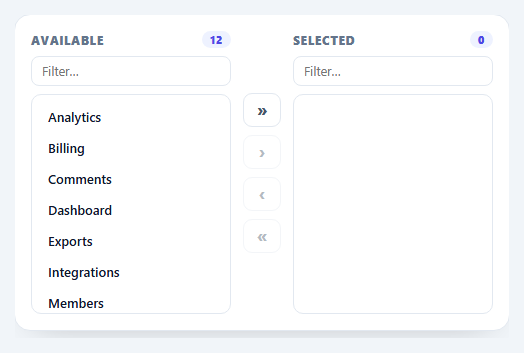
A transfer list — also called a dual list box — lets users move items between two lists: an "available" pool and a "selected" set. It's the classic control for assigning permissions, picking columns, building playlists, or choosing recipients. This snippet builds a complete one with multi-select, per-list filtering, move-selected and move-all buttons, and double-click-to-move, in plain HTML, CSS, and vanilla JavaScript.
A single source of truth
Both lists are rendered from one state object holding two arrays (available and selected) plus a selection set per side. Every action mutates those arrays and re-renders, so the UI can never drift from the data — there's no manual DOM shuffling that risks duplicate or orphaned items. Moving an item splices it out of one array and pushes it into the other, then re-sorts the destination so the lists stay alphabetised.
Multi-select and the four controls
Click an item to toggle its selection (highlighted), then use › to move the selected items right or ‹ to move them left. » and « move everything at once. The buttons disable themselves intelligently: "move selected" is greyed out when nothing is selected on that side, and "move all" is greyed out when a side is empty — so the controls always reflect what's actually possible. Double-clicking an item moves it immediately, the shortcut power users expect.
Per-list filtering
Each side has its own search box that filters that list as you type, matching case-insensitively. Filtering is purely a view concern — it never changes the underlying arrays — so moving a filtered subset still works correctly and clearing the filter restores the full list. This matters when the available pool has dozens or hundreds of items.
Accessible structure
The lists use role="listbox" with aria-multiselectable, and each item is a role="option" carrying aria-selected, so assistive tech understands the multi-select model. The counts in each header announce how many items each side holds, and the move buttons have descriptive title attributes. Because everything is real, focusable markup, it's straightforward to extend with full keyboard navigation.
Responsive
On narrow screens the two lists stack vertically and the control column rotates to sit between them, so the same interaction works on a phone. The whole component is a couple of hundred lines with no dependencies, making it a clean, drop-in reference for the transfer-list pattern that UI kits charge a component for.
Step by step
How to Use
- 1Paste HTML, CSS, and JSTwo lists render — Available is populated, Selected starts empty.
- 2Set your itemsReplace the DATA array with your own labels (or objects, with a small tweak).
- 3Select and moveClick items to select, then use the ›/‹ buttons, or double-click to move one.
- 4Move everythingThe »/« buttons transfer all items at once between the lists.
- 5Filter long listsType in either search box to narrow that side as you go.
- 6Read the resultstate.selected holds the chosen items — submit or sync it as needed.
Real-world uses
Common Use Cases
Got questions?
Frequently Asked Questions
It is a control with two side-by-side lists — an available pool and a selected set — and buttons to move items between them. It is ideal when users assign a subset from a larger collection, such as permissions, columns, or recipients, because it shows both what is chosen and what remains in one view, unlike a multi-select dropdown.
Read state.selected — it is the array of labels currently in the Selected list, kept sorted. Mirror it into a hidden input, post it with fetch, or bind it to your framework state at submit time. Because every move updates that array, it is always an accurate reflection of the UI.
No. The search boxes only change what is displayed; they never alter the underlying arrays. So if you filter the Available list and click "move all," only the visible behaviour you would expect is affected — the move operations work on the real state, and clearing a filter restores the full list intact.
Yes. Click several items to select them (they highlight), then use the move-selected button to transfer them together. The move-all buttons send the entire list across in one click, and double-clicking a single item is a quick shortcut to move just that one.
Hold the two arrays and the selection sets in component state and render both lists from them — useState (React), reactive refs (Vue), or component fields (Angular). The move and filter functions become methods that update state instead of calling render(); the framework re-renders for you. Keep the role=listbox/option markup for accessibility, and in Tailwind swap the classes for utilities.