

View Transitions API Page Navigation — Free document.startViewTransition Demo
View Transitions API Page Navigation · Navigation · Plain HTML, CSS & JS · Live preview
Copy & paste
Source Code
<section class="vtn-app" id="vtnApp">
  <div class="vtn-list-view" id="vtnListView">
    <div class="vtn-header">
      <h1>Inbox</h1>
      <span class="vtn-count">3 messages</span>
    </div>
    <button class="vtn-row" data-id="1" data-name="Priya Shah" data-subj="Q3 roadmap review" data-body="Quick heads up before Thursday's sync — I've moved the roadmap doc into the shared folder and flagged two open questions on pricing tiers." data-color="#f97316">
      <span class="vtn-avatar" style="background:#f97316">PS</span>
      <span class="vtn-row-text"><strong>Priya Shah</strong><span>Q3 roadmap review</span></span>
      <span class="vtn-time">9:14 AM</span>
    </button>
    <button class="vtn-row" data-id="2" data-name="Dev Ops Bot" data-subj="Deploy succeeded: main" data-body="Build #482 deployed to production in 46s. No failed health checks. View the full deploy log in the pipeline dashboard." data-color="#22c55e">
      <span class="vtn-avatar" style="background:#22c55e">DB</span>
      <span class="vtn-row-text"><strong>Dev Ops Bot</strong><span>Deploy succeeded: main</span></span>
      <span class="vtn-time">8:52 AM</span>
    </button>
    <button class="vtn-row" data-id="3" data-name="Marcus Lee" data-subj="Re: Contract renewal" data-body="Thanks for the quick turnaround. I've signed and attached the updated terms — let's plan to kick off onboarding the week after next." data-color="#6366f1">
      <span class="vtn-avatar" style="background:#6366f1">ML</span>
      <span class="vtn-row-text"><strong>Marcus Lee</strong><span>Re: Contract renewal</span></span>
      <span class="vtn-time">Yesterday</span>
    </button>
  </div>

  <div class="vtn-detail-view" id="vtnDetailView" hidden>
    <button class="vtn-back" id="vtnBack">
      <svg width="14" height="14" viewBox="0 0 24 24" fill="none" stroke="currentColor" stroke-width="2.5"><path d="M19 12H5M12 19l-7-7 7-7"/></svg>
      Back to inbox
    </button>
    <div class="vtn-detail-head">
      <span class="vtn-avatar large" id="vtnDetailAvatar"></span>
      <div>
        <strong id="vtnDetailName"></strong>
        <span id="vtnDetailSubj"></span>
      </div>
    </div>
    <p id="vtnDetailBody"></p>
  </div>

  <p class="vtn-support-note" id="vtnSupportNote" hidden>Your browser doesn't support the View Transitions API — the list and detail swap instantly instead of cross-fading.</p>
</section>*{box-sizing:border-box;margin:0;padding:0}
body{font-family:system-ui,-apple-system,sans-serif;background:#0b0f1a;color:#fff;min-height:100vh;display:flex;justify-content:center;padding:30px 20px;align-items:center}
.vtn-app{width:100%;max-width:420px}
.vtn-header{display:flex;align-items:baseline;justify-content:space-between;margin-bottom:16px}
.vtn-header h1{font-size:22px;font-weight:800;letter-spacing:-.02em}
.vtn-count{font-size:12px;color:#8b93ab;font-weight:600}
.vtn-list-view{display:flex;flex-direction:column;gap:8px}
.vtn-row{display:flex;align-items:center;gap:12px;width:100%;text-align:left;padding:13px 14px;border-radius:13px;border:1px solid rgba(255,255,255,.08);background:rgba(255,255,255,.03);cursor:pointer;font:inherit;color:inherit;transition:background .15s}
.vtn-row:hover{background:rgba(255,255,255,.07)}
.vtn-avatar{width:38px;height:38px;border-radius:50%;display:flex;align-items:center;justify-content:center;font-size:13px;font-weight:800;color:#fff;flex-shrink:0;view-transition-name:none}
.vtn-avatar.large{width:52px;height:52px;font-size:16px}
.vtn-row-text{flex:1;display:flex;flex-direction:column;gap:2px;min-width:0}
.vtn-row-text strong{font-size:13.5px;font-weight:700}
.vtn-row-text span{font-size:12.5px;color:#9aa3bd;white-space:nowrap;overflow:hidden;text-overflow:ellipsis}
.vtn-time{font-size:11px;color:#6b7390;flex-shrink:0}
.vtn-detail-view{padding:4px 2px}
.vtn-back{display:flex;align-items:center;gap:6px;background:none;border:none;color:#93a5f5;font:700 12.5px system-ui;cursor:pointer;margin-bottom:18px;padding:0}
.vtn-detail-head{display:flex;align-items:center;gap:14px;margin-bottom:18px}
.vtn-detail-head strong{display:block;font-size:16px;font-weight:800}
.vtn-detail-head span{display:block;font-size:13px;color:#9aa3bd;margin-top:2px}
#vtnDetailBody{font-size:14px;line-height:1.7;color:#c3cadd}
.vtn-support-note{font-size:11.5px;color:#f0abfc;background:rgba(240,171,252,.08);border:1px solid rgba(240,171,252,.25);padding:10px 12px;border-radius:10px;margin-top:16px}
/* Named view-transition group so the clicked row's avatar and detail avatar
are treated as the same morphing element by the browser. */
.vtn-avatar.vt-active{view-transition-name:vtn-avatar-active}var app = document.getElementById('vtnApp');
var listView = document.getElementById('vtnListView');
var detailView = document.getElementById('vtnDetailView');
var backBtn = document.getElementById('vtnBack');
var supportNote = document.getElementById('vtnSupportNote');
var detailAvatar = document.getElementById('vtnDetailAvatar');
var detailName = document.getElementById('vtnDetailName');
var detailSubj = document.getElementById('vtnDetailSubj');
var detailBody = document.getElementById('vtnDetailBody');
var supported = typeof document.startViewTransition === 'function';
function showDetail(row) {
var avatarHtml = row.querySelector('.vtn-avatar').textContent;
var color = row.dataset.color;
function swap() {
listView.hidden = true;
detailView.hidden = false;
detailAvatar.textContent = avatarHtml;
detailAvatar.style.background = color;
detailName.textContent = row.dataset.name;
detailSubj.textContent = row.dataset.subj;
detailBody.textContent = row.dataset.body;
detailAvatar.classList.add('vt-active');
}
// Real View Transitions API path: startViewTransition takes a callback
// that performs the DOM mutation. The browser snapshots the before/after
// states and cross-fades + morphs between them automatically -- no
// FLIP math, no animation library.
if (supported) {
document.startViewTransition(swap);
} else {
// Honest fallback: browsers without support (notably older Safari and
// Firefox releases) simply get an instant swap, no cross-fade. The
// page still works identically, just without the transition polish.
swap();
}
}
function showList() {
function swap() {
detailView.hidden = true;
listView.hidden = false;
detailAvatar.classList.remove('vt-active');
}
if (supported) {
document.startViewTransition(swap);
} else {
swap();
}
}
listView.addEventListener('click', function (e) {
var row = e.target.closest('.vtn-row');
if (row) showDetail(row);
});
backBtn.addEventListener('click', showList);
if (!supported) {
supportNote.hidden = false;
}Extend with AI
Take This Snippet Further With AI
The AI prompt for this one is for Patreon supporters ($3 a month, 7 days free), along with a site with no ads. Supporters enter the passcode once and it is remembered in this browser.
What's included
Features
About this UI Snippet
View Transitions API Page Navigation — Native Cross-Fades With No Animation Library
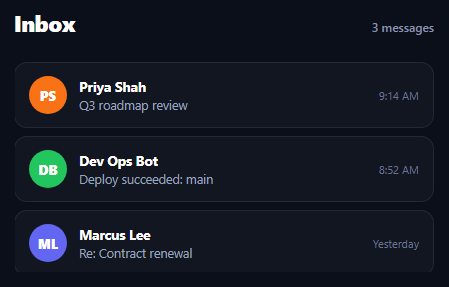
This is a genuine SPA-style navigation: clicking a row in a list swaps to a detail view for that item, and back again — the kind of state swap you'd otherwise reach for a router or a manual FLIP animation to make feel smooth. Instead it uses the real document.startViewTransition() browser API to let the browser itself handle the cross-fade.
The real API: startViewTransition's callback
document.startViewTransition(callback) takes a synchronous callback that performs a DOM mutation — here, hiding the list view and showing the detail view (or the reverse). Before running the callback, the browser captures a snapshot of the current DOM state; after the callback runs, it captures the new state; then it automatically cross-fades between old and new pixels using the View Transitions pseudo-element tree, entirely via compositor-driven CSS animations the browser generates for you.
Named elements morph, not just fade
The clicked row's avatar circle gets view-transition-name: vtn-avatar-active applied (via the .vt-active class) right inside the same callback that swaps views. Because both the list avatar and the detail-view avatar share that transition name across the before/after snapshots, the browser treats them as *one* continuous element and morphs its size and position between the two layouts, rather than cross-fading two unrelated circles in place. Removing the class on the way back to the list releases the name so a second click can reuse it. This is a genuinely different interaction than a scroll-driven gallery reveal — this is a discrete state swap between two named "pages" inside one document, not motion tied to scroll position.
Honest fallback: instant swap, no error
document.startViewTransition doesn't exist in every browser (older Firefox and Safari releases lack it). The code checks typeof document.startViewTransition === 'function' up front and, when absent, calls the exact same swap() function directly instead of wrapping it — so the list-to-detail navigation still works perfectly, just without the cross-fade. A visible note explains the fallback is active rather than leaving the user to wonder why nothing animated. Pair this with an accordion FAQ for a broader "native browser transitions" showcase page.
Step by step
How to Use
- 1Paste HTML, CSS, and JSA three-item inbox list renders.
- 2Click any rowThe view cross-fades to a detail screen for that message.
- 3Watch the avatar morphThe same named element grows into the detail header.
- 4Click "Back to inbox"The transition reverses smoothly back to the list.
- 5Unsupported browser?A note explains the swap is instant instead, with no error.
- 6Swap in your own dataReplace the row dataset attributes with real content.
Real-world uses
Common Use Cases
document.startViewTransition() API, with an avatar morphing across both views.view-transition-name on both elements.Got questions?
Frequently Asked Questions
This snippet performs a discrete state swap triggered by a click -- one named "view" (the list) is replaced by another (the detail screen) inside the same document, with no dependency on scroll position at all. A scroll-driven view transition effect instead ties its animation progress to how far the user has scrolled. Both can use the View Transitions API, but the trigger and interaction model are entirely different.
It accepts a callback that performs a DOM mutation. Before invoking the callback, the browser captures a screenshot-like snapshot of the current DOM; after the callback finishes, it captures the new state; then it automatically generates and plays a cross-fade (and, for elements sharing a view-transition-name, a morph) between the two snapshots using compositor-driven pseudo-elements it creates internally -- no manual FLIP measurement or animation library required.
The clicked row's avatar circle gets the CSS property view-transition-name: vtn-avatar-active applied via a class, inside the same callback that swaps the views. Because the avatar element in the detail view shares that same transition name in the "after" snapshot, the browser recognizes them as one continuous element across the transition and interpolates its size and position, producing a morph rather than a plain cross-fade of two separate circles.
The code checks typeof document.startViewTransition === 'function' before calling it. If it's missing (older Firefox and Safari releases, for example), the exact same swap() function that performs the DOM mutation is called directly instead of being wrapped in startViewTransition -- so the list-to-detail navigation still works correctly, just as an instant swap with no cross-fade, and a note in the UI explains why.
Wrap your state-updating function (e.g. the setState call that swaps which view renders) in a check for document.startViewTransition: if present, call it as document.startViewTransition(() => { /* trigger the state update, then flush synchronously */ }), noting that framework state updates are often asynchronous, so you may need flushSync (React) or a synchronous DOM update inside the callback for the snapshot timing to work correctly. If unsupported, just call the state update directly.
Yes. While the View Transitions API Page Navigation snippet gives you one pattern to copy, the free Responsive Navbar Builder at webdevpuneet.com/navbar-builder/ designs a whole navigation bar: logo, links and dropdown menus, a mobile hamburger menu (dropdown panel, slide-in drawer or full screen) and a scroll effect (sticky, shrink, hide on scroll or transparent). It has six presets, a live preview that runs the real code, and exports HTML + CSS + vanilla JS, React, Tailwind, Vue 3 or Angular — or you can click Fork & Edit to keep editing it in My Code.