

Virtual Piano Keyboard — Web Audio Synth, Chords & MIDI
Virtual Piano Keyboard · Media · Plain HTML, CSS & JS · Live preview
Copy & paste
Source Code
<div class="studio">
  <header class="top">
    <div class="brand">
      <h2>Virtual Piano</h2>
      <p>25 keys · Web Audio synth · no samples</p>
    </div>
    <div class="chord" aria-live="polite">
      <span class="chord-name" id="chordName">—</span>
      <small class="chord-notes" id="noteList">Press a key to play</small>
    </div>
  </header>

  <div class="controls">
    <div class="seg" id="voices" role="group" aria-label="Sound">
      <button type="button" data-voice="piano" aria-pressed="true">Piano</button>
      <button type="button" data-voice="epiano" aria-pressed="false">E-Piano</button>
      <button type="button" data-voice="organ" aria-pressed="false">Organ</button>
      <button type="button" data-voice="pad" aria-pressed="false">Pad</button>
    </div>
    <label class="slider"><span>Volume</span><input id="vol" type="range" min="0" max="1" step="0.01" value="0.75"></label>
    <label class="slider"><span>Reverb</span><input id="rev" type="range" min="0" max="1" step="0.01" value="0.3"></label>
    <div class="octave" role="group" aria-label="Octave shift">
      <button type="button" id="octDown" aria-label="Octave down">−</button>
      <span id="octVal">Oct 0</span>
      <button type="button" id="octUp" aria-label="Octave up">+</button>
    </div>
    <button type="button" class="pill" id="sustainBtn" aria-pressed="false">Sustain <kbd>Space</kbd></button>
    <button type="button" class="pill" id="labelsBtn" aria-pressed="true">Labels</button>
    <div class="rec">
      <button type="button" class="pill rec-btn" id="recBtn">● Rec</button>
      <button type="button" class="pill" id="playBtn" disabled>▶ Play</button>
      <span class="rec-info" id="recInfo"></span>
    </div>
    <button type="button" class="pill" id="midiBtn" hidden>MIDI</button>
  </div>

  <div class="stage">
    <canvas class="rise" id="rise" aria-hidden="true"></canvas>
    <div class="piano" id="piano" role="group" aria-label="Piano keyboard"></div>
  </div>
  <p class="hint">Computer keys: <kbd>Z</kbd>–<kbd>M</kbd> lower row, <kbd>Q</kbd>–<kbd>I</kbd> upper row · <kbd>Space</kbd> sustain · <kbd>←</kbd><kbd>→</kbd> octave · drag across the keys for a glissando · press lower on a key to play it louder</p>
</div>*{box-sizing:border-box;margin:0;padding:0}
body{font-family:system-ui,-apple-system,'Segoe UI',sans-serif;background:radial-gradient(800px 420px at 50% 0%,rgba(99,102,241,.22),transparent 70%),#080a14;min-height:100vh;display:flex;align-items:center;justify-content:center;padding:22px 14px;color:#e5e9fb}
.studio{width:100%;max-width:900px;background:linear-gradient(180deg,#141830,#0d1022);border:1px solid #262c55;border-radius:22px;padding:18px 18px 16px;box-shadow:0 30px 70px -30px rgba(79,70,229,.55)}
.top{display:flex;justify-content:space-between;align-items:center;gap:16px;flex-wrap:wrap;margin-bottom:14px}
.brand h2{font-size:19px;font-weight:800;letter-spacing:-.01em;color:#fff}
.brand p{font-size:12px;color:#7d86b8;margin-top:2px}
.chord{min-width:150px;text-align:right}
.chord-name{display:block;font-size:30px;font-weight:900;letter-spacing:-.02em;line-height:1;color:#fff;text-shadow:0 0 18px rgba(129,140,248,.8);font-variant-numeric:tabular-nums;min-height:30px}
.chord-notes{display:block;margin-top:4px;font-size:12px;color:#8e97c9;min-height:15px}
.controls{display:flex;flex-wrap:wrap;gap:10px 14px;align-items:center;padding:12px 14px;background:#0b0e20;border:1px solid #1f2550;border-radius:14px;margin-bottom:14px}
.seg{display:flex;background:#151a3a;border:1px solid #2a3070;border-radius:10px;padding:3px;gap:2px}
.seg button{font:inherit;font-size:12px;font-weight:700;color:#9aa4d6;background:none;border:0;border-radius:7px;padding:6px 11px;cursor:pointer;transition:background .15s,color .15s}
.seg button:hover{color:#fff}
.seg button[aria-pressed="true"]{background:linear-gradient(135deg,#6366f1,#8b5cf6);color:#fff;box-shadow:0 4px 12px -3px rgba(99,102,241,.8)}
.slider{display:flex;align-items:center;gap:8px;font-size:11px;font-weight:700;letter-spacing:.06em;text-transform:uppercase;color:#7d86b8}
.slider input{width:86px;accent-color:#8b5cf6}
.octave{display:flex;align-items:center;gap:6px;font-size:12px;font-weight:700;color:#cbd2f5}
.octave span{min-width:46px;text-align:center;font-variant-numeric:tabular-nums}
.octave button{width:26px;height:26px;border-radius:8px;border:1px solid #2a3070;background:#151a3a;color:#cbd2f5;font-size:15px;line-height:1;cursor:pointer}
.octave button:hover{background:#222a64}
.pill{font:inherit;font-size:12px;font-weight:700;color:#cbd2f5;background:#151a3a;border:1px solid #2a3070;border-radius:999px;padding:7px 13px;cursor:pointer;transition:background .15s,border-color .15s}
.pill:hover:not(:disabled){background:#222a64;border-color:#4c55b8}
.pill[aria-pressed="true"]{background:rgba(139,92,246,.25);border-color:#8b5cf6;color:#fff}
.pill:disabled{opacity:.4;cursor:default}
.pill kbd{margin-left:4px}
.rec{display:flex;align-items:center;gap:6px}
.rec-btn.on{background:rgba(239,68,68,.2);border-color:#ef4444;color:#fecaca;animation:recPulse 1.2s infinite}
@keyframes recPulse{50%{box-shadow:0 0 0 5px rgba(239,68,68,.12)}}
.rec-info{font-size:11px;color:#7d86b8;min-width:70px}
button:focus-visible,input:focus-visible{outline:2px solid #a5b4fc;outline-offset:2px}
.stage{position:relative}
.rise{display:block;width:100%;height:120px;border-radius:12px 12px 0 0;background:linear-gradient(180deg,rgba(99,102,241,.05),rgba(99,102,241,.14));pointer-events:none}
.piano{position:relative;display:flex;height:210px;padding-top:12px;background:linear-gradient(#0a0c18,#1a1c30);border-radius:0 0 12px 12px;border:1px solid #2a2f5a;border-top:none;touch-action:none;user-select:none;-webkit-user-select:none;box-shadow:0 18px 30px -14px rgba(0,0,0,.7)}
.key{cursor:pointer;-webkit-tap-highlight-color:transparent}
.key.white{flex:1;position:relative;background:linear-gradient(#fdfdff,#e7ebf3 88%,#cfd6e6);border:1px solid #aeb7cc;border-top:none;border-radius:0 0 7px 7px;display:flex;flex-direction:column;align-items:center;justify-content:flex-end;padding-bottom:9px;gap:2px;transition:transform .06s,background .1s,box-shadow .1s;transform-origin:top}
.key.white.active{background:linear-gradient(hsl(var(--h) 95% 90%),hsl(var(--h) 85% 70%));transform:translateY(3px);box-shadow:inset 0 8px 12px rgba(20,24,60,.25),0 0 22px -2px hsl(var(--h) 90% 60%)}
.key.white.sustained{background:linear-gradient(#f3f1ff,#ddd8f7)}
.key.black{position:absolute;top:12px;width:4%;height:60%;z-index:2;background:linear-gradient(#34384e,#10121f 85%,#05060c);border:1px solid #05060c;border-top:none;border-radius:0 0 6px 6px;box-shadow:0 5px 8px rgba(0,0,0,.55),inset 0 -6px 5px rgba(255,255,255,.07);display:flex;align-items:flex-end;justify-content:center;padding-bottom:7px;transition:transform .06s,background .1s,box-shadow .1s;transform-origin:top}
.key.black.active{background:linear-gradient(hsl(var(--h) 75% 55%),hsl(var(--h) 80% 32%));transform:translateY(2px);box-shadow:0 2px 4px rgba(0,0,0,.5),0 0 18px -2px hsl(var(--h) 90% 60%)}
.key .kb{font-size:10px;font-weight:800;color:#8a93ad;pointer-events:none}
.key.black .kb{color:#6b7394}
.key .nn{font-size:10.5px;font-weight:800;color:#4f46e5;pointer-events:none}
.hide-labels .kb,.hide-labels .nn{display:none}
.hint{margin-top:12px;font-size:11.5px;line-height:1.6;color:#6f78a8;text-align:center}
kbd{display:inline-block;min-width:18px;padding:1px 5px;background:#171c3f;border:1px solid #333b82;border-bottom-width:2px;border-radius:5px;font:700 10.5px system-ui;color:#c5cdf7;text-align:center}
@media(max-width:640px){.studio{padding:12px}.piano{height:170px}.rise{height:90px}.key .kb{display:none}.slider input{width:70px}.chord{text-align:left}.chord-name{font-size:26px}}
@media(prefers-reduced-motion:reduce){.rec-btn.on{animation:none}.key.white,.key.black{transition:none}}const NOTE_NAMES = ['C', 'C#', 'D', 'D#', 'E', 'F', 'F#', 'G', 'G#', 'A', 'A#', 'B'];
const BLACK_PC = [1, 3, 6, 8, 10];
const FIRST = 60, LAST = 84; // C4 to C6: 25 keys
// Computer keyboard: two rows like a tracker. Z-M = C4-B4, Q-U = C5-B5, I = C6
const KEYCODES = { KeyZ: 0, KeyS: 1, KeyX: 2, KeyD: 3, KeyC: 4, KeyV: 5, KeyG: 6, KeyB: 7, KeyH: 8, KeyN: 9, KeyJ: 10, KeyM: 11,
KeyQ: 12, Digit2: 13, KeyW: 14, Digit3: 15, KeyE: 16, KeyR: 17, Digit5: 18, KeyT: 19, Digit6: 20, KeyY: 21, Digit7: 22, KeyU: 23, KeyI: 24 };
// Voice recipes. parts: [oscillator type, harmonic multiple, level, detune cents]
const VOICES = {
piano: { parts: [['triangle', 1, 1], ['sine', 2, 0.4], ['sine', 3, 0.15], ['sine', 4, 0.06]], attack: 0.004, decay: 0.9, sustain: 0.12, release: 0.35, bright: 5, brightEnd: 2, peak: 0.34 },
epiano: { parts: [['sine', 1, 1], ['sine', 2, 0.25], ['sine', 7, 0.07]], attack: 0.006, decay: 1.1, sustain: 0.2, release: 0.4, bright: 8, brightEnd: 4, peak: 0.36 },
organ: { parts: [['sine', 1, 0.9], ['sine', 2, 0.6], ['sine', 3, 0.3], ['sine', 4, 0.25], ['sine', 6, 0.12]], attack: 0.015, decay: 0, sustain: 1, release: 0.09, bright: 20, brightEnd: 20, peak: 0.2 },
pad: { parts: [['sawtooth', 1, 0.5, -7], ['sawtooth', 1, 0.5, 7], ['triangle', 0.5, 0.5]], attack: 0.35, decay: 0, sustain: 1, release: 1.1, bright: 6, brightEnd: 6, peak: 0.16 },
};
const $ = id => document.getElementById(id);
const piano = $('piano'), canvas = $('rise'), cx = canvas.getContext('2d');
const SETTINGS_KEY = 'virtual-piano-settings';
let voiceName = 'piano', octave = 0, pedalHeld = false, pedalLatch = false;
try { const s = JSON.parse(localStorage.getItem(SETTINGS_KEY) || '{}'); if (VOICES[s.voice]) voiceName = s.voice; if (typeof s.vol === 'number') $('vol').value = s.vol; if (typeof s.rev === 'number') $('rev').value = s.rev; } catch (e) {}
function saveSettings() { try { localStorage.setItem(SETTINGS_KEY, JSON.stringify({ voice: voiceName, vol: +$('vol').value, rev: +$('rev').value })); } catch (e) {} }
// ── Build the keyboard: white keys are a flex row, black keys sit on the boundaries ──
const keyEl = {}, geom = {};
(function build() {
const whites = []; for (let m = FIRST; m <= LAST; m++) if (BLACK_PC.indexOf(m % 12) === -1) whites.push(m);
const W = whites.length; let wi = 0;
for (let m = FIRST; m <= LAST; m++) {
const pc = m % 12, black = BLACK_PC.indexOf(pc) !== -1, el = document.createElement('div');
el.className = 'key ' + (black ? 'black' : 'white'); el.dataset.midi = m; el.style.setProperty('--h', pc * 30);
el.setAttribute('role', 'button'); el.setAttribute('aria-pressed', 'false'); el.setAttribute('aria-label', NOTE_NAMES[pc] + (Math.floor(m / 12) - 1));
const code = Object.keys(KEYCODES).filter(c => KEYCODES[c] === m - FIRST)[0] || '';
el.innerHTML = '<span class="kb">' + code.replace('Key', '').replace('Digit', '') + '</span>' + (pc === 0 ? '<span class="nn">C' + (Math.floor(m / 12) - 1) + '</span>' : '');
if (black) { const left = wi / W - 0.02; el.style.left = (left * 100) + '%'; geom[m] = { x: left, w: 0.04 }; }
else { geom[m] = { x: wi / W, w: 1 / W }; wi++; }
piano.appendChild(el); keyEl[m] = el;
}
})();
// ── Audio engine: voices -> bus -> (dry + reverb) -> compressor -> master ──
let actx = null, bus, wet, master;
function audio() {
if (!actx) {
actx = new (window.AudioContext || window.webkitAudioContext)();
master = actx.createGain(); bus = actx.createGain(); wet = actx.createGain();
const comp = actx.createDynamicsCompressor(), conv = actx.createConvolver(), dry = actx.createGain();
const len = Math.floor(actx.sampleRate * 2), ir = actx.createBuffer(2, len, actx.sampleRate);
for (let c = 0; c < 2; c++) { const d = ir.getChannelData(c); for (let i = 0; i < len; i++) d[i] = (Math.random() * 2 - 1) * Math.pow(1 - i / len, 3); } // decaying noise = a synthetic room
conv.buffer = ir;
bus.connect(dry); dry.connect(comp); bus.connect(conv); conv.connect(wet); wet.connect(comp); comp.connect(master); master.connect(actx.destination);
applyMix();
}
if (actx.state === 'suspended') actx.resume();
return actx;
}
function applyMix() { if (!actx) return; master.gain.value = +$('vol').value; wet.gain.value = +$('rev').value * 0.9; }
function startVoice(midi, vel) {
const a = audio(), t = a.currentTime, P = VOICES[voiceName];
const freq = 440 * Math.pow(2, (midi + octave * 12 - 69) / 12);
const env = a.createGain(), filt = a.createBiquadFilter(), peak = P.peak * vel;
filt.type = 'lowpass';
filt.frequency.setValueAtTime(Math.min(16000, freq * P.bright * (0.6 + vel)), t);
if (P.brightEnd !== P.bright) filt.frequency.setTargetAtTime(Math.min(16000, freq * P.brightEnd), t + P.attack, 0.5); // the tone mellows as it rings
env.gain.setValueAtTime(0.0001, t); env.gain.linearRampToValueAtTime(peak, t + P.attack);
if (P.decay) env.gain.setTargetAtTime(peak * P.sustain, t + P.attack, P.decay / 3);
const total = P.parts.reduce((s, p) => s + p[2], 0), oscs = [];
P.parts.forEach(p => {
const o = a.createOscillator(), g = a.createGain();
o.type = p[0]; o.frequency.value = freq * p[1]; if (p[3]) o.detune.value = p[3];
g.gain.value = p[2] / total; o.connect(g); g.connect(filt); o.start(t); oscs.push(o);
});
filt.connect(env); env.connect(bus);
return { env, oscs, P };
}
function stopVoice(v, fast) {
const t = actx.currentTime, rel = fast ? 0.05 : v.P.release;
v.env.gain.cancelScheduledValues(t); v.env.gain.setValueAtTime(v.env.gain.value, t); v.env.gain.setTargetAtTime(0.0001, t, rel / 4);
v.oscs.forEach(o => { try { o.stop(t + rel + 0.2); } catch (e) {} });
}
// ── Note state: held keys (several sources can hold one note), pedal-sustained voices ──
const held = {}, sustained = {};
const rec = { on: false, events: [], t0: 0, timers: [], playing: false };
function pedalOn() { return pedalHeld || pedalLatch; }
function press(midi, vel, src) {
if (midi < 0 || midi > 127) return;
if (held[midi]) { held[midi].srcs.add(src); return; }
if (sustained[midi]) { stopVoice(sustained[midi], true); delete sustained[midi]; } // re-strike while pedalled
const h = { voice: startVoice(midi, vel), srcs: new Set([src]), bar: null };
held[midi] = h;
if (keyEl[midi]) { keyEl[midi].classList.add('active'); keyEl[midi].classList.remove('sustained'); keyEl[midi].setAttribute('aria-pressed', 'true'); }
if (geom[midi]) { h.bar = { m: midi, t0: performance.now(), t1: null }; bars.push(h.bar); loop(); }
if (src !== 'play') log('on', midi, vel);
readout();
}
function release(midi, src) {
const h = held[midi]; if (!h) return;
h.srcs.delete(src); if (h.srcs.size) return;
delete held[midi];
if (h.bar) h.bar.t1 = performance.now();
if (pedalOn()) { sustained[midi] = h.voice; if (keyEl[midi]) keyEl[midi].classList.add('sustained'); }
else stopVoice(h.voice);
if (keyEl[midi]) { keyEl[midi].classList.remove('active'); keyEl[midi].setAttribute('aria-pressed', 'false'); }
if (src !== 'play') log('off', midi, 0);
readout();
}
function releasePedal() {
if (pedalOn() || !actx) return;
Object.keys(sustained).forEach(m => { stopVoice(sustained[m]); delete sustained[m]; if (keyEl[m]) keyEl[m].classList.remove('sustained'); });
readout();
}
function releaseAll() {
Object.keys(held).forEach(m => { held[m].srcs.clear(); release(+m, '__'); });
pedalHeld = false; pedalLatch = false; $('sustainBtn').setAttribute('aria-pressed', 'false'); releasePedal();
}
// ── Chord detection: try each sounding note as a root and compare the intervals to known shapes ──
const CHORDS = { '0,4,7': '', '0,3,7': 'm', '0,3,6': 'dim', '0,4,8': 'aug', '0,2,7': 'sus2', '0,5,7': 'sus4', '0,4,7,10': '7', '0,4,7,11': 'maj7', '0,3,7,10': 'm7', '0,3,6,10': 'm7b5', '0,3,6,9': 'dim7', '0,4,7,9': '6', '0,3,7,9': 'm6', '0,2,4,7': 'add9' };
function noteName(m) { return NOTE_NAMES[m % 12] + (Math.floor(m / 12) - 1); }
function detect(mids) {
const pcs = Array.from(new Set(mids.map(m => m % 12)));
if (pcs.length < 3) return '';
const bass = mids[0] % 12, order = [bass].concat(pcs.filter(p => p !== bass));
for (const root of order) {
const key = pcs.map(p => (p - root + 12) % 12).sort((a, b) => a - b).join(',');
if (key in CHORDS) return NOTE_NAMES[root] + CHORDS[key] + (root !== bass ? '/' + NOTE_NAMES[bass] : '');
}
return '';
}
function readout() {
const mids = Object.keys(held).concat(Object.keys(sustained)).map(Number).filter((m, i, a) => a.indexOf(m) === i).sort((a, b) => a - b);
$('chordName').textContent = mids.length === 1 ? NOTE_NAMES[mids[0] % 12] : (detect(mids) || '—');
$('noteList').textContent = mids.length ? mids.map(noteName).join(' · ') : 'Press a key to play';
}
// ── Rising note bars (Synthesia style) ──
const bars = []; let raf = 0;
function sizeCanvas() {
const dpr = Math.min(window.devicePixelRatio || 1, 2), r = canvas.getBoundingClientRect();
canvas.width = Math.round(r.width * dpr); canvas.height = Math.round(r.height * dpr); cx.setTransform(dpr, 0, 0, dpr, 0, 0);
}
function loop() { if (!raf) raf = requestAnimationFrame(frame); }
function frame(now) {
raf = 0;
const W = canvas.clientWidth, H = canvas.clientHeight, SPEED = 0.09;
cx.clearRect(0, 0, W, H);
for (let i = bars.length - 1; i >= 0; i--) {
const b = bars[i], bottom = H - (b.t1 ? (now - b.t1) * SPEED : 0), top = H - (now - b.t0) * SPEED;
if (bottom < 0) { bars.splice(i, 1); continue; }
const g = geom[b.m], x = g.x * W + 1.5, w = g.w * W - 3, hue = (b.m % 12) * 30;
const y = Math.max(0, top), grad = cx.createLinearGradient(0, y, 0, bottom);
grad.addColorStop(0, 'hsla(' + hue + ',90%,70%,.25)'); grad.addColorStop(1, 'hsla(' + hue + ',90%,62%,.95)');
cx.shadowColor = 'hsl(' + hue + ',90%,60%)'; cx.shadowBlur = 12; cx.fillStyle = grad;
cx.beginPath(); cx.roundRect ? cx.roundRect(x, y, w, Math.max(2, bottom - y), 4) : cx.rect(x, y, w, Math.max(2, bottom - y)); cx.fill();
}
cx.shadowBlur = 0;
if (bars.length) loop();
}
window.addEventListener('resize', sizeCanvas); sizeCanvas();
// ── Pointer input: press, slide across keys (glissando), multi-touch, velocity from press height ──
const pointers = {};
function keyAt(x, y) { const el = document.elementFromPoint(x, y); return el && el.closest ? el.closest('.key') : null; }
function velocity(el, y) { const r = el.getBoundingClientRect(); return 0.4 + 0.6 * Math.min(1, Math.max(0, (y - r.top) / r.height)); }
piano.addEventListener('pointerdown', e => {
const el = e.target.closest('.key'); if (!el) return;
e.preventDefault(); const m = +el.dataset.midi;
pointers[e.pointerId] = m; press(m, velocity(el, e.clientY), 'p' + e.pointerId);
});
document.addEventListener('pointermove', e => {
if (!(e.pointerId in pointers)) return;
const el = keyAt(e.clientX, e.clientY), cur = pointers[e.pointerId];
if (!el || +el.dataset.midi === cur) return;
release(cur, 'p' + e.pointerId); pointers[e.pointerId] = +el.dataset.midi; press(+el.dataset.midi, velocity(el, e.clientY), 'p' + e.pointerId);
});
function pointerEnd(e) { if (e.pointerId in pointers) { release(pointers[e.pointerId], 'p' + e.pointerId); delete pointers[e.pointerId]; } }
document.addEventListener('pointerup', pointerEnd); document.addEventListener('pointercancel', pointerEnd);
// ── Keyboard input ──
document.addEventListener('keydown', e => {
if (e.ctrlKey || e.metaKey || e.altKey) return;
if (e.code === 'Space') { e.preventDefault(); if (!pedalHeld) { pedalHeld = true; } return; }
if ((e.code === 'ArrowLeft' || e.code === 'ArrowRight') && e.target.tagName !== 'INPUT') { e.preventDefault(); if (!e.repeat) shiftOctave(e.code === 'ArrowRight' ? 1 : -1); return; }
if (e.repeat || !(e.code in KEYCODES)) return;
e.preventDefault(); press(FIRST + KEYCODES[e.code], 0.8, 'kb:' + e.code);
});
document.addEventListener('keyup', e => {
if (e.code === 'Space') { pedalHeld = false; releasePedal(); return; }
if (e.code in KEYCODES) release(FIRST + KEYCODES[e.code], 'kb:' + e.code);
});
window.addEventListener('blur', releaseAll);
// ── Controls ──
function setVoice(name) {
voiceName = name; saveSettings();
document.querySelectorAll('#voices button').forEach(b => b.setAttribute('aria-pressed', String(b.dataset.voice === name)));
}
document.querySelectorAll('#voices button').forEach(b => b.addEventListener('click', () => setVoice(b.dataset.voice)));
setVoice(voiceName);
$('vol').addEventListener('input', () => { applyMix(); saveSettings(); });
$('rev').addEventListener('input', () => { applyMix(); saveSettings(); });
function shiftOctave(d) { octave = Math.max(-2, Math.min(2, octave + d)); $('octVal').textContent = 'Oct ' + (octave > 0 ? '+' : '') + octave; }
$('octDown').addEventListener('click', () => shiftOctave(-1)); $('octUp').addEventListener('click', () => shiftOctave(1));
$('sustainBtn').addEventListener('click', () => { pedalLatch = !pedalLatch; $('sustainBtn').setAttribute('aria-pressed', String(pedalLatch)); releasePedal(); });
$('labelsBtn').addEventListener('click', () => { const on = $('labelsBtn').getAttribute('aria-pressed') !== 'true'; $('labelsBtn').setAttribute('aria-pressed', String(on)); document.querySelector('.studio').classList.toggle('hide-labels', !on); });
// ── Record and play back ──
function log(type, m, vel) { if (rec.on) rec.events.push({ t: performance.now() - rec.t0, type, m, vel }); }
function recInfo() {
const n = rec.events.filter(x => x.type === 'on').length, last = rec.events.length ? rec.events[rec.events.length - 1].t : 0;
$('recInfo').textContent = n ? n + ' notes · ' + (last / 1000).toFixed(1) + 's' : '';
$('playBtn').disabled = !n || rec.on;
}
function stopPlayback() {
rec.timers.forEach(clearTimeout); rec.timers = []; rec.playing = false;
Object.keys(held).forEach(m => release(+m, 'play')); $('playBtn').textContent = '▶ Play';
}
$('recBtn').addEventListener('click', () => {
if (!rec.on) { stopPlayback(); rec.events = []; rec.t0 = performance.now(); rec.on = true; $('recBtn').textContent = '■ Stop'; $('recBtn').classList.add('on'); }
else {
Object.keys(held).forEach(m => rec.events.push({ t: performance.now() - rec.t0, type: 'off', m: +m, vel: 0 })); // close notes still held
rec.on = false; $('recBtn').textContent = '● Rec'; $('recBtn').classList.remove('on');
}
recInfo();
});
$('playBtn').addEventListener('click', () => {
if (rec.playing) { stopPlayback(); return; }
if (!rec.events.length) return;
rec.playing = true; $('playBtn').textContent = '■ Stop';
rec.events.forEach(ev => rec.timers.push(setTimeout(() => { ev.type === 'on' ? press(ev.m, ev.vel, 'play') : release(ev.m, 'play'); }, ev.t)));
rec.timers.push(setTimeout(stopPlayback, rec.events[rec.events.length - 1].t + 900));
});
// ── Optional: play with a real MIDI keyboard (asks for permission only when you click MIDI) ──
if (navigator.requestMIDIAccess) {
$('midiBtn').hidden = false;
$('midiBtn').addEventListener('click', () => {
navigator.requestMIDIAccess().then(access => {
function wire() {
let names = [];
access.inputs.forEach(inp => {
names.push(inp.name);
inp.onmidimessage = ev => {
const st = ev.data[0] & 0xf0, n = ev.data[1], v = ev.data[2];
if (st === 0x90 && v > 0) press(n, v / 127, 'midi');
else if (st === 0x80 || (st === 0x90 && v === 0)) release(n, 'midi');
else if (st === 0xb0 && n === 64) { pedalHeld = v >= 64; releasePedal(); } // sustain pedal
};
});
$('midiBtn').textContent = names.length ? 'MIDI: ' + names[0] : 'MIDI: no device';
}
access.onstatechange = wire; wire();
}, () => { $('midiBtn').textContent = 'MIDI blocked'; });
});
}Extend with AI
Take This Snippet Further With AI
The AI prompt for this one is for Patreon supporters ($3 a month), along with a site with no ads. Supporters enter the passcode once and it is remembered in this browser.
What's included
Features
About this UI Snippet
Virtual Piano Keyboard — A Playable Web Audio Synth with Chord Detection, Recording and MIDI
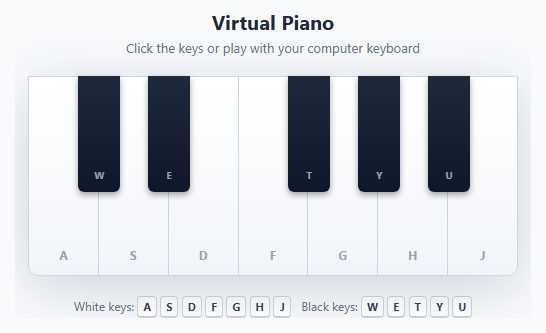
Most "piano" demos on the web are static images or buttons that toggle a colour with no real sound. This snippet is a genuine playable instrument: 25 keys across two octaves (C4 to C6), every note synthesized live in the browser with the Web Audio API — no audio files, no samples, no libraries — and wrapped in a small studio: four sounds, reverb, a sustain pedal, chord detection, a recorder and optional MIDI keyboard input.
A keyboard layout built from maths, not hand-tuned CSS
The keys are generated by a short loop over MIDI note numbers 60 to 84. White keys are a display: flex row, each taking an equal share. Black keys live in the same container with position: absolute; each one is placed at left = whiteKeysBefore / totalWhiteKeys − halfBlackWidth, which is why the gaps between E and F and between B and C stay empty exactly like a real piano. The same geometry is stored in a geom map and reused by the note-bar animation, so changing the number of octaves means changing one constant.
Synthesis: voices, envelopes and a filter
Each voice is a recipe of oscillators (type, harmonic multiple, level, detune), mixed into a low-pass filter and a gain envelope. The Piano is a triangle wave plus quiet 2nd–4th harmonics with a fast attack and a decay that settles to a low sustain level, using setTargetAtTime for a natural exponential fall. The E-Piano is a bell-like sine blend, the Organ is additive sines with no decay and a very short release, and the Pad is two detuned sawtooths plus a sub with a slow swell. The filter cutoff follows the note's pitch and starts brighter than it ends, so notes mellow as they ring. Frequencies come from equal temperament: 440 × 2^((midi − 69) / 12).
Mixing: compressor and a generated reverb
All voices feed one bus that splits into a dry path and a ConvolverNode reverb, then into a DynamicsCompressor so big chords do not clip, then a master volume. The reverb's impulse response is not a file: it is two channels of random noise multiplied by a decaying curve, generated at start-up, which gives a convincing synthetic room for zero bytes of download. The Reverb slider is simply the wet gain.
Playing it: velocity, glissando, multi-touch and pedal
Pointer Events handle mouse, pen and touch together. Pressing lower on a key plays it louder, because velocity is computed from the press position inside the key's rectangle. A pointermove handler uses document.elementFromPoint to move a held pointer onto a new key, releasing the old note and pressing the new one, which gives a real glissando, and every pointer is tracked separately so multi-touch chords work. Each note remembers which sources are holding it (mouse, a computer key, MIDI), so two inputs on the same note never cut each other off. The computer keyboard uses event.code, so the layout is positional on any keyboard language, with Z–M and Q–I as two rows and Space as the sustain pedal.
Sustain pedal logic
When the pedal is down, releasing a key moves its voice into a sustained map instead of stopping it; lifting the pedal stops them all. Striking a pedalled note again fades the old voice quickly before starting the new one so there is no phasing. A button latches the pedal for touch users.
Chord detection
Every time a note starts or stops, the sounding notes are reduced to their distinct pitch classes. Each one is tried as a root: intervals above it are sorted and compared with a table of shapes (major, minor, diminished, augmented, sus2, sus4, 6, add9, 7, maj7, m7, m7♭5, dim7). The bass note is tried first, so inversions are labelled as slash chords (C/E). It turns the toy into a hands-on music theory tool.
Visual feedback and recording
Each key lights up in a colour derived from its pitch class, and a canvas above the keyboard draws Synthesia-style bars that grow while a note is held and float upward after release. The recorder logs note on/off events with timestamps and replays them with setTimeout; pressing Stop closes any notes still held so the replay never hangs. The canvas is scaled by devicePixelRatio for sharp rendering.
MIDI keyboard support
If the browser supports the Web MIDI API, a MIDI button appears. It only asks for permission when clicked, then wires every input: note-on (with velocity), note-off, and controller 64 for a hardware sustain pedal. Settings (sound, volume, reverb) are remembered in localStorage, and all held notes are released when the window loses focus so nothing gets stuck. For more instruments see the tone synth pad, the Tone.js synth pad and the audio metronome.
Step by step
How to Use
- 1Play with mouse, touch or keyboardClick or tap keys, or use the computer keyboard: Z S X D C V G B H N J M for C4 to B4 and Q 2 W 3 E R 5 T 6 Y 7 U for C5 to B5, with I for C6. The key letters are printed on the keys. Press lower on a key to play it louder.
- 2Slide for a glissandoHold the mouse button or a finger and drag across the keys. Each key you cross plays and the one you leave is released. With two fingers you can slide two hands at once.
- 3Change the soundSwitch between Piano, E-Piano, Organ and Pad. Use Volume and Reverb to shape the mix, and the − / + buttons (or the ← → keys) to shift the pitch by an octave.
- 4Use the sustain pedalHold Space for a pedal, or click Sustain to latch it. Released notes keep ringing until you lift the pedal.
- 5Read the chordsHold C, E and G together (Z, C, B). The display shows C, and adding another note changes it to Cmaj7 or C7. Rolling a chord over different bass notes shows slash chords.
- 6Record and replayClick Rec, play something, then click Stop and Play. The note count and length appear next to the buttons. If you own a MIDI keyboard, click MIDI to play it through the same synth.
Real-world uses
Common Use Cases
Got questions?
Frequently Asked Questions
Browsers only allow an AudioContext to start after a user gesture. The snippet creates it on the first key press and calls resume() if it was suspended. If you still hear nothing, check that the tab is not muted and that your volume is up.
With equal temperament: frequency = 440 × 2^((midi − 69) / 12), where 69 is A4. The octave buttons add 12 semitones per step, so shifting an octave multiplies the frequency by two.
The ConvolverNode needs an impulse response. The snippet builds one in code: two channels of random noise multiplied by a curve that fades to silence over two seconds. The Reverb slider controls how much of that signal is mixed in.
While the pedal is down, a released key moves its voice into a "sustained" list instead of stopping it. When the pedal is lifted, all sustained voices fade out. Pressing the same key again while pedalled fades the old voice quickly first.
The sounding notes are reduced to distinct pitch classes. Each is tried as a root, the intervals above it are sorted, and the result is looked up in a table such as 0,4,7 for major. The lowest note is tried first, so inversions get a slash-chord name.
Yes, in browsers that support Web MIDI (Chromium-based ones). Click the MIDI button and allow access. Note on, note off with velocity and the sustain pedal controller are supported. The button is hidden where Web MIDI is not available.
Create the AudioContext lazily in a ref on the first gesture and keep voices in a ref, not state. Render keys from the MIDI range, put the key pointer handlers on the container, and stop all voices in the unmount cleanup. Use the export buttons on this page for the markup and styles.