


Tone.js Synth Pad — Free Web Audio Note Grid Snippet
Tone.js Synth Pad · Media · Plain HTML, CSS & JS · Live preview
Copy & paste
Source Code
<div class="tp-wrap">
  <div class="tp-head">
    <h1>Synth Pad</h1>
    <p id="tpStatus">Tap a pad to start audio and play a note.</p>
  </div>
  <div class="tp-grid" id="tpGrid">
    <button class="tp-pad" data-note="C4">C4</button>
    <button class="tp-pad" data-note="D4">D4</button>
    <button class="tp-pad" data-note="E4">E4</button>
    <button class="tp-pad" data-note="F4">F4</button>
    <button class="tp-pad" data-note="G4">G4</button>
    <button class="tp-pad" data-note="A4">A4</button>
    <button class="tp-pad" data-note="B4">B4</button>
    <button class="tp-pad" data-note="C5">C5</button>
  </div>
</div>*{box-sizing:border-box;margin:0;padding:0}
body{font-family:system-ui,-apple-system,sans-serif;background:#0a0b12;color:#fff;min-height:100vh;display:flex;align-items:center}
.tp-wrap{width:100%;max-width:560px;margin:0 auto;padding:clamp(24px,6vw,48px);display:flex;flex-direction:column;gap:24px}
.tp-head{text-align:center}
.tp-head h1{font-size:clamp(26px,5vw,38px);letter-spacing:-.02em;background:linear-gradient(135deg,#34d399,#38bdf8);-webkit-background-clip:text;background-clip:text;color:transparent}
.tp-head p{color:#8b90ab;margin-top:8px;font-size:14px}
.tp-grid{display:grid;grid-template-columns:repeat(4,1fr);gap:12px}
.tp-pad{aspect-ratio:1;border-radius:16px;border:1px solid #232a3d;background:linear-gradient(160deg,#151a2c,#0e1120);color:#c9cee0;font-family:inherit;font-size:14px;font-weight:700;cursor:pointer;transition:transform .08s,box-shadow .15s,background .15s;position:relative;overflow:hidden}
.tp-pad:active{transform:scale(.94)}
.tp-pad.is-active{background:linear-gradient(160deg,#134e4a,#0e1120);box-shadow:0 0 0 2px #34d399,0 0 30px rgba(52,211,153,.5);color:#fff}// Browsers block audio until a user gesture. Tone.start() resolves the
// shared AudioContext, and it must be called from inside a real click/tap
// handler — we do it lazily on the first pad press, not on load.
let started = false;
const synth = new Tone.PolySynth(Tone.Synth, {
oscillator: { type: 'triangle' },
envelope: { attack: 0.01, decay: 0.2, sustain: 0.2, release: 0.6 },
}).toDestination();
const status = document.getElementById('tpStatus');
const pads = document.querySelectorAll('.tp-pad');
pads.forEach((pad) => {
pad.addEventListener('pointerdown', async () => {
if (!started) {
await Tone.start();
started = true;
status.textContent = 'Audio running — tap any pad.';
}
const note = pad.dataset.note;
synth.triggerAttackRelease(note, '8n');
flash(pad);
});
});
function flash(pad) {
pad.classList.add('is-active');
setTimeout(() => pad.classList.remove('is-active'), 220);
}Extend with AI
Take This Snippet Further With AI
The AI prompt for this one is for Patreon supporters ($3 a month, 7 days free), along with a site with no ads. Supporters enter the passcode once and it is remembered in this browser.
What's included
Features
About this UI Snippet
Tone.js Synth Pad — Click-to-Play Notes With Correct Autoplay Handling
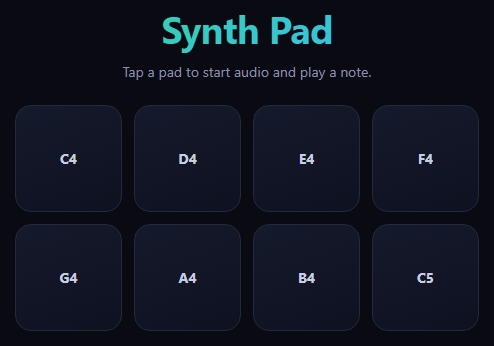
Tone.js wraps the Web Audio API in a musician-friendly API — synths, envelopes, effects, and scheduling — so a click-to-play instrument doesn't require hand-building an oscillator graph. This snippet is a small eight-pad grid, each pad mapped to a note in a C major scale, where pressing a pad calls synth.triggerAttackRelease(note, '8n') and flashes a glow so the interaction reads clearly even with the sound off.
The autoplay rule, handled correctly
Browsers refuse to let audio play until a real user gesture unlocks the page's AudioContext — starting Tone (or any Web Audio graph) on page load simply does nothing silently. This snippet calls await Tone.start() from inside the first pointerdown handler, not from a page-load script, which is the one place browsers reliably honor as a qualifying gesture. A started flag makes sure it only runs once; every pad press after that goes straight to triggerAttackRelease.
One PolySynth, many notes
Rather than creating a synth per pad, a single Tone.PolySynth(Tone.Synth, {...}) handles all eight — PolySynth manages voice allocation internally, so overlapping presses (or a fast double-tap) don't cut each other off. The triangle oscillator and short envelope (fast attack, quick decay, low sustain, moderate release) give each note a soft pluck rather than a harsh buzz or a synth-pad drone.
Visual feedback independent of audio
flash() adds an is-active class for 220ms regardless of whether sound is actually audible (muted tab, no speakers) — a glowing ring and background shift on the CSS side, not tied to any Tone.js callback. That separation matters: the pad always looks pressed, even in edge cases where audio output isn't available.
Where this fits
For animating elements on scroll or hover rather than triggering sound, see scroll reveal grid or interactive hover button; for a celebratory click effect with confetti instead of audio, see confetti button. The pattern of "unlock on first gesture, feed a flag" generalizes to any Web Audio-based interaction, not just Tone.js.
Customizing it
Swap Tone.Synth for Tone.FMSynth/Tone.MembraneSynth for a different timbre, change the note list to a different scale or chord voicing, or route the synth through a Tone.Reverb/Tone.FeedbackDelay before toDestination() for a fuller sound. Change '8n' to a different note duration for longer or shorter notes.
Step by step
How to Use
- 1Add the Tone.js CDNInclude Tone.js from the CDN panel.
- 2Paste HTML, CSS, and JSAn 8-pad grid renders, silent until the first tap.
- 3Tap any padTone.start() unlocks audio; the note plays.
- 4Tap other padsEach plays instantly, no further unlock needed.
- 5Watch the glowEvery press flashes regardless of audio output.
- 6Change the soundSwap Tone.Synth for a different synth type.
Real-world uses
Common Use Cases
PolySynth so fast repeated presses never cut earlier notes off.Tone.start() correctly called inside the first gesture to satisfy autoplay rules.Got questions?
Frequently Asked Questions
Browsers enforce an autoplay policy that blocks any AudioContext from producing sound until the user has performed a genuine gesture like a click or tap on the page. Calling Tone.start() (which resolves Tone's shared AudioContext) has to happen inside a real event handler — attempting it on page load or in a setTimeout without a preceding gesture silently fails to unlock audio in most browsers.
Once the AudioContext has been successfully resumed, it stays running for the rest of the page's lifetime — calling Tone.start() again is harmless but unnecessary. The started flag just avoids an extra await on every subsequent press, so notes after the first one trigger with no perceptible delay.
Tone.PolySynth internally manages a pool of voices for a single synth definition, allocating and releasing them as notes are triggered and released. That means one PolySynth instance can play all eight pads' notes, including overlapping ones from a fast double-tap, without needing to manage eight separate synth objects or worry about one note cutting another off.
It combines two steps — starting a note's envelope (attack) and releasing it (release) — into one call with a specified note and duration, here "8n" (an eighth note at the current tempo). That's the right method for a single tap-and-release pad interaction; triggerAttack and triggerRelease as separate calls are more useful when you want a note to sustain for as long as a button stays held down.
No — flash() runs purely by adding and removing a CSS class on a timer, completely independent of Tone.js's playback state or whether the browser tab is muted or has no audio output device. That separation means the pad always gives clear visual confirmation of a press, even in situations where sound isn't actually audible.