
Flash Sale Countdown — Free Promo & Sales Social Post Template
Promo & Sales · v1.0.0 · Updated 2026-11-19 · Instagram, Facebook & X · HTML + CSS
Extend with AI
Take This Post Further With AI
Ask an AI assistant to adapt the Flash Sale HTML and CSS: write short urgency lines for each repost, change the palette to your brand, or add a product photo beside the discount.
Prompt to recreate it
Copy this into your AI assistant of choice to build the effect from scratch, or as a jumping-off point for your own variant:
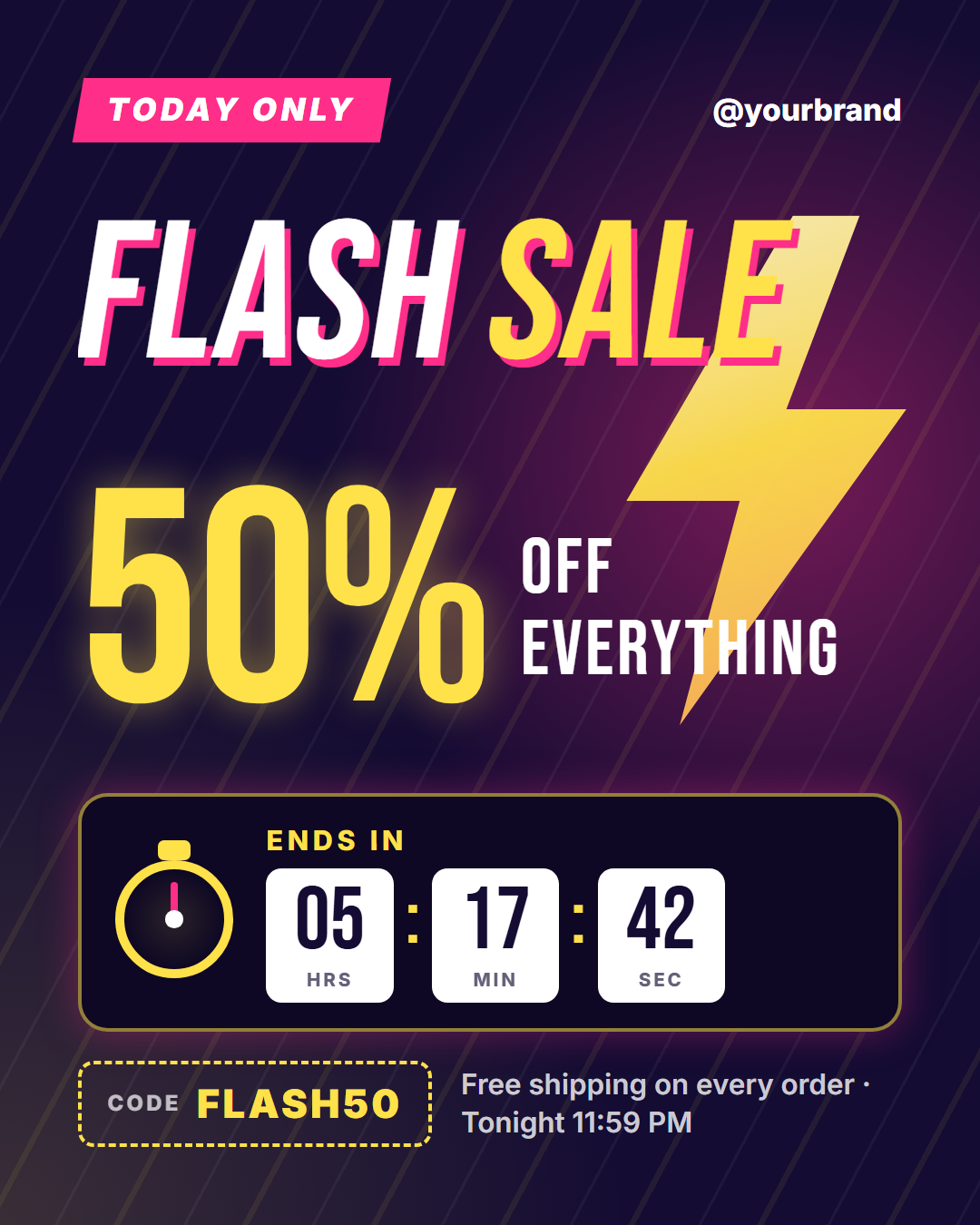
Create a 1080×1350 flash sale post in plain HTML and CSS.

- Deep indigo background (#140c33) with a magenta glow behind the middle right and diagonal speed lines (a repeating linear gradient at -62deg, thin white and yellow stripes at low opacity).
- A large glowing yellow lightning bolt (clip-path polygon, yellow gradient, yellow drop-shadow) on the right, behind the text.
- Top row: a skewed magenta label "TODAY ONLY" in white uppercase and the handle on the right.
- "FLASH SALE" in Bebas Neue about 216px, skewed -9deg, white with "SALE" in yellow and a magenta offset text shadow.
- "50%" in yellow Bebas Neue about 330px with a soft glow, and "OFF / EVERYTHING" stacked beside it.
- A dark timer panel with a yellow border: a stopwatch (yellow ring, crown on top, magenta hand), an "ENDS IN" label and three white tiles "05 HRS", "17 MIN", "42 SEC" with yellow colons.
- Footer: a dashed yellow code box "CODE FLASH50" and a note "Free shipping on every order · Tonight 11:59 PM".
- Optional: flash the bolt, tick the hand once per second and count the seconds down.
Want to tighten it up first? Run this prompt through the AI Prompt Studio to score it across 8 quality dimensions, catch anti-patterns, and tune the wording for Claude, ChatGPT, or Gemini before you paste it in.
What's included
Features
About this template
Flash Sale Post Template — A Countdown Timer With Real Urgency
A flash sale only works if people believe it ends soon, and most sale graphics say "limited time" without showing any time at all. Flash Sale Countdown is a free template that puts the clock in the post: hours, minutes and seconds tiles, a ticking stopwatch and a lightning bolt, all around one big discount.
Speed in every part
Diagonal speed lines race behind a slanted Flash Sale headline in tall condensed type, and a glowing yellow bolt flashes twice every couple of seconds in the video export. The top label ("Today only", "48 hours", "Lunch deal") gives a little shake now and then, the way a notification asks for attention.
The discount, then the deadline
The discount is the largest thing on the post and counts up from zero in the animated version. Next to it a short line says what it applies to. Below, a dark timer panel holds a stopwatch whose hand ticks one step a second, an "Ends in" label and three tiles. In the video the minutes and seconds count down to the values you typed, and the colons blink.
Code and the small print
A dashed code box pulses gently, and a note line beside it carries the end time, free shipping or anything else that removes doubt. Your handle and optional logo sit in the top bar.
Sizes
Use portrait for the feed and Story for a same-day reminder, then the wide sizes for X and Facebook. Set the timer to the time left when you post, and post again with fresh numbers as the deadline gets close. For a whole-weekend event use Black Friday Sale or Discount Badge.
Why use it
Why Use the Flash Sale Countdown Template
How it’s different
How It’s Different From Canva-Style Templates
Step by step
How to Use
- 1Pick the sizeChoose Portrait 4:5 (the Instagram feed default), Square, Story / Reel, Landscape 16:9 for X, a 1200×627 LinkedIn image or a 1000×1500 Pinterest pin. Flash Sale Countdown opens at 1080×1350.
- 2Edit the textClick any text in the preview, or use the fields on the left (top label, headline, discount, discount line and more). Wrap words in *asterisks* to colour them.
- 3Add your imagesClick a photo area in the preview or use Images to upload your logo. Images stay in your browser.
- 4Match your brandApply your saved brand kit or one of 12 palettes, set exact colours, and choose heading and body fonts from any Google Font or your own uploaded font.
- 5Preview it in the feedSwitch the preview to Instagram, Story, X or LinkedIn to see the post with your name, handle and caption, and fix anything the quality checks flag.
- 6Download, save or bulk createDownload PNG, JPG or PDF, every size as a ZIP, or copy the HTML. Save it to My designs to reuse later, or turn a CSV into dozens of posts with Bulk create.
Real-world uses
Common Use Cases
Got questions?
Frequently Asked Questions
A post image cannot count down on its own. The still image shows the time you type, and the animated video counts the minutes and seconds down to it. Update the numbers each time you repost.
The time left when you publish, such as 05 hours 17 minutes 42 seconds. If you post a still image only, round it, for example 06 : 00 : 00 with "Ends tonight 11:59 PM" in the note line.
Yes. The discount field takes any short text such as "$10", "2 FOR 1" or "-30%". Numbers in it count up in the video.
Countdown is an event countdown with a date and a ring. Flash Sale Countdown is a sales post: it leads with the discount and adds a promo code, a bolt and hours-minutes-seconds tiles.
Portrait post 1080×1350 (4:5): Instagram feed (recommended), Facebook and LinkedIn feeds, X portrait. Square post 1080×1080 (1:1): Instagram, Facebook, LinkedIn and X feeds. Story / Reel 1080×1920 (9:16): Instagram and Facebook Stories, Reel covers. Landscape post 1600×900 (16:9): X feed image, Facebook landscape. LinkedIn image 1200×627 (1.91:1): LinkedIn shared image and link posts, Facebook link images. Pinterest pin 1000×1500 (2:3): Pinterest standard pin (the recommended 2:3 ratio). Switch sizes in the editor and the layout adapts, or click "All sizes (ZIP)" to download every size at once.
Yes, free. Press Play in the editor to watch the animation, then open Export and download it as an animated MP4 (or WebM) for Reels, Stories and WhatsApp Status. PNG, JPG, PDF and HTML exports are free too.
Yes, and it is free. Choose Export, then "Bulk create from CSV", and paste rows from a spreadsheet or upload a CSV whose column names match the Flash Sale Countdown fields. Every row becomes one post, and you download them all as a ZIP.
Yes. The preview switches between the plain design and mock-ups of an Instagram feed post, an Instagram Story, an X post and a LinkedIn post, using the name, handle and logo from your brand kit and the caption you type.
Yes. "Copy HTML" and "Download .html" give you one self-contained file: the markup, all the CSS and links to the Google Fonts it uses. "Fork to My Code" saves an editable copy in the UI Snippets editor. The file records the template name and version (v1.0.0).
Yes. It is free for personal and commercial posts, with no sign-up and no watermark. Everything runs in your browser and nothing you type or upload is sent to a server.