Cyber Monday — Free Promo & Sales Social Post Template
Promo & Sales · v1.0.0 · Updated 2026-11-03 · Instagram, Facebook & X · HTML + CSS
What's included
Features
About this template
Cyber Monday — Free Neon Terminal Sale Post Template
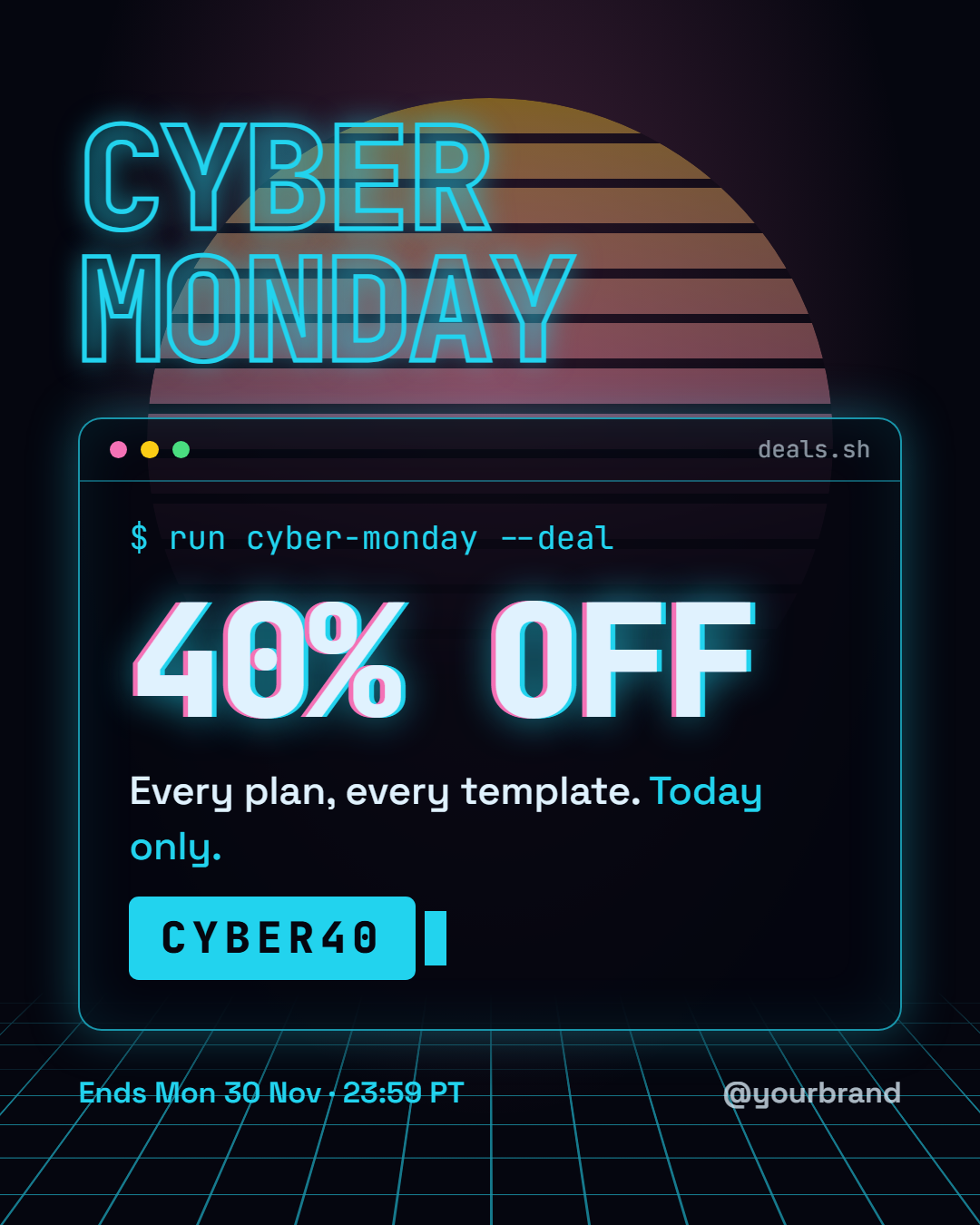
Cyber Monday is a free social post template for the online-only sales day that follows Black Friday, which falls on Monday 30 November 2026. Black Friday posts tend to look alike: black, red and a giant percentage. This one is built to look like the internet itself: a neon command-line window floating over a synthwave grid, with a striped retro sun glowing behind the headline.
A sale that types itself
Inside the window, a command such as "$ run cyber-monday --deal" types out character by character in the exported video, then the discount counts up from zero to "40% OFF" with a cyan and pink chromatic glow. The grid floor rolls towards the viewer and a block cursor blinks after the promo code, so even a still frame reads as "digital".
Everything a deal post needs, in the right order
The big outlined "Cyber Monday" headline says what it is, the discount says how much, one line of offer copy says on what ("Every plan, every template. *Today only.*"), the code sits in a solid cyan box that is easy to copy by eye, and the deadline sits at the bottom with your handle and an optional logo. Words wrapped in asterisks turn cyan.
Made for digital products
The developer look suits SaaS plans, apps, online courses, templates, plugins and tech shops, the businesses that sell most on Cyber Monday. Change the neon colours to your brand, rewrite the command as a joke your audience will get ("npm install savings"), or clear it.
Every size from one design
The layout reflows from the 4:5 feed post to a 9:16 Story, a 16:9 X image and a LinkedIn link image, with the headline on one line on wide sizes. Export PNG, JPEG, PDF, an animated MP4 or the HTML. For the Friday before, use Black Friday Sale; for the final hours, Countdown; and pair it with the Black Friday email.
Extend with AI
Take This Post Further With AI
Ask an AI assistant to adapt the Cyber Monday HTML and CSS: write five command-line jokes for your product, turn it into a five-day Cyber Week series, or recolour the neon to your brand while keeping the contrast readable.
Prompt to recreate it
Copy this into your AI assistant of choice to build the effect from scratch, or as a jumping-off point for your own variant:
Create a 1080×1350 Cyber Monday sale social post in plain HTML and CSS.

- Background #05060f with a pink glow behind the top half.
- A synthwave grid floor at the bottom: two linear-gradient line patterns in cyan (#22d3ee), tilted back with perspective and rotateX, fading out towards the horizon with a mask.
- A large striped retro sun (yellow to pink gradient cut by horizontal dark stripes) behind the headline at low opacity.
- A huge outlined headline "CYBER MONDAY" on two lines in JetBrains Mono, transparent fill with a cyan text-stroke and glow.
- Below it, a terminal window with a cyan border and glow, traffic-light dots and a "deals.sh" tab, containing: the command "$ run cyber-monday --deal" in cyan, "40% OFF" in giant mono type with a pink and cyan chromatic text-shadow, one line of offer text, and the code "CYBER40" in a solid cyan box followed by a block cursor.
- A footer row with the deadline in cyan on the left and the handle on the right.
- Size everything with a CSS variable --u equal to 1% of the shorter side, so it also works at 1080×1920 and 1600×900.
Want to tighten it up first? Run this prompt through the AI Prompt Studio to score it across 8 quality dimensions, catch anti-patterns, and tune the wording for Claude, ChatGPT, or Gemini before you paste it in.
Why use it
Why Use the Cyber Monday Template
How it’s different
How It’s Different From Canva-Style Templates
Step by step
How to Use
- 1Pick the sizeChoose Portrait 4:5 (the Instagram feed default), Square, Story / Reel, Landscape 16:9 for X, a 1200×627 LinkedIn image or a 1000×1500 Pinterest pin. Cyber Monday opens at 1080×1350.
- 2Edit the textClick any text in the preview, or use the fields on the left (command line, headline, discount, offer and more). Wrap words in *asterisks* to colour them.
- 3Add your imagesClick a photo area in the preview or use Images to upload your logo. Images stay in your browser.
- 4Match your brandApply your saved brand kit or one of 12 palettes, set exact colours, and choose heading and body fonts from any Google Font or your own uploaded font.
- 5Preview it in the feedSwitch the preview to Instagram, Story, X or LinkedIn to see the post with your name, handle and caption, and fix anything the quality checks flag.
- 6Download, save or bulk createDownload PNG, JPG or PDF, every size as a ZIP, or copy the HTML. Save it to My designs to reuse later, or turn a CSV into dozens of posts with Bulk create.
Real-world uses
Common Use Cases
Follow it up
Email Templates to Match the Cyber Monday Post
Reach the people who are not on social media with a matching email from the free responsive HTML email templates: Black Friday Sale Email. Both libraries use the same brand colours and fonts, so the post and the email look like one campaign.
Got questions?
Frequently Asked Questions
Cyber Monday 2026 is on Monday 30 November, the Monday after US Thanksgiving (26 November) and Black Friday (27 November). Many brands run the sale from Saturday to Monday or extend it into a Cyber Week.
Black Friday Sale is a bold condensed type poster. Cyber Monday is a digital-themed design, a neon terminal over a retro grid, so your Monday post looks new in the feed instead of repeating Friday's.
Yes. Clear the command field and it disappears. The two neon colours, the background and the code box are editable, so the grid, sun, glow and headline outline all follow your brand.
Choose the animated video export. The command types out, the discount counts up from zero, the grid rolls forward and the cursor blinks, which works well as a Reel, TikTok or Story.
Portrait post 1080×1350 (4:5): Instagram feed (recommended), Facebook and LinkedIn feeds, X portrait. Square post 1080×1080 (1:1): Instagram, Facebook, LinkedIn and X feeds. Story / Reel 1080×1920 (9:16): Instagram and Facebook Stories, Reel covers. Landscape post 1600×900 (16:9): X feed image, Facebook landscape. LinkedIn image 1200×627 (1.91:1): LinkedIn shared image and link posts, Facebook link images. Pinterest pin 1000×1500 (2:3): Pinterest standard pin (the recommended 2:3 ratio). Switch sizes in the editor and the layout adapts, or click "All sizes (ZIP)" to download every size at once.
Yes. Choose Export, then "Bulk create from CSV", and paste rows from a spreadsheet or upload a CSV whose column names match the Cyber Monday fields. Every row becomes one post, and you download them all as a ZIP.
Yes. The preview switches between the plain design and mock-ups of an Instagram feed post, an Instagram Story, an X post and a LinkedIn post, using the name, handle and logo from your brand kit and the caption you type.
Yes. "Copy HTML" and "Download .html" give you one self-contained file: the markup, all the CSS and links to the Google Fonts it uses. "Fork to My Code" saves an editable copy in the UI Snippets editor. The file records the template name and version (v1.0.0).
Yes. It is free for personal and commercial posts, with no sign-up and no watermark. Everything runs in your browser and nothing you type or upload is sent to a server.