Click any text to edit it right here · click an image or link to jump to its setting
- Replace the placeholder links: Header link, Button link, Pick 1 link, Pick 2 link, Unsubscribe link, Email preferences link.
Black Friday Sale Email — Free Responsive HTML Email Template
Marketing · v1.0.0 · Updated 2026-10-17 · Gmail, Outlook & Apple Mail · Dark mode
What's included
Features
About this template
Black Friday Sale Email — Free HTML Cyber Monday Template
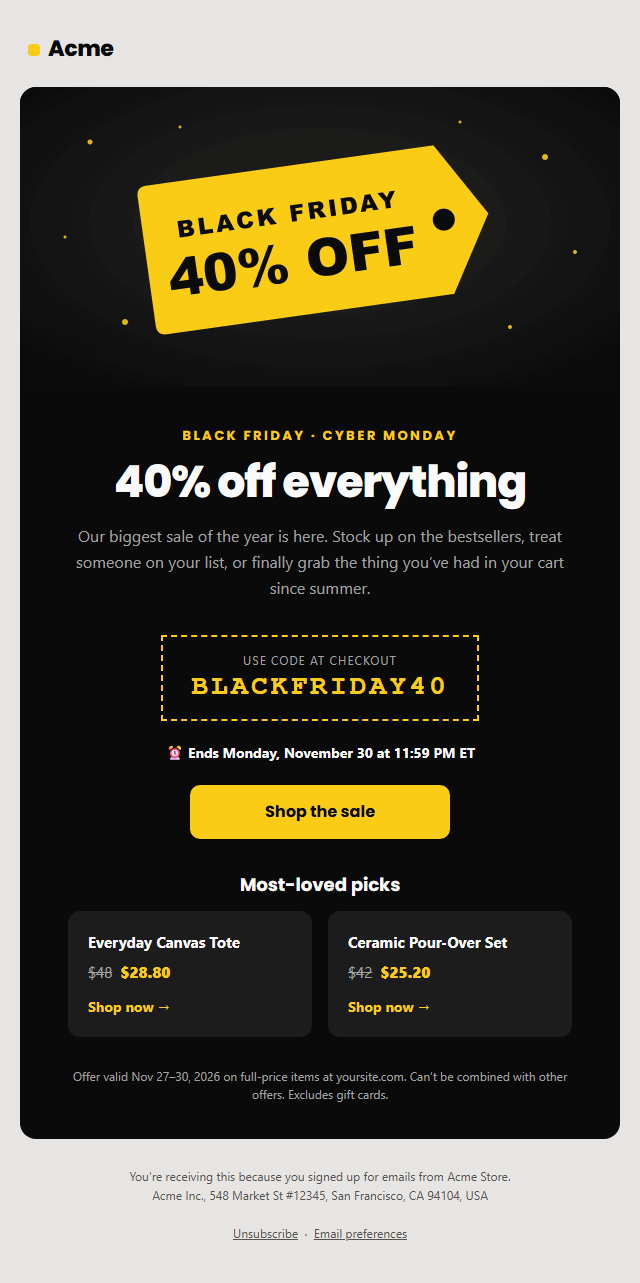
Black Friday Sale Email is a free, responsive HTML promo email template for Black Friday, Cyber Monday, holiday sales and flash sales. It uses a bold black-and-yellow design: a hero image, a "40% off everything" headline, a dashed promo-code box, a deadline line, a big Shop the sale button, two product picks with crossed-out and sale prices, the fine print, and a CAN-SPAM footer with unsubscribe.
Built to stand out in a crowded inbox
Black Friday week is the busiest of the year for email. Inboxes fill with sale emails, so yours has to say the offer in a second. This template leads with the discount, repeats it in the code box and the hero image, and gives people a clear deadline (Black Friday 2026 is November 27 and Cyber Monday is November 30) so they act now instead of later.
Promo code people can copy
The code is set in large monospace type inside a dashed "coupon" border, so it's easy to read and copy. Turn the code section off for automatic discounts, or reuse the template for any sale by changing the eyebrow, headline and hero.
Product picks with was and now prices
Two product cards show the regular price struck through next to the sale price, with "Shop now" links. They sit side by side on desktop and stack on phones. Leave a pick name empty, or hide the section, if you'd rather send people straight to the sale page.
Dark by design, compliant by default
The card is dark in both light and dark mode, so it looks the same in Apple Mail, Gmail and Outlook.com, while the header and footer stay readable on the light page. The button is a VML "bulletproof" button for Outlook on Windows. Because this is marketing email, the footer includes an unsubscribe link, a preferences link and your postal address, as US CAN-SPAM and the Gmail and Yahoo sender rules require.
Edit everything in the browser, then paste the HTML into Klaviyo, Mailchimp, Shopify Email, Omnisend or Brevo, or fork it into My Code. Promoting the sale on social too? See the Holiday Sale social post template.
Why use it
Why Use the Black Friday Sale Email Template
How it’s different
How It’s Different From Other Free Email Templates
Step by step
How to Use
- 1Set the inbox detailsWrite the sender name, subject line and preheader (the preview text shown next to the subject in the inbox). The character counts show when they get too long for phones.
- 2Edit the contentFill in the hero image, offer & button, promo code and product picks, or click any text in the preview to jump to its field. Switch the hero image, promo code and product picks on or off.
- 3Add your brandUpload or paste your logo and images, set the brand colour and the light and dark palettes, pick fonts, or apply your saved brand kit.
- 4Preview and checkSwitch between desktop, mobile and dark mode, and fix anything the pre-send checks flag, such as placeholder links or missing alt text.
- 5Export or forkCopy the HTML into Mailchimp, Klaviyo, HubSpot, Brevo or your own code, copy the plain-text version, download a ZIP with images, or fork it into My Code.
Real-world uses
Common Use Cases
Got questions?
Frequently Asked Questions
Black Friday is November 27, 2026 and Cyber Monday is November 30. Many brands send a teaser the week before, a launch email on Thursday evening or Friday morning, a reminder over the weekend and a last-chance email on Cyber Monday.
Edit the template and open the HTML tab and click "Copy". In Klaviyo and Mailchimp create a custom HTML template and paste it; in Shopify Email use a custom HTML section. Replace the unsubscribe link with the platform's merge tag, such as {% unsubscribe %} in Klaviyo.
Yes. Change the card, accent and text colours under Colours, or apply your brand kit. Keep strong contrast between the text and the card, and check the button text against the accent colour.
Both. The hero image catches the eye, but many people have images turned off, so the headline and promo code are real text that always shows, and the hero has alt text.
Yes. Sale and promotional emails are commercial email, so US CAN-SPAM requires a working unsubscribe link and your postal address, and Gmail and Yahoo require one-click unsubscribe for bulk senders.
It saves an editable copy of your Black Friday Sale Email in My Code, the UI Snippets code editor: the email markup goes in the HTML panel and its CSS (mobile and dark-mode rules plus fonts) in the CSS panel, so you can keep refining the code and save your own versions.
Yes. It is free for personal and commercial email, with no sign-up and no watermark. Everything runs in your browser, and your edits are saved locally.