


Action Sheet — Free HTML CSS JS iOS Bottom Sheet Snippet
Action Sheet · Modals · Plain HTML, CSS & JS · Live preview
Copy & paste
Source Code
<div class="as-demo">
  <button type="button" class="as-open" id="asOpen">Show actions</button>

  <div class="as-root" id="asRoot" aria-hidden="true">
    <div class="as-backdrop" id="asBackdrop"></div>
    <div class="as-sheet" id="asSheet" role="dialog" aria-modal="true" aria-label="Actions">
      <div class="as-grab" aria-hidden="true"></div>
      <p class="as-title">Photo options</p>
      <div class="as-group">
        <button class="as-item">📷 Take photo</button>
        <button class="as-item">🖼 Choose from library</button>
        <button class="as-item">🔗 Copy link</button>
        <button class="as-item as-danger">🗑 Delete photo</button>
      </div>
      <button class="as-item as-cancel" id="asCancel">Cancel</button>
    </div>
  </div>
</div>*{box-sizing:border-box;margin:0;padding:0}
body{font-family:system-ui,-apple-system,sans-serif;background:#0c0c14;color:#fff;display:flex;justify-content:center;align-items:center;min-height:100vh}
.as-open{background:#6366f1;color:#fff;border:none;border-radius:12px;padding:13px 22px;font-family:inherit;font-size:15px;font-weight:700;cursor:pointer}
.as-root{position:fixed;inset:0;z-index:50;visibility:hidden}
.as-root.open{visibility:visible}
.as-backdrop{position:absolute;inset:0;background:rgba(0,0,0,.5);opacity:0;transition:opacity .3s}
.as-root.open .as-backdrop{opacity:1}
.as-sheet{position:absolute;left:0;right:0;bottom:0;padding:8px 12px max(14px,env(safe-area-inset-bottom));display:flex;flex-direction:column;gap:8px;transform:translateY(100%);transition:transform .34s cubic-bezier(.32,.72,0,1);touch-action:none}
.as-root.open .as-sheet{transform:translateY(0)}
.as-grab{width:38px;height:5px;border-radius:3px;background:#3a3a52;margin:2px auto 6px}
.as-title{text-align:center;font-size:12.5px;color:#8b8ba3;padding:4px 0 8px}
.as-group{background:#1b1b2b;border-radius:16px;overflow:hidden;display:flex;flex-direction:column}
.as-item{background:none;border:none;border-bottom:1px solid #26263c;color:#e8e8f4;font-family:inherit;font-size:16px;font-weight:600;padding:16px;cursor:pointer;text-align:center;transition:background .15s}
.as-group .as-item:last-child{border-bottom:none}
.as-item:active{background:#26263c}
.as-danger{color:#fb7185}
.as-cancel{background:#1b1b2b;border-radius:16px;font-weight:800}var root = document.getElementById('asRoot');
var sheet = document.getElementById('asSheet');
var lastFocus = null;
function open() {
lastFocus = document.activeElement;
root.classList.add('open'); root.setAttribute('aria-hidden', 'false');
}
function close() {
root.classList.remove('open'); root.setAttribute('aria-hidden', 'true');
sheet.style.transform = '';
if (lastFocus) lastFocus.focus();
}
document.getElementById('asOpen').addEventListener('click', open);
document.getElementById('asCancel').addEventListener('click', close);
document.getElementById('asBackdrop').addEventListener('click', close);
document.addEventListener('keydown', function (e) { if (e.key === 'Escape' && root.classList.contains('open')) close(); });
// Swipe-down to dismiss: drag the sheet, and if pulled far/fast enough, close.
var startY = 0, dy = 0, dragging = false, t0 = 0;
sheet.addEventListener('pointerdown', function (e) {
dragging = true; startY = e.clientY; dy = 0; t0 = Date.now();
sheet.style.transition = 'none';
sheet.setPointerCapture(e.pointerId);
});
sheet.addEventListener('pointermove', function (e) {
if (!dragging) return;
dy = Math.max(0, e.clientY - startY); // only allow downward drag
sheet.style.transform = 'translateY(' + dy + 'px)';
});
sheet.addEventListener('pointerup', function () {
if (!dragging) return;
dragging = false;
sheet.style.transition = '';
var fast = dy / (Date.now() - t0) > 0.5;
if (dy > 110 || fast) close();
else sheet.style.transform = 'translateY(0)';
});Extend with AI
Take This Snippet Further With AI
The AI prompt for this one is for Patreon supporters ($3 a month), along with a site with no ads. Supporters enter the passcode once and it is remembered in this browser.
What's included
Features
About this UI Snippet
Action Sheet — iOS-Style Slide-Up Options With Swipe Dismiss
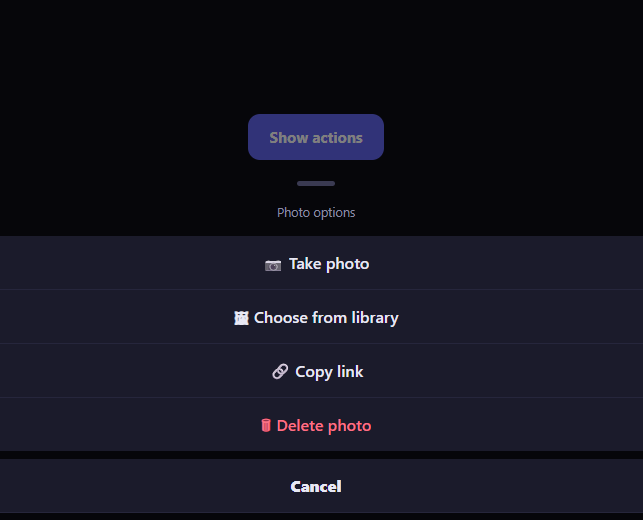
The action sheet is the iOS-style contextual menu that slides up from the bottom of the screen with a grouped list of options and a separate cancel button — the native way mobile apps present "what do you want to do with this?" choices. This snippet builds it with plain HTML, CSS, and vanilla JavaScript, including the swipe-down-to-dismiss gesture that makes it feel native.
The slide-up transition
The sheet is anchored to the bottom with position: absolute; bottom: 0 and is hidden by translating it fully below the screen (translateY(100%)). Adding an .open class transitions it to translateY(0), sliding it up into view, while the backdrop fades in. The transition uses cubic-bezier(.32, .72, 0, 1) — a decisive ease-out that mimics the iOS sheet feel, fast at first and gently settling. A visibility toggle on the root keeps the whole thing non-interactive when closed.
Grouped options and a separate cancel
The layout follows the platform convention: primary options sit together in one rounded group with hairline separators, and Cancel is a visually detached button below it. Destructive actions like Delete are tinted red. This grouping is purely structural CSS, but it is what makes the sheet read as a familiar action sheet rather than a generic menu — the separation signals that Cancel is distinct from the choices.
Swipe-down to dismiss
The native-feeling part is the drag gesture. On pointerdown the sheet captures the pointer and disables its transition; on pointermove it follows the finger but only downward (Math.max(0, deltaY)), so you can pull it toward dismissal. On release, it decides using both distance and velocity: if you have dragged past 110px or flicked quickly (computed from drag distance over time), it closes; otherwise it snaps back to fully open by restoring the transition. Honoring velocity as well as distance is why a quick flick dismisses even a short drag — exactly how iOS sheets behave. A grab handle at the top hints that the sheet is draggable.
Full dismissal and focus
Beyond the swipe, the sheet closes via the Cancel button, a tap on the dimmed backdrop, and the Escape key. It is marked up as role="dialog" with aria-modal="true", and it stores the previously focused element on open and restores focus to it on close — the correct focus handling for a modal. The root toggles aria-hidden so assistive tech ignores it while closed.
Safe-area aware
The sheet pads its bottom with env(safe-area-inset-bottom) so its content clears the home indicator on notched phones, a detail that separates a real mobile sheet from a desktop-only one.
Customizing it
Change the options and their icons, restyle or recolor the groups, adjust the slide easing and the dismissal thresholds (distance and velocity), or add a title and message. Replace the demo options with real handlers. Pair it with a bottom sheet for taller content or a snackbar undo to confirm a destructive choice.
Step by step
How to Use
- 1Paste HTML, CSS, and JSA button renders; clicking it slides up an action sheet.
- 2Review the optionsGrouped choices appear with a separate Cancel below.
- 3Swipe the sheet downDrag past a threshold or flick to dismiss it.
- 4Or tap the backdropTapping outside or pressing Escape also closes it.
- 5Edit the optionsChange the items, icons, and danger styling.
- 6Tune the gestureAdjust the dismissal distance and velocity.
Real-world uses
Common Use Cases
Got questions?
Frequently Asked Questions
On release it checks both distance and velocity: if you have dragged the sheet past 110px or flicked it quickly — computed as drag distance over elapsed time — it closes; otherwise it snaps back to fully open. Honoring velocity as well as distance is why a fast flick dismisses even a short drag, matching how native iOS sheets behave.
On pointermove the offset is clamped with Math.max(0, deltaY), so dragging up does nothing and only downward movement translates the sheet. That mirrors the platform behavior where a sheet can be pulled toward dismissal but not lifted above its open position.
The sheet sits below the screen at translateY(100%) and transitions to translateY(0) when opened, using cubic-bezier(.32,.72,0,1) — a decisive ease-out that is fast at first and settles gently, like the native sheet. During a drag the transition is disabled so the sheet tracks the finger, then restored on release for the snap-back or close.
It is marked role="dialog" with aria-modal, stores and restores focus around open and close, toggles aria-hidden on the root, and closes on Escape and backdrop tap as well as the swipe. It also pads the bottom with env(safe-area-inset-bottom) so its content clears the home indicator on notched phones.
Drive the open state from component state and render the sheet conditionally or toggle the class. Implement the drag with pointer handlers writing the transform via a ref so it does not re-render each move, and keep the distance/velocity logic in the pointerup handler. Add Escape and focus restoration in effects with cleanup. In Tailwind, use translate-y utilities and an arbitrary cubic-bezier transition.