



Address Validation Form — Free Real-Time Shipping Address UI
Address Validation Form · Forms · Plain HTML, CSS & JS · Live preview
Copy & paste
Source Code
<form class="avf-card" id="avfForm" novalidate>
  <h3>Shipping address</h3>

  <div class="avf-field">
    <label for="avfStreet">Street address</label>
    <input type="text" id="avfStreet" name="street" placeholder="123 Market Street" value="123 Mrket Street" required>
    <span class="avf-msg" id="avfStreetMsg"></span>
  </div>

  <div class="avf-row">
    <div class="avf-field">
      <label for="avfCity">City</label>
      <input type="text" id="avfCity" name="city" placeholder="San Francisco" value="San Francisco" required>
      <span class="avf-msg" id="avfCityMsg"></span>
    </div>
    <div class="avf-field avf-field-sm">
      <label for="avfState">State</label>
      <input type="text" id="avfState" name="state" placeholder="CA" maxlength="2" value="CA" required>
      <span class="avf-msg" id="avfStateMsg"></span>
    </div>
  </div>

  <div class="avf-field avf-field-sm">
    <label for="avfZip">ZIP code</label>
    <input type="text" id="avfZip" name="zip" placeholder="94103" value="94103" required>
    <span class="avf-msg" id="avfZipMsg"></span>
  </div>

  <div class="avf-suggestion" id="avfSuggestion" hidden>
    <div class="avf-suggestion-icon">!</div>
    <div class="avf-suggestion-body">
      <p class="avf-suggestion-title">We couldn't verify this address</p>
      <p class="avf-suggestion-text">Did you mean:</p>
      <button type="button" class="avf-suggestion-pick" id="avfSuggestionPick">123 Market Street, San Francisco, CA 94103</button>
      <button type="button" class="avf-suggestion-dismiss" id="avfSuggestionDismiss">Use address as entered</button>
    </div>
  </div>

  <button type="submit" class="avf-submit">Save address</button>
</form>*{box-sizing:border-box;margin:0;padding:0}
body{font-family:system-ui,-apple-system,sans-serif;background:#0d1117;min-height:100vh;display:flex;align-items:center;justify-content:center;padding:40px 24px}
.avf-card{background:#151b23;border:1px solid #262e3a;border-radius:16px;padding:24px;width:100%;max-width:420px;box-shadow:0 24px 60px rgba(0,0,0,.4)}
.avf-card h3{font-size:16.5px;font-weight:800;color:#e7ebf3;margin-bottom:16px}
.avf-field{display:flex;flex-direction:column;gap:5px;margin-bottom:14px}
.avf-row{display:grid;grid-template-columns:1fr 78px;gap:10px}
.avf-field-sm{max-width:120px}
.avf-field label{font-size:11.5px;font-weight:700;color:#8b96ac;text-transform:uppercase;letter-spacing:.04em}
.avf-field input{padding:10px 12px;border-radius:9px;border:1.5px solid #2a3141;background:#0f141c;color:#e7ebf3;font-family:inherit;font-size:13.5px;transition:border-color .15s,box-shadow .15s}
.avf-field input::placeholder{color:#4a5266}
.avf-field input:focus{outline:none;border-color:#7c9bff;box-shadow:0 0 0 3px rgba(124,155,255,.15)}
.avf-field.valid input{border-color:#3a5a45}
.avf-field.invalid input{border-color:#a24848;box-shadow:0 0 0 3px rgba(248,113,113,.1)}
.avf-msg{font-size:11.5px;min-height:14px;display:flex;align-items:center;gap:4px}
.avf-field.valid .avf-msg{color:#4ade80}
.avf-field.invalid .avf-msg{color:#f87171}
.avf-suggestion{display:flex;gap:12px;background:#1f1a10;border:1px solid #4a3a17;border-radius:12px;padding:14px;margin-bottom:16px}
.avf-suggestion-icon{width:22px;height:22px;border-radius:50%;background:#fbbf24;color:#1f1a10;font-weight:800;font-size:13px;display:flex;align-items:center;justify-content:center;flex-shrink:0}
.avf-suggestion-title{font-size:13px;font-weight:800;color:#fde68a;margin-bottom:2px}
.avf-suggestion-text{font-size:12px;color:#c9ba8e;margin-bottom:8px}
.avf-suggestion-pick{display:block;width:100%;text-align:left;background:#241d10;border:1.5px solid #5c4a1f;border-radius:8px;padding:9px 11px;color:#fde68a;font-family:inherit;font-size:12.5px;font-weight:700;cursor:pointer;margin-bottom:8px;transition:border-color .15s}
.avf-suggestion-pick:hover{border-color:#fbbf24}
.avf-suggestion-dismiss{background:none;border:none;color:#c9ba8e;font-family:inherit;font-size:11.5px;text-decoration:underline;cursor:pointer;padding:0}
.avf-submit{width:100%;background:linear-gradient(135deg,#7c9bff,#5b7cfa);color:#fff;border:none;border-radius:10px;padding:13px;font-size:14px;font-weight:800;cursor:pointer;transition:filter .15s;font-family:inherit}
.avf-submit:hover{filter:brightness(1.08)}
.avf-submit.success{background:linear-gradient(135deg,#4ade80,#22c55e)}var form = document.getElementById('avfForm');
var fields = {
street: { input: document.getElementById('avfStreet'), msg: document.getElementById('avfStreetMsg') },
city: { input: document.getElementById('avfCity'), msg: document.getElementById('avfCityMsg') },
state: { input: document.getElementById('avfState'), msg: document.getElementById('avfStateMsg') },
zip: { input: document.getElementById('avfZip'), msg: document.getElementById('avfZipMsg') },
};
var suggestion = document.getElementById('avfSuggestion');
var suggestionPick = document.getElementById('avfSuggestionPick');
var suggestionDismiss = document.getElementById('avfSuggestionDismiss');
var submitBtn = document.querySelector('.avf-submit');
var ZIP_RE = /^\d{5}(-\d{4})?$/;
var STATE_RE = /^[A-Za-z]{2}$/;
function setFieldState(key, state, message) {
var f = fields[key];
f.input.parentElement.classList.remove('valid', 'invalid');
if (state) f.input.parentElement.classList.add(state);
f.msg.textContent = message || '';
}
function validateField(key) {
var val = fields[key].input.value.trim();
if (!val) {
setFieldState(key, 'invalid', 'This field is required.');
return false;
}
if (key === 'zip') {
if (!ZIP_RE.test(val)) {
setFieldState(key, 'invalid', 'Enter a 5-digit ZIP code.');
return false;
}
}
if (key === 'state') {
if (!STATE_RE.test(val)) {
setFieldState(key, 'invalid', 'Use a 2-letter state code.');
return false;
}
}
setFieldState(key, 'valid', '\u2713 Looks good');
return true;
}
Object.keys(fields).forEach(function (key) {
fields[key].input.addEventListener('input', function () { validateField(key); });
fields[key].input.addEventListener('blur', function () { validateField(key); });
});
function allFieldsValid() {
return Object.keys(fields).every(function (key) { return validateField(key); });
}
// Simulated address verification: flags a typo pattern ("Mrket" -> "Market") to
// demonstrate the suggestion card. Swap this for a real address-verification API.
function looksUnverifiable(streetVal) {
return /mrket|strret|aveneu/i.test(streetVal);
}
form.addEventListener('submit', function (e) {
e.preventDefault();
if (!allFieldsValid()) return;
var streetVal = fields.street.input.value.trim();
if (looksUnverifiable(streetVal)) {
suggestion.removeAttribute('hidden');
return;
}
confirmSave();
});
suggestionPick.addEventListener('click', function () {
fields.street.input.value = '123 Market Street';
fields.city.input.value = 'San Francisco';
fields.state.input.value = 'CA';
fields.zip.input.value = '94103';
allFieldsValid();
suggestion.setAttribute('hidden', '');
confirmSave();
});
suggestionDismiss.addEventListener('click', function () {
suggestion.setAttribute('hidden', '');
confirmSave();
});
function confirmSave() {
var original = 'Save address';
submitBtn.textContent = '\u2713 Address saved';
submitBtn.classList.add('success');
setTimeout(function () {
submitBtn.textContent = original;
submitBtn.classList.remove('success');
}, 1800);
}Extend with AI
Take This Snippet Further With AI
The AI prompt for this one is for Patreon supporters ($3 a month), along with a site with no ads. Supporters enter the passcode once and it is remembered in this browser.
What's included
Features
About this UI Snippet
Address Validation Form — Real-Time Checks Plus a Verification Suggestion
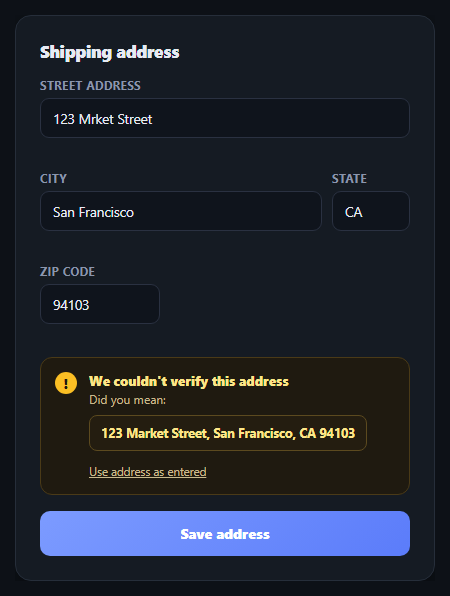
Bad shipping addresses are one of the most expensive UX failures in e-commerce — a typo that isn't caught until a package bounces costs real money. This snippet builds the two-layer defense real checkout forms use: real-time per-field validation as the user types, plus a simulated "we couldn't verify this address, did you mean" suggestion card mimicking what a real address-verification API (Smarty, Lob, Google's Address Validation API) would return. It complements inline validation form and address autocomplete in a full checkout flow.
One function, three consistent states
setFieldState(key, state, message) is the single place that touches a field's visual state — it clears any previous valid/invalid class, applies the new one, and sets the message text together, in one call. This guarantees a field's border color and its message text can never contradict each other, a common bug when validation styling and message text are updated by separate code paths.
Validating on both input and blur
Each field validates on every keystroke (input) and again on blur — validating on input gives immediate feedback as the user types (particularly useful for catching a malformed ZIP before they move on), while validating on blur catches the case where a field is left empty after the user tabs away without typing anything.
Format checks with real regular expressions
The ZIP field is checked against /^\d{5}(-\d{4})?$/, accepting both 5-digit and ZIP+4 formats, and the state field against /^[A-Za-z]{2}$/ for a 2-letter code. These are deliberately simple, honest regex checks — they verify *format*, not that the ZIP or state code actually exists, which is exactly the distinction a real form should make clear to the user (format-valid isn't the same as address-verified).
The suggestion card is a distinct failure mode
Even a form where every field individually validates can still fail address *verification* — the format-valid but unverifiable case is what the "did you mean" suggestion card handles. It's deliberately visually distinct (an amber warning tone) from the red invalid-field state, because a suggested correction is a different kind of problem than a missing or malformed field: the form doesn't know the address is wrong, only that it can't confirm it's right.
Two ways out of the suggestion
The card offers both "use the suggested address" (which repopulates and revalidates every field) and "use address as entered" (which respects the user's insistence and proceeds anyway) — a real verification flow should never trap the user behind a suggestion they don't want to accept. Wire looksUnverifiable() to a real geocoding/address-verification API call, and replace the hardcoded suggested address with whatever the API actually returns.
Step by step
How to Use
- 1Paste HTML, CSS, and JSA shipping address form renders pre-filled with a deliberate street typo ("Mrket").
- 2Edit a fieldEach field validates on every keystroke and on blur, showing a green check or a red error inline.
- 3Submit the formSince every field is format-valid but the street has a typo pattern, a "did you mean" suggestion card appears.
- 4Accept or dismiss the suggestionPick the suggested address to auto-fill and revalidate every field, or dismiss to proceed as entered.
- 5Watch the save confirmationThe submit button briefly confirms "Address saved" before reverting.
- 6Connect a real APIReplace looksUnverifiable() with a call to an address-verification service, using its actual suggested address.
Real-world uses
Common Use Cases
setFieldState() function controlling every field's border, class and message.Got questions?
Frequently Asked Questions
setFieldState(key, state, message) is the single function that ever touches a field's valid/invalid class and its message text — it clears any previous state class before applying the new one and setting the message, in one call. Because no other code path modifies these independently, a field's border color and its message can never contradict each other.
Validating on input gives immediate feedback as the user types, which is especially useful for a field like ZIP where a malformed pattern should be caught before the user moves on. Validating again on blur catches the separate case of a required field being left empty entirely — a user who tabs through a field without typing anything never fires an input event, so blur is needed to catch that.
The red invalid state means a field fails a structural check the form can verify itself (empty, wrong ZIP format, not a 2-letter state code). The amber suggestion card represents a different kind of uncertainty: every field is structurally valid, but the form (or a real address-verification API) still can't confirm the address actually exists as entered. Keeping these visually distinct avoids implying a suggested correction is the same severity as a missing field.
Replace looksUnverifiable() with an async call to a service like Smarty, Lob, or Google's Address Validation API, sent on submit once all fields pass local format validation. Use whatever corrected/standardized address the API returns as the suggestion card's content instead of the hardcoded "123 Market Street" fallback, and handle the API's own confidence levels (verified, partially verified, unverifiable) as distinct UI states if needed.
Hold each field's value and validation state (valid/invalid/none plus message) in component state, updating it in onChange and onBlur handlers that mirror validateField()'s logic. Represent the suggestion card's visibility and its suggested-address content as state too, so picking the suggestion becomes a single state update that repopulates and revalidates every field's state object at once.