

Quill Rich Text Editor with Custom Toolbar and Character Limit

CodeMirror JSON Editor with Validation Gutter

CodeMirror Code Editor with Line Numbers, Folding and Themes

Marked + DOMPurify Live Markdown Preview

FilePond Image Upload with Preview and Reorder

Cropper.js Aspect-Ratio Presets for Social Posts
Checkout Payment Form — Card UI HTML CSS JS Snippet
Checkout Payment Form · Forms · Plain HTML, CSS & JS · Live preview
Copy & paste
Source Code
<div class="checkout-page">
  <div class="checkout-wrap">
    <!-- Left: Form -->
    <div class="checkout-form-col">
      <h1 class="checkout-title">Checkout</h1>

      <section class="form-section">
        <h2 class="section-label">Contact</h2>
        <div class="field-row">
          <div class="field">
            <label class="field-label" for="email">Email</label>
            <input class="field-input" type="email" id="email" placeholder="[email protected]" oninput="validate(this)">
            <span class="field-error" id="emailError"></span>
          </div>
        </div>
      </section>

      <section class="form-section">
        <h2 class="section-label">Delivery</h2>
        <div class="field-row two-col">
          <div class="field">
            <label class="field-label" for="fname">First name</label>
            <input class="field-input" type="text" id="fname" placeholder="Alex" oninput="validate(this)">
          </div>
          <div class="field">
            <label class="field-label" for="lname">Last name</label>
            <input class="field-input" type="text" id="lname" placeholder="Morgan" oninput="validate(this)">
          </div>
        </div>
        <div class="field-row">
          <div class="field">
            <label class="field-label" for="address">Street address</label>
            <input class="field-input" type="text" id="address" placeholder="123 Main St" oninput="validate(this)">
          </div>
        </div>
        <div class="field-row two-col">
          <div class="field">
            <label class="field-label" for="city">City</label>
            <input class="field-input" type="text" id="city" placeholder="San Francisco" oninput="validate(this)">
          </div>
          <div class="field">
            <label class="field-label" for="zip">ZIP / Postcode</label>
            <input class="field-input" type="text" id="zip" placeholder="94102" oninput="validate(this)">
          </div>
        </div>
      </section>

      <section class="form-section">
        <h2 class="section-label">Payment</h2>
        <div class="card-icons">
          <div class="card-icon visa">VISA</div>
          <div class="card-icon mc">MC</div>
          <div class="card-icon amex">AMEX</div>
          <div class="card-icon lock">🔒 Secure</div>
        </div>
        <div class="field-row">
          <div class="field">
            <label class="field-label" for="cardNum">Card number</label>
            <div class="card-input-wrap">
              <input class="field-input card-num-input" type="text" id="cardNum" placeholder="1234 5678 9012 3456" maxlength="19" oninput="formatCard(this)">
              <div class="card-type-indicator" id="cardTypeIndicator"></div>
            </div>
          </div>
        </div>
        <div class="field-row two-col">
          <div class="field">
            <label class="field-label" for="expiry">Expiry</label>
            <input class="field-input" type="text" id="expiry" placeholder="MM / YY" maxlength="7" oninput="formatExpiry(this)">
          </div>
          <div class="field">
            <label class="field-label" for="cvv">CVV</label>
            <input class="field-input" type="text" id="cvv" placeholder="•••" maxlength="4" oninput="this.value=this.value.replace(/\D/g,'')">
          </div>
        </div>
        <div class="field-row">
          <div class="field">
            <label class="field-label" for="cardName">Name on card</label>
            <input class="field-input" type="text" id="cardName" placeholder="ALEX MORGAN">
          </div>
        </div>
      </section>

      <button class="pay-btn" id="payBtn" onclick="submitOrder()">
        <span id="payBtnText">Pay $89.00</span>
        <svg id="payBtnSpinner" class="spinner hidden" width="16" height="16" viewBox="0 0 24 24" fill="none" stroke="currentColor" stroke-width="2.5"><circle cx="12" cy="12" r="10" stroke-opacity=".3"/><path d="M12 2a10 10 0 0 1 10 10"/></svg>
      </button>
      <p class="secure-note">🔒 Payments secured by 256-bit SSL encryption.</p>
    </div>

    <!-- Right: Order summary -->
    <div class="order-summary">
      <h2 class="summary-title">Order Summary</h2>
      <div class="summary-items">
        <div class="summary-item">
          <div class="item-thumb" style="background:linear-gradient(135deg,#6366f1,#8b5cf6)"></div>
          <div class="item-info">
            <div class="item-name">webdevpuneet.com Pro Plan</div>
            <div class="item-desc">12 months · Unlimited access</div>
          </div>
          <div class="item-price">$79.00</div>
        </div>
        <div class="summary-item">
          <div class="item-thumb" style="background:linear-gradient(135deg,#10b981,#059669)"></div>
          <div class="item-info">
            <div class="item-name">Component Export Add-on</div>
            <div class="item-desc">React + Vue + Angular</div>
          </div>
          <div class="item-price">$10.00</div>
        </div>
      </div>
      <div class="summary-divider"></div>
      <div class="summary-row"><span>Subtotal</span><span>$89.00</span></div>
      <div class="summary-row"><span>Discount (FIRST20)</span><span class="discount">−$0.00</span></div>
      <div class="summary-row"><span>Tax</span><span>$0.00</span></div>
      <div class="summary-row total"><span>Total</span><span>$89.00</span></div>

      <div class="promo-field">
        <input type="text" class="promo-input" id="promoInput" placeholder="Promo code">
        <button class="promo-btn" onclick="applyPromo()">Apply</button>
      </div>

      <div class="trust-row">
        <span class="trust-item">✓ 30-day money back</span>
        <span class="trust-item">✓ Instant access</span>
        <span class="trust-item">✓ Cancel anytime</span>
      </div>
    </div>
  </div>
</div>*{box-sizing:border-box;margin:0;padding:0}
body{font-family:system-ui,sans-serif;background:#f8fafc;min-height:100vh;padding:28px 16px}
.checkout-page{max-width:900px;margin:0 auto}
.checkout-wrap{display:grid;grid-template-columns:1fr 340px;gap:32px;align-items:start}
.checkout-title{font-size:22px;font-weight:800;color:#1e293b;margin-bottom:20px}
.form-section{margin-bottom:24px}
.section-label{font-size:11px;font-weight:700;letter-spacing:.07em;text-transform:uppercase;color:#94a3b8;margin-bottom:12px;display:flex;align-items:center;gap:8px}
.section-label::after{content:'';flex:1;height:1px;background:#e2e8f0}
.field-row{display:flex;flex-direction:column;gap:12px;margin-bottom:12px}
.field-row.two-col{flex-direction:row}
.field-row.two-col .field{flex:1;min-width:0}
.field{display:flex;flex-direction:column;gap:4px}
.field-label{font-size:12px;font-weight:600;color:#374151}
.field-input{padding:9px 12px;border:1.5px solid #e2e8f0;border-radius:10px;font-size:13px;color:#1e293b;outline:none;transition:border-color .15s,box-shadow .15s;font-family:inherit;background:#fff}
.field-input:focus{border-color:#6366f1;box-shadow:0 0 0 3px rgba(99,102,241,.12)}
.field-input.valid{border-color:#10b981}
.field-input.invalid{border-color:#ef4444}
.field-error{font-size:11px;color:#ef4444;min-height:14px}
.card-icons{display:flex;align-items:center;gap:6px;margin-bottom:10px;flex-wrap:wrap}
.card-icon{font-size:9px;font-weight:800;padding:3px 7px;border-radius:4px}
.card-icon.visa{background:#1a1f71;color:#fff}
.card-icon.mc{background:#eb001b;color:#fff}
.card-icon.amex{background:#007bc1;color:#fff}
.card-icon.lock{color:#64748b;font-size:10px;background:#f1f5f9;border-radius:6px;padding:3px 8px}
.card-input-wrap{position:relative}
.card-num-input{width:100%;padding-right:60px}
.card-type-indicator{position:absolute;right:10px;top:50%;transform:translateY(-50%);font-size:10px;font-weight:700;color:#6366f1}
.pay-btn{width:100%;padding:13px;background:linear-gradient(135deg,#6366f1,#8b5cf6);color:#fff;font-size:15px;font-weight:700;border:none;border-radius:12px;cursor:pointer;transition:all .2s;display:flex;align-items:center;justify-content:center;gap:8px;font-family:inherit;margin-top:4px}
.pay-btn:hover{transform:translateY(-2px);box-shadow:0 8px 24px rgba(99,102,241,.4)}
.pay-btn:active{transform:scale(.98)}
.pay-btn:disabled{opacity:.7;cursor:not-allowed;transform:none}
.spinner{animation:spin 1s linear infinite}
@keyframes spin{from{transform:rotate(0deg)}to{transform:rotate(360deg)}}
.hidden{display:none}
.secure-note{font-size:11px;color:#94a3b8;text-align:center;margin-top:10px}
/* Order summary */
.order-summary{background:#fff;border:1.5px solid #e2e8f0;border-radius:16px;padding:22px;position:sticky;top:20px}
.summary-title{font-size:14px;font-weight:700;color:#1e293b;margin-bottom:16px}
.summary-items{display:flex;flex-direction:column;gap:12px;margin-bottom:16px}
.summary-item{display:flex;align-items:center;gap:10px}
.item-thumb{width:36px;height:36px;border-radius:8px;flex-shrink:0}
.item-info{flex:1;min-width:0}
.item-name{font-size:12px;font-weight:600;color:#1e293b}
.item-desc{font-size:11px;color:#64748b}
.item-price{font-size:13px;font-weight:700;color:#1e293b;white-space:nowrap}
.summary-divider{height:1px;background:#f1f5f9;margin-bottom:10px}
.summary-row{display:flex;justify-content:space-between;font-size:13px;color:#64748b;margin-bottom:6px}
.summary-row.total{font-size:15px;font-weight:800;color:#1e293b;margin-top:6px;padding-top:6px;border-top:1.5px solid #e2e8f0}
.discount{color:#10b981;font-weight:600}
.promo-field{display:flex;gap:6px;margin-top:14px}
.promo-input{flex:1;padding:8px 10px;border:1.5px solid #e2e8f0;border-radius:8px;font-size:12px;color:#1e293b;outline:none;transition:border-color .15s;font-family:inherit}
.promo-input:focus{border-color:#6366f1}
.promo-btn{padding:8px 14px;background:#1e293b;color:#fff;border:none;border-radius:8px;font-size:12px;font-weight:700;cursor:pointer;transition:background .15s;font-family:inherit;white-space:nowrap}
.promo-btn:hover{background:#334155}
.trust-row{display:flex;flex-direction:column;gap:5px;margin-top:14px;padding-top:12px;border-top:1px solid #f1f5f9}
.trust-item{font-size:11px;color:#10b981;font-weight:600}
@media(max-width:700px){.checkout-wrap{grid-template-columns:1fr}.order-summary{position:static;order:-1}.field-row.two-col{flex-direction:column}}function formatCard(input) {
let val = input.value.replace(/\D/g, '').slice(0, 16);
input.value = val.replace(/(\d{4})(?=\d)/g, '$1 ');
const indicator = document.getElementById('cardTypeIndicator');
if (val.startsWith('4')) indicator.textContent = 'VISA';
else if (val.startsWith('5')) indicator.textContent = 'MC';
else if (val.startsWith('3')) indicator.textContent = 'AMEX';
else indicator.textContent = '';
}
function formatExpiry(input) {
let val = input.value.replace(/\D/g, '').slice(0, 4);
if (val.length >= 2) val = val.slice(0, 2) + ' / ' + val.slice(2);
input.value = val;
}
function validate(input) {
const val = input.value.trim();
if (input.type === 'email') {
const valid = /^[^\s@]+@[^\s@]+\.[^\s@]+$/.test(val);
input.classList.toggle('valid', valid && val.length > 0);
input.classList.toggle('invalid', !valid && val.length > 0);
} else {
input.classList.toggle('valid', val.length >= 2);
input.classList.toggle('invalid', val.length === 1);
}
}
function applyPromo() {
const code = document.getElementById('promoInput').value.trim().toUpperCase();
if (code === 'FIRST20') {
document.querySelector('.discount').textContent = '−$17.80';
document.querySelector('.summary-row.total span:last-child').textContent = '$71.20';
document.getElementById('payBtn').querySelector('#payBtnText').textContent = 'Pay $71.20';
}
}
function submitOrder() {
const btn = document.getElementById('payBtn');
const text = document.getElementById('payBtnText');
const spinner = document.getElementById('payBtnSpinner');
btn.disabled = true;
text.textContent = 'Processing…';
spinner.classList.remove('hidden');
setTimeout(() => {
spinner.classList.add('hidden');
text.textContent = '✓ Order confirmed!';
btn.style.background = 'linear-gradient(135deg,#10b981,#059669)';
}, 2200);
}Extend with AI
Take This Snippet Further With AI
The AI prompt for this one is for Patreon supporters ($3 a month, 7 days free), along with a site with no ads. Supporters enter the passcode once and it is remembered in this browser.
What's included
Features
/(\d{4})(?=\d)/g inserts spaces every 4 digits — turns raw input into the familiar "1234 5678" format in real-time..valid) on correct input, red border (.invalid) on partial/invalid — fires on oninput for immediate positive feedback.applyPromo() updates the discount row, total row, and pay button label simultaneously — ensures all three stay in sync.position: sticky; top: 20px on the summary panel — stays visible while the form scrolls on tall viewports.About this UI Snippet
Checkout Form — Card Number Formatting, Expiry Mask, Card Type Detection & Order Summary
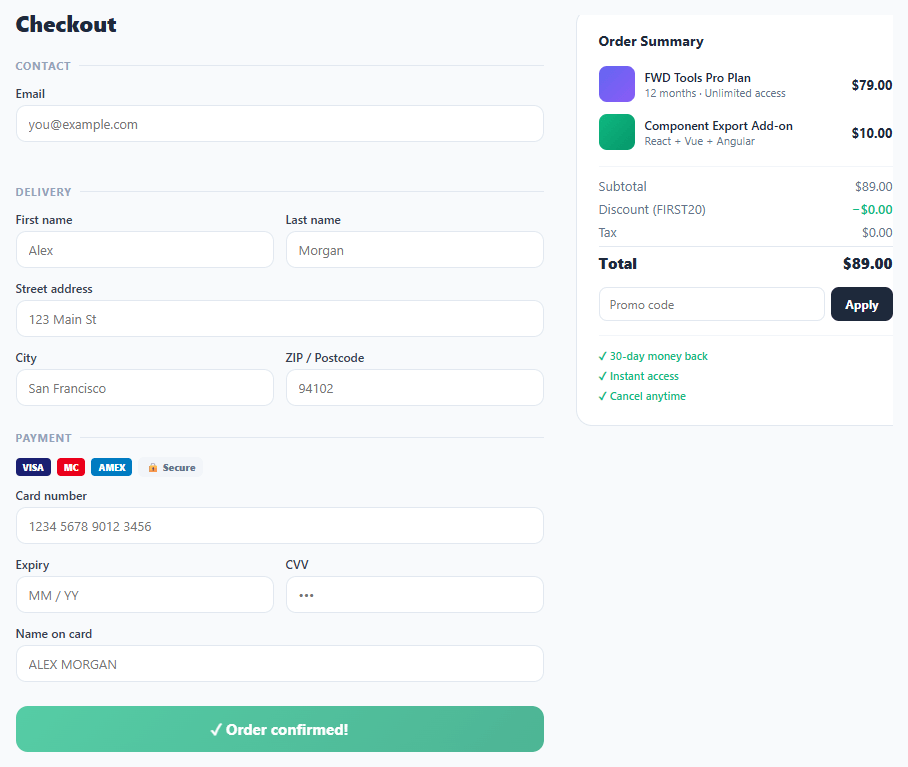
The checkout form is the most conversion-critical UI component in e-commerce — every friction point costs revenue. A production-quality checkout must handle card number formatting (auto-spaces every 4 digits), expiry masking (MM / YY format), CVV restriction (digits only), card type detection (Visa/Mastercard/Amex from first digit), inline field validation, loading state, success state, and an order summary with promo code input. This snippet delivers all of these in a two-panel checkout layout.
Checkout UX is one of the most studied areas of e-commerce conversion optimisation. According to Baymard Institute, 18% of cart abandonment is caused by "too long / complicated checkout process." The techniques in this snippet directly address the most common friction points: card number spacing (reduces input errors), live field validation (catches errors before submit), and a visible order summary (confirms what the user is paying for).
Card number auto-formatting
The formatCard function strips non-digits from the input, slices to 16 characters, then applies a regex replacement /(\d{4})(?=\d)/g to insert a space after every 4th digit. The result is the 1234 5678 9012 3456 format users expect from physical card numbers. The function also detects the card type from the first digit: 4 → Visa, 5 → Mastercard, 3 → Amex. The type indicator updates inline in the card number field, providing immediate feedback on which network the card belongs to.
Expiry date masking
The formatExpiry function strips non-digits, takes the first 4, and inserts / after position 2. The user types "1226" and sees "12 / 26" — the format that exactly matches the physical card. The maxlength="7" attribute limits input to "MM / YY" (7 characters including spaces and slash).
Inline validation with visual state
Each field gets .valid (green border) or .invalid (red border) class toggled on input. Email validation uses a simple regex /^[^\s@]+@[^\s@]+\.[^\s@]+$/. Text fields validate as valid when length ≥ 2. The validation fires on oninput (not onblur) to give immediate positive feedback as the user types, which has been shown to reduce form abandonment compared to blur-only validation.
Promo code with order total update
The promo code input triggers an applyPromo function that checks for known codes and updates the discount row and total in the order summary. The pay button label also updates to reflect the new total — ensuring the amount shown on the button always matches the order summary. In production, promo validation would be a server-side API call. Pair with a modal for a promo code success confirmation overlay.
Step by step
How to Use
- 1Paste HTML, CSS, and JSA two-column checkout appears: form on the left (contact, delivery, payment), order summary on the right with two line items and a total.
- 2Type a card numberNumbers auto-format into groups of 4 (1234 5678...). Starting with 4 shows "VISA" in the field; 5 shows "MC"; 3 shows "AMEX".
- 3Type the expiry dateType "1226" — it formats to "12 / 26" automatically. Try any MM YY combination.
- 4Enter the promo codeType
FIRST20in the promo field and click Apply — the discount updates to −$17.80 and the pay button changes to "Pay $71.20". - 5Click PayThe button shows a spinning loader for 2.2 seconds, then changes to "✓ Order confirmed!" with a green gradient.
- 6Check inline validationType a partial email address — the field border turns red. Complete the email — it turns green. Same for all text fields with 2+ characters.
Real-world uses
Common Use Cases
Got questions?
Frequently Asked Questions
Replace the mock submitOrder with Stripe Elements or Stripe.js. Use stripe.createPaymentMethod({type: 'card', card: elements.getElement('card')}) to tokenise the card. Send the paymentMethod.id to your server, create a PaymentIntent via the Stripe API, and confirm it client-side. Never send raw card numbers to your server.
Add a checkbox "Same as delivery address" above the payment section. When checked, copy the delivery fields to hidden billing fields on submit. When unchecked, show the billing address fields below the payment section.
Add a validateAll() function that checks all required fields. Call it in submitOrder() before the loading state. Collect all invalid field IDs, focus the first one, and return early if any are invalid. Show a summary error message above the pay button listing what needs to be completed.
Use React Hook Form (useForm) for field management. Each input uses register('fieldName', {required: true, pattern: ...}). Card formatting uses onChange handlers calling the format functions. The pay button state is const [status, setStatus] = useState('idle') — 'idle', 'loading', 'success'. The order summary is a separate OrderSummary component accepting {items, discount, total} props.