



App Store Rating Prompt Modal — Free HTML CSS JS Snippet
App Store Rating Prompt Modal · Modals · Plain HTML, CSS & JS · Live preview
Copy & paste
Source Code
<button class="asrp-trigger" id="asrpTrigger">Open rating prompt</button>

<div class="asrp-overlay" id="asrpOverlay" hidden>
  <div class="asrp-modal" role="dialog" aria-modal="true" aria-labelledby="asrpTitle">
    <div class="asrp-step" id="asrpStepRate">
      <div class="asrp-app-icon" aria-hidden="true">FT</div>
      <h3 id="asrpTitle">Enjoying FwdTools?</h3>
      <p class="asrp-sub">Your feedback helps other developers find this app.</p>
      <div class="asrp-stars" id="asrpStars">
        <span data-v="1">★</span><span data-v="2">★</span><span data-v="3">★</span><span data-v="4">★</span><span data-v="5">★</span>
      </div>
      <button class="asrp-btn asrp-ghost" id="asrpNotNow">Not now</button>
    </div>

    <div class="asrp-step" id="asrpStepStore" hidden>
      <div class="asrp-emoji">🎉</div>
      <h3>Thanks for the love!</h3>
      <p class="asrp-sub">Mind leaving a quick rating on the App Store? It takes 10 seconds.</p>
      <button class="asrp-btn asrp-primary" id="asrpGoToStore">Rate on the App Store</button>
      <button class="asrp-btn asrp-ghost" id="asrpMaybeLater">Maybe later</button>
    </div>

    <div class="asrp-step" id="asrpStepFeedback" hidden>
      <div class="asrp-emoji">💬</div>
      <h3>Help us improve</h3>
      <p class="asrp-sub">Sorry to hear that. What could be better?</p>
      <textarea id="asrpFeedback" placeholder="Tell us what went wrong..."></textarea>
      <button class="asrp-btn asrp-primary" id="asrpSendFeedback">Send feedback</button>
      <button class="asrp-btn asrp-ghost" id="asrpSkipFeedback">Skip</button>
    </div>

    <div class="asrp-step" id="asrpStepDone" hidden>
      <div class="asrp-emoji">✅</div>
      <h3 id="asrpDoneTitle">All set</h3>
      <p class="asrp-sub" id="asrpDoneSub">Thanks for helping us improve.</p>
      <button class="asrp-btn asrp-primary" id="asrpClose">Close</button>
    </div>
  </div>
</div>*{box-sizing:border-box;margin:0;padding:0}
body{font-family:system-ui,-apple-system,sans-serif;background:#f8fafc;min-height:100vh;display:flex;align-items:center;justify-content:center;padding:24px}
.asrp-trigger{padding:12px 20px;background:#6366f1;color:#fff;border:none;border-radius:10px;font-size:14px;font-weight:700;cursor:pointer}
.asrp-trigger:hover{background:#4f46e5}
.asrp-overlay{position:fixed;inset:0;background:rgba(15,23,42,.5);display:flex;align-items:center;justify-content:center;padding:20px;z-index:50;animation:asrpFade .15s ease}
.asrp-overlay[hidden]{display:none}
@keyframes asrpFade{from{opacity:0}to{opacity:1}}
.asrp-modal{background:#fff;border-radius:18px;padding:30px 26px;width:100%;max-width:340px;text-align:center;box-shadow:0 20px 50px rgba(0,0,0,.25);animation:asrpPop .2s cubic-bezier(.34,1.56,.64,1)}
@keyframes asrpPop{from{transform:scale(.92);opacity:0}to{transform:scale(1);opacity:1}}
.asrp-step[hidden]{display:none}
.asrp-app-icon{width:56px;height:56px;border-radius:16px;background:linear-gradient(135deg,#6366f1,#8b5cf6);color:#fff;font-weight:800;font-size:18px;display:flex;align-items:center;justify-content:center;margin:0 auto 14px}
.asrp-emoji{font-size:38px;margin-bottom:10px}
.asrp-modal h3{font-size:17px;font-weight:800;color:#0f172a;margin-bottom:6px}
.asrp-sub{font-size:12.5px;color:#64748b;line-height:1.5;margin-bottom:18px}
.asrp-stars{display:flex;gap:6px;justify-content:center;margin-bottom:20px;font-size:32px}
.asrp-stars span{color:#e2e8f0;cursor:pointer;transition:color .1s,transform .1s}
.asrp-stars span:hover{transform:scale(1.1)}
.asrp-stars span.on{color:#f59e0b}
.asrp-btn{width:100%;padding:12px;border-radius:10px;font-size:13.5px;font-weight:700;cursor:pointer;border:none;font-family:inherit;margin-bottom:8px}
.asrp-primary{background:#6366f1;color:#fff}
.asrp-primary:hover{background:#4f46e5}
.asrp-ghost{background:none;color:#94a3b8}
.asrp-ghost:hover{color:#64748b}
textarea{width:100%;min-height:80px;padding:10px 12px;border:1.5px solid #e2e8f0;border-radius:9px;font-family:inherit;font-size:13px;resize:vertical;margin-bottom:14px;outline:none}
textarea:focus{border-color:#6366f1}(function(){
var trigger = document.getElementById('asrpTrigger');
var overlay = document.getElementById('asrpOverlay');
var stepRate = document.getElementById('asrpStepRate');
var stepStore = document.getElementById('asrpStepStore');
var stepFeedback = document.getElementById('asrpStepFeedback');
var stepDone = document.getElementById('asrpStepDone');
var stars = Array.prototype.slice.call(document.querySelectorAll('#asrpStars span'));
var doneTitle = document.getElementById('asrpDoneTitle');
var doneSub = document.getElementById('asrpDoneSub');
function showStep(step) {
[stepRate, stepStore, stepFeedback, stepDone].forEach(function (s) { s.hidden = (s !== step); });
}
function open() { overlay.hidden = false; showStep(stepRate); highlightStars(0); }
function close() { overlay.hidden = true; }
function highlightStars(value) {
stars.forEach(function (s) { s.classList.toggle('on', Number(s.getAttribute('data-v')) <= value); });
}
trigger.addEventListener('click', open);
overlay.addEventListener('click', function (e) { if (e.target === overlay) close(); });
document.getElementById('asrpNotNow').addEventListener('click', close);
document.getElementById('asrpMaybeLater').addEventListener('click', close);
document.getElementById('asrpSkipFeedback').addEventListener('click', close);
document.getElementById('asrpClose').addEventListener('click', close);
stars.forEach(function (star) {
star.addEventListener('mouseenter', function () { highlightStars(Number(star.getAttribute('data-v'))); });
star.addEventListener('click', function () {
var value = Number(star.getAttribute('data-v'));
// route: 4-5 stars -> ask for a public store rating; 1-3 stars -> ask for private feedback first
if (value >= 4) showStep(stepStore);
else showStep(stepFeedback);
});
});
document.getElementById('asrpStars').addEventListener('mouseleave', function () {
var onStars = stars.filter(function (s) { return s.classList.contains('on'); });
highlightStars(onStars.length);
});
document.getElementById('asrpGoToStore').addEventListener('click', function () {
// in production this opens the platform's real store review URL
doneTitle.textContent = 'Thanks for rating us!';
doneSub.textContent = 'You are being redirected to the App Store.';
showStep(stepDone);
});
document.getElementById('asrpSendFeedback').addEventListener('click', function () {
var text = document.getElementById('asrpFeedback').value.trim();
doneTitle.textContent = 'Feedback received';
doneSub.textContent = text ? 'Thanks — our team will review this personally.' : 'Thanks for letting us know.';
showStep(stepDone);
});
})();Extend with AI
Take This Snippet Further With AI
The AI prompt for this one is for Patreon supporters ($3 a month), along with a site with no ads. Supporters enter the passcode once and it is remembered in this browser.
What's included
Features
About this UI Snippet
App Store Rating Prompt — Star-Gated Branching Flow
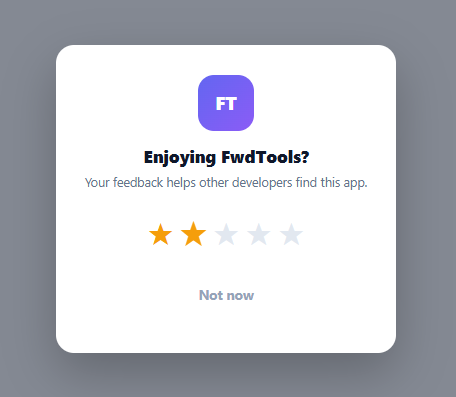
Native mobile apps rarely ask "please leave a public review" outright — instead they ask an in-app star question first, then route the response: happy users get sent to the App Store or Play Store to leave a public review, while unhappy users are redirected to a private feedback form instead of a public one-star review. This snippet reproduces that exact branching flow with four self-contained modal steps.
Four steps, one visibility switch
showStep(step) loops all four step elements and sets hidden on every one except the target, so only one step is ever visible at a time. This keeps all the flow's markup and state in a single DOM tree — no step needs to be dynamically created or destroyed, which keeps the routing logic in showStep() trivially simple.
The routing decision
Clicking a star calls highlightStars() to update the visual state, then branches on the star value: if (value >= 4) showStep(stepStore); else showStep(stepFeedback). This single if statement is the entire mechanism behind the pattern — a high rating leads to the public ask, a low rating leads to the private one, protecting the app's visible store rating from frustrated one-off complaints while still capturing that feedback internally.
Hover preview mirrors the half-star pattern
stars.forEach(star => star.addEventListener('mouseenter', () => highlightStars(value))) previews the rating on hover the same way a checkout star-rating input would, and mouseleave restores the highlight to the last *committed* star count (tracked by counting how many stars currently carry the .on class) rather than resetting to zero — so browsing past the stars without clicking doesn't lose the visual state.
A shared "done" step for two different outcomes
Both the store-redirect button and the feedback-submit button ultimately call showStep(stepDone), but each first sets doneTitle.textContent and doneSub.textContent to outcome-specific copy. Reusing one terminal step for both paths avoids duplicating the "all set" UI while still giving each path its own confirmation message.
Escape hatches at every step
"Not now," "Maybe later," and "Skip" are all wired to the same close() function, so a user can exit the flow from any point without being forced through every step — an unhappy user is never trapped between "give feedback" and "leave a review" with no way out.
Customizing it
Replace the asrpGoToStore handler's placeholder with a real window.location.href to your platform's store review URL (using the App Store's itms-apps:// deep link or the Play Store's review intent), and wire asrpSendFeedback to your actual support or feedback API.
Step by step
How to Use
- 1Paste HTML, CSS, and JSA trigger button opens the rating prompt modal with a 5-star row.
- 2Hover and click a starHovering previews the rating; clicking commits it and routes the flow.
- 3Rate 4 or 5 starsThe flow shows a "Rate on the App Store" step with a public review call to action.
- 4Rate 1-3 starsThe flow instead shows a private feedback textarea, keeping the complaint out of the public store.
- 5Complete either pathBoth paths end on a shared "done" step with outcome-specific confirmation text.
- 6Wire up real destinationsReplace the store button's placeholder with your real App Store or Play Store review deep link, and connect the feedback form to your support API.
Real-world uses
Common Use Cases
Got questions?
Frequently Asked Questions
It's a widely used and generally accepted pattern (most major consumer apps use some version of it), but it does shape which sentiment becomes public. Many teams pair it with genuinely acting on the private feedback from low-rating users, rather than using it purely to suppress visible criticism — how you use the routed feedback matters more than the routing mechanism itself.
The star's click handler reads its data-v attribute as a number and checks if (value >= 4). Four or five stars shows the store-review step; one through three stars shows the private feedback step instead. Everything else in the flow is the same regardless of which branch is taken.
Both outcomes need the same basic "thanks, you're done" UI shell, so reusing one step avoids duplicating that markup and styling. Before showing it, each button handler sets doneTitle.textContent and doneSub.textContent to outcome-specific copy, so the shared step still shows the right message for whichever path was taken.
Replace the placeholder logic inside the asrpGoToStore click handler with window.location.href set to your app's actual store review URL — for iOS, an itms-apps:// URL with the action=write-review query parameter and your app's numeric ID; for Android, a Play Store URL with the same intent.
Yes — the "Not now" button already closes the modal without any rating being recorded. If you want an explicit "just leave feedback" option regardless of star count, add a link on the first step that calls showStep(stepFeedback) directly, bypassing the star-based routing.